Establishing secure connection…Loading editor…Preparing document…

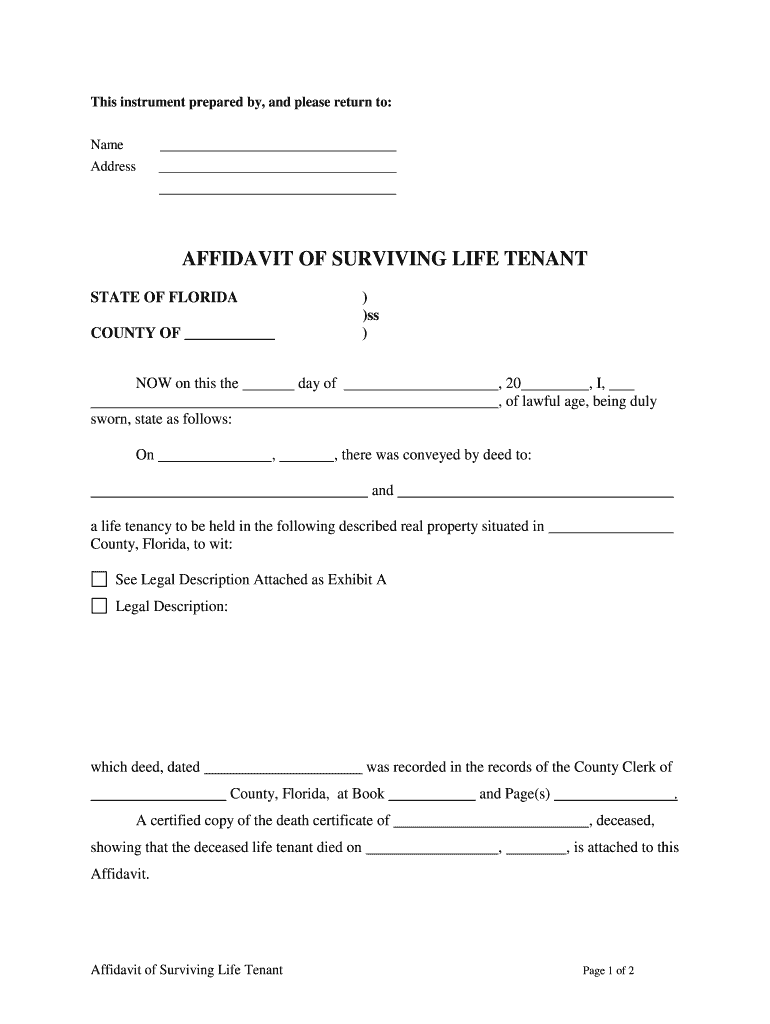
Florida Affidavit of Surviving Life Tenant

This template is fully customizable. Edit the text, fill out the fields, and send it for signature. Give it a try!
Florida Affidavit of Surviving Life Tenant

What the Florida Affidavit of Surviving Life Tenant Is

The Florida Affidavit of Surviving Life Tenant is a sworn statement used to establish that a named life tenant has died and that another named person is the surviving life tenant with rights to possess or manage the property interest. It summarizes the decedent’s ownership interest, identifies the property, and sets out chain-of-title facts that support recording a corrected title or transferring possessory rights without full probate. The affidavit is typically signed under oath and may require notarization and witness attestations before county recording.

Why this affidavit matters for clear title and property transfer

The affidavit provides a concise, sworn record that can shorten or avoid probate, enable county clerks to accept corrected title, and help title companies clear encumbrances when a life tenant dies.

Why this affidavit matters for clear title and property transfer

Who typically completes the affidavit

Common users prepare and file this affidavit to establish a surviving life tenant and enable title or possession changes.

  • Surviving family members preparing a title correction or property transfer after a life tenant’s death.
  • Title companies and closing agents who need a sworn statement for underwriting and clearing title exceptions.
  • Estate attorneys or personal representatives resolving nonprobate transfers or recording affidavits in county land records.

Parties should confirm local recording and witness requirements before submission and may request attorney review when complex interests exist.

Primary signers and stakeholders

Surviving Life Tenant

The individual asserting survival of the life interest. Must provide identifying details, relationship to decedent, and facts supporting survival; signature typically required under oath and may require witnesses and notary.

Title Examiner

Title company representative or attorney who reviews the affidavit, confirms chain-of-title statements, and may accept or request supplemental documents before recording or clearing title exceptions.

Required information and common fields

Decedent Name: Full legal name
Surviving Tenant: Full legal name
Property Description: Legal description
Recording Info: Book/page or instrument
Death Date: MM/DD/YYYY
Notary Block: Acknowledgement text

Essential elements of a professional affidavit

A well-prepared affidavit includes precise factual statements, legal descriptions, identifying information, and the required authentication so county recording offices and title carriers can rely on the statement.

Caption

A title indicating the affidavit purpose, the county and state, and the document type so it is easy to classify at recording offices.
Parties

Full legal names and current addresses for the surviving tenant, the decedent, and any interest holders referenced; avoid nicknames or initials that could cause mismatches.

Property

The complete legal description used in prior instruments, including lot, block, subdivision, and recording references to ensure precise identification of the subject property.

Factual Statements

Clear, chronological facts establishing the decedent’s death, prior life tenancy, the surviving tenant’s status, and any relevant dates or instruments supporting the claim.

Attachments

Certified death certificate, copies of referenced recorded instruments, and any prior affidavits or probated documents supporting the asserted facts.

Authentication

Signature block for the affiant, notary acknowledgement, and witness lines where required to meet Florida or county-specific rules.

Step-by-step: filling and filing the affidavit

Follow these practical steps to complete the affidavit, assemble attachments, and submit for recording with minimal rework.

  • 01
    Prepare Draft: Populate fields and attach death certificate.
  • 02
    Review Title: Confirm legal description and recorded references.
  • 03
    Notarize: Sign before a notary; obtain witness signatures if required.
  • 04
    Record: Submit to county recorder with required fees.

How to customize and complete the affidavit digitally

Set up a digital workflow that captures signatures, attachments, and notarization data while ensuring an auditable record of each step.

Field Configuration
Affiant Signature Require signature field with signer email verification
Death Certificate Attach scanned PDF, required upload before signing
Notary Block Add static notary acknowledgement text for in-person or RON
Audit Trail Enable timestamp, IP, and authentication logs

Where to file, send, or submit the completed affidavit

After execution and notarization, the affidavit is typically filed in the county where the property is recorded and shared with title insurers or interested parties.

  • County Recorder: Record original affidavit with clerk of court
  • Title Company: Provide copy for underwriting and clearing title
  • Interested Parties: Send executed copies to heirs or lienholders
  • Escrow Agent: Include in closing package if transferring property

Distribution and electronic submission considerations

Choose a delivery method that preserves evidentiary metadata and supports required authentication for each signer and the notary.

  • Email Delivery: Sends PDF with audit trail
  • Secure Link: Guest signing, no account required
  • Integration: Connect to cloud storage

Ensure the chosen platform supports the notary workflow you need (in-person or RON), captures an audit trail, and stores signed copies securely for retention requirements.

Timelines, deadlines, and processing expectations

Timelines vary by county, but planning can reduce delays. Know local recording processing times and whether RON or in-person notarization is acceptable.

Recording Turnaround:

County recording often 1–10 business days

Title Review:

Title company underwriting 3–15 business days

Notary Scheduling:

In-person or RON availability varies locally

Document Retention:

Keep originals until recording confirmed

Supplement Requests:

Title companies may request extra evidence

Key milestones from execution to recorded title

A typical processing timeline includes execution, notarization, recording, title clearances, and final distribution of recorded documents.

01

Execute Affidavit

Affiant signs and dates under oath

02

Notarize / Witness

Notary acknowledges signature; witnesses sign if required

03

Record Document

Submit affidavit and fees to county recorder

04

Title Clearance

Title company updates records and closes exceptions

Common mistakes that cause rejections or delays

  • Using informal property descriptions or street addresses instead of the recorded legal description causes recording offices to reject the affidavit.
  • Failing to attach a certified death certificate or referencing the wrong instrument book and page increases title examiner follow-up and delays.
  • Mismatched names between the affidavit and recorded instruments, including omitted middle names or initials, can require corrective affidavits or additional proof.
  • Skipping required witness signatures or notarization, or using an out-of-state notary without RON authority, leads to refusal by local recorders and title insurers.

Consequences of incorrect or incomplete affidavits

Recording Refusal: Recording may be rejected
Title Exceptions: Unresolved title defects persist
Delays: Closings and transfers delayed
Additional Costs: Attorney and amendment fees
Insurance Risk: Title insurers may require indemnity
Probate Exposure: Court intervention may be necessary

How this affidavit differs from related documents

Compare similar instruments to choose the correct document for your situation and to avoid unnecessary probate or recording steps.

Document Type Affidavit of Surviving Life Tenant Death Certificate Probate Decree
Primary Purpose establish surviving life tenant verify death appoint personal representative
Recording yes, often recorded court record
Notarization
When Used title correction/transfer evidence of death estate administration

eSignature vendor pricing and feature snapshot

Comparing basic price and core features helps decide which eSignature provider suits affidavit workflows and volume needs without suggesting a specific purchase.

signNow DocuSign Adobe Sign PandaDoc HelloSign
Starting Price $8/user/mo $15/user/mo $14/user/mo $19/user/mo $15/user/mo
Free Trial 7-day free trial Yes Yes Yes Yes
Bulk Send Yes Yes Yes Yes No
Audit Trail Yes Yes Yes Yes Yes
HIPAA Compliant Yes Yes Yes No No

Frequently asked questions about the affidavit

Answers to common practical questions about completion, notarization, recording, and electronic signing for affidavits affecting title.


Need help? Contact support

be ready to get more
Join over 28 million airSlate SignNow users