Establishing secure connection…Loading editor…Preparing document…

Affidavit Support Form

This template is fully customizable. Edit the text, fill out the fields, and send it for signature. Give it a try!
Affidavit Support Form

What an Affidavit Support Form Is and when it’s used

An Affidavit Support Form is a sworn written statement used to document facts, attach supporting exhibits, and provide an authenticated declaration for use in legal, administrative, or transactional processes. Typical uses include court filings, immigration and benefits applications, tax reporting, and verification for third parties. Affidavits are ordinarily signed under penalty of perjury and often require notarization or acknowledgment; where permitted, electronic execution and retention may be accepted under federal and state e-signature frameworks such as the ESIGN Act (15 U.S.C. ch. 96) and state UETA statutes.

Why a clear Affidavit Support Form matters

A properly prepared affidavit provides a concise, verifiable record of facts that decision-makers can rely on. It reduces ambiguity, supports evidentiary submissions, and helps agencies and courts process claims more quickly while establishing a formal basis for enforcement or further inquiry.

Why a clear Affidavit Support Form matters

Who typically prepares or signs an Affidavit Support Form

Accurate completion and proper authentication (notarization or permitted electronic alternatives) are essential to avoid rejection or evidentiary challenge.

  • Individuals and Affiants: A person with first-hand knowledge who signs under oath to state facts relevant to a case or application.
  • Attorneys and Paralegals: Draft and review wording to ensure factual clarity and compliance with court or agency rules.
  • Courts and Agencies: Accept, file, and rely on affidavits as part of administrative records or evidentiary filings.

Primary roles that interact with this form

Affiant

The individual who prepares and signs the affidavit; provides the factual narrative and attaches exhibits. The affiant must be competent and truthful because false statements can trigger perjury charges under federal or state law (for federal matters, see 18 U.S.C. §1621).

Notary / Attorney

A licensed notary public or attorney may authenticate the signature and administer the oath. Authentication verifies identity and the voluntariness of the signature and may be required by courts or agencies before accepting the affidavit.

Key components to include in a professional Affidavit Support Form

A complete affidavit follows a consistent structure so readers can verify facts, identity, and chain of custody. Include these essential parts for clarity and enforceability.

Caption and Case Reference

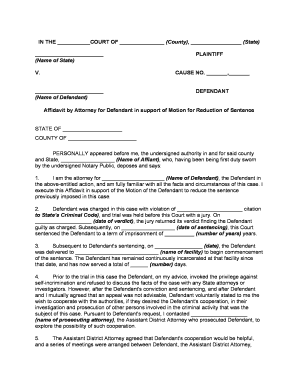
Include the court or agency name, docket or file number, and parties. This anchors the affidavit to the specific matter and prevents administrative misfiling.
Statement of Facts

A numbered, chronological account of facts the affiant personally knows. Keep entries specific, avoid hearsay language, and reference dates, locations, and observable events.

Exhibits and Attachments

List and attach documents, photos, or records referenced in the narrative. Label exhibits (Exhibit A, B) and cross-reference them to the relevant paragraph.

Affiant Identification

Provide full legal name, current address, date of birth or other ID details as required by the receiving authority to permit identity verification.

Signature and Jurat

A signature block followed by a jurat or notarial acknowledgement showing oath, date, and the official’s signature. For sworn statements, include the oath text or affirmation language.

Contact and Certification

Include the affiant’s contact information and a clear certification line stating the truthfulness of the contents under penalty of perjury.

Step-by-step: preparing and submitting an Affidavit Support Form

Follow this sequence to reduce errors and speed acceptance by courts or agencies.

  • 01
    Draft the facts: Write a clear, numbered factual narrative with dates and specifics.
  • 02
    Attach exhibits: Label and include supporting documents referenced in the affidavit.
  • 03
    Verify identity: Present government ID to the notary or follow electronic identity-proofing steps.
  • 04
    Sign and authenticate: Sign in presence of notary or use an approved e-notarization method where allowed.

Typical routing and handling for an affidavit submission

Affidavits move through preparation, authentication, delivery, and filing. Below are the common stages in most workflows.

  • Prepare document: Assemble narrative, exhibits, and reference information.
  • Authenticate signature: Notary or approved electronic notary confirms identity.
  • Deliver to recipient: Send via accepted channel (court filing, agency portal, or certified mail).
  • Record retention: Recipient files and retains per records policy or court rules.

Digital signing and technical requirements to submit an affidavit

Use platforms that produce a tamper-evident PDF and maintain an audit trail with timestamps, signer identity, and any notarization metadata to satisfy ESIGN/UETA record retention requirements.

  • File formats: PDF, DOCX, or flattened PDF preferred
  • Authentication options: Email link, SMS code, KBA, or RON where accepted
  • Integrations: Common: Microsoft 365, Google Workspace, NetSuite, Salesforce

Legal risks and penalties for incorrect or false affidavits

Perjury (federal): 18 U.S.C. §1621 applies
State perjury: State statutes impose fines or imprisonment
Document rejection: Agency or court may refuse filing
Civil liability: Potential tort claims for false statements
Delay in proceedings: Incorrect affidavits can cause case delays
Professional sanctions: Attorneys may face discipline for improper filings

Common preparation mistakes to avoid

  • Using vague language or hearsay instead of first-hand facts, which can reduce evidentiary weight or trigger objections.
  • Failing to label or attach exhibits properly, making it difficult for reviewers to verify referenced documents and slowing processing.
  • Signing before notarization or using an uncertified electronic method where the receiving authority requires in-person notarization.
  • Providing inconsistent personal identification (name or address mismatches) that prevents acceptance or requires corrective affidavits.

Security and compliance elements for electronic affidavits

In-transit encryption: TLS 1.2 / 1.3
At-rest encryption: AES-256
Audit trail: Timestamps, IP, action history
Certifications: SOC 2 Type II, ISO 27001
Regulatory support: ESIGN, UETA, 21 CFR Part 11
Healthcare BAA: HIPAA available with BAA

Comparison of typical eSignature options for executing affidavits

Below is a concise vendor comparison focused on price, trial availability, bulk-sending capability, audit trail presence, HIPAA support, and envelope or session caps.

signNow DocuSign Adobe Sign PandaDoc HelloSign
Starting Price $8/user/mo $15/user/mo $14/user/mo $19/user/mo $15/user/mo
Free Trial 7-day free trial, no credit card Varies by vendor Varies by vendor Varies by vendor Varies by vendor
Bulk Send Yes (Business Premium) Yes (paid tiers) Yes (paid tiers) Yes (paid tiers) Limited
Audit Trail Yes Yes Yes Yes Yes
HIPAA Compliant Yes Yes Yes No No
Envelope Cap No cap 100 envelopes/user/year Varies by plan Varies by plan Varies by plan

Practical examples where an Affidavit Support Form is used

Real-world scenarios illustrate how affidavits support decisions and administrative actions.

Immigration Support

An individual documents personal knowledge of family relationships for a visa petition, attaching birth certificates and photos

  • The affidavit cites dates and locations of events to corroborate the claim
  • The sworn affidavit and exhibits assist USCIS case officers in verifying familial claims and reduce follow-up requests for evidence.

Landlord-Tenant Matter

A property manager swears to the condition and occupancy dates of a rental unit, including inspection photos and repair invoices

  • The affidavit identifies witnesses and dates of entry
  • Courts and housing agencies use the affidavit to resolve deposit disputes and expedite remedies without repeated testimony.

Frequently asked questions about Affidavit Support Forms

Answers to common concerns about execution, notarization, electronic submission, and retention.


Need help? Contact support

be ready to get more
Join over 28 million airSlate SignNow users