Establishing secure connection…Loading editor…Preparing document…

Letter of Intent to Purchase Assets

This template is fully customizable. Edit the text, fill out the fields, and send it for signature. Give it a try!
Letter of Intent to Purchase Assets

What a Letter of Intent to Purchase Assets Is and When it’s Used

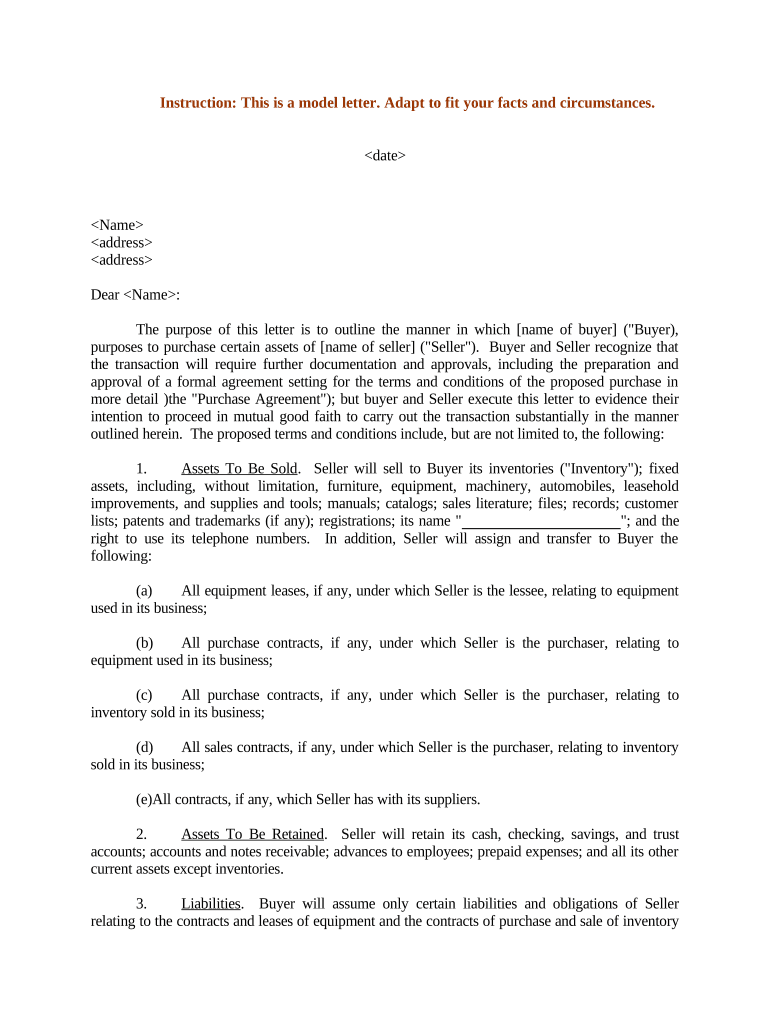
A Letter of Intent to Purchase Assets (LOI) is a preliminary written statement outlining the key terms under which a buyer proposes to purchase specified assets from a seller. The LOI frames material business points — assets, purchase price, payment terms, closing conditions, exclusivity, and confidentiality — and sets expectations for due diligence, negotiation timelines, and the drafting of a definitive asset purchase agreement.

Why a Clear LOI Helps Transactions Move Forward

A well-drafted LOI reduces misunderstanding, focuses due diligence, and signals serious intent without committing parties to a final sale. It preserves negotiation leverage, allocates immediate costs and responsibilities, and creates a roadmap for the definitive purchase agreement and closing mechanics.

Why a Clear LOI Helps Transactions Move Forward

Who Typically Prepares and Signs an LOI

The LOI is prepared by a prospective buyer or the buyer’s counsel and routed to the seller for review, often before detailed due diligence begins.

  • Corporate buyers and strategic acquirers initiating asset-level purchases, clarifying intended assets and allocation.
  • Private equity sponsors and investors assessing deal economics before committing capital or signing definitive documents.
  • Seller representatives and management teams summarizing transaction expectations and negotiating exclusivity or break fees.

Who Signs on Behalf of Each Party

Buyer — CFO

The chief financial officer or authorized corporate officer typically signs for an acquiring entity after board or investment committee approval; signatory authority should be confirmed in corporate resolutions to avoid invalidation.

Seller — CEO

The seller’s chief executive or an authorized officer signs for the selling entity; contract review should confirm delegation of authority and any necessary shareholder approvals before closing.

Essential Information the LOI Must Include

Buyer Name: Legal entity full name
Seller Name: Legal entity full name
Assets Described: Clear asset list or schedule
Purchase Price: Total consideration stated
Closing Conditions: Key conditions listed
Confidentiality: Nondisclosure terms present

Common Preparation Pitfalls to Avoid

  • Vague asset descriptions that omit serial numbers, contracts, or intellectual property make allocation and transfer unclear and delay closing.
  • Failing to state whether the LOI is binding or non-binding can create unexpected legal obligations during negotiation.
  • Omitting key conditions precedent, such as third-party consents or regulatory approvals, risks wasted time and expense.
  • Using ambiguous payment mechanics or escrow triggers can produce disputes about timing and release of funds at closing.

Step-by-Step: How to Complete an LOI

Follow a concise, ordered process to prepare an LOI that balances clarity with negotiability and protects both parties during due diligence.

  • 01
    Identify Parties: Enter full legal names and entity types.
  • 02
    List Assets: Describe assets with schedules or exhibits.
  • 03
    Specify Price: State total consideration and allocations.
  • 04
    Set Conditions: List closing conditions and timelines.

Where the LOI Fits in the Transaction Flow

The LOI typically precedes due diligence and a definitive purchase agreement; it creates timelines and identifies the next contractual steps leading to closing.

  • Offer Stage: Buyer proposes terms and exclusivity period.
  • Due Diligence: Buyer inspects records, assets, and contracts.
  • Definitive Agreement: Parties negotiate definitive APA terms.
  • Closing: Conditions satisfied and assets transferred.

Key Sections to Include in a Professional LOI

A complete LOI organizes essential deal terms so counsel can draft a definitive asset purchase agreement efficiently and with fewer open issues.

Parties

Identify buyer and seller by full legal name, entity type, and jurisdiction of organization to ensure enforceability and accurate contract routing.
Assets

Describe included assets and attach schedules for tangible property, contracts, IP, and inventory; explicitly list any excluded assets to avoid ambiguity.

Purchase Price

State the total consideration, payment structure (cash, stock, escrow), and allocation among asset categories for tax and accounting purposes.

Payment Terms

Define timing, escrow arrangements, holdbacks, and any earn-out mechanics with measurable performance metrics and clear calculation methods.

Conditions Precedent

List required approvals, third-party consents, regulatory clearances, and satisfactory due diligence items that must be satisfied before closing.

Confidentiality & Exclusivity

Include nondisclosure provisions and any exclusivity or no-shop period along with remedy or break fee terms if applicable.

Common eSignature Pricing and Feature Comparison

Basic pricing and core capabilities vary by vendor and plan; signNow appears first to show starting price and common capability differences without implying recommendation.

signNow DocuSign Adobe Sign PandaDoc HelloSign
Starting Price $8/user/mo $15/user/mo $14/user/mo $19/user/mo $15/user/mo
Free Trial 7-day free trial Varies by plan Varies by plan Varies by plan Varies by plan
Bulk Send Yes (Business Premium) Varies by plan Varies by plan Varies by plan Varies by plan
Audit Trail Yes Yes Yes Yes Yes
HIPAA Compliant Yes (BAA required) Varies by plan Varies by plan Varies by plan Varies by plan
Envelope Cap No envelope cap 100 envelopes/user/year Varies by plan Varies by plan Varies by plan

Practical Examples of LOIs in Use

Real organizations use LOIs to accelerate negotiations, document key deal economics, and reduce drafting cycles for definitive agreements.

Optica Ventures — COO

Optica used an LOI to summarize asset categories and payment terms before due diligence began, reducing early disputes.

  • The LOI included schedules for contracts and IP.
  • The concise LOI saved two weeks of negotiation and clarified allocation points for the final purchase agreement, streamlining counsel review and closing timelines.

Martin Properties — Founder

A regional real estate buyer issued an LOI to secure exclusivity while performing title review.

  • The LOI required environmental and title contingencies.
  • This protected the buyer during inspections and allowed the parties to finalize risk allocation in the asset purchase agreement without immediate commitment to close.

Practical Tips for Drafting an Effective LOI

Follow these drafting practices to reduce ambiguity and preserve optionality during negotiation.

State governing law
Choose the governing state with clear body of contract law and consider where enforcement or asset transfer will occur.
Binding vs Non-binding
Explicitly label which provisions are binding (e.g., confidentiality, exclusivity) and which are subject to definitive agreement to avoid disputes.
Define material terms
Quantify price adjustments, working capital mechanics, and included/excluded assets to prevent post-closing disagreements.
Track approvals
Document required board, lender, or third-party consents and set realistic timelines for obtaining them.

Configuring an Online LOI Workflow

Set up an electronic workflow that controls maker, reviewer, and signer roles to maintain an auditable LOI trail.

Field Configuration
Signer Order Sequential or parallel as required
Authentication Email, SMS code, or stronger as needed
Document Versioning Enable version control and audit trail
Retention Set automatic archival and export

Digital Signing and eSubmission Considerations

Choose a platform that supports secure signing, clear audit trails, and appropriate authentication for your transaction risk.

  • File formats: PDF, DOCX supported
  • Integrations: CRM and cloud storage integrations
  • Security: TLS/AES encryption and audit logs

Ensure the platform supports the authentication strength you need, provides retention/export capabilities for audits, and can accommodate notarization or witness workflows where state law requires them.

Legal and Financial Risks of a Faulty LOI

Unintended Binding Terms: Can create enforceable obligations
Tax Misallocation: Improper asset allocation affects tax liabilities
Failed Conditions: Missing consents can void closing
I-9 / Employment: Employment transfers may trigger compliance
Confidentiality Breach: Damages and injunctive relief possible
Title Defects: Costs to cure or indemnify

Typical Timelines and Deadlines in an LOI

LOIs establish timing for exclusivity, diligence, regulatory approvals, and a target closing date; set realistic windows for complex reviews.

Exclusivity Period:

Commonly 30–90 days for diligence

Due Diligence Window:

Often 30–60 days depending on complexity

Regulatory Filings:

Allow additional 30–90 days for approvals

Definitive Agreement Deadline:

Set a target date to avoid open-ended negotiations

Closing Date:

Specify target closing and extension mechanics

Key Deal Milestones from LOI to Closing

A milestone sequence clarifies responsibilities and escalation points to keep the deal on schedule.

01

LOI Execution

Parties sign the LOI and begin exclusivity period.

02

Document Exchange

Seller provides data room and asset schedules.

03

Due Diligence

Buyer completes inspections and legal review.

04

Definitive APA

Negotiate and sign the asset purchase agreement.

Frequently Asked Questions About LOIs

Answers to common questions about enforceability, signatures, and electronic execution of an LOI in U.S. transactions.


Need help? Contact support

be ready to get more
Join over 28 million airSlate SignNow users