Establishing secure connection… Loading editor… Preparing document…
Navigation

Fill and Sign the Agreement Exclusive Right Buy Form
Fill and Sign the Agreement Exclusive Right Buy Form

How it works

Open the document and fill out all its fields.
Apply your legally-binding eSignature.
Save and invite other recipients to sign it.

Rate template

4.7
58 votes
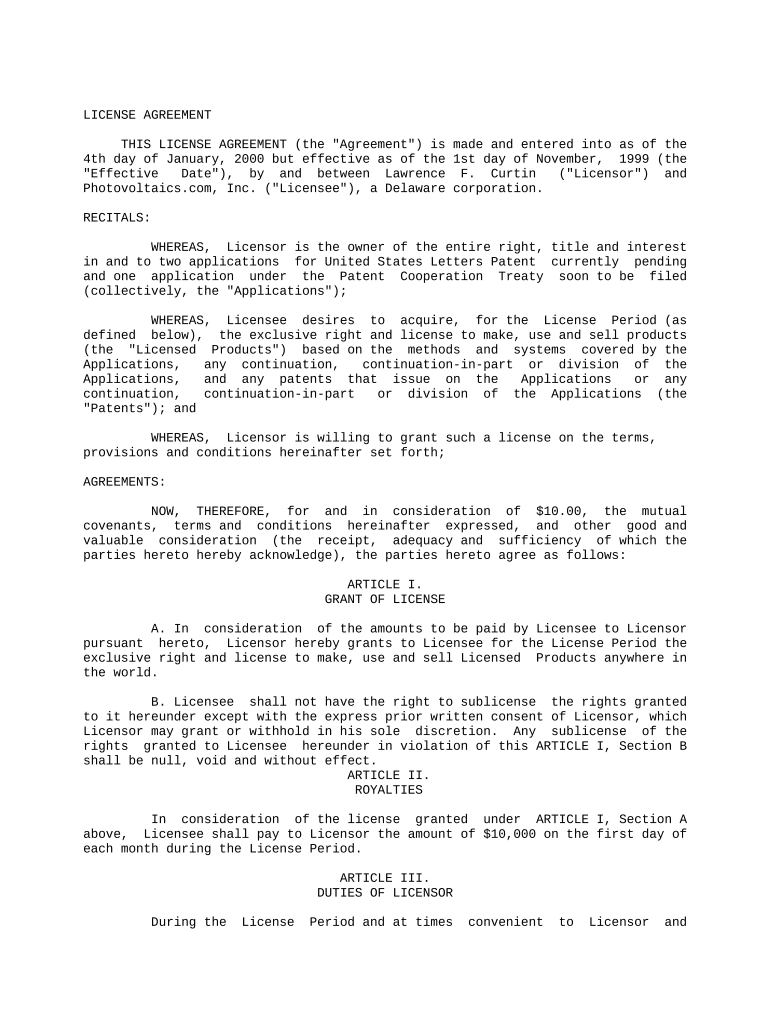
LICENSE AGREEMENT THIS LICENSE AGREEMENT (the "Agreement") is made and entered into as of the 4th day of January, 2000 but effective as of the 1st day of November, 1999 (the "Effective Date"), by and between Lawrence F. Curtin ("Licensor") and Photovoltaics.com, Inc. ("Licensee"), a Delaware corporation. RECITALS: WHEREAS, Licensor is the owner of the entire right, title and interest in and to two applications for United States Letters Patent currently pending and one application under the Patent Cooperation Treaty soon to be filed (collectively, the "Applications"); WHEREAS, Licensee desires to acquire, for the License Period (as defined below), the exclusive right and license to make, use and sell products (the "Licensed Products") based on the methods and systems covered by the Applications, any continuation, continuation-in-part or division of the Applications, and any patents that issue on the Applications or any continuation, continuation-in-part or division of the Applications (the "Patents"); and WHEREAS, Licensor is willing to grant such a license on the terms, provisions and conditions hereinafter set forth; AGREEMENTS: NOW, THEREFORE, for and in consideration of $10.00, the mutual covenants, terms and conditions hereinafter expressed, and other good and valuable consideration (the receipt, adequacy and sufficiency of which the parties hereto hereby acknowledge), the parties hereto agree as follows: ARTICLE I. GRANT OF LICENSE A. In consideration of the amounts to be paid by Licensee to Licensor pursuant hereto, Licensor hereby grants to Licensee for the License Period the exclusive right and license to make, use and sell Licensed Products anywhere in the world. B. Licensee shall not have the right to sublicense the rights granted to it hereunder except with the express prior written consent of Licensor, which Licensor may grant or withhold in his sole discretion. Any sublicense of the rights granted to Licensee hereunder in violation of this ARTICLE I, Section B shall be null, void and without effect. ARTICLE II. ROYALTIES In consideration of the license granted under ARTICLE I, Section A above, Licensee shall pay to Licensor the amount of $10,000 on the first day of each month during the License Period. ARTICLE III. DUTIES OF LICENSOR During the License Period and at times convenient to Licensor and Licensee, Licensor shall (A) disclose to Licensee all information, including all skills, techniques and other know-how, known to him or that may become known to him, that relates to the Licensed Products (the "Information"), (B) submit to Licensee for review and copying all documentation, including all writings of Licensor, in the possession of Licensor or which may come into the possession of Licensor, that relates to the Licensed Products (the "Documents"), and (C) to the extent reasonably necessary to a proper understanding of the Licensed Products, explain in full detail the Information and Documents and answer all questions of Licensee and its representatives relating to the Licensed Products. All reasonable expenses incurred by Licensor in complying with this ARTICLE III shall be paid by Licensee. During the License Period, Licensor shall not disclose to any third party any of the Information or Documents except as required by this Agreement. ARTICLE IV. DUTIES OF LICENSEE A. During the License Period and for two years thereafter, Licensee shall receive, hold in confidence and take all reasonable efforts to prevent disclosure of the Information and the Documents, except any Information or Documents that are Non-Proprietary, as defined immediately hereafter. For the purposes of this Agreement, "Non-Proprietary" Information and Documents are those which: (1) are, or shall have been in the possession of Licensee prior to the disclosure or submission thereof by Licensor to Licensee, (2) are, or through no fault of Licensee become published or otherwise available to others or to the public under circumstances such that others or the public may utilize the same without any direct or indirect obligation to Licensor, or (3) are, or at any time may be, acquired by Licensee from any third party rightfully possessed of the same and having no direct or indirect obligation to Licensor with respect to same. B. Upon the termination of the License Period: (1) Licensee shall promptly return to Licensor all of the Documents submitted by Licensor to Licensee; (2) Licensee shall not use or disclose to any third party any of the Information, Documents or copies thereof, except any which are Non-Proprietary. C. Licensee shall cause all copies of the Licensed Product (as well as all promotional material) to bear appropriate proprietary notices. ARTICLE V. REPRESENTATIONS AND WARRANTIES A. Licensor hereby represents and warrants that he is the owner of the entire right, title and interest in and to the Applications and has the sole right to grant licenses of the scope herein granted, and (to the best of his knowledge) the manufacture, sale and use of the Licensed Products by Licensee will not infringe the rights of any other person. Licensor makes no representation or warranty with respect to the validity of any Patents that may be granted with respect to the Applications. B. Licensee hereby represents and warrants that it shall use its best commercial efforts to market the Licensed Products and that their sale and marketing shall be in conformance with all applicable laws and regulations, including but not limited to all intellectual property laws. C. NOTHING IN THIS AGREEMENT SHALL BE DEEMED TO BE A REPRESENTATION OR WARRANTY BY LICENSOR OF THE ACCURACY, SAFETY, OR USEFULNESS FOR ANY PURPOSE OF ANY TECHNICAL INFORMATION, TECHNIQUES, OR PRACTICES AT ANY TIME MADE AVAILABLE BY LICENSOR. LICENSOR SHALL HAVE NO LIABILITY WHATSOEVER TO LICENSEE OR ANY OTHER PERSON FOR OR ON ACCOUNT OF ANY INJURY, LOSS, OR DAMAGE, OF ANY KIND OR NATURE, SUSTAINED BY, OR ANY DAMAGE ASSESSED OR ASSERTED AGAINST, OR ANY OTHER LIABILITY INCURRED BY OR IMPOSED ON LICENSEE OR ANY OTHER PERSON, ARISING OUT OF OR IN CONNECTION WITH OR RESULTING FROM (1) THE PRODUCTION, USE, OR SALE OF ANY LICENSED PRODUCT; (2) THE USE OF ANY TECHNICAL INFORMATION, TECHNIQUES, OR PRACTICES DISCLOSED BY LICENSOR; OR (3) ANY ADVERTISING OR OTHER PROMOTIONAL ACTIVITIES WITH RESPECT TO ANY OF THE FOREGOING, AND LICENSEE SHALL HOLD LICENSOR, AND ITS OFFICERS, EMPLOYEES, AND AGENTS, HARMLESS IN THE EVENT LICENSOR, OR ITS OFFICERS, EMPLOYEES, OR AGENTS, IS HELD LIABLE. ARTICLE VI. INDEMNIFICATION A. Licensor shall indemnify Licensee and hold Licensee harmless from any damages and liabilities (including reasonable attorneys' fees and costs) arising from any breach of any agreement, representation or warranty made by Licensor herein. Licensor's maximum liability to Licensee under this Agreement, regardless on what basis liability is asserted, shall in no event exceed the total amount paid to Licensor under this Agreement. Licensor shall not be liable to Licensee for any incidental, consequential, punitive or special damages. B. Licensee shall indemnify Licensor and hold Licensor harmless from any damages and liabilities (including reasonable attorneys' fees and costs) (1) arising from any breach of any agreement, representation or warranty made by Licensee herein, (2) arising out of the manufacture, sale or use of the Licensed Products, except to the extent that such manufacture, sale or use results in a claim for infringement, and Licensor knew or should have known that Licensee's manufacture, sale or use of the Licensed Products would result in the infringement of the rights of another person, (3) arising out of any alleged defects or failures to perform of the Licensed Products or any product liability claims or use of the Licensed Products, and (4) any claims arising out of advertising, distribution or marketing of the Licensed Products. ARTICLE VII. INTELLECTUAL PROPERTY RIGHTS AND PROTECTION A. Licensor may, but is not obligated to, continue to prosecute, in its own name and at its own expense, the Applications in an effort to obtain Patents. Licensor grants to Licensee the right, if Licensor ever abandons the prosecution of the Applications in an effort to obtain Patents, to apply for patents on the Licensed Products provided that such patents shall be applied for in the name of Licensor and licensed to Licensee during the License Period and according to the terms, provisions and conditions of this Agreement. Licensee shall have the right to deduct its reasonable out-of-pocket expenses for the preparation, filing and prosecution of any such patent application (but in no event more than $5,000) from future royalties due to Licensor under this Agreement. Licensee shall obtain Licensor's prior written consent before incurring expenses for any foreign patent application. B. Improvements in the Licensed Products (an "Improvement") made by Licensee shall be the exclusive property of Licensee. Licensee hereby grants to Licensor, upon the termination of this Agreement in accordance with ARTICLE VIII, a worldwide, royalty-free, perpetual license under all Improvements, together with the right to sublicense others. Licensor's license shall be exclusive. In the event Licensee does not wish to seek governmental protection of any Improvement, it shall so notify Licensor prior to any public divulging thereof and upon the request of Licensor, execute and procure the execution of any and all applications and papers necessary or desirable to enable Licensor to seek governmental protection and whatever assignments or transfer instruments are necessary or required to effectuate ownership of the rights in Licensor in any and all countries of the world which Licensor may elect. Any expense incurred in the prosecution of such governmental protection by Licensor shall be borne by Licensor. C. In the event that either party learns of imitations or infringements of the Licensed Products, that party shall notify the other in writing of the infringements or imitations. Licensor shall have the right to commence lawsuits against third persons arising from infringement of Licensed Products. In the event that Licensor does not commence a lawsuit against an alleged infringer within 60 days of notification by Licensee, Licensee may commence a lawsuit against the third party. Before the filing suit, Licensee shall obtain the written consent of Licensor to do so, and such consent shall not be unreasonably withheld. Licensor shall cooperate fully and in good faith with Licensee for the purpose of securing and preserving Licensee's rights to the Applications and Patents. Any recovery (including, but not limited to a judgment, settlement or licensing agreement included as resolution of an infringement dispute) shall be divided equally between the parties after deduction and payment of reasonable attorneys' fees to the party bringing the lawsuit. D. During the License Period, Licensee shall bring to Licensor's attention any prior art or other information known to Licensee that is relevant to the Licensed Products, the Applications or the Patents and that might cause a court to deem any of the Applications or Patents wholly or partly inoperative or invalid. Licensee shall particularly specify such prior art or other information to Licensor at the time it learns thereof and not less than ninety (90) days prior to bringing any action against Licensor asserting the invalidity of any of the Applications or Patents. ARTICLE VIII. LICENSE PERIOD AND TERMINATION A. The term of this Agreement (the "License Period") shall commence upon the Effective Date and shall expire simultaneously with the expiration of the longest-living Patent or last-remaining Application (whichever occurs last), unless sooner terminated pursuant to a provision of this Agreement. B. Licensee may terminate this Agreement at any time upon sixty (60) days' prior written notice to Licensor. C. If either party shall be in default of any obligation hereunder, or shall have filed a petition of bankruptcy or reorganization, have had filed against it an involuntary proceeding, be adjudged bankrupt, become insolvent, have made an assignment for the benefit of creditors, or have been placed in the hands of a receiver, trustee in bankruptcy, receiver or liquidator, the other party may terminate this Agreement by giving sixty (60) days' prior written notice to the other party, specifying the basis for termination. If within sixty (60) days after the receipt of such notice, the party who received notice shall remedy the condition forming the basis for termination, such notice shall cease to be operative, and this Agreement shall continue in full force. D. Licensor may terminate this Agreement, by giving written notice to Licensee, at any time within sixty (60) days after November 1, 2001, if by November 1, 2001 Licensee has failed to commence the sale of Licensed Products in commercially reasonable quantities. E. After the termination of this Agreement, all rights granted to Licensee under this Agreement shall terminate and revert to Licensor, and Licensee shall refrain from further manufacturing, marketing, distribution, or use of any Licensed Product, except as otherwise expressly permitted herein. Notwithstanding the preceding, Licensee may dispose of Licensed Products (completed by the date of termination or expiration) for a period of three months after termination or expiration, provided that Licensee continues to pay timely the royalty provided for in ARTICLE II hereof for each of the three months in which sales continue. F. The obligations under the following provisions of this Agreement shall survive any termination of this Agreement: (1) the royalty provisions of ARTICLE II, to the extent that Licensee elects to continue sales of Licensed Products for three months after termination in accordance with ARTICLE VIII, Section E above; (2) the confidentiality and related provisions of ARTICLE IV; (3) the indemnification provisions of ARTICLE VI; (4) the miscellaneous provisions of ARTICLE IX; and (5) all disclaimers made herein. ARTICLE IX. MISCELLANEOUS A. THIS AGREEMENT SHALL BE INTERPRETED AND CONSTRUED IN ACCORDANCE WITH AND SHALL BE GOVERNED BY THE LAWS OF THE STATE OF FLORIDA. B. The parties consent to the exclusive jurisdiction and venue of the federal and state courts located in Dade County, Florida in any action arising out of or relating to this Agreement. The parties waive any other venue to which either party might be entitled by domicile or otherwise. C. This Agreement represents the entire understanding between the parties, and supersedes all other agreements, express or implied, between the parties concerning the Applications and Patents. A provision of this Agreement may be altered only by a writing signed by both parties. D. The parties agree that if any part, term, or provision of this Agreement shall be found illegal or in conflict with any valid controlling law, the validity of the remaining provisions shall not be affected thereby. In the event the legality of any provision of this Agreement is brought into question because of a decision by a court of competent jurisdiction of any country in which this Agreement applies, Licensor, by written notice to Licensee, may revise the provision in question or may delete it entirely so as to comply with the decision of said court. E. The waiver of a breach hereunder may be effected only by a writing signed by the waiving party and shall not constitute a waiver of any other breach. F. Nothing contained in this Agreement shall be construed to place the parties in the relationship of agent, employee, franchisee, officer, partners or joint ventures. Neither party may create or assume any obligation on behalf of the other.. G. Any notices, requests, demands, or other communications herein required or permitted to be given shall be in writing and may be personally served, sent by United States mail, sent by an overnight courier who keeps proper records regarding its deliveries, faxed or e-mailed. Notice shall be deemed to have been given if personally served, when served, or if mailed, on the third business day after deposit in the United States mail with postage pre-paid by certified or registered mail and properly addressed, or if sent by overnight courier as aforesaid with charges being billed to the sender, when received by the party being notified, or if faxed, when the person giving the notice receives a confirmation statement with all relevant details indicating that the fax was properly received, or if e-mailed, when the person giving the notice receives a confirmation statement with all relevant details indicating that the e-mail was properly received. As used in this Agreement, the term "business day" means days other than Saturdays, Sundays, and holidays recognized by Federal banks. For purposes of this Agreement, the physical addresses, fax numbers and e-mail addresses of the parties hereto shall be the physical addresses, fax numbers and e-mail addresses as set forth on the signature pages of this Agreement. Any party to be notified hereunder may change its physical address, fax number and e-mail address by notifying each other party hereto in writing as to the new physical address, fax number and e-mail address for sending notices. [REMAINDER OF PAGE INTENTIONALLY LEFT BLANK] IN WITNESS WHEREOF, the parties have executed this Agreement in duplicate on the date set forth above. /s/ Lawrence F. Curtin Lawrence F. Curtin Address:_____________________________ ------------------------------------ Fax no:______________________________ E-mail Address:____________________________ PHOTOVOLTAICS.COM, INC. By: /s/ Harvey Judkowitz Harvey Judkowitz, Treasurer Address:_____________________________ ------------------------------------ Fax no:______________________________ E-mail Address:____________________________

Valuable advice on finishing your ‘Agreement Exclusive Right Buy’ online

Are you fed up with the burden of handling paperwork? Look no further than airSlate SignNow, the premier digital signature solution for individuals and organizations. Bid farewell to the tedious routine of printing and scanning documents. With airSlate SignNow, you can effortlessly complete and sign paperwork online. Take advantage of the extensive features embedded in this user-friendly and cost-effective platform and transform your document management strategy. Whether you have to authorize forms or collect digital signatures, airSlate SignNow simplifies the entire process, needing only a few clicks.

Follow this detailed guide:

  1. Access your account or initiate a free trial with our service.
  2. Click +Create to upload a file from your device, cloud storage, or our form repository.
  3. Open your ‘Agreement Exclusive Right Buy’ in the editor.
  4. Click Me (Fill Out Now) to set up the document on your end.
  5. Add and designate fillable fields for others (if necessary).
  6. Proceed with the Send Invite settings to solicit eSignatures from others.
  7. Download, print your copy, or transform it into a reusable template.

No need to worry if you have to work with your teammates on your Agreement Exclusive Right Buy or send it for notarization—our solution provides you with everything required to complete such activities. Create an account with airSlate SignNow today and enhance your document management to a new level!

Here is a list of the most common customer questions. If you can’t find an answer to your question, please don’t hesitate to reach out to us.

Need help? Contact Support

The best way to complete and sign your agreement exclusive right buy form

Save time on document management with airSlate SignNow and get your agreement exclusive right buy form eSigned quickly from anywhere with our fully compliant eSignature tool.

How to Sign a PDF Online How to Sign a PDF Online

How to complete and sign forms online

Previously, working with paperwork took pretty much time and effort. But with airSlate SignNow, document management is quick and simple. Our powerful and easy-to-use eSignature solution enables you to effortlessly fill out and electronically sign your agreement exclusive right buy form online from any internet-connected device.

Follow the step-by-step guide to eSign your agreement exclusive right buy form template online:

  • 1.Sign up for a free trial with airSlate SignNow or log in to your account with password credentials or SSO authentication.
  • 2.Click Upload or Create and import a form for eSigning from your device, the cloud, or our form library.
  • 3.Click on the document name to open it in the editor and use the left-side toolbar to fill out all the blank fields accordingly.
  • 4.Place the My Signature field where you need to approve your form. Provide your name, draw, or import a picture of your regular signature.
  • 5.Click Save and Close to finish modifying your completed document.

After your agreement exclusive right buy form template is ready, download it to your device, export it to the cloud, or invite other people to eSign it. With airSlate SignNow, the eSigning process only requires a few clicks. Use our robust eSignature tool wherever you are to handle your paperwork successfully!


How to Sign a PDF Using Google Chrome How to Sign a PDF Using Google Chrome

How to complete and sign forms in Google Chrome

Completing and signing documents is simple with the airSlate SignNow extension for Google Chrome. Adding it to your browser is a fast and efficient way to deal with your paperwork online. Sign your agreement exclusive right buy form sample with a legally-binding eSignature in just a few clicks without switching between applications and tabs.

Follow the step-by-step guidelines to eSign your agreement exclusive right buy form template in Google Chrome:

  • 1.Go to the Chrome Web Store, find the airSlate SignNow extension for Chrome, and add it to your browser.
  • 2.Right-click on the link to a form you need to approve and choose Open in airSlate SignNow.
  • 3.Log in to your account with your password or Google/Facebook sign-in option. If you don’t have one, you can start a free trial.
  • 4.Use the Edit & Sign menu on the left to fill out your template, then drag and drop the My Signature option.
  • 5.Add an image of your handwritten signature, draw it, or simply enter your full name to eSign.
  • 6.Verify all information is correct and click Save and Close to finish editing your form.

Now, you can save your agreement exclusive right buy form sample to your device or cloud storage, send the copy to other individuals, or invite them to electronically sign your document with an email request or a protected Signing Link. The airSlate SignNow extension for Google Chrome enhances your document workflows with minimum time and effort. Try airSlate SignNow today!


How to Sign a PDF in Gmail How to Sign a PDF in Gmail How to Sign a PDF in Gmail

How to fill out and sign paperwork in Gmail

When you receive an email containing the agreement exclusive right buy form for approval, there’s no need to print and scan a document or download and re-upload it to another program. There’s a better solution if you use Gmail. Try the airSlate SignNow add-on to promptly eSign any paperwork right from your inbox.

Follow the step-by-step guidelines to eSign your agreement exclusive right buy form in Gmail:

  • 1.Visit the Google Workplace Marketplace and locate a airSlate SignNow add-on for Gmail.
  • 2.Set up the program with a related button and grant the tool access to your Google account.
  • 3.Open an email containing an attached file that needs approval and utilize the S symbol on the right panel to launch the add-on.
  • 4.Log in to your airSlate SignNow account. Select Send to Sign to forward the document to other people for approval or click Upload to open it in the editor.
  • 5.Drop the My Signature option where you need to eSign: type, draw, or import your signature.

This eSigning process saves efforts and only takes a couple of clicks. Take advantage of the airSlate SignNow add-on for Gmail to adjust your agreement exclusive right buy form with fillable fields, sign documents legally, and invite other parties to eSign them al without leaving your inbox. Boost your signature workflows now!


How to Sign a PDF on a Mobile Device How to Sign a PDF on a Mobile Device How to Sign a PDF on a Mobile Device

How to fill out and sign documents in a mobile browser

Need to quickly submit and sign your agreement exclusive right buy form on a mobile phone while working on the go? airSlate SignNow can help without needing to set up additional software apps. Open our airSlate SignNow tool from any browser on your mobile device and create legally-binding electronic signatures on the go, 24/7.

Follow the step-by-step guidelines to eSign your agreement exclusive right buy form in a browser:

  • 1.Open any browser on your device and follow the link www.signnow.com
  • 2.Create an account with a free trial or log in with your password credentials or SSO option.
  • 3.Click Upload or Create and pick a file that needs to be completed from a cloud, your device, or our form library with ready-to go templates.
  • 4.Open the form and fill out the blank fields with tools from Edit & Sign menu on the left.
  • 5.Put the My Signature field to the form, then enter your name, draw, or add your signature.

In a few simple clicks, your agreement exclusive right buy form is completed from wherever you are. As soon as you're finished editing, you can save the file on your device, generate a reusable template for it, email it to other individuals, or ask them to electronically sign it. Make your documents on the go speedy and efficient with airSlate SignNow!


How to Sign a PDF on iPhone How to Sign a PDF on iPhone

How to fill out and sign paperwork on iOS

In today’s business world, tasks must be done quickly even when you’re away from your computer. Using the airSlate SignNow app, you can organize your paperwork and approve your agreement exclusive right buy form with a legally-binding eSignature right on your iPhone or iPad. Install it on your device to conclude contracts and manage forms from anywhere 24/7.

Follow the step-by-step guide to eSign your agreement exclusive right buy form on iOS devices:

  • 1.Go to the App Store, search for the airSlate SignNow app by airSlate, and set it up on your device.
  • 2.Open the application, tap Create to import a form, and choose Myself.
  • 3.Opt for Signature at the bottom toolbar and simply draw your autograph with a finger or stylus to eSign the form.
  • 4.Tap Done -> Save after signing the sample.
  • 5.Tap Save or utilize the Make Template option to re-use this document in the future.

This process is so simple your agreement exclusive right buy form is completed and signed in a few taps. The airSlate SignNow application works in the cloud so all the forms on your mobile device are kept in your account and are available whenever you need them. Use airSlate SignNow for iOS to boost your document management and eSignature workflows!


How to Sign a PDF on Android How to Sign a PDF on Android

How to complete and sign forms on Android

With airSlate SignNow, it’s easy to sign your agreement exclusive right buy form on the go. Install its mobile application for Android OS on your device and start enhancing eSignature workflows right on your smartphone or tablet.

Follow the step-by-step guidelines to eSign your agreement exclusive right buy form on Android:

  • 1.Open Google Play, find the airSlate SignNow app from airSlate, and install it on your device.
  • 2.Log in to your account or register it with a free trial, then add a file with a ➕ button on the bottom of you screen.
  • 3.Tap on the uploaded file and select Open in Editor from the dropdown menu.
  • 4.Tap on Tools tab -> Signature, then draw or type your name to eSign the sample. Complete empty fields with other tools on the bottom if required.
  • 5.Utilize the ✔ button, then tap on the Save option to end up with editing.

With an intuitive interface and total compliance with primary eSignature laws and regulations, the airSlate SignNow app is the best tool for signing your agreement exclusive right buy form. It even operates offline and updates all record modifications when your internet connection is restored and the tool is synced. Fill out and eSign documents, send them for approval, and generate multi-usable templates anytime and from anyplace with airSlate SignNow.

Sign up and try Agreement exclusive right buy form
  • Close deals faster
  • Improve productivity
  • Delight customers
  • Increase revenue
  • Save time & money
  • Reduce payment cycles

