Establishing secure connection… Loading editor… Preparing document…
Navigation

Fill and Sign the Agreement This Agreement is Entered into Thisday of Form
Fill and Sign the Agreement This Agreement is Entered into Thisday of Form

How it works

Open the document and fill out all its fields.
Apply your legally-binding eSignature.
Save and invite other recipients to sign it.

Rate template

4.8
39 votes
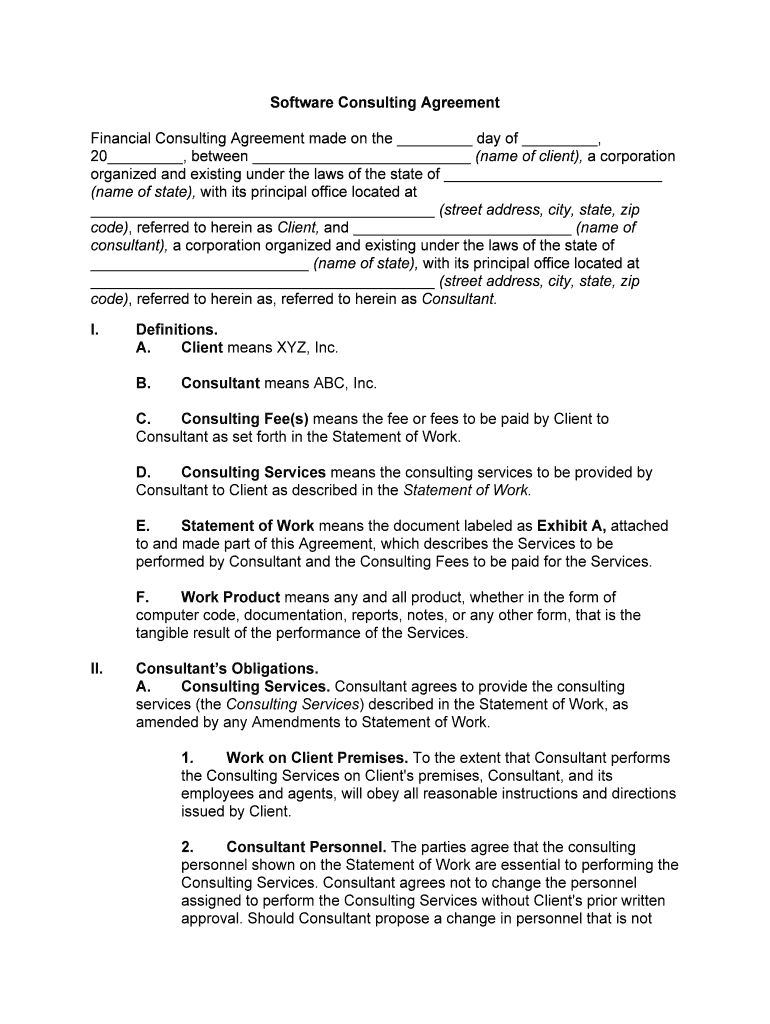
Software Consulting Agreement Financial Consulting Agreement made on the _________ day of _________, 20_________, between __________________________ (name of client), a corporation organized and existing under the laws of the state of __________________________ (name of state), with its principal office located at _________________________________________ (street address, city, state, zip code), referred to herein as Client, and __________________________ (name of consultant), a corporation organized and existing under the laws of the state of __________________________ (name of state), with its principal office located at _________________________________________ (street address, city, state, zip code), referred to herein as, referred to herein as Consultant.I. Definitions.A.Client means XYZ, Inc.B. Consultant means ABC, Inc.C. Consulting Fee(s) means the fee or fees to be paid by Client to Consultant as set forth in the Statement of Work.D. Consulting Services means the consulting services to be provided by Consultant to Client as described in the Statement of Work.E.Statement of Work means the document labeled as Exhibit A, attached to and made part of this Agreement, which describes the Services to be performed by Consultant and the Consulting Fees to be paid for the Services.F. Work Product means any and all product, whether in the form of computer code, documentation, reports, notes, or any other form, that is the tangible result of the performance of the Services.II. Consultant’s Obligations.A.Consulting Services. Consultant agrees to provide the consulting services (the Consulting Services) described in the Statement of Work, as amended by any Amendments to Statement of Work.1. Work on Client Premises. To the extent that Consultant performs the Consulting Services on Client's premises, Consultant, and its employees and agents, will obey all reasonable instructions and directions issued by Client.2. Consultant Personnel. The parties agree that the consulting personnel shown on the Statement of Work are essential to performing the Consulting Services. Consultant agrees not to change the personnel assigned to perform the Consulting Services without Client's prior written approval. Should Consultant propose a change in personnel that is not acceptable to Client, Client has the right to terminate this Agreement on fifteen (15) days' written notice and on payment to Consultant of all Consulting Fees accrued as of the date of termination.B. Progress Reports and Meetings. Consultant agrees to: 1. Provide Client with __________________________ (e.g., weekly or monthly) written progress reports, setting forth the status of the Consulting Services in a format to be mutually agreed upon by the parties; and 2.Participate in __________________________ (e.g., weekly or monthly) meetings to review the progress of the Consulting Services.III. Client’s Obligations.A. Programs, Data, and Documentation. Client agrees to make available to Consultant, upon reasonable notice, computer programs, data, and documentation required by Consultant to complete the Consulting Services.B.Equipment and Office Facilities. To the extent that the Consulting Services are to be performed on Client's premises, Client agrees to provide Consultant with the equipment and office facilities necessary for performance of the Consulting Services.IV.Payment.A.Payment for Consulting Services. Client agrees to pay Consultant the Consulting Fee set forth in the Statement of Work. The Consulting Fee specified in the Statement of Work represents the total fees and charges for the Consulting Services and will not be increased during the term of this Agreement except pursuant to a written Amendment to the Statement of Work substantially in the form attached as Exhibit B.B.Payment for Additional Consulting Services. Client agrees to pay Consultant any and all additional fees set forth in a properly completed and executed Amendment to the Statement of Work.C. Expense Reimbursement. In addition to the Consulting Fee, Client agrees to pay Consultant the reasonable out-of-pocket expenses incurred by Consultant in performance of the Consulting Services. Consultant shall obtain the written approval of Client before incurring expenses in excess of Dollars ($__________________________).D.Invoices. Consultant will invoice Client monthly for the Consulting Services rendered during the preceding month. The invoice will detail the Consulting Services performed during the invoice period. Client will pay the invoices within thirty (30) days after receipt. Any invoices not paid within thirty (30) days of receipt will bear interest at the lesser of twelve percent (12%) per year or the maximum amount allowed by law.V. Statement of Work and Amendment to Statement of Work.A.Statement of Work. The Consulting Services to be provided pursuant to this Agreement are set forth in the Statement of Work attached as Exhibit A.B. Amendments to Statement of Work. Any and all additions, deletions, or modifications to the Statement of Work will be set forth in writing on an Amendment to the Statement of Work, substantially in the form set forth in Exhibit B to this Agreement, and executed by both parties. Consultant reserves the right not to consent to an Amendment to the Statement of Work that substantially increases the Consulting Services, whether in terms of time necessary to complete performance, or personnel and equipment requirements for completion.VI.Term and Termination.A. Term. The term of this Agreement is from __________________________ (date) until the earlier of completion of the Consulting Services, which is estimated to be __________________________ (date) or termination pursuant to Subsections B or C below.B. Termination for Convenience. Client may terminate this Agreement at any time on __________________________ (number) days' written notice to Consultant and upon payment to Consultant of all Consulting Fees accrued as of the date of termination and payment of a termination fee of __________________________ Dollars ($__________________________).C. Termination for Cause. Either party, as applicable, shall have the right, in addition and without prejudice to any other rights or remedies, to terminate this Agreement as follows:1. By Consultant, upon ten (10) days' written notice, if Client fails to pay the amounts due to Consultant pursuant to Section IV;2. By Client, upon fifteen (15) days' written notice and payment to Consultant of all Consulting Fees accrued as of the date of termination, should Consultant propose a change in personnel that is not acceptable to Client;3.By Client, upon ten (10) days' written notice, if Consultant fails to meet any of the milestones or other deadlines required to be met pursuant to this Agreement;4. By either party for any material breach of this Agreement, other than failure to make payments under Section 4 of this Agreement, that is not cured within ten (10) days of receipt by the party in default of a notice specifying the breach and requiring its cure; or5. By either party, effective immediately upon written notice if: (i) all or a substantial portion of the assets of the other party are transferred to an assignee for the benefit of creditors, to a receiver, or to a trustee in bankruptcy; (ii) a proceeding is commenced by or against the other party for relief under the bankruptcy or similar laws and such proceeding is not dismissed within sixty (60) days; or (iii) the other party is adjudged bankrupt.D. Obligations on Termination. Upon termination of this Agreement, the parties shall have no further obligations pursuant to the terms of this Agreement except that Sections IV, VII, VIII, IX, and X shall survive termination.VII. Ownership of Work Product.A. Ownership. Client and Consultant agree that the Work Product and any and all related copyrights, trademarks, patents, trade secrets, Confidential Information, and any other proprietary rights are the property of Client. Except to the extent otherwise provided in this Agreement, Consultant does not have any right, ownership, or title in the Work Product or any related copyrights, trademarks, patents, trade secrets, Confidential Information, or any other proprietary rights.B.Assignment of Rights. Consultant specifically agrees that all copyrights and other proprietary rights in computer programs, files, documentation, reports, notes, and related materials that are paid for by Client or developed by Consultant in connection with this Agreement are owned by Client, and Consultant assigns to Client all right, title, and interest in the copyrights and other proprietary rights.C.Consultant's Proprietary Software Programs. Notwithstanding the provisions of Subsection A and B above, it is understood and agreed that Consultant may use its proprietary intellectual property in providing the Consulting Services. If Consultant uses any of its proprietary intellectual property and so notifies Client, Client shall not acquire any proprietary rights to such intellectual property by virtue of this Agreement.VIII. Confidentiality. A.Each party acknowledges that it may receive confidential information and trade secrets (Confidential Information) from the other party while carrying out the actions contemplated by this Agreement. Confidential Information includes all information one party receives from the other party, except anything designated as not confidential. During the period this Agreement is in effect, and at all times afterwards, each party, and its employees, contractors, consultants, and agents, will (i) safeguard the other party's Confidential Information with the same degree of care that it uses to protect its own confidential information; (ii) maintain the confidentiality of this information; (iii) not use such information except as permitted under this Agreement; and (iv) not disseminate, disclose, sell, publish, or otherwise make available this information to any third party without the prior written consent of the disclosing party.B. Limitations on Confidentiality Restrictions. Subsection A above does not apply to any information that: (i) is already lawfully in the receiving party's possession (unless received pursuant to a nondisclosure agreement); (ii) is or becomes generally available to the public through no fault of the receiving party; (iii) is disclosed to the receiving party by a third party who may transfer or disclose such information without restriction; (iv) is required to be disclosed by the receiving party as a matter of law (provided that the receiving party will use all reasonable efforts to provide the disclosing party with prior notice of such disclosure and to obtain a protective order); (v) is disclosed by the receiving party with the disclosing party's approval; and (vi) is independently developed by the receiving party without any use of confidential information. In all cases, the receiving party will use all reasonable efforts to give the disclosing party ten (10) days' prior written notice of any disclosure of information under this Agreement. The parties will maintain the confidentiality of all confidential and proprietary information learned pursuant to this Agreement for a period of (number) years from the date of termination of this Agreement. C.Nondisclosure Agreements. Each party agrees to execute a reasonable nondisclosure agreement if asked to do so by the other party.IX. Warranties, Disclaimer, Limitation of Liability.A. Warranties. Consultant warrants as follows:1. Compliance with Specifications. Consultant warrants that the Consulting Services and the Work Product will strictly comply with the descriptions and representations as to the Consulting Services and Work Product (including performance capabilities, completeness, specifications, configurations, and function) that appear in the Statement of Work or any Amendments to the Statement of Work.2. Ongoing Compliance. Consultant warrants that for a period of 180 days after completion of the Consulting Services and Client's acceptance of the Work Product any computer programs or enhancements or modifications to computer programs included in the Work Product will operate in conformance with the specifications for such computer programs.3. Non-infringement. Consultant further warrants that the Consulting Services and the Work Product, to the extent created by Consultant, will not violate or in any way infringe upon the rights of third parties, including property, contractual, employment, trade secrets, proprietary information, and nondisclosure rights, or any trademark, copyright, or patent rights.B.Disclaimer. THE WARRANTIES SET FORTH IN SUBSECTION A, ABOVE, ARE IN LIEU OF, AND THIS AGREEMENT EXPRESSLY EXCLUDES, ALL OTHER WARRANTIES, EXPRESS OR IMPLIED, ORAL OR WRITTEN, INCLUDING, WITHOUT LIMITATION: (i) ANY WARRANTY THAT THE SOFTWARE IS ERROR- FREE, WILL OPERATE WITHOUT INTERRUPTION, OR IS COMPATIBLE WITH ALL EQUIPMENT AND SOFTWARE CONFIGURATIONS; (ii) ANY AND ALL WARRANTIES OF MERCHANTABILITY; AND (iii) ANY AND ALL WARRANTIES OF FITNESS FOR A PARTICULAR PURPOSE.C.Limitation of Liability. CONSULTANT IS NOT LIABLE FOR ANY INDIRECT, INCIDENTAL, SPECIAL, OR CONSEQUENTIAL DAMAGES, INCLUDING THE LOSS OF PROFITS, REVENUE, DATA, OR USE OR COST OF PROCUREMENT OF SUBSTITUTE GOODS INCURRED BY CLIENT OR ANY THIRD PARTY, WHETHER IN AN ACTION IN CONTRACT OR TORT OR BASED ON A WARRANTY, EVEN IF CONSULTANT OR ANY OTHER PERSON HAS BEEN ADVISED OF THE POSSIBILITY OF SUCH DAMAGES. CONSULTANT'S LIABILITY FOR DAMAGES UNDER THIS AGREEMENT SHALL NOT EXCEED THE AMOUNTS ACTUALLY PAID BY CLIENT TO CONSULTANT FOR CONSULTING SERVICES UNDER THIS AGREEMENT.X.Indemnification. Consultant indemnifies and agrees to hold Client harmless from any loss, claim, or damage (including attorney's fees) to persons or property arising out of this Agreement, the Work Product, or the Consulting Services to the extent that the loss, claim, or damage is caused by Consultant's breach of any term of this Agreement or the intentional act of Consultant. This indemnity survives termination of this Agreement.XI. Nonexclusivity, Subcontracting, and Non-recruitment.A. Nonexclusivity. Client acknowledges that Consultant may be performing similar consulting services for businesses other than Client including, without limitation, other computer software companies. This Agreement does not prohibit Consultant from performing those consulting services.B. Subcontracting. Any subcontract made by Consultant with the consent of Client shall incorporate by reference all the terms of this Agreement. Consultant agrees to guarantee the performance of any subcontractor used in performance of the Consulting Services. C. Non-recruitment. Consultant and Client agree not to recruit the employees of the other party unless written permission is obtained from the employing party. This provision will remain in effect for (number) months after termination of this Agreement.XII. General. A.Injunctive relief. The parties agree that damages would be an inadequate remedy in the event of a breach of this Agreement by Consultant. Therefore, Consultant agrees that Client is entitled, in addition to any other rights and remedies otherwise available, to injunctive and other equitable relief in the event of a breach or threatened breach by Consultant.B. Independent Contractor. Consultant is, and at all times will be, an independent contractor. Nothing in this Agreement shall be deemed to create an employer-employee, principal-agent, or joint venture relationship. Neither party has the authority to enter into any contracts on behalf of the other party or otherwise act on behalf of the other party.C. Assignment. Neither party may assign or transfer its rights or delegate its obligations under this Agreement without the other party's prior written consent, which will not be unreasonably withheld. This Agreement shall be binding upon the successors and assigns of the parties to this Agreement.D. Publicity. Without the prior written consent of the other party, neither party shall disclose the terms and conditions of this Agreement except such disclosure may be made as is reasonably necessary to the disclosing party's bankers, attorneys, or accountants or except as may be required by law.E. Force Majeure. Neither party shall be liable to the other for its failure to perform any of its obligations under this Agreement, except for payment obligations, during any period in which such performance is delayed or rendered impracticable or impossible due to circumstances beyond its reasonable control, provided that the party experiencing the delay promptly notifies the other of the delay.XIII. Severability. The invalidity of any portion of this Agreement will not and shall not be deemed to affect the validity of any other provision. If any provision of this Agreement is held to be invalid, the parties agree that the remaining provisions shall be deemed to be in full force and effect as if they had been executed by both parties subsequent to the expungement of the invalid provision. XIV. No Waiver. The failure of either party to this Agreement to insist upon the performance of any of the terms and conditions of this Agreement, or the waiver of any breach of any of the terms and conditions of this Agreement, shall not be construed as subsequently waiving any such terms and conditions, but the same shall continue and remain in full force and effect as if no such forbearance or waiver had occurred.XV.Governing Law. This Agreement shall be governed by, construed, and enforced in accordance with the laws of the State of __________________________ (name of state).XVI.Notices. Unless provided herein to the contrary, any notice provided for or concerning this Agreement shall be in writing and shall be deemed sufficiently given when sent by certified or registered mail if sent to the respective address of each party as set forth at the beginning of this Agreement.XVII. Attorney’s Fees. In the event that any lawsuit is filed in relation to this Agreement, the unsuccessful party in the action shall pay to the successful party, in addition to all the sums that either party may be called on to pay, a reasonable sum for the successful party's attorney fees.XVIII.Mandatory Arbitration. Notwithstanding the foregoing, and anything herein to the contrary, any dispute under this Agreement shall be required to be resolved by binding arbitration of the parties hereto. If the parties cannot agree on an arbitrator, each party shall select one arbitrator and both arbitrators shall then select a third. The third arbitrator so selected shall arbitrate said dispute. The arbitration shall be governed by the rules of the American Arbitration Association then in force and effect. XIX.Entire Agreement. This Agreement shall constitute the entire agreement between the parties and any prior understanding or representation of any kind preceding the date of this Agreement shall not be binding upon either party except to the extent incorporated in this Agreement.XX. Modification of Agreement. Any modification of this Agreement or additional obligation assumed by either party in connection with this Agreement shall be binding only if placed in writing and signed by each party or an authorized representative of each party.XXI.Counterparts. This Agreement may be executed in any number of counterparts, each of which shall be deemed to be an original, but all of which together shall constitute but one and the same instrument.XXII. Compliance with Laws. In performing under this Agreement, all applicable governmental laws, regulations, orders, and other rules of duly-constituted authority will be followed and complied with in all respects by both parties.WITNESS our signatures as of the day and date first above stated.__________________________ __________________________(Name of Client) (Name of Consultant) By: _____________________ By: _____________________ (Printed Name & Office in Corporation) (Printed Name & Office in Corporation)_____________________ _____________________ (Signature of Officer) (Signature of Officer) Attach Exhibits

Valuable tips on preparing your ‘Agreement This Agreement Is Entered Into Thisday Of ’ online

Are you fed up with the complications of handling paperwork? Look no further than airSlate SignNow, the premier electronic signature tool for individuals and enterprises. Bid farewell to the lengthy routine of printing and scanning documents. With airSlate SignNow, you can easily complete and sign documents online. Utilize the powerful features embedded within this user-friendly and budget-friendly platform and transform your document management process. Whether you need to sign forms or collect eSignatures, airSlate SignNow manages it all seamlessly, with just a few clicks.

Follow this detailed guide:

  1. Log into your account or sign up for a complimentary trial with our platform.
  2. Click +Create to upload a document from your device, cloud storage, or our form library.
  3. Open your ‘Agreement This Agreement Is Entered Into Thisday Of ’ in the editor.
  4. Click Me (Fill Out Now) to fill out the form on your end.
  5. Insert and designate fillable fields for other participants (if necessary).
  6. Proceed with the Send Invite options to solicit eSignatures from others.
  7. Save, print your version, or convert it into a reusable template.

No need to worry if you need to work together with others on your Agreement This Agreement Is Entered Into Thisday Of or send it for notarization—our solution offers everything required to accomplish these tasks. Sign up with airSlate SignNow today and elevate your document management to a new level!

Here is a list of the most common customer questions. If you can’t find an answer to your question, please don’t hesitate to reach out to us.

Need help? Contact Support

The best way to complete and sign your agreement this agreement is entered into thisday of form
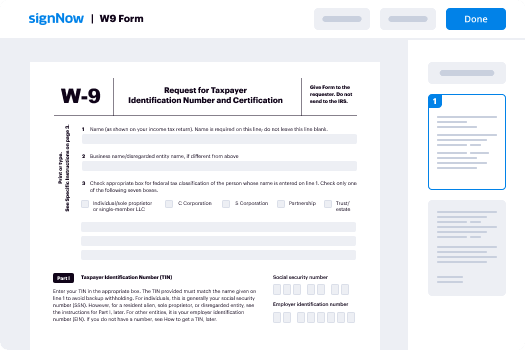
Save time on document management with airSlate SignNow and get your agreement this agreement is entered into thisday of form eSigned quickly from anywhere with our fully compliant eSignature tool.
How to Sign a PDF Online How to Sign a PDF Online

How to fill out and sign forms online

Previously, coping with paperwork took pretty much time and effort. But with airSlate SignNow, document management is quick and easy. Our powerful and easy-to-use eSignature solution allows you to easily fill out and eSign your agreement this agreement is entered into thisday of form online from any internet-connected device.

Follow the step-by-step guide to eSign your agreement this agreement is entered into thisday of form template online:

  • 1.Register for a free trial with airSlate SignNow or log in to your account with password credentials or SSO authentication.
  • 2.Click Upload or Create and import a form for eSigning from your device, the cloud, or our form catalogue.
  • 3.Click on the document name to open it in the editor and utilize the left-side toolbar to complete all the empty fields properly.
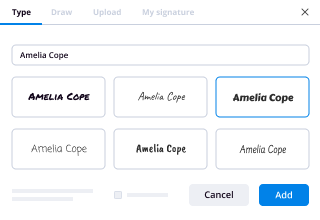
  • 4.Drop the My Signature field where you need to eSign your form. Provide your name, draw, or upload an image of your handwritten signature.
  • 5.Click Save and Close to accomplish editing your completed form.

Once your agreement this agreement is entered into thisday of form template is ready, download it to your device, save it to the cloud, or invite other people to eSign it. With airSlate SignNow, the eSigning process only takes a couple of clicks. Use our robust eSignature tool wherever you are to manage your paperwork productively!
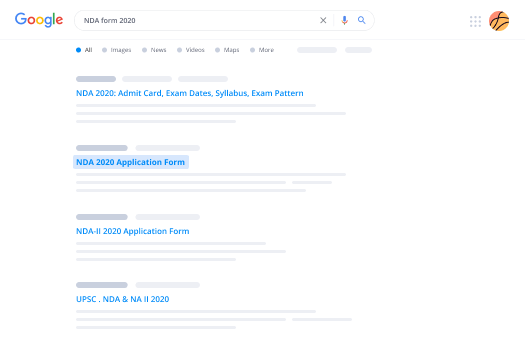
How to Sign a PDF Using Google Chrome How to Sign a PDF Using Google Chrome

How to fill out and sign documents in Google Chrome

Completing and signing documents is simple with the airSlate SignNow extension for Google Chrome. Adding it to your browser is a fast and beneficial way to deal with your paperwork online. Sign your agreement this agreement is entered into thisday of form sample with a legally-binding electronic signature in a couple of clicks without switching between programs and tabs.

Follow the step-by-step guide to eSign your agreement this agreement is entered into thisday of form template in Google Chrome:

  • 1.Go to the Chrome Web Store, search for the airSlate SignNow extension for Chrome, and install it to your browser.
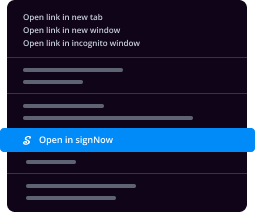
  • 2.Right-click on the link to a form you need to approve and choose Open in airSlate SignNow.
  • 3.Log in to your account with your credentials or Google/Facebook sign-in buttons. If you don’t have one, sign up for a free trial.
  • 4.Utilize the Edit & Sign menu on the left to complete your template, then drag and drop the My Signature field.
  • 5.Add an image of your handwritten signature, draw it, or simply type in your full name to eSign.
  • 6.Make sure all information is correct and click Save and Close to finish editing your form.

Now, you can save your agreement this agreement is entered into thisday of form template to your device or cloud storage, send the copy to other individuals, or invite them to eSign your document with an email request or a secure Signing Link. The airSlate SignNow extension for Google Chrome enhances your document workflows with minimum effort and time. Try airSlate SignNow today!
How to Sign a PDF in Gmail How to Sign a PDF in Gmail How to Sign a PDF in Gmail

How to complete and sign paperwork in Gmail

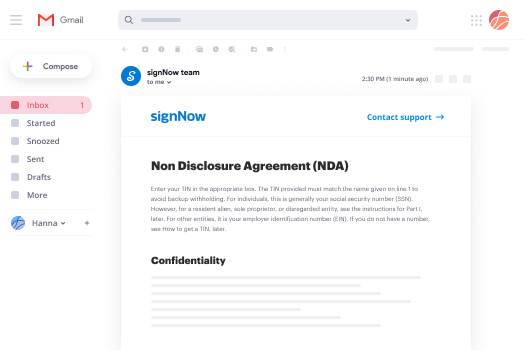
Every time you receive an email with the agreement this agreement is entered into thisday of form for signing, there’s no need to print and scan a document or download and re-upload it to a different program. There’s a much better solution if you use Gmail. Try the airSlate SignNow add-on to rapidly eSign any documents right from your inbox.

Follow the step-by-step guide to eSign your agreement this agreement is entered into thisday of form in Gmail:

  • 1.Navigate to the Google Workplace Marketplace and locate a airSlate SignNow add-on for Gmail.
  • 2.Set up the tool with a related button and grant the tool access to your Google account.
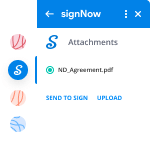
  • 3.Open an email with an attached file that needs approval and use the S sign on the right panel to launch the add-on.
  • 4.Log in to your airSlate SignNow account. Choose Send to Sign to forward the file to other parties for approval or click Upload to open it in the editor.
  • 5.Put the My Signature option where you need to eSign: type, draw, or import your signature.

This eSigning process saves efforts and only requires a couple of clicks. Take advantage of the airSlate SignNow add-on for Gmail to adjust your agreement this agreement is entered into thisday of form with fillable fields, sign documents legally, and invite other people to eSign them al without leaving your inbox. Boost your signature workflows now!
How to Sign a PDF on a Mobile Device How to Sign a PDF on a Mobile Device How to Sign a PDF on a Mobile Device

How to fill out and sign forms in a mobile browser

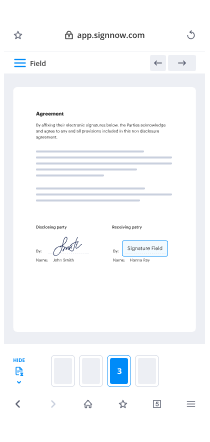
Need to rapidly fill out and sign your agreement this agreement is entered into thisday of form on a mobile phone while working on the go? airSlate SignNow can help without needing to install extra software applications. Open our airSlate SignNow tool from any browser on your mobile device and add legally-binding eSignatures on the go, 24/7.

Follow the step-by-step guide to eSign your agreement this agreement is entered into thisday of form in a browser:

  • 1.Open any browser on your device and go to the www.signnow.com
  • 2.Sign up for an account with a free trial or log in with your password credentials or SSO option.
  • 3.Click Upload or Create and pick a file that needs to be completed from a cloud, your device, or our form catalogue with ready-to go templates.
  • 4.Open the form and complete the empty fields with tools from Edit & Sign menu on the left.
  • 5.Place the My Signature area to the sample, then type in your name, draw, or upload your signature.

In a few easy clicks, your agreement this agreement is entered into thisday of form is completed from wherever you are. When you're finished editing, you can save the file on your device, generate a reusable template for it, email it to other people, or ask them to electronically sign it. Make your documents on the go fast and productive with airSlate SignNow!
How to Sign a PDF on iPhone How to Sign a PDF on iPhone

How to fill out and sign forms on iOS

In today’s business world, tasks must be accomplished rapidly even when you’re away from your computer. Using the airSlate SignNow application, you can organize your paperwork and approve your agreement this agreement is entered into thisday of form with a legally-binding eSignature right on your iPhone or iPad. Set it up on your device to conclude contracts and manage documents from anywhere 24/7.

Follow the step-by-step guidelines to eSign your agreement this agreement is entered into thisday of form on iOS devices:

  • 1.Open the App Store, find the airSlate SignNow app by airSlate, and set it up on your device.
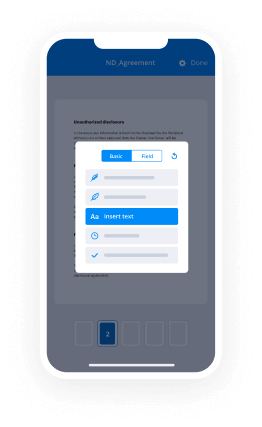
  • 2.Launch the application, tap Create to import a template, and select Myself.
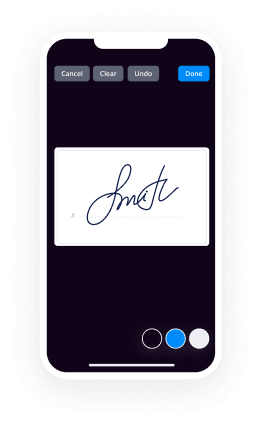
  • 3.Opt for Signature at the bottom toolbar and simply draw your signature with a finger or stylus to eSign the form.
  • 4.Tap Done -> Save after signing the sample.
  • 5.Tap Save or take advantage of the Make Template option to re-use this paperwork later on.

This method is so straightforward your agreement this agreement is entered into thisday of form is completed and signed in just a couple of taps. The airSlate SignNow app works in the cloud so all the forms on your mobile device are kept in your account and are available any time you need them. Use airSlate SignNow for iOS to enhance your document management and eSignature workflows!
How to Sign a PDF on Android How to Sign a PDF on Android

How to fill out and sign forms on Android

With airSlate SignNow, it’s easy to sign your agreement this agreement is entered into thisday of form on the go. Set up its mobile application for Android OS on your device and start enhancing eSignature workflows right on your smartphone or tablet.

Follow the step-by-step guide to eSign your agreement this agreement is entered into thisday of form on Android:

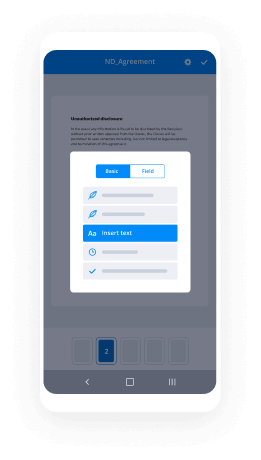
  • 1.Go to Google Play, search for the airSlate SignNow app from airSlate, and install it on your device.
  • 2.Sign in to your account or register it with a free trial, then import a file with a ➕ button on the bottom of you screen.
  • 3.Tap on the uploaded document and select Open in Editor from the dropdown menu.
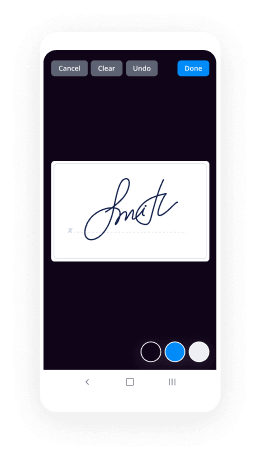
  • 4.Tap on Tools tab -> Signature, then draw or type your name to electronically sign the template. Complete empty fields with other tools on the bottom if required.
  • 5.Use the ✔ key, then tap on the Save option to end up with editing.

With an easy-to-use interface and full compliance with major eSignature requirements, the airSlate SignNow application is the best tool for signing your agreement this agreement is entered into thisday of form. It even operates without internet and updates all record modifications once your internet connection is restored and the tool is synced. Fill out and eSign forms, send them for approval, and generate multi-usable templates anytime and from anywhere with airSlate SignNow.

Sign up and try Agreement this agreement is entered into thisday of form
  • Close deals faster
  • Improve productivity
  • Delight customers
  • Increase revenue
  • Save time & money
  • Reduce payment cycles