Establishing secure connection… Loading editor… Preparing document…
Navigation

Fill and Sign the Alabama Disability Form
Fill and Sign the Alabama Disability Form

How it works

Open the document and fill out all its fields.
Apply your legally-binding eSignature.
Save and invite other recipients to sign it.

Rate template

4.8
36 votes
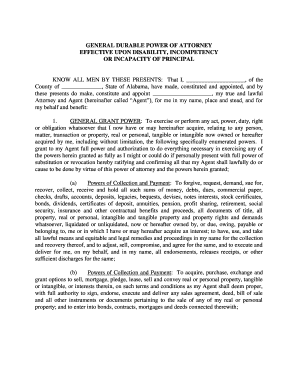
GENERAL DURABLE POWER OF ATTORNEY EFFECTIVE UPON DISABILITY, INCOMPETENCY OR INCAPACITY OF PRINCIPAL KNOW ALL MEN BY THESE PRESENTS: That I, ______________________ , of the County of _______________ , State of Alabama, h ave made, constituted and appointed, and by these presents do make, constitute and appoint ______________________ , my true and lawful Attorney and Agent (hereinafter called “Agent”), for me in my name, place and stead, and for my behalf and benefit: 1. GENERAL GRANT POWER : To exercis e or perform any act, power, duty, right or obligation whatsoever that I now have or may hereinafter acquire, relating to any person, matter, transaction or property, real or personal, tangible or intangible now owned or hereafter acquired by me, including without limitation, the following specifically enumerated powers. I grant to my Agent full power and authorization to do everything necessary in exercising any of the powers herein granted as fully as I might or could do if personally present with full p ower of substitution or revocation hereby ratifying and confirming all that my Agent shall lawfully do or cause to be done by virtue of this power of attorney and the powers herein granted; (a) Powers of Collection and Payment : To forgive, request, de mand, sue for, recover, collect, receive and hold all such sums of money, debts, dues, commercial paper, checks, drafts, accounts, deposits, legacies, bequests, devises, notes interests, stock certificates, bonds, dividends, certificates of deposit, annuit ies, pension, profit sharing, retirement, social security, insurance and other contractual benefits and proceeds, all documents of title, all property, real or personal, intangible and tangible property and property rights and demands whatsoever, liquidate d or unliquidated, now or hereafter owned by, or due, owing, payable or belonging to, me or in which I have or may hereafter acquire an interest; to have, use, and take all lawful means and equitable and legal remedies and proceedings in my name for the co llection and recovery thereof, and to adjust, sell, compromise, and agree for the same, and to execute and deliver for me, on my behalf, and in my name, all endorsements, releases receipts, or other sufficient discharges for the same; (b) Powers of Coll ection and Payment : To acquire, purchase, exchange and grant options to sell, mortgage, pledge, lease, sell and convey real or personal property, tangible or intangible, or interests therein, on such terms and conditions as my Agent shall deem proper, wit h full authority to sign, endorse, execute and deliver any sales agreement, deed, bill of sale and all other instruments or documents pertaining to the sale of any of my real or personal property; and to enter into bonds, contracts, mortgages and deeds con nected therewith; (c) Management Powers : To maintain, repair, improve, invest, manage, insure, rent, lease, encumber, and in any manner deal with any real or personal property, tangible or intangible, or any interest therein that I now own or may her eafter acquire in my name and for my benefit, upon such terms and conditions as my Agent shall deem proper; (d) Banking Powers : To make, receive and endorse checks and drafts, deposit and withdraw funds, acquire and redeem certificates of deposit, in b anks, savings and loan associations, and other institutions, execute or release such deeds of trust or other security agreements as may be necessary or proper in the exercise of the rights and powers herein granted; (e) Business Interests : To conduct o r participate in any lawful business of whatever nature for me and in my name; to execute partnership agreements and amendments thereto; to incorporate, reorganize, merge, consolidate, recapitalize, sell, liquidate or dissolve any business; to elect or emp loy officers, directors and agents; to carry out the provisions of any agreement for the sale of any business interest or the stock therein; and to exercise voting rights with respect to stock, either in person or by proxy, and to exercise stock options; (f) Tax Powers : To prepare, sign and file joint or separate income tax returns or declarations of estimated tax for any year or years; to prepare, sign and file gift tax returns with respect to gifts made by me for any year or years; to consent to any g ift and to utilize any gift splitting provision or other tax election; and to prepare, sign and file any claims for refund of any tax; (g) Safe Deposit Boxes : To have access at any time or times to any safe deposit box rented by me, wheresoever locate d, and to remove all or part of the contents thereof, and to surrender or relinquish said safe deposit box, and any institution in which any such safe deposit box may he located shall not incur any liability to me or my estate as a result of permitting my Agent to exercise this power; (h) Flower Bonds : To purchase for and in my name United States Treasury Bonds issued before March 4, 1971, redeemable at par in payment of Federal estate taxes (including the power to borrow money and sign my name to any p romissory note for such purpose, and to pledge any property of mine, including such Bonds as security for any such loan); (i) Power to Hold Property and Make Investments : The power to hold or acquire any property or securities, regardless of whether su ch property or securities are a so - called “Legal” investment, where such course is, in the said Agent’s opinion, for my best interest; (j) Power of Access and Disclosure of Medical Records and Financial Information : To request, receive and review any information, verbal or written, regarding my financial affairs or my physical or mental health, including medical and hospital records, and to execute any release or other documents that may be required in Order to obt ain such information and to disclose such information to such persons, organizations, firms or corporations as my Agent shall deem appropriate; (k) Power to Provide Health Care Services : To give or withhold consent to any medical procedure, test or tre atment for me including choice of a physician, choice of a hospital or nursing home; to revoke, withdraw, modify or change consents to such procedures, tests or treatment; and to provide such other care, comfort, maintenance and support as my Agent may dee m necessary; (l) Power to Employ and Discharge Health Care Personnel : To employ and discharge medical personnel including such physicians, psychiatrists, dentists, nurses, and therapists as my Agent shall deem necessary for my physical, mental and emot ional well -being, and to pay such individuals, or any of them, reasonable compensation; (m) Power to Borrow : To borrow any sum or sums of money on such terms (including the power to borrow against the cash surrender value of any life insurance policy issued on my life), and with such security, whether real or personal property, as my Agent may think fit, and for that purpose to execute all promissory notes, bonds, mortgages, deeds of trust, security agreements, and other instruments which may be necessa ry or proper; (n) Disclaimer : To exercise or release powers of appointment in whole or in part and to disclaim or renounce in whole or in part any interest that I might otherwise have as a joint owner, beneficiary, heir or otherwise and in exercising s uch discretion, my Agent may take into account such matters as shall include but shall not be limited to any reduction in estate or inheritance taxes on my estate, and the effect of such renunciation or disclaimer upon persons interested in my estate and p ersons who would receive the renounced or disclaimed property; (o) Trusts : To transfer, assign and convey any property or interest in property, the legal or equitable title to which is in my name, to any trust of which I am the primary beneficiary duri ng my lifetime and under the terms of which I expressly have the power to amend or revoke such trust, and to exercise any right of withdrawal of income and/or principal which I may have pursuant to the terms and conditions of such trust, whether such trust was created before or after the execution of this power of attorney; (p) Power to Change Beneficiaries on Any Insurance Policies on my Life : To change the beneficiaries on any insurance policies on my life, provided, however, that neither such right and power, not any other rights and powers, shall be exercisable with respect to any policies of life insurance on the life of my said Agent herein named, which may at any time be owned by me. 2. MISCELLANEOUS : I grant to the Agent named herein the foll owing additional powers of authority: (a) In the event any agent named herein should be of the opinion at any time that she or he does not have the expertise to manage all or any part of my assets, I grant to said Agent the right and power to delegate t he management powers hereinabove granted over all or any part of my assets to any person(s) or firm(s), and to enter into any management or agency agreements with said person(s) or firm(s), pertaining thereto, with the right on the part of the Agent named herein to revoke and cancel any such agreement at any time upon ninety (90) days’ written notice to said person(s) or firm(s). (b) I grant full and absolute authority to the Agent named herein, on a noncumulative, yearly basis, to make gifts to my child ren, in trust or otherwise, as well as to their spouses, and to their children, in trust or otherwise, with the amount of gifts to each such person each year not to exceed that amount which is excludable from the total amount of gifts made during such year under Section 2503(b) Internal Revenue Code of 1986, as amended from time to time. (c) I further authorize and empower the Agent named herein to use and apply so much of the income and principal of the assets comprising my estate as may be necessary or desirable, in the sole discretion of said Agent, for my maintenance and support. Any provision herein to the contrary notwithstanding, the Agent shall have no power or authority to use or apply the principal to discharge any legal obligation that the age nt or any other person may have to support me or any dependent or beneficiary or mine, except to the extent that there are no assets reasonably available to the person having the obligation of support to pay the same. (d) I further authorize and empower my Agent to engage, employ and dismiss any agents, clerks, servants, attorneys -at-law, accountants, investment advisors, custodians, or other persons in and about the performance of these presents as my Agent shall think fit. Any decisions made by the s aid Agent with respect to the matters set forth hereinabove in sections 2(b), 2(c), and 2(d) shall be final, binding and conclusive upon all of the beneficiaries of my estate, and said Agent shall be released and discharged of and from all liability for an y such decisions that she or he may make in good faith with respect thereto. 3. INTERPRETATION AND GOVERNING LAW : This instrument is to be construed and interpreted as a general durable power of attorney. The enumeration of specific powers herein is no t intended to, nor does it, limit or restrict the general powers herein granted to my Agent. This instrument is executed and delivered in the State of Alabama, and the laws of the State of Alabama shall govern all questions as to the validi ty of this power and the construction of its provisions. 4. INDEMNITY : I hereby bind myself to indemnify my Agent and any successor who shall so act, against any and all claims, demands, losses, damages, actions and causes of action, including expenses, costs and reasonable attorneys’ fees which my Agent at any time may sustain or incur in connection with carrying out the authority granted her or him in this power of attorney. 5. THIRD PARTY RELIANCE : Third parties may rely upon the representations of my Agent as to all matters relating to any power granted to my Agent, and no person who may act in reliance upon the representations of my Agent or the authority granted to my Agent shall incur any liab ility to me or my estate as a result of permitting my Agent to exercise any power. 6. EFFECTIVENESS OF POWER OF ATTORNEY : This instrument is to be construed and interpreted as a general durable power of attorney effective only upon my disability, in c ompetency or incapacity, it being my intent that the authority conferred herein upon my said Agent shall be exercisable only upon my subsequent disability, incompetency or incapacity. For the purposes of the powers and authority herein granted to my said Agent, I shall be presumed to be physically or mentally disabled or incompetent upon the presentation of a certificate, letter or other writing executed by a physician duly licensed to practice medicine in any state in the United States or in any other cou ntry stating that at such time I have become physically incapacitated, or feeble minded or so mentally or physically defective by reason of age, sickness, use of drugs, the excessive use of alcohol or for other causes that I am unable to take care of my pr operty and, in consequence thereof, I am liable to dissipate or lose the same, or to become the victim of designing persons. When a letter or other writing of such a physician as hereinabove set forth is attached to this power of attorney, any Agent will then be authorized to represent to all third parties that the powers and authority granted to her or him as herein set forth have become fully effective, and that no person who may act in reliance upon such representation of my Agent or the authority grant ed to my Agent herein shall incur any liability to me or my estate as a result of permitting my Agent to exercise any such power. 7. NOMINATION OF GUARDIAN OR CONSERVATOR : In the event court proceedings are hereafter commenced to appoint a guardian, c onservator or other fiduciary to take charge of my person, or to manage and conserve my property, I hereby nominate and appoint my Agent above -named, as my guardian, conservator, or other fiduciary, to serve without bond unless otherwise required by a cour t of competent jurisdiction. 8. REVOCATION : This general durable power of attorney may be voluntarily revoked by me by written instrument signed by me and delivered to my Agent. My guardian may also revoke this instrument by written instrument signed b y him or her and delivered to my Agent. Any affidavit executed by my Agent stating that she or he does not have, at the time of doing any act pursuant to this power of attorney, actual knowledge of the revocation or termination of this power of attorney, i s, in the absence of fraud, conclusive proof of the nonrevocation or nontermination of the power at that time. 9. DEATH : My death shall not revoke or terminate this agency as to my Agent or any other person who, without actual knowledge of my death, act s in good faith under this power of attorney. Any action so taken, unless otherwise invalid or unenforceable, shall be binding upon me and my heirs, devises, and personal representatives. 10. SUBSTITUTE AGENT : If ______________________ ceases to act as my Agent due to her death, incapacity, or resignation, I appoint ______________________ and ______________________ , to serve as my Agent. If either ______________________ or _____ _________________ cease to act as my Agent due to death, incapacity or resignation, I appoint the survivor of the two to serve as may Agent. 11. JOINT POWER : So long a s any two persons shall be serving as my Agent hereunder, it is my intent that the power granted to them shall be a joint power, which shall and must be exercised by them together as they may from time to time act on my behalf. No action or transaction re quiring a signature will be effective or binding without both such persons’ signatures affixed to the written instrument(s) reflecting the action or transaction. IN WITNESS WHEREOF, I have executed this General Durable Power of Attorney, effective upon m y disability, incapacity or incompetency, and I have directed that photographic copies of this power be made, which shall have the same force and effect as an original. DATED at _______________ , Alabama, on the _______ day of _______________ , _______ . ___________________________________ ___________________________, Principal STATE OF ALABAMA: COUNTY OF _______________ : I, the undersigned, a Notary Public in and for said County in said State, hereby certify that _______________ , who is known to me, acknowledged before me on this day that, being informed of the contents of the instrument, he/she executed the same voluntarily on the day the same bears date. Given under my hand and official seal this the _______ day of _______________ , _______________ . _____________________________________________ Notary Public My Commission Expires: _______________ (SEAL) THIS INSTRUMENT PREPARED BY: (Attorney Name and Address)

Practical suggestions for preparing your ‘Alabama Disability’ online

Are you weary of the burden of handling paperwork? Look no further than airSlate SignNow, the leading eSignature solution for individuals and businesses. Bid farewell to the monotonous task of printing and scanning documents. With airSlate SignNow, you can effortlessly complete and sign documents online. Take advantage of the robust features packed into this user-friendly and economical platform and transform your method of document management. Whether you need to approve forms or collect signatures, airSlate SignNow manages it all seamlessly, with just a few clicks.

Follow this step-by-step guide:

  1. Log into your account or initiate a free trial with our service.
  2. Click +Create to upload a file from your device, cloud storage, or our form library.
  3. Open your ‘Alabama Disability’ in the editor.
  4. Click Me (Fill Out Now) to finalize the document on your end.
  5. Add and designate fillable fields for others (if necessary).
  6. Continue with the Send Invite settings to request eSignatures from others.
  7. Save, print your copy, or convert it into a reusable template.

Don’t be concerned if you need to collaborate with your colleagues on your Alabama Disability or send it for notarization—our platform provides everything you need to accomplish these tasks. Sign up with airSlate SignNow today and elevate your document management to a new level!

Here is a list of the most common customer questions. If you can’t find an answer to your question, please don’t hesitate to reach out to us.

Need help? Contact Support

The best way to complete and sign your alabama disability form

Save time on document management with airSlate SignNow and get your alabama disability form eSigned quickly from anywhere with our fully compliant eSignature tool.

How to Sign a PDF Online How to Sign a PDF Online

How to fill out and sign documents online

In the past, coping with paperwork took pretty much time and effort. But with airSlate SignNow, document management is easy and fast. Our robust and user-friendly eSignature solution allows you to effortlessly fill out and eSign your alabama disability form online from any internet-connected device.

Follow the step-by-step guidelines to eSign your alabama disability form template online:

  • 1.Sign up for a free trial with airSlate SignNow or log in to your account with password credentials or SSO authorization option.
  • 2.Click Upload or Create and import a form for eSigning from your device, the cloud, or our form catalogue.
  • 3.Click on the file name to open it in the editor and use the left-side toolbar to complete all the empty fields properly.
  • 4.Place the My Signature field where you need to eSign your form. Type your name, draw, or import a photo of your regular signature.
  • 5.Click Save and Close to accomplish modifying your completed form.

As soon as your alabama disability form template is ready, download it to your device, export it to the cloud, or invite other parties to electronically sign it. With airSlate SignNow, the eSigning process only takes a few clicks. Use our robust eSignature solution wherever you are to handle your paperwork productively!

How to Sign a PDF Using Google Chrome How to Sign a PDF Using Google Chrome

How to complete and sign documents in Google Chrome

Completing and signing documents is easy with the airSlate SignNow extension for Google Chrome. Installing it to your browser is a quick and effective way to deal with your paperwork online. Sign your alabama disability form template with a legally-binding electronic signature in a few clicks without switching between tools and tabs.

Follow the step-by-step guide to eSign your alabama disability form template in Google Chrome:

  • 1.Go to the Chrome Web Store, search for the airSlate SignNow extension for Chrome, and install it to your browser.
  • 2.Right-click on the link to a form you need to eSign and select Open in airSlate SignNow.
  • 3.Log in to your account with your password or Google/Facebook sign-in option. If you don’t have one, you can start a free trial.
  • 4.Utilize the Edit & Sign menu on the left to complete your sample, then drag and drop the My Signature option.
  • 5.Upload a photo of your handwritten signature, draw it, or simply type in your full name to eSign.
  • 6.Verify all information is correct and click Save and Close to finish editing your form.

Now, you can save your alabama disability form sample to your device or cloud storage, send the copy to other people, or invite them to electronically sign your document with an email request or a protected Signing Link. The airSlate SignNow extension for Google Chrome improves your document processes with minimum effort and time. Try airSlate SignNow today!

How to Sign a PDF in Gmail How to Sign a PDF in Gmail How to Sign a PDF in Gmail

How to complete and sign forms in Gmail

When you get an email with the alabama disability form for signing, there’s no need to print and scan a file or save and re-upload it to a different program. There’s a better solution if you use Gmail. Try the airSlate SignNow add-on to quickly eSign any documents right from your inbox.

Follow the step-by-step guidelines to eSign your alabama disability form in Gmail:

  • 1.Go to the Google Workplace Marketplace and look for a airSlate SignNow add-on for Gmail.
  • 2.Set up the program with a related button and grant the tool access to your Google account.
  • 3.Open an email with an attachment that needs approval and utilize the S sign on the right panel to launch the add-on.
  • 4.Log in to your airSlate SignNow account. Opt for Send to Sign to forward the document to other people for approval or click Upload to open it in the editor.
  • 5.Place the My Signature option where you need to eSign: type, draw, or upload your signature.

This eSigning process saves efforts and only requires a few clicks. Take advantage of the airSlate SignNow add-on for Gmail to adjust your alabama disability form with fillable fields, sign paperwork legally, and invite other parties to eSign them al without leaving your inbox. Enhance your signature workflows now!

How to Sign a PDF on a Mobile Device How to Sign a PDF on a Mobile Device How to Sign a PDF on a Mobile Device

How to complete and sign documents in a mobile browser

Need to rapidly fill out and sign your alabama disability form on a mobile phone while doing your work on the go? airSlate SignNow can help without the need to set up additional software programs. Open our airSlate SignNow solution from any browser on your mobile device and add legally-binding eSignatures on the go, 24/7.

Follow the step-by-step guidelines to eSign your alabama disability form in a browser:

  • 1.Open any browser on your device and follow the link www.signnow.com
  • 2.Sign up for an account with a free trial or log in with your password credentials or SSO authentication.
  • 3.Click Upload or Create and import a file that needs to be completed from a cloud, your device, or our form library with ready-made templates.
  • 4.Open the form and complete the blank fields with tools from Edit & Sign menu on the left.
  • 5.Place the My Signature field to the sample, then enter your name, draw, or upload your signature.

In a few simple clicks, your alabama disability form is completed from wherever you are. As soon as you're done with editing, you can save the file on your device, generate a reusable template for it, email it to other individuals, or invite them eSign it. Make your paperwork on the go quick and effective with airSlate SignNow!


How to Sign a PDF on iPhone How to Sign a PDF on iPhone

How to complete and sign forms on iOS

In today’s business community, tasks must be done rapidly even when you’re away from your computer. With the airSlate SignNow app, you can organize your paperwork and sign your alabama disability form with a legally-binding eSignature right on your iPhone or iPad. Set it up on your device to close deals and manage documents from anywhere 24/7.

Follow the step-by-step guide to eSign your alabama disability form on iOS devices:

  • 1.Open the App Store, find the airSlate SignNow app by airSlate, and install it on your device.
  • 2.Launch the application, tap Create to upload a form, and select Myself.
  • 3.Opt for Signature at the bottom toolbar and simply draw your signature with a finger or stylus to eSign the form.
  • 4.Tap Done -> Save right after signing the sample.
  • 5.Tap Save or use the Make Template option to re-use this document in the future.

This process is so simple your alabama disability form is completed and signed within a couple of taps. The airSlate SignNow app works in the cloud so all the forms on your mobile device are kept in your account and are available any time you need them. Use airSlate SignNow for iOS to improve your document management and eSignature workflows!


How to Sign a PDF on Android How to Sign a PDF on Android

How to complete and sign forms on Android

With airSlate SignNow, it’s easy to sign your alabama disability form on the go. Install its mobile app for Android OS on your device and start enhancing eSignature workflows right on your smartphone or tablet.

Follow the step-by-step guidelines to eSign your alabama disability form on Android:

  • 1.Navigate to Google Play, find the airSlate SignNow app from airSlate, and install it on your device.
  • 2.Sign in to your account or create it with a free trial, then upload a file with a ➕ option on the bottom of you screen.
  • 3.Tap on the uploaded document and select Open in Editor from the dropdown menu.
  • 4.Tap on Tools tab -> Signature, then draw or type your name to eSign the sample. Fill out blank fields with other tools on the bottom if required.
  • 5.Use the ✔ button, then tap on the Save option to end up with editing.

With an easy-to-use interface and total compliance with main eSignature requirements, the airSlate SignNow application is the perfect tool for signing your alabama disability form. It even works without internet and updates all record adjustments when your internet connection is restored and the tool is synced. Complete and eSign documents, send them for approval, and create re-usable templates whenever you need and from anywhere with airSlate SignNow.

Sign up and try Alabama disability form
  • Close deals faster
  • Improve productivity
  • Delight customers
  • Increase revenue
  • Save time & money
  • Reduce payment cycles







