Establishing secure connection… Loading editor… Preparing document…
Navigation

Fill and Sign the Alaska Advance Form
Fill and Sign the Alaska Advance Form

How it works

Open the document and fill out all its fields.
Apply your legally-binding eSignature.
Save and invite other recipients to sign it.

Rate template

4.4
66 votes
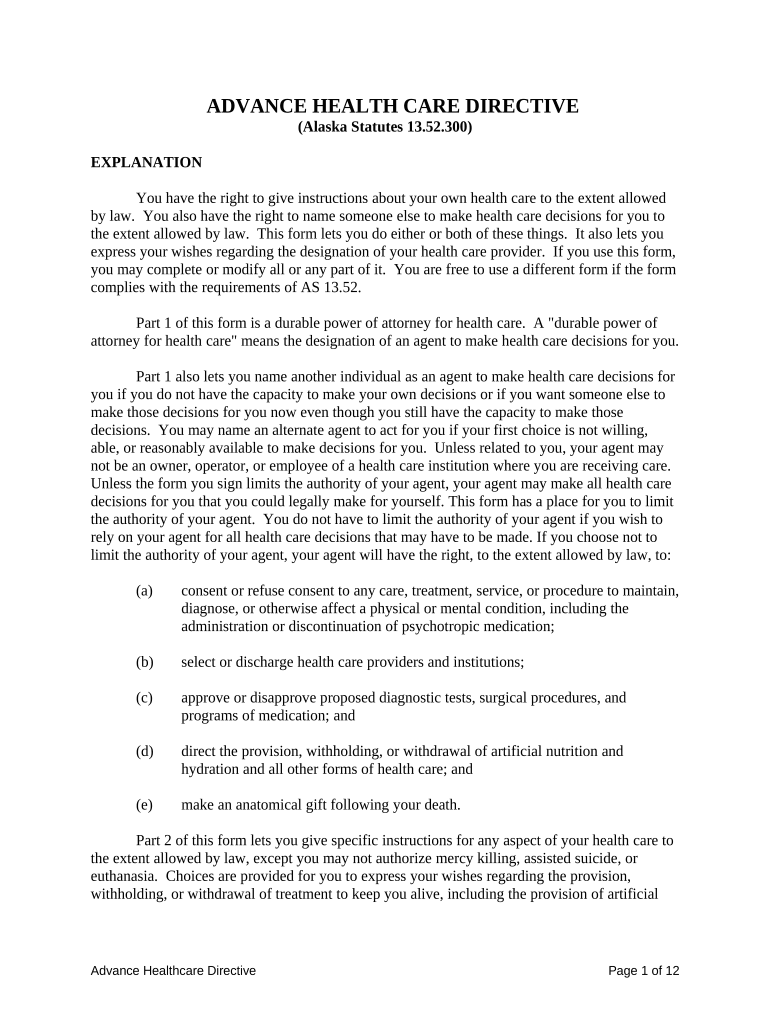
ADVANCE HEALTH CARE DIRECTIVE (Alaska Statutes 13.52.300) EXPLANATION You have the right to give instructions about your own health care to the extent allowed by law. You also have the right to name someone else to make health care decisions for you to the extent allowed by law. This form lets you do either or both of these things. It also lets you express your wishes regarding the designation of your health care provider. If you use this form, you may complete or modify all or any part of it. You are free to use a different form if the form complies with the requirements of AS 13.52. Part 1 of this form is a durable power of attorney for health care. A "durable power of attorney for health care" means the designation of an agent to make health care decisions for you. Part 1 also lets you name another individual as an agent to make health care decisions for you if you do not have the capacity to make your own decisions or if you want someone else to make those decisions for you now even though you still have the capacity to make those decisions. You may name an alternate agent to act for you if your first choice is not willing, able, or reasonably available to make decisions for you. Unless related to you, your agent may not be an owner, operator, or employee of a health care institution where you are receiving care. Unless the form you sign limits the authority of your agent, your agent may make all health care decisions for you that you could legally make for yourself. This form has a place for you to limit the authority of your agent. You do not have to limit the authority of your agent if you wish to rely on your agent for all health care decisions that may have to be made. If you choose not to limit the authority of your agent, your agent will have the right, to the extent allowed by law, to: (a) consent or refuse consent to any care, treatment, service, or procedure to maintain, diagnose, or otherwise affect a physical or mental condition, including the administration or discontinuation of psychotropic medication; (b) select or discharge health care providers and institutions; (c) approve or disapprove proposed diagnostic tests, surgical procedures, and programs of medication; and (d) direct the provision, withholding, or withdrawal of artificial nutrition and hydration and all other forms of health care; and (e) make an anatomical gift following your death. Part 2 of this form lets you give specific instructions for any aspect of your health care to the extent allowed by law, except you may not authorize mercy killing, assisted suicide, or euthanasia. Choices are provided for you to express your wishes regarding the provision, withholding, or withdrawal of treatment to keep you alive, including the provision of artificial Advance Healthcare Directive Page 1 of 12 nutrition and hydration, as well as the provision of pain relief medication. Space is provided for you to add to the choices you have made or for you to write out any additional wishes. Part 3 of this form lets you express an intention to make an anatomical gift following your death. Part 4 of this form lets you make decisions in advance about certain types of mental health treatment. Part 5 of this form lets you designate a physician to have primary responsibility for your health care. After completing this form, sign and date the form at the end and have the form witnessed by one of the two alternative methods listed below. Give a copy of the signed and completed form to your physician, to any other health care providers you may have, to any health care institution at which you are receiving care, and to any health care agents you have named. You should talk to the person you have named as your agent to make sure that the person understands your wishes and is willing to take the responsibility. You have the right to revoke this advance health care directive or replace this form at any time, except that you may not revoke this declaration when you are determined not to be competent by a court, by two physicians, at least one of whom shall be a psychiatrist, or by both a physician and a professional mental health clinician. In this advance health care directive, "competent" means that you have the capacity: (1) to assimilate relevant facts and to appreciate and understand your situation with regard to those facts; and (2) to participate in treatment decisions by means of a rational thought process. Advance Healthcare Directive Page 2 of 12 PART 1 DURABLE POWER OF ATTORNEY FOR HEALTH CARE DECISIONS (1) DESIGNATION OF AGENT. I designate the following individual as my agent to make health care decisions for me:       (name of individual you choose as agent)       (street address, city, state, zip code)             (home phone) (work phone) OPTIONAL: If I revoke my agent's authority or if my agent is not willing, able, or reasonably available to make a health care decision for me, I designate as my first alternate agent:       (name of individual you choose as agent)       (street address, city, state, zip code)             (home phone) (work phone) OPTIONAL: If I revoke the authority of my agent and first alternate agent or if neither is willing, able, or reasonably available to make a health care decision for me, I designate as my second alternate agent       (name of individual you choose as agent)       (street address, city, state, zip code)             (home phone) (work phone) (2) AGENT'S AUTHORITY. My agent is authorized and directed to follow my individual instructions and my other wishes to the extent known to the agent in making all health care decisions for me. If these are not known, my agent is authorized to make these Advance Healthcare Directive Page 3 of 12 decisions in accordance with my “best interest”, including decisions to provide, withhold, or withdraw artificial hydration and nutrition and other forms of health care to keep me alive, except as I state here: (a)       (b)       (c)       (d)       (Add additional sheets if needed) Under this authority, "best interest" means that the benefits to you resulting from a treatment outweigh the burdens to you resulting from that treatment after assessing: (A) the effect of the treatment on your physical, emotional, and cognitive functions; (B) the degree of physical pain or discomfort caused to you by the treatment or the withholding or withdrawal of the treatment; (C) the degree to which your medical condition, the treatment, or the withholding or withdrawal of treatment, results in a severe and continuing impairment; (D) the effect of the treatment on your life expectancy; (E) your prognosis for recovery, with and without the treatment; (F) the risks, side effects, and benefits of the treatment or the withholding of treatment; and (G) your religious beliefs and basic values, to the extent that these may assist in determining benefits and burdens. (3) WHEN AGENT'S AUTHORITY BECOMES EFFECTIVE. Except in the case of mental illness, my agent's authority becomes effective when my primary physician determines that I am unable to make my own health care decisions unless I mark the following box. In the case of mental illness, unless I mark the following box, my agent's authority becomes effective when a court determines I am unable to make my own decisions, or, in an emergency, if my primary physician or another health care provider determines I am unable to make my own decisions. If I mark this box, my agent's authority to make health care decisions for me takes effect immediately: (4) AGENT'S OBLIGATION. My agent shall make health care decisions for me in accordance with this durable power of attorney for health care, any instructions I give in Part 2 of this form, and my other wishes to the extent known to my agent. To the extent Advance Healthcare Directive Page 4 of 12 my wishes are unknown, my agent shall make health care decisions for me in accordance with what my agent determines to be in my best interest. In determining my best interest, my agent shall consider my personal values to the extent known to my agent. (5) NOMINATION OF GUARDIAN. If a guardian of my person needs to be appointed for me by a court, I nominate the agent designated in this form. If that agent is not willing, able, or reasonably available to act as guardian, I nominate the alternate agents whom I have named under (1) above, in the order designated. PART 2 INSTRUCTIONS FOR HEALTH CARE If you are satisfied to allow your agent to determine what is best for you in making health care decisions, you do not need to fill out this part of the form. If you do fill out this part of the form, you may strike any wording you do not want. There is a state protocol that governs the use of do not resuscitate orders by physicians and other health care providers. You may obtain a copy of the protocol from the Alaska Department of Health and Social Services. A "do not resuscitate order" means a directive from a licensed physician that emergency cardiopulmonary resuscitation should not be administered to you. (6) END-OF-LIFE DECISIONS. Except to the extent prohibited by law, I direct that my health care providers and others involved in my care provide, withhold, or withdraw treatment in accordance with the choice I have marked below: (Check only one box) (A) Choice To Prolong Life I want my life to be prolonged as long as possible within the limits of generally accepted health care standards; OR (B) Choice Not To Prolong Life I want comfort care only and I do not want my life to be prolonged with medical treatment if, in the judgment of my physician, I have (check all choices that represent your wishes): (i) a condition of permanent unconsciousness: a condition that, to a high degree of medical certainty, will last permanently without improvement; in which, to a high degree of medical certainty, thought, sensation, purposeful action, social interaction, and awareness of myself and the environment are absent; and for which, to a high degree of medical certainty, initiating or continuing life — sustaining procedures for me, in light of my medical outcome, will provide only minimal medical benefit for me; or Advance Healthcare Directive Page 5 of 12 (ii) a terminal condition: an incurable or irreversible illness or injury that without the administration of life-sustaining procedures will result in my death in a short period of time, for which there is no reasonable prospect of cure or recovery, that imposes severe pain or otherwise imposes an inhumane burden on me, and for which, in light of my medical condition, initiating or continuing life- sustaining procedures will provide only minimal medical benefit; Additional instructions:                   (C) Artificial Nutrition and Hydration. If I am unable to safely take nutrition, fluids, or nutrition and fluids (check your choices or write your instructions), I wish to receive artificial nutrition and hydration indefinitely; I wish to receive artificial nutrition and hydration indefinitely, unless it clearly increases my suffering and is no longer in my best interest; I wish to receive artificial nutrition and hydration on a limited trial basis to see if I can improve; In accordance with my choices in (6)(B) above, I do not wish to receive artificial nutrition and hydration. Other instructions:                   (D) Relief from Pain. I direct that adequate treatment be provided at all times for the sole purpose of the alleviation of pain or discomfort; or I give these instructions:                   (E) Should I become unconscious and I am pregnant, I direct that                   Advance Healthcare Directive Page 6 of 12 (7) OTHER WISHES. (If you do not agree with any of the optional choices above and wish to write your own, or if you wish to add to the instructions you have given above, you may do so here.) I direct that: (a)       (b)       (c)       (d)       (Add additional sheets if needed) Conditions or limitations: (a)       (b)       (c)       (d)       (Add additional sheets if needed) PART 3 ANATOMICAL GIFT AT DEATH (OPTIONAL) If you are satisfied to allow your agent to determine whether to make an anatomical gift at your death, you do not need to fill out this part of the form. (8) Upon my death: (mark applicable box) (A) I give any needed organs, tissues, or other body parts, OR (B) I give the following organs, tissues, or other body parts only             (C) My gift is for the following purposes (mark any of the following you want): (i) transplant; Advance Healthcare Directive Page 7 of 12 (ii) therapy; (iii) research; (iv) education. (D) I refuse to make an anatomical gift. PART 4 MENTAL HEALTH TREATMENT This part of the declaration allows you to make decisions in advance about mental health treatment. The instructions that you include in this declaration will be followed only if a court, two physicians that include a psychiatrist, or a physician and a professional mental health clinician believe that you are not competent and cannot make treatment decisions. Otherwise, you will be considered to be competent and to have the capacity to give or withhold consent for the treatments. If you are satisfied to allow your agent to determine what is best for you in making these mental health decisions, you do not need to fill out this part of the form. If you do fill out this part of the form, you may strike any wording you do not want. (9) PSYCHOTROPIC MEDICATIONS. If I do not have the capacity to give or withhold informed consent for mental health treatment, my wishes regarding psychotropic medications are as follows: I consent to the administration of the following medications: (a)       (b)       (c)       (d)       (Add additional sheets if needed) I do not consent to the administration of the following medications: (a)       (b)       (c)       (d)       (Add additional sheets if needed) Advance Healthcare Directive Page 8 of 12 Conditions or limitations:                   (10) ELECTROCONVULSIVE TREATMENT. If I do not have the capacity to give or withhold informed consent for mental health treatment, my wishes regarding electroconvulsive treatment are as follows: I consent to the administration of electroconvulsive treatment. I do not consent to the administration of electroconvulsive treatment. Conditions or limitations:                   (11) ADMISSION TO AND RETENTION IN FACILITY. If I do not have the capacity to give or withhold informed consent for mental health treatment, my wishes regarding admission to and retention in a mental health facility for mental health treatment are as follows: I consent to being admitted to a mental health facility for mental health treatment for up to       days. (The number of days not to exceed 17.) I do not consent to being admitted to a mental health facility for mental health treatment. Conditions or limitations:                   OTHER WISHES OR INSTRUCTIONS                   Conditions or limitations:                   Advance Healthcare Directive Page 9 of 12 PART 5 PRIMARY PHYSICIAN (OPTIONAL) (12) I designate the following physician as my primary physician:       (name of physician)       (street address, city, state, zip code)       (phone) OPTIONAL: If the physician I have designated above is not willing, able, or reasonably available to act as my primary physician, I designate the following physician as my primary physician:       (name of physician)       (street address, city, state, zip code)       (phone) (13) EFFECT OF COPY. A copy of this form has the same effect as the original. (14) SIGNATURES. Sign and date the form here:       (date) (sign your name)       (print or type your name)       (street address, city, state, zip code) (15) WITNESSES. This advance care health directive will not be valid for making health care decisions unless it is Advance Healthcare Directive Page 10 of 12 (A) Signed by two qualified adult witnesses who are personally known to you and who are present when you sign or acknowledge your signature; the witnesses may not be a health care provider employed at the health care institution or health care facility where you are receiving health care, an employee of the health care provider who is providing health care to you, an employee of the health care institution or health care facility where you are receiving health care, or the person appointed as your agent by this document; at least one of the two witnesses may not be related to you by blood, marriage, or adoption or entitled to a portion of your estate upon your death under your will or codicil; OR (B) acknowledged before a notary public in the state. ALTERNATIVE NO. 1 Witness(es) Who is/are Not Related to or a Devisee of the Principal I swear under penalty of perjury under AS 11.56.200 that the principal is personally known to me, that the principal signed or acknowledged this durable power of attorney for health care in my presence, that the principal appears to be of sound mind and under no duress, fraud, or undue influence, that I am not (1) a health care provider employed at the health care institution or health care facility where the principal is receiving health care; (2) an employee of the health care provider providing health care to the principal; (3) an employee of the health care institution or health care facility where the principal is receiving health care; (4) the person appointed as agent by this document; (5) related to the principal by blood, marriage, or adoption; or (6) entitled to a portion of the principal's estate upon the principal's death under a will or codicil.       (Date) (Signature of Witness)       (Print or Type Name of Witness)       (Street Address)       (City, State, Zip Code) Advance Healthcare Directive Page 11 of 12 I swear under penalty of perjury under AS 11.56.200 that the principal is personally known to me, that the principal signed or acknowledged this durable power of attorney for health care in my presence, that the principal appears to be of sound mind and under no duress, fraud, or undue influence, that I am not (1) a health care provider employed at the health care institution or health care facility where the principal is receiving health care; (2) an employee of the health care provider providing health care to the principal; (3) an employee of the health care institution or health care facility where the principal is receiving health care; (4) the person appointed as agent by this document; (5) related to the principal by blood, marriage, or adoption; or (6) entitled to a portion of the principal's estate upon the principal's death under a will or codicil.       (Date) (Signature of Witness)       (Print or Type Name of Witness)       (Street Address)       (City, State, Zip Code) ALTERNATIVE NO. 2 State of Alaska,       Judicial District On this       day of       , in the year 20       , before me,       (insert name of notary public) appeared       , personally known to me (or proved to me on the basis of satisfactory evidence) to be the person whose name is subscribed to this instrument, and acknowledged that the person executed it. Notary Public Notary Seal       Type or Print Name My commission expires:       Advance Healthcare Directive Page 12 of 12

Useful advice for finalizing your ‘Alaska Advance’ online

Are you fed up with the complications of handling paperwork? Look no further than airSlate SignNow, the leading eSignature service for individuals and businesses. Bid farewell to the monotonous routine of printing and scanning documents. With airSlate SignNow, you can easily complete and sign paperwork online. Utilize the powerful features integrated into this intuitive and cost-effective platform and transform your approach to document management. Whether you need to approve forms or gather signatures, airSlate SignNow manages it all smoothly, needing just a few clicks.

Follow this detailed guide:

  1. Sign in to your account or sign up for a free trial with our service.
  2. Click +Create to upload a file from your device, cloud storage, or our template library.
  3. Open your ‘Alaska Advance’ in the editor.
  4. Click Me (Fill Out Now) to complete the form on your end.
  5. Add and assign fillable fields for other users (if needed).
  6. Proceed with the Send Invite settings to request eSignatures from others.
  7. Download, print your copy, or convert it into a reusable template.

Don’t worry if you need to collaborate with your team on your Alaska Advance or send it for notarization—our service provides everything necessary to complete such tasks. Create an account with airSlate SignNow today and elevate your document management to new heights!

Here is a list of the most common customer questions. If you can’t find an answer to your question, please don’t hesitate to reach out to us.

Need help? Contact Support

The best way to complete and sign your alaska advance form

Save time on document management with airSlate SignNow and get your alaska advance form eSigned quickly from anywhere with our fully compliant eSignature tool.

How to Sign a PDF Online How to Sign a PDF Online

How to fill out and sign paperwork online

In the past, dealing with paperwork required pretty much time and effort. But with airSlate SignNow, document management is easy and fast. Our powerful and easy-to-use eSignature solution enables you to effortlessly fill out and eSign your alaska advance form online from any internet-connected device.

Follow the step-by-step guide to eSign your alaska advance form template online:

  • 1.Sign up for a free trial with airSlate SignNow or log in to your account with password credentials or SSO authorization option.
  • 2.Click Upload or Create and import a form for eSigning from your device, the cloud, or our form library.
  • 3.Click on the file name to open it in the editor and utilize the left-side toolbar to complete all the empty areas properly.
  • 4.Put the My Signature field where you need to approve your form. Provide your name, draw, or import an image of your handwritten signature.
  • 5.Click Save and Close to finish modifying your completed form.

As soon as your alaska advance form template is ready, download it to your device, export it to the cloud, or invite other individuals to eSign it. With airSlate SignNow, the eSigning process only requires a couple of clicks. Use our robust eSignature solution wherever you are to deal with your paperwork effectively!


How to Sign a PDF Using Google Chrome How to Sign a PDF Using Google Chrome

How to fill out and sign paperwork in Google Chrome

Completing and signing documents is easy with the airSlate SignNow extension for Google Chrome. Adding it to your browser is a fast and efficient way to deal with your forms online. Sign your alaska advance form template with a legally-binding eSignature in just a couple of clicks without switching between programs and tabs.

Follow the step-by-step guide to eSign your alaska advance form template in Google Chrome:

  • 1.Navigate to the Chrome Web Store, search for the airSlate SignNow extension for Chrome, and install it to your browser.
  • 2.Right-click on the link to a form you need to eSign and select Open in airSlate SignNow.
  • 3.Log in to your account using your credentials or Google/Facebook sign-in option. If you don’t have one, sign up for a free trial.
  • 4.Use the Edit & Sign menu on the left to complete your sample, then drag and drop the My Signature field.
  • 5.Upload an image of your handwritten signature, draw it, or simply type in your full name to eSign.
  • 6.Make sure all information is correct and click Save and Close to finish modifying your paperwork.

Now, you can save your alaska advance form sample to your device or cloud storage, email the copy to other people, or invite them to eSign your document via an email request or a protected Signing Link. The airSlate SignNow extension for Google Chrome improves your document processes with minimum effort and time. Try airSlate SignNow today!


How to Sign a PDF in Gmail How to Sign a PDF in Gmail How to Sign a PDF in Gmail

How to fill out and sign paperwork in Gmail

Every time you get an email with the alaska advance form for approval, there’s no need to print and scan a file or save and re-upload it to a different program. There’s a better solution if you use Gmail. Try the airSlate SignNow add-on to rapidly eSign any paperwork right from your inbox.

Follow the step-by-step guidelines to eSign your alaska advance form in Gmail:

  • 1.Go to the Google Workplace Marketplace and find a airSlate SignNow add-on for Gmail.
  • 2.Set up the program with a corresponding button and grant the tool access to your Google account.
  • 3.Open an email containing an attachment that needs signing and utilize the S sign on the right sidebar to launch the add-on.
  • 4.Log in to your airSlate SignNow account. Opt for Send to Sign to forward the file to other people for approval or click Upload to open it in the editor.
  • 5.Put the My Signature option where you need to eSign: type, draw, or import your signature.

This eSigning process saves efforts and only requires a couple of clicks. Use the airSlate SignNow add-on for Gmail to update your alaska advance form with fillable fields, sign paperwork legally, and invite other parties to eSign them al without leaving your mailbox. Boost your signature workflows now!


How to Sign a PDF on a Mobile Device How to Sign a PDF on a Mobile Device How to Sign a PDF on a Mobile Device

How to fill out and sign paperwork in a mobile browser

Need to rapidly fill out and sign your alaska advance form on a smartphone while working on the go? airSlate SignNow can help without needing to install extra software programs. Open our airSlate SignNow tool from any browser on your mobile device and create legally-binding electronic signatures on the go, 24/7.

Follow the step-by-step guide to eSign your alaska advance form in a browser:

  • 1.Open any browser on your device and go to the www.signnow.com
  • 2.Create an account with a free trial or log in with your password credentials or SSO option.
  • 3.Click Upload or Create and add a file that needs to be completed from a cloud, your device, or our form catalogue with ready-made templates.
  • 4.Open the form and fill out the empty fields with tools from Edit & Sign menu on the left.
  • 5.Put the My Signature area to the form, then type in your name, draw, or add your signature.

In a few easy clicks, your alaska advance form is completed from wherever you are. As soon as you're done with editing, you can save the document on your device, create a reusable template for it, email it to other individuals, or invite them electronically sign it. Make your paperwork on the go speedy and productive with airSlate SignNow!


How to Sign a PDF on iPhone How to Sign a PDF on iPhone

How to fill out and sign paperwork on iOS

In today’s business community, tasks must be done quickly even when you’re away from your computer. With the airSlate SignNow app, you can organize your paperwork and sign your alaska advance form with a legally-binding eSignature right on your iPhone or iPad. Set it up on your device to conclude agreements and manage documents from anywhere 24/7.

Follow the step-by-step guide to eSign your alaska advance form on iOS devices:

  • 1.Open the App Store, find the airSlate SignNow app by airSlate, and set it up on your device.
  • 2.Launch the application, tap Create to upload a form, and choose Myself.
  • 3.Opt for Signature at the bottom toolbar and simply draw your autograph with a finger or stylus to eSign the sample.
  • 4.Tap Done -> Save right after signing the sample.
  • 5.Tap Save or use the Make Template option to re-use this paperwork later on.

This method is so simple your alaska advance form is completed and signed in a couple of taps. The airSlate SignNow application works in the cloud so all the forms on your mobile device are kept in your account and are available whenever you need them. Use airSlate SignNow for iOS to enhance your document management and eSignature workflows!


How to Sign a PDF on Android How to Sign a PDF on Android

How to fill out and sign paperwork on Android

With airSlate SignNow, it’s simple to sign your alaska advance form on the go. Install its mobile application for Android OS on your device and start enhancing eSignature workflows right on your smartphone or tablet.

Follow the step-by-step guide to eSign your alaska advance form on Android:

  • 1.Open Google Play, search for the airSlate SignNow app from airSlate, and install it on your device.
  • 2.Sign in to your account or create it with a free trial, then add a file with a ➕ key on the bottom of you screen.
  • 3.Tap on the imported document and select Open in Editor from the dropdown menu.
  • 4.Tap on Tools tab -> Signature, then draw or type your name to electronically sign the form. Fill out empty fields with other tools on the bottom if necessary.
  • 5.Use the ✔ button, then tap on the Save option to finish editing.

With an easy-to-use interface and total compliance with major eSignature standards, the airSlate SignNow app is the perfect tool for signing your alaska advance form. It even operates without internet and updates all document changes once your internet connection is restored and the tool is synced. Complete and eSign documents, send them for approval, and make multi-usable templates anytime and from anyplace with airSlate SignNow.

Sign up and try Alaska advance form
  • Close deals faster
  • Improve productivity
  • Delight customers
  • Increase revenue
  • Save time & money
  • Reduce payment cycles


