Establishing secure connection…Loading editor…Preparing document…

Amend Judgment

This template is fully customizable. Edit the text, fill out the fields, and send it for signature. Give it a try!
Amend Judgment

What an Amend Judgment document is and when it’s used

An Amend Judgment is a court filing that seeks to change, correct, or clarify a previously entered judgment. Typical amendments include correcting clerical errors, modifying the judgment’s terms after newly discovered facts, or requesting relief under procedural rules such as Fed. R. Civ. P. 59(e) or 60(b). Parties use an amended judgment to update the court record, resolve ambiguities that affect enforcement, or reflect post-judgment settlements. Local rules and the court’s record-keeping process determine format, required attachments, and whether e-filing or electronic signatures are permitted.

Why preparing a clear Amend Judgment matters

A precise Amend Judgment reduces risk of rejection, speeds judicial processing, and helps ensure enforceability. Cite the governing procedural rule, attach supporting evidence, and follow filing instructions to preserve appellate and enforcement rights.

Why preparing a clear Amend Judgment matters

Who typically prepares and files an Amend Judgment

Confirm local rules, service and proof-of-service requirements, and any fee or form templates before filing to avoid delays.

  • Attorneys and law firms — Prepare motion, draft amended judgment text, attach exhibits, and serve parties according to local rule timing.
  • Court clerks and administrators — Process the filing, check compliance with caption and form, and enter the amended judgment into the docket.
  • Pro se litigants — Must follow the same procedural requirements; courts often have guidance for self-represented parties.

Core elements to include in a professional Amend Judgment

A well-structured amended judgment is concise, references the original judgment, and includes a clear statement of the requested change plus supporting authority or facts.

Caption

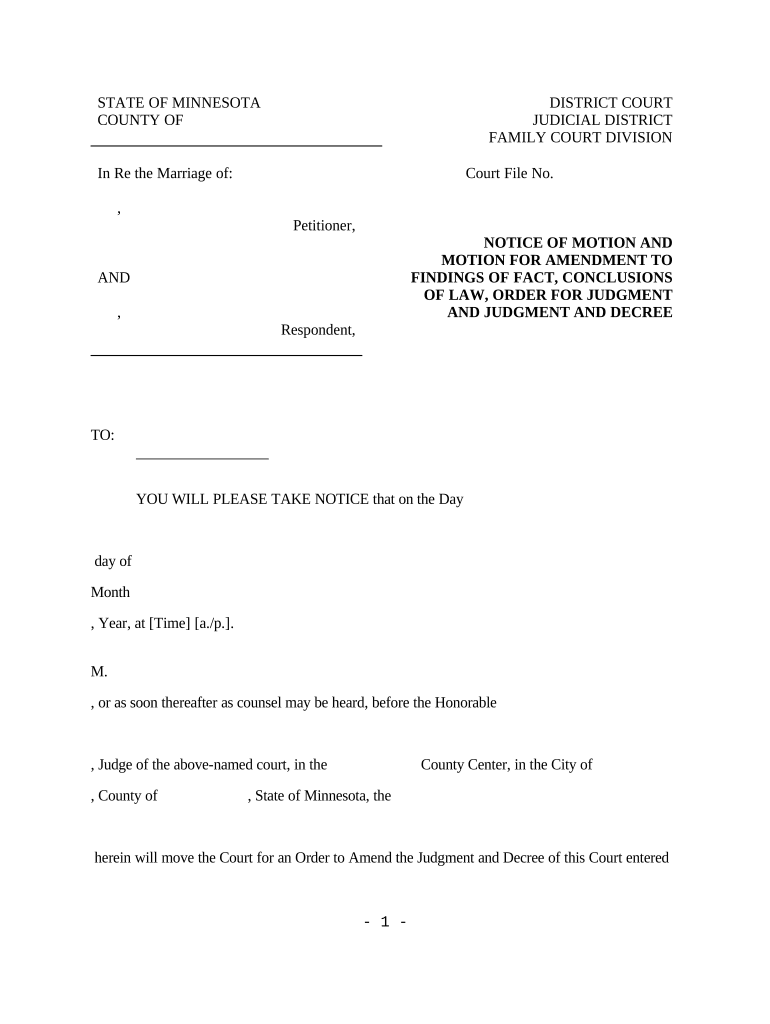
Include the court name, case number, party names, and identifying docket entry for the original judgment to ensure correct docketing and linkage.
Purpose Statement

Begin with a short statement that identifies whether the filing corrects an error, modifies terms, or supplements the original judgment with new factual or legal grounds.

Amendment Text

Provide the exact language to replace, add, or strike from the original judgment so the clerk can enter the amended judgment without further drafting.

Legal Basis

Cite controlling rules or statutes (for example Fed. R. Civ. P. 59(e) or 60(b)) and explain why relief is appropriate under those provisions.

Supporting Evidence

Attach declarations, exhibits, or orders that justify the amendment, and reference exhibit tabs in the body of the motion.

Certificate of Service

Include a signed proof-of-service showing how and when opposing parties and the clerk were served per local rules.

Step-by-step: prepare and file an Amend Judgment

Follow these steps in order to prepare a compliant amended judgment and limit procedural objections.

  • 01
    Draft amendment: Prepare the exact replacement text and statement of grounds.
  • 02
    Gather exhibits: Attach declarations, evidence, and prior orders supporting the change.
  • 03
    File and serve: E-file where permitted; serve opposing parties per local rule.
  • 04
    Confirm docket entry: Verify clerk entered the amendment and obtain a conformed copy.

How to configure an online workflow for Amend Judgment filings

Set up a reproducible template and routing to speed repeat filings while ensuring legal steps are preserved.

Field Configuration
Case Caption Field Pre-fill with party and docket variables
Amendment Text Field Editable block for insertion or replacement text
Attachments Section Require file upload and exhibit labeling
Signing Workflow Route to attorney, client, and filer in sequence

Where to file and how the filing typically flows

Filing destinations depend on court level and local e-filing rules; the clerk’s office ultimately enters the amended judgment on the docket.

  • Trial Court Clerk: Primary recipient for amended judgments and docket entry.
  • E-Filing System: Use the court’s e-filing portal when available for immediate submission.
  • Service to Parties: Serve opposing counsel and pro se parties per local rule.
  • Recordation: Record liens or releases at the county recorder when judgment affects property rights.

Key timing rules and filing deadlines to watch

Several federal and local timing rules affect amended judgments; verify both the applicable procedural rule and the court’s local rules before filing.

Rule 59(e) deadline:

File within 28 days of judgment under Fed. R. Civ. P. 59(e).

Rule 60(b) timing:

File a Rule 60(b) motion within a reasonable time; some grounds require within one year (Fed. R. Civ. P. 60(c)(1)).

Local rule variations:

State and local courts often set shorter or different timeframes for amendments.

Service deadlines:

Proof of service must meet local-service timing and form requirements.

Appeal impact:

Amendments may toll or alter appeal deadlines; verify appellate rules before filing.

Typical milestone timeline when seeking an amended judgment

A straightforward timeline helps coordinate drafting, service, and clerk processing for the amended judgment.

01

Draft and review

Prepare amendment language and collect supporting exhibits for filing.

02

File and serve

E-file with the clerk and serve opposing parties promptly per local rule.

03

Response period

Allow time for oppositions or requests for hearing under local procedure.

04

Entry and enforcement

Clerk enters amended judgment and you confirm docketing and any recording required.

Digital signing and e-submission considerations for Amend Judgment filings

Check the target court’s e-filing system for accepted formats and digital certificate requirements before submission to avoid processing delays.

  • File Formats: PDF or DOCX preferred
  • Integrations: Supports Salesforce, NetSuite, Google Workspace
  • Authentication: Email, SMS, or stronger

Security and compliance for electronically signed amended judgments

Encryption: TLS 1.2/1.3 in transit
Data at Rest: AES-256 encryption
Certifications: SOC 2 Type II
HIPAA: BAA available
ESIGN/UETA: Compliant with ESIGN and UETA
Audit Trail: Timestamped actions and IP logs

Consequences of filing an incorrect or untimely Amend Judgment

Rejection: Clerk may reject noncompliant filings
Waiver: Procedural errors can waive issues
Sanctions: Court may impose sanctions in bad faith
Appeal Impact: Amendments can affect appeal timing
Recording Errors: Improper county recording can cloud title
Fee Liability: Refiling fees or penalties may apply

Common mistakes to avoid when preparing an Amend Judgment

  • Using imprecise amendment language that requires the clerk to re-draft the order, which can delay entry and cause disputes over intent.
  • Failing to reference the original judgment docket entry or date, leading the clerk to misfile the amendment under the wrong matter.
  • Missing proof-of-service or using incorrect service methods that do not meet local rule requirements and may nullify the filing.
  • Ignoring local formatting or signature requirements (including notary or verification rules), resulting in rejection or the need to refile.

Examples: how practitioners approach Amend Judgment filings

Two real-world examples illustrate common workflows for amending judgments and how e-signing tools support them.

Optica Ventures LLC

A small litigation firm standardized amendment templates to reduce drafting time.

  • They use a template that references the original docket by number.
  • The standardized approach reduced clerk rejections and improved turnaround on conformed copies while keeping the file trail auditable.

Tech Data

An enterprise legal team automated service and filing steps for post-judgment changes.

  • Automation enforced proof-of-service requirements.
  • Centralized templates and auditable signing reduced administrative overhead and improved compliance with local court specifications.

eSignature vendor comparison for signing and submitting Amend Judgment filings

A concise comparison of common features and starting prices for vendors used to prepare and sign amended judgments. Pricing varies by plan and billing frequency.

signNow DocuSign Adobe Sign PandaDoc HelloSign
Starting Price $8/user/mo $15/user/mo $14/user/mo $19/user/mo $15/user/mo
Free Trial 7-day free trial Varies by vendor Varies by vendor Varies by vendor Varies by vendor
Bulk Send Yes Yes Yes Yes Varies
Audit Trail Yes Yes Yes Yes Yes
HIPAA Compliant Yes Yes Yes No No

Frequently asked questions about amending a judgment

Answers to common questions about form requirements, filing timelines, signatures, and electronic submission for Amend Judgment filings.


Need help? Contact support

be ready to get more
Join over 28 million airSlate SignNow users