Establishing secure connection… Loading editor… Preparing document…
Navigation

Fill and Sign the Angel Term Form
Fill and Sign the Angel Term Form

How it works

Open the document and fill out all its fields.
Apply your legally-binding eSignature.
Save and invite other recipients to sign it.

Rate template

4.4
65 votes
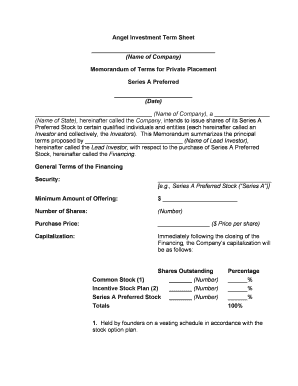
Angel Investment Term Sheet ______________________________________ (Name of Company) Memorandum of Terms for Private Placement Series A Preferred ________________________ (Date) ____________________________________ (Name of Company), a _________________ (Name of State), hereinafter called the Company, intends to issue shares of its Series A Preferred Stock to certain qualified individuals and entities (each hereinafter called an Investor and collectively, the Investors). This Memorandum summarizes the principal terms proposed by ______________________________ (Name of Lead Investor), hereinafter called the Lead Investor, with respect to the purchase of Series A Preferred Stock, hereinafter called the Financing. General Terms of the FinancingSecurity: ___________________________________ [e.g., Series A Preferred Stock (“Series A”)] Minimum Amount of Offering: $ _______________________Number of Shares: (Number)Purchase Price: ________________ ($ Price per share)Capitalization: Immediately following the closing of the Financing, the Company’s capitalization will be as follows: Shares Outstanding Percentage Common Stock (1) _______ (Number) ______%Incentive Stock Plan (2) _______ (Number) ______%Series A Preferred Stock_______ (Number) ______%Totals 100%1. Held by founders on a vesting schedule in accordance with the stock option plan. 2. The Company's Board of Directors has adopted a stock option plan to be administered by the Board authorizing the Company to grant options and stock purchase rights to employees and consultants. There are ________ (Number) shares under the Stock Option Plan that are subject to outstanding options and _______ (Number) shares remain available for future issuance. Rights, Preferences, and PrivilegesDividends: The holders of Series A Preferred Stock (“Series A”) shall be entitled to receive in preference to the Common Stock (Common), noncumulative dividends of $ ______ per share per annum (____%/____%/____%), respectively, when and if declared by the Board of directors.Liquidation Preference: In the event of any liquidation or winding up of the Company, the holders of Series A shall be entitled to receive, in preference to the holders of Common, an amount equal to the price paid per Series A share, plus all declared but unpaid dividends on such shares. Thereafter, the assets available for distribution shall be distributed ratably among the holders of [Common Series A / Common and Series A will be capped at ______ (e.g., 3x) the Investor’s Initial Investment / Common]. A merger or sale of all or substantially all of the assets of the Company shall be treated as a liquidation or winding up for purposes of the liquidation preference.Conversion: Optional Conversion: The holders of Preferred shall have the right to convert their shares of Preferred, at the option of the holder, at any time into shares of Common, at the rate of one share of Preferred for one share of Common, subject to adjustment as described below.Automatic Conversion: The Preferred shall be automatically converted into Common, at the then applicable conversion rate, (i) in the event of the closing of an underwritten public offering of the Company’s securities in which the aggregate gross proceeds to the Company equals or exceeds _______________ [e.g., $20,000,000 / $10,000,000], or (ii) upon the election of the holders of a ___________________ [e.g., 66% / majority] of the shares of Preferred then outstanding. Anti-dilution Provisions: In the event that the Company issues additional securities without consideration or for a consideration per share less than the price paid for Series A Stock, as adjusted for capital reorganization, stock splits, reclassification, etc., (other than (i) the issuance of options or shares of Common Stock to employees, directors, and consultants, (ii) the sale of shares in connection with a firm commitment underwritten public offering, (iii) the issuance of Common Stock upon conversion of the Preferred Stock or other already outstanding convertible securities, (iv) dividends or distributions on Preferred Stock, (v) the issuance of warrants to banks or equipment lessors, or (vi) the issuance of shares in connection with business combinations or corporate partnering agreements approved by the Board of Directors), then, and in such event, the Conversion Price for the Series A Preferred Stock shall be adjusted using a _________ _____________________ [e.g., ratchet / narrow based / broad based weighted average] anti-dilution formula. Redemption. Commencing on the date that there is __________________________________ ___________________________________________________________ [e.g., three years after Closing and for three years thereafter, the holders of a majority of Series A (provided that the Lead Investor consents) may require the Company to redeem their respective shares of Preferred at a price equal to cost plus dividends declared but not paid. Any redemption payment not made when due shall thereafter bear interest at the ___________ ____________ (e.g., Prime Rate plus 5%). Voting Rights: Generally. The holder of each share of Preferred shall have the right to that number of votes equal to the number of shares of Common issuable upon conversion of such share of Preferred. The Preferred votes together with the Common on all matters except as described below. Election of Directors: The Company’s Board of directors will have ___________ [five (5)] directors. The holders of Common, voting as a separate class, shall be entitled to elect ________ (e.g., two) members of the Company’s Board of directors. The holders of Preferred Stock, voting as a separate class, shall be entitled to elect _______ (e.g., two) members of the Company’s Board of directors. The Lead Investor will be entitled to elect the ________ [e.g, one] member of the Company’s Board of directors. Board Composition: Upon the closing of the sale and issuance of the Series A, the Company’s Board shall be comprised of _____________________ (Name) and __________________ (Name), who will be deemed elected by the holders of Common, and _____________ and _____________, who will be deemed elected by Series A, and _____________, who will be deemed elected by the Lead Investor.Protective Provisions: Consent of both (i) the holders of at least a majority of the outstanding Series A voting together as a single class and (ii) at least a majority of the Board of Directors that includes the Lead Investor director shall be required for any action which would allow (a) the repurchase or redemption of Common (except from an employee or consultant upon termination), (b) any increase in the number of authorized shares of Series A, (c) any offer, sale, or issuance of any security senior to or ranking equally with Series A Preferred, (d) any amendment to the Bylaws or Articles of Incorporation of the Company, (e) the payment by the Company of any dividends to the holders of Common, (f) any merger, reorganization or sale of all or substantially all of the assets of the Company, (g) any liquidation or dissolution of the Company, (h) the issuance of securities of any subsidiary of the Company, (i) increase to the Board size, (j) increase in compensation for any executive officer during any one year in excess of ____________ (e.g., 15%) or (k) any change to the Company’s stock option plan. Consent by at least a majority vote of the Board of Directors that includes the Lead Investor director shall be required for the Company to: (a) mortgage or pledge, or create a security interest in, permit any subsidiary to mortgage, pledge or create a security interest in, all or substantially all of the property of the Company or such subsidiary Company, (b) make any loans or advances to employees, except in the ordinary course of business as part of travel advances or salary (promissory notes for purchase of shares permitted); (c) make guarantees except in ordinary course; (d) grant or issue any equity, options or warrants representing in the aggregate over __________ (e.g., 0.5%) of the fully diluted capitalization of the Company or (e) allow acceleration of either the vesting of options or expiration of the Company’s right of repurchase as to the equity interest of any service provider. Terms of Investors Rights AgreementInformation Rights: So long as a holder of Preferred continues to hold at least _____________________ [e.g., 50,000 / 100,000] shares of Preferred or Common issuable upon conversion of Preferred (the “Conversion Stock”) (each a “Major Investor”), the Company shall deliver to such holder audited annual and unaudited ______________________ [e.g., monthly / quarterly] financial statements. These information rights provisions shall terminate upon the initial public offering of the Common Stock. Information rights may be transferred to a transferee who, after such transfer, will hold at least __________ [e.g., 50,000 / 100,000] shares of Preferred or Conversion Stock, provided that the Company is given prior written notice of such transfer. Right of Participation: Each Major Investor shall have a right to purchase its pro rata portion of New Securities in the event of any sale of New Securities by the Company, excluding shares sold to employees, consultants, officers or directors in connection with services pursuant to arrangements authorized by the Board of directors, and other customary exclusions. Each Major Investor shall have the right of re-allotment in the event any Major Investor chooses not to exercise his right of participation.Registration Rights: Demand Rights: If, at any time after the earlier of ___________ [e.g., three / four] years from the date of Closing of the Series A or the date that is six months following the Company’s initial public offering, holders of a majority of the Preferred or Conversion Stock requests that the Company file a registration statement for an aggregate offering price of at least ______________ [e.g., $5,000,000 / $10,000,000], the Company will use its best efforts to cause such shares of Conversion Stock to be registered. The Company shall not be obligated to effect more than __________ [e.g., two / one] registrations under these demand right provisions.“Piggyback” Registration: If at any time the Company determines to register its securities, the holders of Preferred shall be entitled to have their shares of Conversion Stock included in such registration. The Company and its underwriters shall have the right to terminate or withdraw any registration initiated by the Company and, in the case of the Company’s initial public offering, to reduce or eliminate the number of shares proposed to be registered on behalf of the holders in view of market conditions. For registrations following the initial public offering, the holders of registration rights may not be cut back to less than ________ [e.g., 30% / 15%] of the offering. S-3 Demand Rights: If available for use by the Company, the holders of Conversion Stock will be entitled to _________________ (e.g., unlimited / three) S-3 registrations provided that the anticipated aggregate offering price, net of discounts and commissions, would exceed $1,000,000. The Company shall not be obligated to file more than one S -3 registration statement in any twelve-month period.Expenses: All registration expenses (including expenses of one attorney for the holders of Registrable Securities but excluding underwriting discounts and commissions) shall be borne by the Company, subject to customary exclusions and exceptions. Other Provisions: Registration rights terminate __________ [e.g., five / three] years after consummation of the Company’s first underwritten public offering or earlier as to a particular holder if such holder can sell all of its shares in a 90 day period pursuant to Rule 144. The registration rights may be transferred to a transferee who acquires a minimum number of shares of Preferred or Conversion Stock provided the Company is given written notice thereof. The holders of Preferred agree not to sell any shares of the Preferred or Conversion Stock for 180 days following the closing of the Company’s initial public offering. Registration rights provisions may be amended or waived solely with the consent of: (i) the Company (ii) holders of over 50% of the Registrable Securities and (iii) the Lead Investor. Other Issues Co-Sale Right and Right of First Refusal: Right of First Refusal. The Company will have the right to repurchase shares offered for sale by a Founder, subject to customary exceptions for transfers in connection with estate planning, bona fide loan transactions and sales up to _______ [e.g., 5% / 10%] of the total number of shares of capital stock held by a Founder. To the extent not exercised by the Company, the right of first refusal will be transferred to the holders of Series A on a pro rata basis with a right of re-allotment. Co-Sale Right. In the event that a Founder proposes to sell any shares of the Company’s Common Stock (subject to customary exclusions), the holders of Series A shall be given the right to sell on a pro rata basis a portion of their shares to the proposed purchaser in lieu of the purchase being made from the Founder. Such right shall include a right of re- allotment to the extent that the right is not exercised by holders of Series A. Termination. These rights shall terminate upon the closing of the Company’s initial public offering or upon the merger of the Company into another entity. Small Business Stock: So long as it does not require the Company to operate its business in a manner which would limit its prospects, the Company’s shall seek to have Series A Preferred Stock qualify as a small business stock within the meaning of Section 1202(c) of the Internal Revenue Code and the Company shall perform all acts reasonably necessary to so qualify its stock and shall make all filings required under Section 1202(d)(1)(c) of the IRC and related Treasury regulations.Purchase Agreement: The investment shall be made subject to the negotiation of a Stock Purchase Agreement for Series A reasonably acceptable to the Company and the Lead Investor, which agreement shall contain, among other things, customary and appropriate representations and warranties of the Company, covenants of the Company reflecting the provisions set forth herein, and appropriate conditions of closing. The Stock Purchase Agreement shall provide that it may only be amended and any waivers thereunder shall only be made with the consent of (i) the Company (ii) holders of over 50% of the Series A sold thereunder and (iii) the Lead Investor. The Closing: The closing is subject to the Company raising at least the Minimum Amount of Offering in the Financing and completion of legal and financial due diligence by the Lead Investor.Indemnification Agreements: The officers and directors will have standard indemnification agreements acceptable to the Investors.Expenses: The Company will bear its legal expenses; in addition, the Company will pay the reasonable legal fees and expenses of one counsel to the Investors up to a maximum of _______________ [e.g., $15,000 / $7,500]. No Commitment: Nothing in this Memorandum of Terms, or any notes, or any actions occurring after there is an agreement on this Memorandum of Terms, will be construed as a commitment by Lead Investor or any other Investor to proceed with any stage of the financing contemplated hereby. However, once closing occurs, Investors’ obligations as set forth in the closing documents will be binding upon all parties.

Useful advice for finalizing your ‘Angel Term’ online

Are you fed up with the inconvenience of dealing with documentation? Look no further than airSlate SignNow, the premier eSignature solution for both individuals and organizations. Bid farewell to the tedious routine of printing and scanning documents. With airSlate SignNow, you can seamlessly complete and sign documents online. Take advantage of the extensive features included in this user-friendly and cost-effective platform to transform your document management process. Whether you need to sign forms or collect electronic signatures, airSlate SignNow manages it all effortlessly, with just a few clicks.

Adhere to this comprehensive guideline:

  1. Access your account or initiate a free trial with our service.
  2. Hit +Create to upload a document from your device, cloud storage, or our form repository.
  3. Open your ‘Angel Term’ in the editor.
  4. Select Me (Fill Out Now) to prepare the document on your end.
  5. Add and designate fillable fields for other participants (if necessary).
  6. Continue with the Send Invite settings to request eSignatures from others.
  7. Save, print a copy for yourself, or convert it into a reusable template.

Don't worry if you need to collaborate with your colleagues on your Angel Term or send it for notarization—our solution offers everything you need to complete such tasks. Register with airSlate SignNow today and elevate your document management to new levels!

Here is a list of the most common customer questions. If you can’t find an answer to your question, please don’t hesitate to reach out to us.

Need help? Contact Support

The best way to complete and sign your angel term form

Save time on document management with airSlate SignNow and get your angel term form eSigned quickly from anywhere with our fully compliant eSignature tool.

How to Sign a PDF Online How to Sign a PDF Online

How to complete and sign documents online

In the past, coping with paperwork took lots of time and effort. But with airSlate SignNow, document management is easy and fast. Our robust and user-friendly eSignature solution lets you effortlessly fill out and electronically sign your angel term form online from any internet-connected device.

Follow the step-by-step guidelines to eSign your angel term form template online:

  • 1.Sign up for a free trial with airSlate SignNow or log in to your account with password credentials or SSO authorization option.
  • 2.Click Upload or Create and add a form for eSigning from your device, the cloud, or our form catalogue.
  • 3.Click on the file name to open it in the editor and use the left-side menu to fill out all the blank areas accordingly.
  • 4.Drop the My Signature field where you need to approve your sample. Type your name, draw, or upload an image of your regular signature.
  • 5.Click Save and Close to finish modifying your completed document.

As soon as your angel term form template is ready, download it to your device, export it to the cloud, or invite other parties to electronically sign it. With airSlate SignNow, the eSigning process only takes a few clicks. Use our powerful eSignature solution wherever you are to handle your paperwork effectively!


How to Sign a PDF Using Google Chrome How to Sign a PDF Using Google Chrome

How to fill out and sign documents in Google Chrome

Completing and signing paperwork is easy with the airSlate SignNow extension for Google Chrome. Adding it to your browser is a quick and effective way to manage your forms online. Sign your angel term form template with a legally-binding electronic signature in a couple of clicks without switching between tools and tabs.

Follow the step-by-step guidelines to eSign your angel term form in Google Chrome:

  • 1.Navigate to the Chrome Web Store, locate the airSlate SignNow extension for Chrome, and add it to your browser.
  • 2.Right-click on the link to a form you need to sign and choose Open in airSlate SignNow.
  • 3.Log in to your account with your password or Google/Facebook sign-in option. If you don’t have one, you can start a free trial.
  • 4.Utilize the Edit & Sign menu on the left to fill out your sample, then drag and drop the My Signature option.
  • 5.Insert an image of your handwritten signature, draw it, or simply enter your full name to eSign.
  • 6.Make sure all information is correct and click Save and Close to finish modifying your paperwork.

Now, you can save your angel term form template to your device or cloud storage, send the copy to other individuals, or invite them to eSign your document with an email request or a secure Signing Link. The airSlate SignNow extension for Google Chrome improves your document processes with minimum time and effort. Try airSlate SignNow today!


How to Sign a PDF in Gmail How to Sign a PDF in Gmail How to Sign a PDF in Gmail

How to complete and sign paperwork in Gmail

When you get an email containing the angel term form for approval, there’s no need to print and scan a file or save and re-upload it to another tool. There’s a much better solution if you use Gmail. Try the airSlate SignNow add-on to rapidly eSign any documents right from your inbox.

Follow the step-by-step guide to eSign your angel term form in Gmail:

  • 1.Go to the Google Workplace Marketplace and look for a airSlate SignNow add-on for Gmail.
  • 2.Install the program with a related button and grant the tool access to your Google account.
  • 3.Open an email with an attachment that needs signing and use the S key on the right sidebar to launch the add-on.
  • 4.Log in to your airSlate SignNow account. Choose Send to Sign to forward the file to other parties for approval or click Upload to open it in the editor.
  • 5.Drop the My Signature field where you need to eSign: type, draw, or upload your signature.

This eSigning process saves time and only takes a few clicks. Use the airSlate SignNow add-on for Gmail to adjust your angel term form with fillable fields, sign documents legally, and invite other individuals to eSign them al without leaving your inbox. Boost your signature workflows now!


How to Sign a PDF on a Mobile Device How to Sign a PDF on a Mobile Device How to Sign a PDF on a Mobile Device

How to complete and sign documents in a mobile browser

Need to quickly fill out and sign your angel term form on a mobile phone while doing your work on the go? airSlate SignNow can help without needing to set up additional software apps. Open our airSlate SignNow tool from any browser on your mobile device and create legally-binding eSignatures on the go, 24/7.

Follow the step-by-step guidelines to eSign your angel term form in a browser:

  • 1.Open any browser on your device and go to the www.signnow.com
  • 2.Register for an account with a free trial or log in with your password credentials or SSO authentication.
  • 3.Click Upload or Create and add a file that needs to be completed from a cloud, your device, or our form library with ready-made templates.
  • 4.Open the form and fill out the blank fields with tools from Edit & Sign menu on the left.
  • 5.Place the My Signature area to the sample, then enter your name, draw, or add your signature.

In a few easy clicks, your angel term form is completed from wherever you are. Once you're finished editing, you can save the document on your device, build a reusable template for it, email it to other people, or ask them to electronically sign it. Make your documents on the go prompt and efficient with airSlate SignNow!


How to Sign a PDF on iPhone How to Sign a PDF on iPhone

How to fill out and sign forms on iOS

In today’s business community, tasks must be done rapidly even when you’re away from your computer. With the airSlate SignNow app, you can organize your paperwork and approve your angel term form with a legally-binding eSignature right on your iPhone or iPad. Set it up on your device to close deals and manage documents from just about anywhere 24/7.

Follow the step-by-step guidelines to eSign your angel term form on iOS devices:

  • 1.Open the App Store, search for the airSlate SignNow app by airSlate, and install it on your device.
  • 2.Open the application, tap Create to upload a template, and choose Myself.
  • 3.Select Signature at the bottom toolbar and simply draw your autograph with a finger or stylus to eSign the sample.
  • 4.Tap Done -> Save right after signing the sample.
  • 5.Tap Save or take advantage of the Make Template option to re-use this paperwork later on.

This process is so simple your angel term form is completed and signed within a couple of taps. The airSlate SignNow app works in the cloud so all the forms on your mobile device remain in your account and are available any time you need them. Use airSlate SignNow for iOS to enhance your document management and eSignature workflows!


How to Sign a PDF on Android How to Sign a PDF on Android

How to fill out and sign forms on Android

With airSlate SignNow, it’s easy to sign your angel term form on the go. Install its mobile app for Android OS on your device and start enhancing eSignature workflows right on your smartphone or tablet.

Follow the step-by-step guidelines to eSign your angel term form on Android:

  • 1.Navigate to Google Play, find the airSlate SignNow application from airSlate, and install it on your device.
  • 2.Sign in to your account or create it with a free trial, then import a file with a ➕ key on the bottom of you screen.
  • 3.Tap on the imported document and choose Open in Editor from the dropdown menu.
  • 4.Tap on Tools tab -> Signature, then draw or type your name to eSign the form. Complete empty fields with other tools on the bottom if required.
  • 5.Use the ✔ button, then tap on the Save option to finish editing.

With an easy-to-use interface and total compliance with major eSignature standards, the airSlate SignNow application is the perfect tool for signing your angel term form. It even works without internet and updates all document modifications once your internet connection is restored and the tool is synced. Complete and eSign documents, send them for eSigning, and generate multi-usable templates anytime and from anyplace with airSlate SignNow.

Sign up and try Angel term form
  • Close deals faster
  • Improve productivity
  • Delight customers
  • Increase revenue
  • Save time & money
  • Reduce payment cycles


