Affirmative Counterclaims
If appropriate, assert counterclaims or setoffs succinctly to preserve remedies and potentially shift litigation posture; plead facts and relief sought.
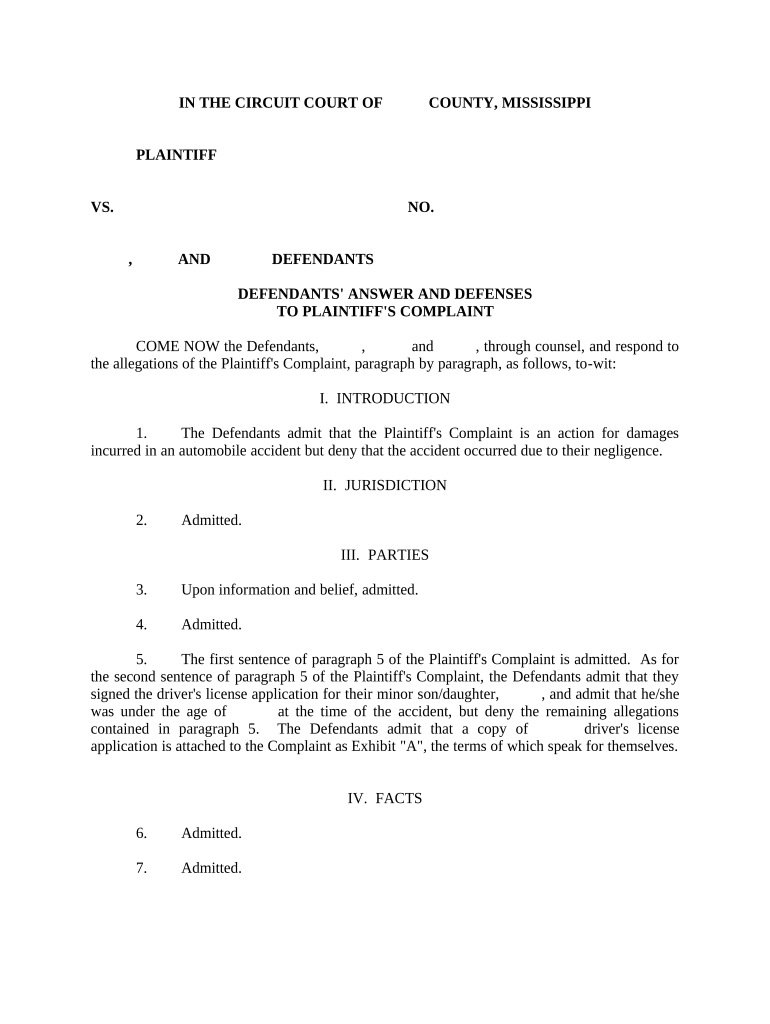
A properly drafted answer protects substantive and procedural rights, creates a record for case management, and preserves affirmative defenses and counterclaims. It prevents default judgment, narrows disputed issues, and enables efficient discovery and motion practice.

Defendants and their attorneys prepare the answer, often with input from in-house counsel or retained litigation counsel.
Timely preparation and filing help preserve defenses and reduce procedural risk regardless of who completes the form.
The named defendant or an authorized officer signs where a corporate defendant appears; signature attests to the truth of factual statements and representation of legal defenses under penalty of perjury where applicable.
Counsel of record signs the pleading, certifies service and compliance with local rules, and provides contact information for the court and opposing counsel for further communications.
Include court name, case number, title of action, and identification of the pleading as 'Answer and Defenses.' Precise captioning ensures the court docket correctly associates the filing with the case.
Numbered responses that correspond to each allegation in the complaint using 'Admit,' 'Deny,' or 'Lack sufficient information to admit or deny' language to create a clear record for the court.
List defenses such as statute of limitations, failure to state a claim, lack of jurisdiction, payment, accord and satisfaction, or estoppel, with brief factual grounding where required to preserve the issue.
A signature block with printed name, bar number for attorneys, contact details, date, and a certificate of service showing how and when the pleading was delivered to all parties.
If appropriate, assert counterclaims or setoffs succinctly to preserve remedies and potentially shift litigation posture; plead facts and relief sought.
Explicitly reserve the right to assert additional defenses or amend the answer based on discovery to avoid waiver of viable positions.
Include any jurisdictional, venue, or service-based objections early to preserve those defenses under the Mississippi Rules of Civil Procedure.
State whether a jury is demanded and ensure compliance with timelines and any required deposit or notation under local rules.
Attach or reference documents on which defenses are based—contracts, correspondence, or payment records—to support factual assertions.
Conclude with a clear statement of the relief requested, such as dismissal, costs, attorney fees, or other equitable relief, tailored to the defenses raised.
Typically within 30 days after service; verify local rules for exact timing.
Court may set a scheduling conference within weeks of answer filing.
Discovery deadlines are set by the scheduling order following the initial conference.
Motions in limine, expert disclosures, and pretrial filings occur as ordered by the court.
Usually 30 days after service; federal answers for removed cases follow Federal Rules.
Fileable prior to or with answer in many jurisdictions; consult the Mississippi Rules of Civil Procedure.
Amendments often allowed early without leave; later amendments require court approval.
Begins after scheduling order; immediate informal exchanges may occur earlier.
Set by court; readiness often depends on completion of discovery and motion practice.
| Document Type | Answer | Motion to Dismiss |
|---|---|---|
| Primary Purpose | responds to allegations | requests case dismissal |
| Timing | post-service response | often pre-answer or with answer |
| Content | admissions/denials and defenses | legal argument and supporting facts |
| Relief Sought | defensive relief | dismissal or judgment |
| signNow | DocuSign | Adobe Sign | PandaDoc | HelloSign | |
|---|---|---|---|---|---|
| Starting Price | $8/user/mo | $15/user/mo | $14/user/mo | $19/user/mo | $15/user/mo |
| Free Trial | Yes, 7-day free trial | No | No | Yes, limited | Yes, limited |
| Bulk Send | Yes | Yes | Yes | Yes | No |
| Audit Trail | Yes | Yes | Yes | Yes | Yes |
| HIPAA Compliant | Yes | Yes | Yes | No | No |
| Field | Configuration |
|---|---|
| Signature Block | Place signer name, role, date, and attorney bar number fields |
| Exhibits Attachment | Attach supporting exhibits as separate, labeled PDFs |
| Routing Order | Set signer order for defendant, counsel, and notary if needed |
| Authentication | Use email or SMS code for signer verification |
Confirm the court accepts electronically signed pleadings and check e-filing format requirements before using an eSignature platform.
Ensure your chosen platform supports audit trails, tamper-evident outputs, and the format required by the clerk to avoid rejection.