Establishing secure connection…Loading editor…Preparing document…

Resolution to Temporarily Fill Vacancy

This template is fully customizable. Edit the text, fill out the fields, and send it for signature. Give it a try!
Resolution to Temporarily Fill Vacancy

What this Resolution Does and when it’s used

A Resolution to Temporarily Fill Vacancy is a formal board or governing-body action that appoints an interim officer or member to serve until a permanent replacement is selected. The resolution documents the vacancy, authorizes a temporary appointment, specifies the scope and duration of the interim appointment, and records any voting or notice procedures required by bylaws or state law. This document is commonly used by corporate boards, municipal councils, nonprofit governing bodies, and cooperative associations to maintain continuity of operations and legal authority while a full recruitment or election process proceeds.

Why adopt a temporary-fill resolution

A clear written resolution preserves governance continuity, protects the organization from authority gaps, and creates an auditable record of the appointment. It reduces uncertainty about who may act on the body’s behalf and documents compliance with bylaws and applicable state laws such as UETA or governing corporate statutes.

Why adopt a temporary-fill resolution

Who typically prepares and approves this resolution

Common preparers include board secretaries, general counsel, municipal clerks, and nonprofit executive directors.

  • Board secretaries and corporate counsel prepare resolution text and verify bylaw compliance for board review.
  • Municipal clerks or city attorneys prepare and post required public notices when a local government vacancy is involved.
  • Nonprofit executive directors and volunteer leaders coordinate board votes and preserve minutes documenting the temporary appointment.

Typical signers and approvers

Board Chair

The chair commonly signs to certify the vote and enforce the appointment; the chair’s signature documents that the resolution was adopted under the board’s authority and bylaws.

City Clerk

For municipal vacancies the clerk often signs or certifies the record for public file, noting posting and notice steps required under local governance rules.

Step-by-step: completing and approving the resolution

Follow these steps in order to prepare, adopt, and record a temporary appointment resolution.

  • 01
    Draft Resolution: Prepare text specifying vacancy, appointee, term, and limitations.
  • 02
    Provide Notice: Give any required notice to members or the public per bylaws or statute.
  • 03
    Hold Vote: Conduct the authorized vote and record the result in minutes.
  • 04
    File Record: Attach resolution to meeting minutes and file per retention rules.

Typical routing and approval workflow

A common workflow ensures legal sufficiency and public transparency for the temporary appointment process.

  • Draft Review: Legal counsel or clerk reviews draft for bylaw and statutory compliance.
  • Public Notice: Post or publish required notice for meetings or appointments as needed.
  • Formal Vote: Governing body votes according to quorum and voting rules.
  • Certification: Authorized officer signs and certifies minutes and resolution.

How to set up an electronic approval workflow

Configure an e-signature workflow that follows the approval steps and preserves an audit trail.

Field Configuration
Signer Order Sequential routing by role to ensure proper sign-off.
Authentication Use email link or stronger authentication for sensitive appointments.
Document Attachments Attach minutes, resignation letters, or statutory citations.
Audit Trail Capture timestamps, IP addresses, and signer emails automatically.

Technical considerations for eSubmission and storage

Choose a platform that supports audit trails, conditional fields, and integration with your records system.

  • Integrations: Salesforce, NetSuite, Microsoft 365, Google Workspace supported
  • File Formats: PDF and DOCX accepted for signing and archival
  • Authentication: Email, SMS code, or advanced options available

Essential sections to include in the resolution

A professional resolution contains clear, discrete sections so it can be enforced, referenced, and retained consistently with organizational records.

Title

A concise header identifying the document as a 'Resolution to Temporarily Fill Vacancy' and referencing the meeting date and body adopting it.
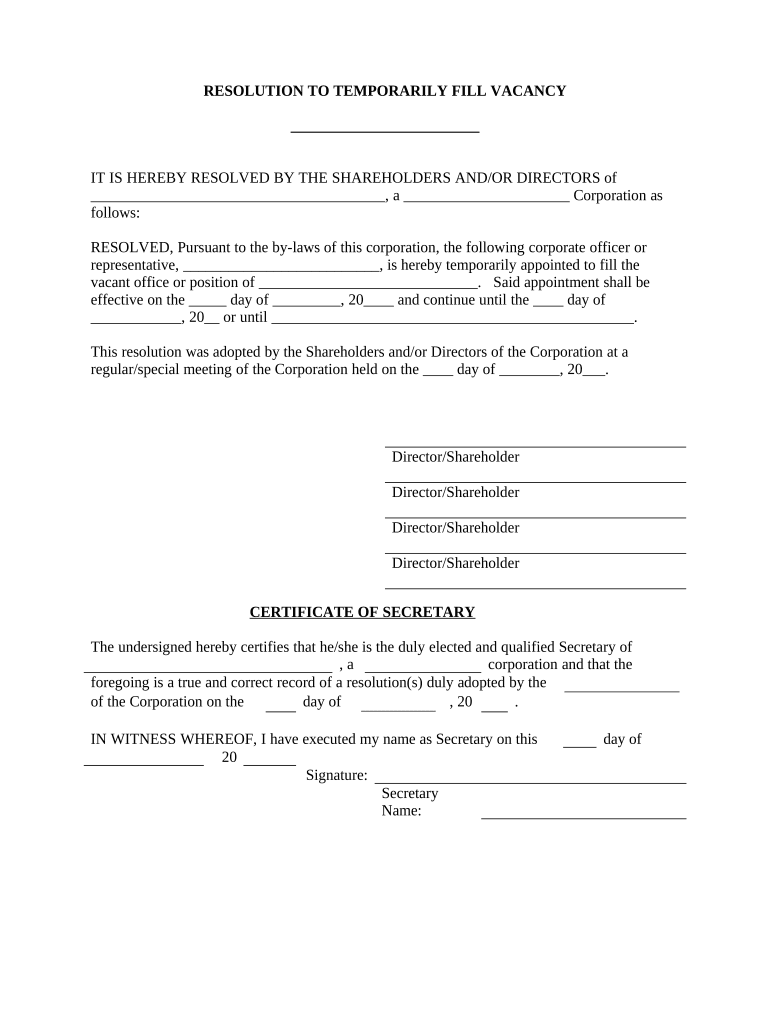
Recitals

Background facts explaining the vacancy (resignation, death, or removal) and any relevant bylaw or statutory citations that authorize temporary appointment.

Resolution Clause

A clearly worded action clause naming the interim appointee, specifying start and end dates, and stating the scope of authority granted.

Voting Record

A line recording the motion, mover, seconder, vote tally, and whether the action met quorum requirements per bylaws.

Certification

A signature block for the presiding officer and clerk with dates and an attestation that minutes reflect the adoption.

Attachments

Include resignation letters, bylaws excerpts, or other supporting documents as exhibits referenced by the resolution.

Timelines and typical deadlines to track

Plan timelines to ensure notice, voting, and recordkeeping occur within required periods under bylaws or statute.

Notice Period:

Provide notice to members or the public per bylaws or open-meeting laws, commonly 24–72 hours before a special meeting.

Posting Requirement:

Local governments often require posting of vacancies and appointments on official agendas and websites; timing varies by jurisdiction.

Interim Term Length:

Specify whether the interim serves until the next regular election, until a special election, or for a fixed term.

Record Filing:

Attach resolution to minutes and retain in official records immediately following the meeting.

Follow-up Actions:

Schedule recruitment, election, or confirmation steps required to select a permanent replacement.

Key milestones from vacancy to permanent replacement

A sequential milestone view helps track required actions and legal checkpoints after a vacancy occurs.

01

Vacancy Occurs

Record date of vacancy and collect any resignation or notice documents.

02

Emergency Appointment

If immediate action is needed, appoint interim with documented authority and limitations.

03

Formal Adoption

Adopt the written resolution at a properly noticed meeting and record the vote in minutes.

04

Permanent Selection

Conduct election or appointment process per bylaws to fill position permanently.

Common preparation errors to avoid

  • Failing to cite the bylaw or statute that authorizes temporary appointment, which can lead to legal challenges or invalidation of actions.
  • Using vague term lengths such as 'until further notice' without defining a maximum or clear triggering event for termination.
  • Neglecting to limit the interim’s authority where bylaws require restricted powers or where significant contracts are involved.
  • Not attaching supporting documents (resignation, vacancy notice) to the resolution, making it harder to verify the factual basis later.

Consequences of an improperly executed resolution

Void Actions: Some acts taken by an improperly appointed interim may be voidable or unenforceable.
Litigation Risk: Affected parties may sue, seeking declaratory relief or to invalidate decisions.
Regulatory Findings: Government entities may find noncompliance with open-meeting or public-record laws.
Financial Exposure: Unauthorized contracts could create unexpected financial liability.
Disqualification: Improper process can disqualify the interim from holding permanent office.
Recordkeeping Gaps: Missing documentation harms auditability and future governance reviews.

Security and compliance considerations for electronic records

Encryption: TLS 1.2/1.3 in transit, AES-256 at rest
Audit Trail: Timestamped events, IP, signer email
HIPAA: BAA required for protected health information
ESIGN / UETA: Meets ESIGN Act and UETA legal tests
SOC 2: SOC 2 Type II available on request
21 CFR Part 11: Support for compliant workflows

Vendor pricing and capability snapshot for e-signature handling

Comparison focuses on starting price, trial availability, bulk send, audit trail, HIPAA capability, and envelope limits to inform tool selection for governance workflows.

signNow DocuSign Adobe Sign PandaDoc HelloSign
Starting Price $8/user/mo $15/user/mo $14/user/mo $19/user/mo $15/user/mo
Free Trial 7-day free trial Varies by plan Varies by plan Varies by plan Varies by plan
Bulk Send Yes (premium tier) Yes Yes Yes Varies
Audit Trail Yes Yes Yes Yes Yes
HIPAA Compliant Yes Varies by plan Varies by plan Varies by plan Varies by plan
Envelope Cap No cap 100 envelopes/user/year Varies by plan Varies by plan Varies by plan

Frequently asked questions about temporary appointment resolutions

Answers to common questions about validity, signing, notarization, and revocation of a Resolution to Temporarily Fill Vacancy.


Need help? Contact support

be ready to get more
Join over 28 million airSlate SignNow users