Establishing secure connection…Loading editor…Preparing document…

Assignment Form

This template is fully customizable. Edit the text, fill out the fields, and send it for signature. Give it a try!
Assignment Form

What an Assignment Form Is and when it applies

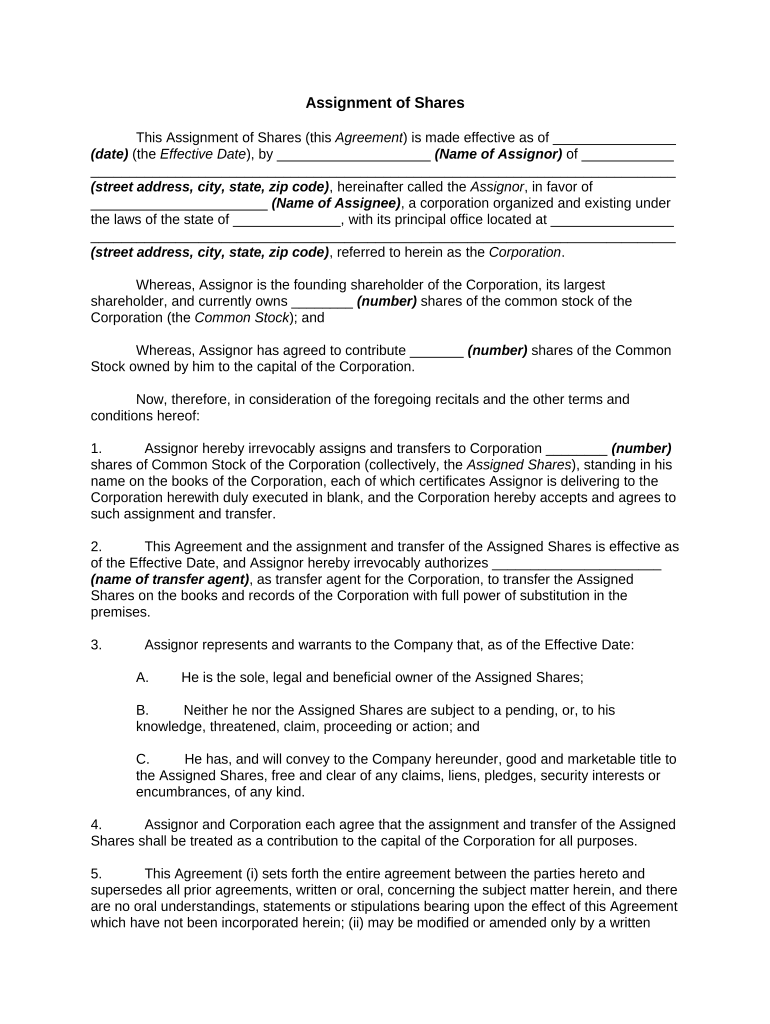
An Assignment Form is a written instrument used to transfer rights, title, or interests from one party (the assignor) to another (the assignee). Commonly used for assignments of contract rights, leases, receivables, intellectual property, and liens, the form records the parties, the asset or right being transferred, the effective date, and any consideration. For some asset types — for example real property or UCC-governed receivables — additional steps such as notarization or public filing may be required to perfect the assignment and protect downstream rights.

Why completing an accurate Assignment Form matters

A clear, correctly executed Assignment Form protects both transferor and transferee by documenting what is being transferred, when the transfer takes effect, and any conditions or limitations. Accuracy reduces the risk of disputes, prevents gaps in chain of title, and supports enforceability in court or administrative proceedings under ESIGN and UETA where electronic execution is used.

Why completing an accurate Assignment Form matters

Who typically prepares and signs an Assignment Form

Assignment Forms are used by parties across law, finance, real estate, and operations to move rights or claims between entities quickly and with legal clarity.

  • Lenders and finance teams handling assignment of receivables or loan participations.
  • Real estate professionals assigning leaseholds, options, or other property interests.
  • Legal counsel and corporate teams reassigning intellectual property or contract rights.

Essential sections to include in a professional Assignment Form

A complete Assignment Form groups identification, scope of rights, effective date, consideration, representations, signature blocks, and any recording instructions. Clear definitions and exhibits reduce ambiguity and help downstream parties verify transferred interests.

Parties

Full legal names and entity types for assignor and assignee, including state of incorporation or formation and a business address for each party.
Assigned Rights

A precise description of the rights or assets being assigned, by reference to contract section, account numbers, or exhibits to eliminate ambiguity about scope.

Consideration

The consideration paid or other exchange for the assignment, stated in dollars or specific performance terms; note if assignment is gratuitous.

Effective Date

The date on which rights transfer and obligations shift; specify time zone if relevant and whether transfer is retroactive or prospective.

Representations

Standard assignor warranties about authority, absence of conflicting encumbrances, and that assigned rights are enforceable and free of undisclosed claims.

Execution and Recording

Signature blocks for authorized signers, notary block if required, and explicit instructions for filing or recording with county clerk or UCC office when needed.

Step-by-step: filling out and executing an Assignment Form

Follow these steps to complete an Assignment Form from drafting through execution and any necessary recording.

  • 01
    Draft: Describe parties and assigned rights precisely.
  • 02
    Confirm authority: Obtain corporate resolutions or powers of attorney if needed.
  • 03
    Sign and notarize: Execute signatures and complete notary blocks if required.
  • 04
    Record or deliver: File UCC or property instruments and send copies to interested parties.

Typical workflow for executing and distributing an Assignment Form

A standard workflow moves from drafting to internal approval, execution, optional notarization/recording, and final distribution to stakeholders.

  • Drafting: Prepare form with precise asset references and exhibits.
  • Internal review: Legal and finance verify authority and consideration terms.
  • Execution: Signers execute; notarization performed if required.
  • Distribution: Deliver executed copies and record where necessary.

Configuring an online workflow for Assignment Forms

When using an eSignature platform, configure fields for parties, date, signature, and conditional logic to present only relevant clauses to each signer.

Field Configuration
Signature Fields Assign to authorized signer by role and require date stamps
Conditional Clauses Show or hide clauses based on asset type selection
Notary Block Include a notary section if jurisdiction or filing requires it
Attachments Attach exhibits and set as required before finalizing

Digital signing and technical requirements for eSubmission

Use an eSignature platform that supports role-based signing, tamper-evident PDFs, and an auditable completion certificate for each transaction.

  • File formats: PDF, DOCX supported
  • Integrations: Salesforce, NetSuite, Box
  • Authentication: Email, SMS, or advanced options

Key timing considerations and typical processing expectations

Timing for assignment effectiveness and public notice varies by asset type and jurisdiction; plan for internal approval, signing, and any recording or third-party notice periods.

Effective Date:

As stated on the form; controls rights transfer moment

Delivery to Counterparty:

Generally within 5 business days of execution

County Recording:

If required by property type, processing often takes 1–4 weeks

UCC Filing:

Filing with state UCC office is immediate to perfect security interests

Internal Retention:

Retain executed copy per company retention policy

Common preparation errors to avoid

  • Imprecise asset descriptions that fail to identify the contract or account being assigned, causing ambiguity and enforcement difficulty.
  • Missing or incorrect signatory authority — lacking corporate resolutions or outdated signer titles can lead counterparties to reject the assignment.
  • Failure to notarize or record when jurisdiction or asset type requires it, leaving the assignee without perfected rights against third parties.
  • Not delivering notice to the obligor or failing to follow contractual notice provisions, which can frustrate collection or enforcement of assigned rights.

Consequences and legal risks of an incorrect Assignment Form

Loss of Priority: Unperfected assignment
Enforceability Risk: Contract challenges
Liability Exposure: Breach claims possible
Recording Rejection: Clerical refusal
Tax Withholding: Backup withholding risks
Penalty Exposure: Fees or fines for noncompliance

Security, compliance, and data protections to consider

In Transit: TLS 1.2/1.3
At Rest: AES-256 encryption
Audit Trail: IP, timestamp, action log
HIPAA Support: BAA required
21 CFR Part 11: Available for regulated records
SOC 2: Type II certification

Representative eSignature vendor pricing and feature comparison for Assignment Forms

Compare basic starting price, trial availability, bulk send, audit trail, HIPAA support, and envelope caps when choosing an eSignature provider for assignment processing.

signNow DocuSign Adobe Sign PandaDoc HelloSign
Starting Price $8/user/mo $15/user/mo $14/user/mo $19/user/mo $15/user/mo
Free Trial Yes, 7-day trial No No Yes, limited Yes, limited
Bulk Send Yes Yes Yes Yes No
Audit Trail Yes Yes Yes Yes Yes
Envelope Cap No cap 100 envelopes/user/year Varies Varies Varies

Frequently asked questions about Assignment Forms and e-signing

Answers to common questions about authority, notarization, enforceability, revocation, and attachments when using Assignment Forms.


Need help? Contact support

be ready to get more
Join over 28 million airSlate SignNow users