Establishing secure connection…Loading editor…Preparing document…

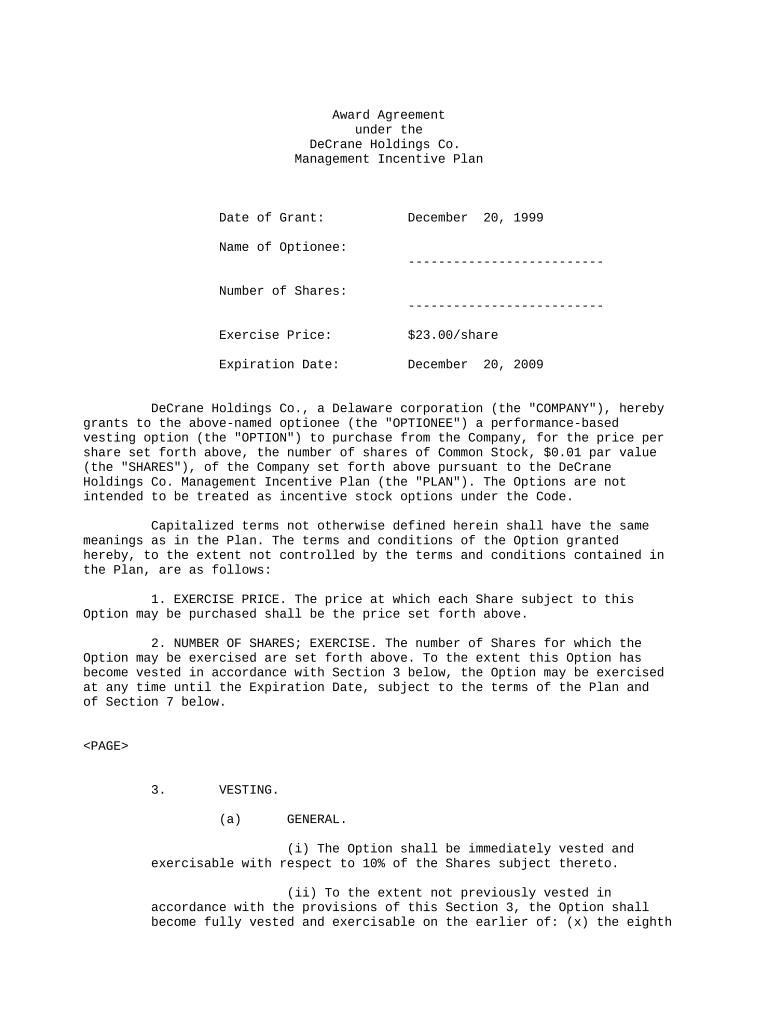
Award Agreement

This template is fully customizable. Edit the text, fill out the fields, and send it for signature. Give it a try!
Award Agreement

What an Award Agreement Is and When It Applies

An Award Agreement is a written contract that documents the grant, grantor, or issuer’s terms when conferring a benefit, payment, equity grant, prize, or grant-funded award to a recipient. It sets the effective date, scope of the award, performance or vesting schedule, payment or disbursement terms, conditions for retention or forfeiture, and any reporting or compliance obligations. Award Agreements are used by employers (equity awards), grantmakers (research or project grants), contest organizers (prize awards), and procurement teams (contractual awards). Accurate execution and clear terms reduce disputes and support enforceability across jurisdictions.

Why a Clear Award Agreement Matters

A precise Award Agreement clarifies obligations, protects parties’ expectations, and documents performance triggers and remedies. Clear terms reduce litigation risk, simplify tax and compliance reporting, and create a single authoritative record of the award’s conditions and timelines.

Why a Clear Award Agreement Matters

Who Typically Prepares and Signs Award Agreements

Organizations and individuals who grant awards prepare these agreements to document conditions, timelines, and deliverables.

  • Grantmakers and foundations completing project or research awards, requiring reporting and budget clauses.
  • Employers issuing equity, stock option, or bonus awards tied to vesting and employment conditions.
  • Event organizers or sponsors granting prizes or contests with eligibility and claim procedures.

Recipients should review terms carefully and confirm acceptance method, tax treatment, and any ongoing reporting duties.

Typical Signers and Their Roles

Grant Administrator

The grant administrator or program officer usually drafts and signs the award on behalf of the issuing organization and ensures budget, reporting, and compliance provisions are included and monitored.

Recipient Authorized Signer

An authorized officer, director, or named recipient signs to accept terms and to confirm authority to receive funds, equity, or prizes as specified in the agreement.

Essential Components of a Professional Award Agreement

A complete Award Agreement organizes legal and operational details to make obligations, schedules, and remedies immediately actionable for all parties.

Parties

Identify full legal names, business types, and contact details for grantor/issuer and recipient, including corporate titles for organizational signers.
Award Description

Describe the award precisely: amount, equity units/options, deliverables, or prize, and include any limitations or ineligible uses.

Effective Date

Specify the exact MM/DD/YYYY effective date that governs vesting, reporting deadlines, and statute of limitations calculations.

Conditions and Deliverables

List milestones, performance metrics, submission formats, reporting intervals, and consequences for missed requirements.

Payment and Tax Treatment

Document payment schedule, withholding responsibilities, reporting obligations, and any tax forms the issuer will provide.

Termination and Remedies

State termination triggers, forfeiture rules, dispute resolution method, and choice of governing law for interpretation.

Required Data Fields at a Glance

Recipient Name: Exact legal name
Issuer Name: Full legal entity
Effective Date: MM/DD/YYYY
Award Amount: Numeric currency format
Payment Terms: Schedule or milestones
Governing Law: Designated state

How to Complete and Execute an Award Agreement — Step by Step

Follow these sequential steps to prepare, verify, sign, and distribute a self-contained Award Agreement for enforceable execution.

  • 01
    Draft Details: Enter parties, award, dates, and conditions.
  • 02
    Review Compliance: Confirm tax, grant, or regulatory clauses are present.
  • 03
    Obtain Authorizations: Get internal approvals and authorized signer names.
  • 04
    Execute Signatures: Sign electronically or in-person; capture audit trail.

Configuring an Online Signing Workflow for Award Agreements

Set up a repeatable workflow to ensure correct routing, signer authentication, and document retention when completing Award Agreements online.

Field Configuration
Signer Order Sequential or parallel routing as required
Authentication Email link, SMS code, or KBA depending on risk
Required Fields Make names, dates, amounts mandatory
Retention Enable immutable audit trail and download PDFs

Digital Signing Considerations and Platform Capabilities

Choose a signing platform that supports required authentication, audit trails, and record retention for legal enforceability.

  • Authentication Options: Email, SMS, KBA, or advanced signer verification
  • Audit Trail: Timestamp, IP, and signature events recorded
  • Document Formats: PDF and DOCX with downloadable certificate

Ensure the selected platform enables reproduction of the signed record and any export formats you must archive or submit for compliance.

Where to Send and How an Executed Award Agreement Is Routed

Understand the routing destinations for an executed agreement so each stakeholder receives the executed copy and compliance teams retain records.

  • Issuer Records: Store executed copy in issuer’s contract repository
  • Recipient Copy: Send signed PDF to recipient email address
  • Finance/Payroll: Route to finance for withholding and payment setup
  • Compliance Archive: Retain in secure, access-controlled storage

Common Timelines and Deadlines to Track

Monitor critical dates within the Award Agreement to avoid missed payments, reporting deadlines, or forfeiture triggers.

Effective Date and Acceptance:

Date award becomes operative; recipient deadline to accept

Payment Dates:

Scheduled disbursement or milestone payment dates

Reporting Deadlines:

Submission dates for progress or financial reports

Vesting or Forfeiture Dates:

Dates when rights vest or lapse under terms

Record Retention Triggers:

Start date for statutory retention periods

Common Mistakes to Avoid When Preparing an Award Agreement

  • Using ambiguous consideration language such as 'reasonable amount' instead of a specific dollar figure or unit count, which invites disputes.
  • Failing to identify the exact legal entity or authorized signer, causing payment delays or rejection by finance teams.
  • Omitting tax or withholding provisions when payments are taxable, which can create unanticipated liability for issuer or recipient.
  • Neglecting to set a clear governing law and dispute resolution clause, complicating enforcement across state lines.

Risks and Practical Consequences of Errors

Tax Penalties: Backup withholding or reporting errors
Payment Delays: Funds withheld or scheduled payments missed
Contract Disputes: Ambiguity leading to litigation or arbitration
Forfeiture: Unintended loss of rights or awards
Regulatory Noncompliance: Grant conditions or public funding breaches
Recordkeeping Failures: Inability to produce signed records

Real-World Examples of Using Electronic Signing for Agreements

These condensed examples show how organizations used electronic signatures to complete agreements and preserve compliance.

Martin Properties

Local property manager needed remote execution for urgent tenant compensation awards

  • Immediate access to mobile signing reduced turnaround
  • Tim Martin: 'I can process and execute all of these documents online with 100% compliance and built-in security.'

Fertility Centers of Illinois

Healthcare provider required secure, auditable consent and award documentation

  • Enforced HIPAA controls and signature audit trails
  • John Butler: 'The airSlate SignNow team has been exceptional, responsive, the API has been great.'

eSignature Provider Comparison — Typical Pricing and Capabilities

Compare starting prices and common capability differences across providers; signNow appears first to show its baseline plan and envelope policy.

signNow DocuSign Adobe Sign PandaDoc HelloSign
Starting Price $8/user/mo $15/user/mo $14/user/mo $19/user/mo $15/user/mo
Free Trial 7-day free trial Yes, trial available Yes, trial available Yes, trial available Yes, trial available
Bulk Send Yes (Business Premium) Yes Yes Yes Varies by plan
Audit Trail Yes Yes Yes Yes Yes
HIPAA Compliant Yes (BAA) Yes (BAA) Yes (BAA) Varies by plan Varies by plan
Envelope Cap No cap 100 envelopes/user/year Varies by plan Varies Varies

Frequently Asked Questions About Award Agreements and Electronic Signing

Answers to common questions about electronic execution, enforceability, notarization, and recordkeeping for Award Agreements.


Need help? Contact support

be ready to get more
Join over 28 million airSlate SignNow users