Establishing secure connection…Loading editor…Preparing document…

Unanimous Written Action of the Board of Directors

This template is fully customizable. Edit the text, fill out the fields, and send it for signature. Give it a try!
Unanimous Written Action of the Board of Directors

What a Unanimous Written Action of the Board of Directors Is

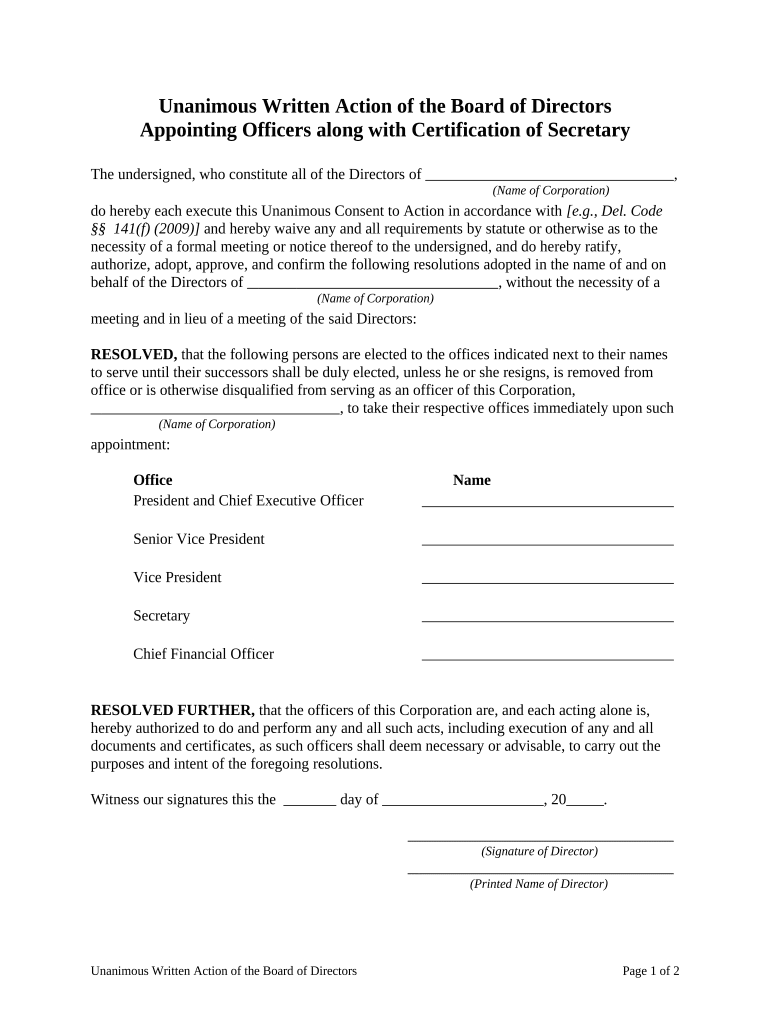
A Unanimous Written Action of the Board of Directors is a signed written consent adopted by all directors in lieu of holding a formal meeting. It documents board approval of corporate actions — for example, mergers, officer appointments, bank authorizations, or major contracts — by unanimous election rather than by convening a quorum. When properly executed and recorded in the corporate minute book, the written action has the same corporate effect as an action taken at a properly noticed and convened board meeting, provided state corporate statutes and the corporation’s bylaws permit written consents.

Why organizations use a Unanimous Written Action

Unanimous written action lets boards take timely decisions without convening a meeting, preserves formal corporate records, and reduces travel and scheduling friction when every director agrees. It is useful for routine approvals, urgent operational decisions, and when directors are geographically dispersed.

Why organizations use a Unanimous Written Action

Who typically prepares and approves a Unanimous Written Action

After execution, the corporate secretary should file the signed consent in the minute book and update related corporate registers or filings as required.

  • Corporate Secretary or General Counsel prepares the draft consent and ensures quorum and bylaw compliance.
  • Board Chair or Lead Director circulates the action to all directors for signatures and records consent.
  • Chief Executive Officer or Chief Financial Officer may request the action for urgent operational or transactional approvals.

Essential components to include in a professional written action

A complete Unanimous Written Action contains clear identification of the corporation, the precise action approved, an effective date, full director signatures, and a record retention statement so it can be entered into the corporate minute book.

Corporate Name

Full legal entity name, state of incorporation, and business address to avoid ambiguity and to match state records and the minute book.
Recitals

Brief background statements explaining why the board is taking the action and any relevant authority under the bylaws or charter.

Resolved Action

A precisely worded resolution clause describing the authority granted, approval language, and any limits or conditions on the action.

Effective Date

The specific date the consent becomes effective; this controls timing for corporate obligations and any statute of limitations considerations.

Director Signatures

Signature lines for each director with printed names, titles (if any), and signature dates showing unanimous consent.

Record Statement

A clause confirming that the signed consent will be maintained in the corporation’s minute book as an official board record.

Required information and quick-reference data

Entity Name: Full legal name
State of Incorporation: Jurisdiction
Action Description: Clear resolution text
Effective Date: MM/DD/YYYY
Director Names: Printed names
Signatures: Signed and dated

Step-by-step: complete and execute a unanimous written action

Follow these steps to prepare, circulate, sign, and file the unanimous written consent so it becomes an effective board action.

  • 01
    Draft: Prepare resolution text and include entity identification.
  • 02
    Verify Authority: Confirm bylaws allow written consent and that action requires unanimous approval.
  • 03
    Circulate: Send the consent to all directors with clear instructions and a reply deadline.
  • 04
    File: Collect signatures, insert into minute book, and update corporate records.

How to set up a digital workflow for the written action

Configure an e-signature workflow to collect signatures, capture an audit trail, and store the executed document in the minute book or corporate document system.

Field Configuration
Signature Order Concurrent signing usually used for unanimous consents
Authentication Email link or SMS code; add higher assurance if needed
Audit Trail Capture IP, timestamp, and signer email for each signature
Storage Save PDF and audit file to secure corporate repository

Where executed written actions are sent and stored

After signing, route the executed consent to the corporate secretary and to any parties who require notice; then archive in the minute book or secure records system.

  • Corporate Secretary: Primary custodian for the original signed consent
  • Board Distribution: Provide all directors final signed copy for their records
  • Corporate Records: File in the minute book or electronic records repository
  • Third Parties: Share with banks or counterparties as proof of authority

Digital signing and technical considerations

Choose configuration options that meet your risk profile and governance requirements; ensure the platform complies with ESIGN and UETA for enforceability.

  • File formats: PDF and DOCX supported
  • Authentication: Email, SMS, or stronger methods
  • Integrations: Connect to storage and DMS systems

How a unanimous written action compares with similar board documents

Compare the unanimous written action to alternatives so you can pick the correct procedure for your situation.

Document Type Unanimous Written Action Board Meeting Minutes Written Consent (Not Unanimous) Administrative Approval
Formality high high medium low
Requires Meeting
Unanimous Required n/a n/a
Public Filing Needed

Comparing eSignature vendors for executing written actions

Vendor selection affects authentication, audit trails, and cost. The table summarizes common plan and feature differences for high-level comparison.

signNow DocuSign Adobe Sign PandaDoc HelloSign
Starting Price $8/user/mo $15/user/mo $14/user/mo $19/user/mo $15/user/mo
Free Trial Yes, 7-day trial Varies Varies Varies Varies
Bulk Send Yes Yes Yes Yes No
Audit Trail Yes Yes Yes Yes Yes
HIPAA Compliant Yes Yes Yes No No

Consequences and legal risks of improper written consents

Invalid Action: Action may be void
Corporate Liability: Directors face exposure
Contract Challenges: Counterparties may refuse reliance
Regulatory Risk: Filing deadlines affected
Shareholder Disputes: May lead to litigation
Recordkeeping Failure: Loss of evidentiary proof

Common preparation errors to avoid

  • Circulating an incomplete resolution that lacks precise authority language, which can lead to ambiguity and downstream disputes over scope of approval.
  • Failing to confirm the bylaws or state law permit written consents for the specific action, which can render the consent ineffective.
  • Collecting signatures but not dating them consistently, making it difficult to determine the effective date for obligations and third-party reliance.
  • Neglecting to file the executed consent in the corporate minute book, which undermines corporate recordkeeping and may complicate audits or litigation.

Illustrative examples of when boards use unanimous written actions

These examples show practical scenarios where written consents accelerate board action while preserving formal approval records.

Privately Held Company

The board needed to approve an amended employment agreement quickly

  • All directors reviewed and signed the consent via secure e-signature
  • The corporate secretary recorded the consent in the minute book and provided signed copies to HR and legal for implementation.

Subsidiary Approval

A parent company approved an asset transfer by its wholly owned board

  • Directors unanimously signed a written action to authorize the transfer and banking instructions
  • The signed consent served as proof of authority for the bank and was retained with transaction files.

Who has authority to sign and finalize the consent

Board Chair

The board chair typically coordinates circulation and may certify the consent; the chair’s role is procedural rather than legally substituting for director signatures.

Corporate Secretary

The corporate secretary maintains the minute book, ensures the consent is properly executed and recorded, and often certifies that the consent reflects unanimous approval.

Practical tips for accurate and efficient completion

Use these best practices to reduce errors, strengthen evidentiary value, and expedite execution.

Standardize a template
Use a company-approved template that includes required corporate identifiers, a standard resolution structure, and a record retention clause to speed review and ensure consistency across actions.
Confirm bylaw provisions
Always verify that the corporation’s bylaws and the governing state statute permit unanimous written consents for the specific action to avoid invalid approvals.
Use secure e-signatures
Select an e-signature workflow that captures an audit trail including timestamps, signer email, and IP address to support enforceability and later verification.
File promptly
After execution, insert the signed consent into the minute book, update corporate registers, and deliver copies to relevant internal and external stakeholders.

Frequently asked questions about unanimous written actions

Answers to common questions about validity, signing, recordkeeping, and electronic execution of written consents.


Need help? Contact support

be ready to get more
Join over 28 million airSlate SignNow users