Establishing secure connection…Loading editor…Preparing document…

Boundary Line Agreement Regarding Fence and Driveway

This template is fully customizable. Edit the text, fill out the fields, and send it for signature. Give it a try!
Boundary Line Agreement Regarding Fence and Driveway

What this Boundary Line Agreement covers

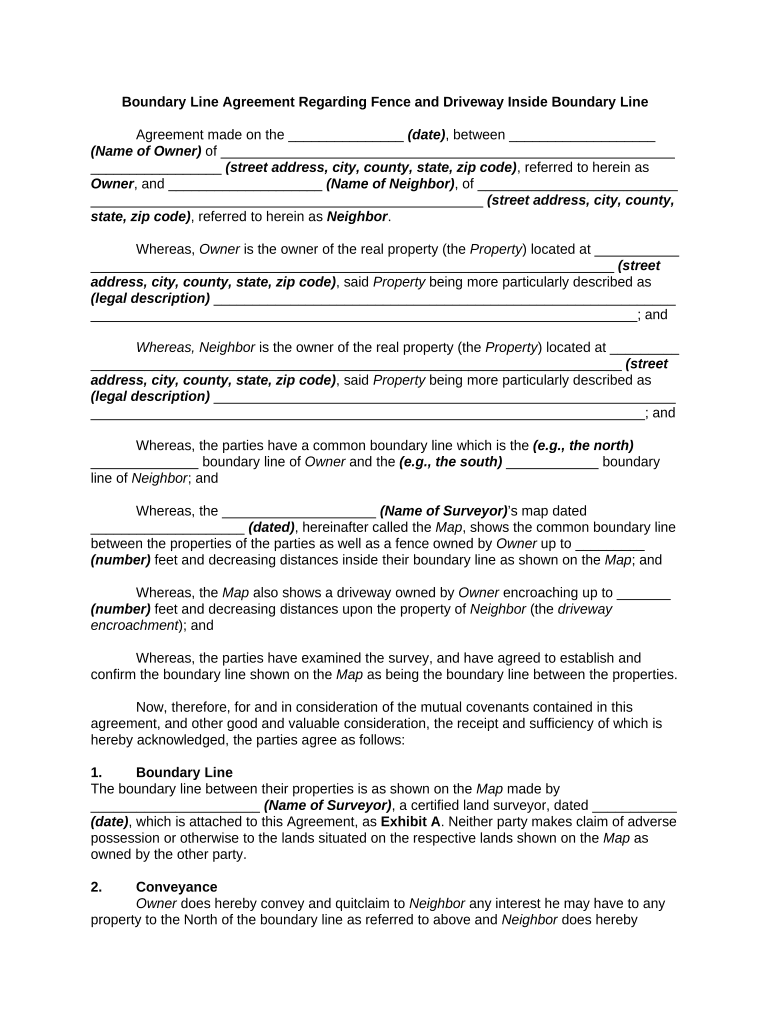
A Boundary Line Agreement Regarding Fence and Driveway is a written contract between neighboring property owners that identifies a shared or disputed property boundary and sets out agreed terms for locating, constructing, maintaining, or relocating a fence and driveway. The agreement records the parties, property descriptions, a legal or surveyed boundary line, any easements or access rights, responsibilities for installation and ongoing maintenance, and how future disputes will be resolved. Properly executed and recorded, the agreement clarifies ownership and reduces the risk of future litigation over encroachments, access, or repair obligations.

Why neighbors use a Boundary Line Agreement

A clear, written agreement prevents misunderstandings, documents mutual consent about where a fence or driveway sits, and creates enforceable obligations between owners.

Why neighbors use a Boundary Line Agreement

Who typically completes this agreement

Neighboring residential property owners and small commercial landlords often use this agreement when improvements approach a shared boundary.

  • Adjoining homeowners agreeing on fence placement or shared driveway maintenance responsibilities.
  • Landlords and tenants documenting responsibilities for access, repairs, and liability for improvements.
  • Surveyors or attorneys preparing formal language to support recording with the county recorder.

Core elements to include in a professional agreement

A robust Boundary Line Agreement should combine clear identification, measured location, responsibilities, access and easement terms, dispute resolution, and recording instructions to ensure enforceability and clear title implications.

Parties

Full legal names and mailing addresses of all owners and any affected tenants or mortgagees to identify signatories and establish who is bound by the agreement.
Property

Legal descriptions and parcel numbers for each property, plus a concise street address and city to avoid ambiguity about which parcels are affected.

Boundary Line

A surveyed line or mutual boundary description with dimensions, bearings, or an attached survey map showing the fence and driveway location relative to property corners.

Rights & Easements

Any express easements or access rights needed for construction, maintenance, or shared use of the driveway, including vehicle and pedestrian access terms.

Costs & Maintenance

Allocation of construction costs, long‑term maintenance responsibilities, schedules for repairs, and procedures for cost sharing or reimbursement.

Recording & Disputes

Instruction to record the agreement with the county recorder, and a dispute resolution clause (mediation/arbitration) plus governing law selection.

Step-by-step: completing the Boundary Line Agreement

Follow this sequence to prepare, sign, and record the agreement with minimal friction and clearer title outcomes.

  • 01
    Survey: Order or obtain a boundary survey showing fence and driveway locations.
  • 02
    Negotiate Terms: Agree on costs, maintenance, easements, and placement specifics in writing.
  • 03
    Draft Agreement: Prepare a written agreement attaching the survey and legal descriptions.
  • 04
    Execution & Record: Sign, notarize if required, and record the agreement with the county recorder.

How to configure an online completion workflow

Set up a sequential digital workflow to collect information, verify identities, and capture signatures with a complete audit trail.

Field Configuration
Document Upload Attach PDF survey and deed; enable version control.
Signature Fields Place signature, date, and initial fields for each signer.
Authentication Use email with optional SMS or ID verification for signers.
Recording Package Generate notarized PDF and recording cover sheet automatically.

Typical routing and submission process

A standard workflow ensures each step is auditable and parties receive completed copies after recording.

  • Prepare: Draft agreement and attach survey.
  • Sign: Collect signatures and notary acknowledgment if required.
  • Record: Submit executed document to county recorder for official filing.
  • Distribute: Provide recorded copy to all parties and title company.

Digital signing and platform considerations

Choose a platform that preserves an audit trail, supports notarization workflows, and exports a tamper-evident PDF.

  • Audit Trail: Timestamped events and IP addresses.
  • Notarization: Remote or in-person notarization support.
  • File Formats: PDF/A and common editable formats.

Timing and practical deadlines to track

While there is no federal filing deadline, use these timing checkpoints to protect interests and ensure recording and notice are timely.

Survey Commission:

Complete survey before negotiating terms; allows accurate location data.

Execution:

Sign and notarize within agreed period after final review.

Recording:

Record promptly to notify third parties and protect title interests.

Insurance Notification:

Notify insurers within 30 days if the agreement affects liability coverage.

Maintenance Schedule:

Document periodic maintenance dates and notice requirements.

Key milestones from negotiation to recorded document

Track these stages sequentially to manage dependencies such as survey delivery, signature collection, and county recording.

01

Survey Delivered

Surveyor delivers map and legal description for review.

02

Terms Finalized

Parties agree on placement, costs, and easements in writing.

03

Execution & Notary

All signatories sign before notary if required by state law.

04

Recordation

Document recorded at county recorder and copies distributed.

Essential data to capture for legal and title clarity

Owner Names: Exact legal names
Parcel IDs: Assessor parcel numbers
Survey Date: Survey issue date
Easement Terms: Scope and duration
Cost Allocation: Who pays what
Recording Info: Recorder book and page

Risks of an incomplete or incorrect agreement

Unrecorded Interest: May not bind third parties
Title Disputes: Encourages litigation risk
Insurance Gaps: Coverage disputes possible
Cost Allocation Unclear: Payment disagreements
Invalid Signatures: Non-compliance with notarization
Survey Errors: Misplaced boundary lines

Common pitfalls when preparing the agreement

  • Relying on an informal line-of-sight rather than a professional survey can lead to inaccurate boundary placement and later disputes.
  • Failing to obtain or attach the recorded survey and legal descriptions often causes title companies to refuse to insure or accept the agreement.
  • Not specifying maintenance schedules or cost-sharing formulas invites recurring disagreements and administrative burden for owners.
  • Skipping recording or delaying filing means the agreement may not be enforceable against third parties or future buyers.

Real-world examples of how boundary agreements are used

These brief examples show practical outcomes when neighbors formalize fence and driveway arrangements.

Neighbor Fence Resolution

A homeowner and neighbor agreed to shift a fence 2 feet onto one parcel to match survey markers.

  • The move avoided litigation.
  • The recorded agreement allocated costs, required shared maintenance, and prevented future encroachment claims by successors.

Shared Driveway Easement

Two properties formalized shared driveway access and maintenance responsibilities.

  • They documented repair cost splits.
  • The recorded easement clarified vehicle access, assigned repair obligations, and made it simpler to obtain homeowner insurance coverage for the shared area.

eSignature vendor comparison for completing and recording agreements

Comparison of common vendor attributes to consider when selecting an eSignature provider for boundary agreements requiring signatures, audit trails, and notarization.

signNow DocuSign Adobe Sign PandaDoc HelloSign
Starting Price $8/user/mo $15/user/mo $14/user/mo $19/user/mo $15/user/mo
Free Trial 7-day free trial Varies by vendor Varies by vendor Varies by vendor Varies by vendor
Bulk Send Yes Yes Yes Yes No
Audit Trail Yes Yes Yes Yes Yes
HIPAA Compliant Yes Yes Yes No No

Frequently asked questions about boundary agreements

Answers to common questions about execution, recording, notarization, and what to do if a dispute arises.


Need help? Contact support

be ready to get more
Join over 28 million airSlate SignNow users