Establishing secure connection…Loading editor…Preparing document…

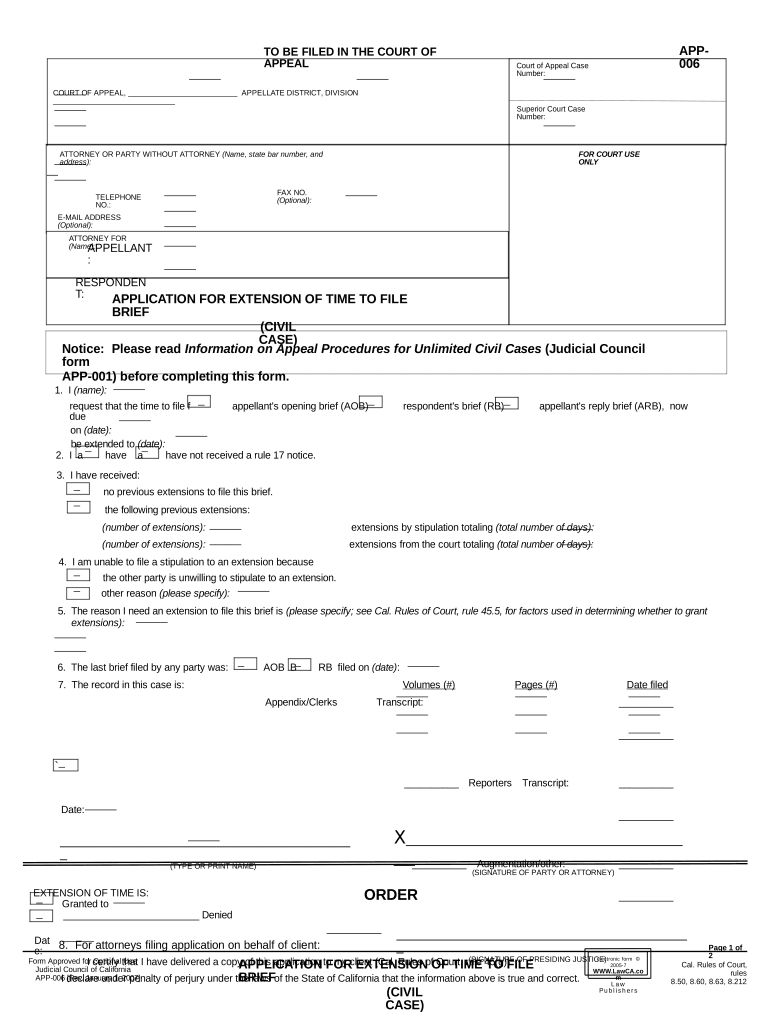
California Application for Extension of Time to File Brief

This template is fully customizable. Edit the text, fill out the fields, and send it for signature. Give it a try!
California Application for Extension of Time to File Brief

What this California Application is and when it applies

The California Application for Extension of Time to File Brief is a court filing used to request additional time to file an appellate brief in a California state court. It explains why the filing party cannot meet the existing deadline, proposes a new deadline or extension period, and asks the clerk or judge to grant relief under the court's procedural rules. Typical use includes appellate briefs, petitions for rehearing, or other time‑sensitive appellate filings where counsel or a party needs more preparation time. Proper service and timely filing are required to preserve appellate rights.

Why an extension application matters for your appeal

An accurate and timely application avoids forfeiture of appellate issues, preserves the right to be heard, and documents good cause for delay under court rules. A clear application reduces the risk of clerk rejection or judicial sanction.

Why an extension application matters for your appeal

Who typically prepares and files this application

The application should be prepared by the person responsible for briefing and must include service on opposing parties per local rules.

  • Appellate attorneys preparing briefs and motions with workload conflicts or additional evidence to review
  • Pro se litigants who need more time to research or obtain records before drafting their brief
  • Trial counsel or parties coordinating record transmission, transcripts, or multiple appeals

Step-by-step: complete and file the extension application

Follow a consistent sequence: prepare caption and facts, attach supporting declarations, serve opposing parties, and file with the court clerk or electronic filing service.

  • 01
    Prepare caption: Use exact case title and court designation.
  • 02
    Explain reasons: State specific, new facts or scheduling conflicts.
  • 03
    Attach declaration: Include signed, dated declaration supporting the request.
  • 04
    Serve and file: Serve all parties then file per court e‑filing rules.

Configure an online workflow for preparing and submitting the application

Set up a repeatable e‑filing flow: template, required fields, signer, and delivery options to ensure consistent, court‑ready filings.

Template Create a reusable application template with fixed caption fields
Mandatory Fields Lock docket number, court name, and requested date
Signer Assign attorney or party as signer with contact details
Service Options Add email, e‑service, and physical mailing steps
Retention Store copy in case folder for appellate record

Where to send and how filing typically moves through the court

After preparation and service, route the application via the court's accepted filing channel and monitor for clerk acceptance and any scheduling order.

  • Court Clerk: File with the clerk by e‑file or accepted physical method
  • Electronic Filing Service: Use the court's e‑filing vendor when required
  • Opposing Counsel: Serve counsel by email, e‑service, or mail per rules
  • Judge or Calendar Dept: Court may issue order or require supplemental briefing

Digital signing and technical requirements

Ensure signatures and timestamps align with e‑filing vendor requirements and retain audit trail evidence for service and authentication.

  • File Format: PDF/A preferred for court filings
  • Authentication: Email or multi‑factor signer verification
  • Supporting Files: Attach declarations and exhibits as separate PDFs

Key timing rules and expectations for filing an extension

Timeliness matters: file the application before the existing brief deadline, and serve opposing parties in the manner required by court rules.

File Before Deadline:

Submit application prior to the brief's due date to preserve options

Service Timing:

Serve opposing parties per local rules at the time of filing

Judge's Discretion:

Court decides on good cause and may set conditions

Emergency Filings:

Use ex parte procedures only when urgent and authorized

E‑filing Processing:

Clerk acceptance times vary by court and vendor

Milestones from preparation through court decision

A sequential milestone view helps track tasks and deadlines from filing to court disposition.

01

Draft Application

Prepare caption, reasons, and supporting declaration

02

Serve Parties

Effect service on all counsel and unrepresented parties

03

File with Clerk

Upload or deliver application per e‑filing rules

04

Await Ruling

Monitor clerk entry and judge's order or hearing date

Required information to include on the application

Case Title: Full caption as on the appellate docket
Docket Number: Exact appellate case or docket number
Court Name: Name of appellate court or division
Applicant: Name of party or counsel seeking extension
Requested Extension: Length or new due date requested
Supporting Facts: Concise reasons and signed declaration

Consequences of filing incorrectly or too late

Denial of Extension: Court may refuse additional time
Waiver of Issues: Late briefs can forfeit appellate issues
Sanctions Risk: Court may impose fees or sanctions
Clerk Rejection: Filing defects can lead to rejection
Service Defect: Improper service may invalidate filing
Preservation Failure: Missing record or transcript risks appeal

Common mistakes to avoid when preparing the application

  • Missing or incorrect docket number that causes misfiling or clerk rejection and delays the court's review.
  • Vague declarations that do not show good cause or explain why prior extensions were not sought earlier.
  • Failure to serve opposing counsel correctly under local rules, producing a procedural defect and possible rejection.
  • Submitting exhibits in non‑searchable or wrong file formats that e‑filing vendors or the clerk will not accept.

Elements of a professional extension application

A well‑prepared application is clear, supported by sworn declaration, properly captioned, served on all parties, and formatted to meet e‑filing and clerk requirements.

Caption

Complete official caption with court name and docket number presented exactly as required by the appellate court.
Clear Request

Plain statement of the exact extension sought, including number of days or a proposed new filing date.

Support Declaration

Signed declaration describing facts, reasons for delay, steps taken, and any schedule constraints.

Proposed Order

Draft order for the court to sign that sets the new deadline and any conditions.

Exhibits

Attach relevant evidence such as transcript orders, scheduling conflicts, or medical documentation as separate PDFs.

Proof of Service

Complete certificate of service showing method, date, and recipients for the filing.

Examples: when an extension application is appropriate

Real situations illustrate typical grounds for extension requests and how courts respond in practice.

Overlapping Briefs

Attorney on multiple dockets with overlapping deadlines needs more time to prepare

  • Court schedules often permit a short extension when promptly requested
  • Drafted application explained conflict, attached calendar, served opposing counsel, and the court granted a ten‑day extension with a briefing schedule.

Unavailable Transcript

Transcript production delayed beyond control of counsel, hindering brief preparation

  • Declaration from reporter documents delay
  • Applicant filed application attaching the reporter declaration and proposed new deadline; the court set a revised briefing date tied to transcript delivery.

Comparing eSignature providers for filing and signing court documents

The table contrasts common commercial eSignature plans and features relevant to preparing and signing court filings; signNow appears first to show its pricing and feature position clearly.

signNow DocuSign Adobe Sign PandaDoc HelloSign
Starting Price $8/user/mo $15/user/mo $14/user/mo $19/user/mo $15/user/mo
Free Trial 7‑day free trial Yes, varies Yes, varies Yes, varies Yes, varies
Bulk Send Yes Yes Yes Yes No
Audit Trail Yes Yes Yes Yes Yes
HIPAA Compliant Yes Yes Yes No No

FAQs: common questions about extension applications

Practical answers to routine questions about timing, signatures, service, and preserving appellate rights when seeking more time.


Need help? Contact support

be ready to get more
Join over 28 million airSlate SignNow users