Establishing secure connection…Loading editor…Preparing document…

Business Trust Template

This template is fully customizable. Edit the text, fill out the fields, and send it for signature. Give it a try!
Business Trust Template

What a Business Trust Template Is and When It Applies

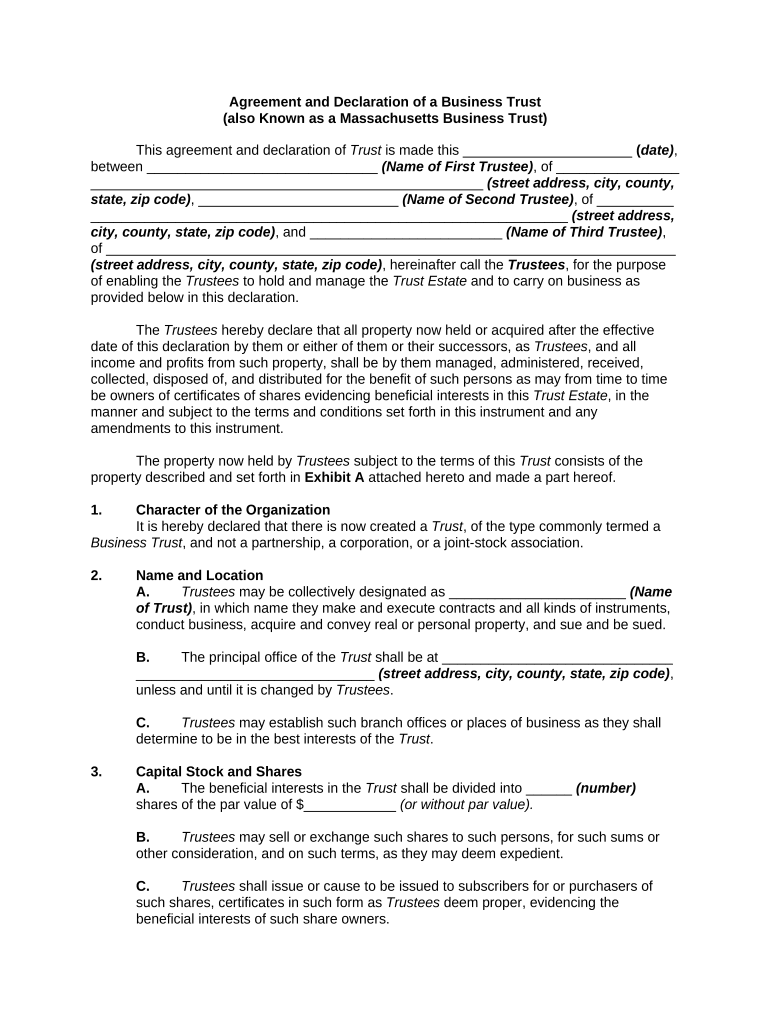
The Business Trust Template is a standardized legal form used to document a trust that holds business assets, equity interests, or revenue streams for beneficiaries. It identifies the settlor, trustee, beneficiaries, asset schedules, trustee powers, distribution rules, amendment procedures, and termination mechanics. Organizations and advisors adapt the template to state law and transaction specifics, attach exhibits that list owned entities or intellectual property, and use it as the foundation for bank relationships, title transfers, and investor reporting to reduce repetitive drafting and clarify governance.

Why Use a Business Trust Template

A Business Trust Template clarifies ownership and management roles, reduces negotiation time, and creates a consistent record for banks, investors, and courts. Standardized clauses for trustee authority, distributions, and transfer limits lower ambiguity and legal risk while simplifying repeat transactions.

Why Use a Business Trust Template

Who Typically Prepares or Signs This Template

Typical users who rely on a Business Trust Template include trustees, attorneys, and business owners preparing asset-holding arrangements.

  • Trustees managing corporate assets and distributions on behalf of beneficiaries
  • Business owners transferring ownership or segregating assets for liability protection
  • Attorneys drafting, reviewing, or customizing trust terms for compliance and client needs

Stepwise Process to Complete and Execute the Template

Follow these steps to populate, review, and finalize the Business Trust Template for execution, recording, and retention.

  • 01
    Prepare Parties: Enter settlor, trustee, and beneficiary details
  • 02
    Describe Assets: Attach schedules listing each asset with identifiers
  • 03
    Set Powers: Define trustee authorities and distribution rules
  • 04
    Execute & Notarize: Sign, date, and obtain required notarizations or witnesses

Core Sections Every Professional Business Trust Template Should Include

A robust Business Trust Template organizes parties, powers, assets, distributions, amendment rules, and termination provisions to reduce disputes and simplify administration.

Parties

Identify settlor, trustee, and beneficiaries with legal names, entity types, and contact details. State each party's role and capacity to avoid later enforcement or banking issues.
Trustee Powers

Define explicit trustee authorities, limits, investment powers, indemnification, and procedures for appointing successors. Clear authority reduces internal disputes and third-party resistance.

Asset Schedule

Attach detailed schedules for equity, membership units, real property, and intellectual property with legal descriptions or registration identifiers and declared valuations or allocation rules.

Distributions

State timing, priority, percentages, formula-based distributions, and reserve requirements. Address tax withholding responsibilities and reporting obligations for distributed amounts.

Amendment

Specify how amendments are authorized, required consents, notice periods, and effective dates. Clarify voting thresholds or trustee-consent mechanisms for durable changes.

Termination

Describe winding procedures, asset distribution order, successor trustee appointment, final tax obligations, and required recordkeeping after termination to comply with regulators.

Security and Compliance Considerations for Templates and Signed Records

Encryption in transit: TLS 1.2 and 1.3 encryption in transit
Encryption at rest: AES-256 encryption for stored records
Compliance standards: ESIGN, UETA, HIPAA (BAA available), SOC 2 Type II
Access controls: Role-based permissions and detailed audit trails
Retention support: Exportable records for legal retention and audits
Accessibility: WCAG 2.0 Level AA accessibility support

Key Risks and Penalties from Inaccurate or Incomplete Templates

Incorrect TIN: Triggers 24% backup withholding
Late filings: IRS penalties up to $330 per form
Missing notarization: May invalidate recorded transfers
Fiduciary breaches: Liability and damages claims
Improper amendment: Disputes over authority and validity
Privacy violations: HIPAA or CCPA fines if PHI exposed

Common Preparation Mistakes to Avoid

  • Vague trustee powers that omit investment or distribution authority create disputes and may block bank acceptance for asset transactions
  • Incomplete asset descriptions or missing legal identifiers lead to title defects and recording rejections when real property or certificates are involved
  • Mismatched beneficiary names, missing TINs, or incorrect addresses can trigger backup withholding or delay tax reporting and payments
  • Skipping notarization or required witness steps for recorded transfers risks invalidation of deeds and additional legal expense to cure defects

Real-World Situations Where a Business Trust Template Helps

These concise examples show practical uses for a Business Trust Template across property, startup, and investment contexts.

Property Holding Trust

A local property owner consolidated multiple rental properties into a single business trust to simplify management and reduce personal liability.

  • The trust centralized distribution rules and banking procedures for rents and expenses.
  • Using the template, counsel attached property schedules and ensured notarizations before recording deeds, which reduced repetitive drafting and clarified successor trustee powers for eventual sale.

Startup Equity Trust

Founders placed founder equity and IP into a trust to manage vesting and investor distribution mechanics.

  • The template specified trustee investment powers and transfer restrictions.
  • Attaching a cap table schedule and explicit amendment rules helped investors review terms quickly and streamlined later rounds by avoiding individualized equity transfer documents.

How to Customize and Configure the Template Online

Map template fields to platform settings and authentication to ensure consistent behavior during electronic completion and signing.

Field Configuration
Document Template Upload PDF or Word DOCX; set version control and template name
Fields Placement Drag-and-drop signature, initials, dates, and conditional fields
Authentication Choose email, SMS code, KBA, or SSO for signer verification
Notifications Set signer order, reminders, and completion notifications

Technical Needs for Digital Completion and Signing

Use platforms that support PDF/DOCX templates, conditional fields, audit trails, and secure signer authentication to create legally defensible records.

  • Formats: PDF, Word DOCX, and HTML supported
  • Integrations: Salesforce, NetSuite, Microsoft 365 integrations available
  • Auth Methods: Email, SMS code, knowledge-based, and SSO options

Where to Send or File the Completed Document

Routing varies by purpose: internal records, bank delivery, county recording, or investor distribution each have different destinations and required attachments.

  • Prepare: Complete template, attach asset schedules, and obtain counsel review
  • Place Fields: Add signature, date, and initial fields; set signer order
  • Send for Signature: Distribute to trustees and beneficiaries with chosen authentication
  • Finalize & Store: Collect signed copies, notarizations, and store exports for retention

Key Related Deadlines and Filing Timelines to Keep in Mind

The template itself has no universal filing due date, but related tax, reporting, and retention deadlines affect timing for providing supporting forms and records.

W-9 Provision:

Provide to payers upon request; no fixed statutory deadline

1099-NEC Filing:

Recipient and IRS copies due January 31 each year

1040 Tax Return:

Individual returns due April 15; extensions to Oct 15

I-9 Retention Rule:

Retain for three years after hire or one year after termination

RON Recordkeeping:

Audio-video session retention typically five to ten years

Practical Tips for Accurate and Efficient Completion

Adopt consistent practices that reduce errors, speed execution, and preserve enforceability when using the template.

Use precise identifiers
Include full legal names, EINs, property legal descriptions, and registration numbers to prevent bank, title, or tax friction during transfers or reporting.
Standardize amendment language
Require clear consent thresholds and written notice procedures so amendments follow a predictable process and reduce later disputes about authority.
Verify signer identity
Apply appropriate signer authentication — email, SMS code, or knowledge-based checks — and retain audit trails that show attribution and intent for each signature.
Document retention and export
Store final signed PDFs and maintain backup exports (PDF/A) with notarizations, schedules, and related correspondence for the full retention period.

Representative Signer and Reviewer Profiles

Corporate Trustee

A corporate trustee typically uses the template to centralize asset administration for multiple beneficiary classes; duties include recordkeeping, distributions per schedule, and compliance with corporate governance and banking requirements.

Family Office

A family office employs the trust template to hold business interests and manage succession planning, ensuring clear beneficiary designations, tax identifiers, and successor trustee provisions for continuity.

Frequently Asked Questions About the Business Trust Template

Answers to common questions about eSigning, notarization, retention, and amendment of Business Trust Templates to prevent mistakes and litigation exposure.


Need help? Contact support

be ready to get more
Join over 28 million airSlate SignNow users