Establishing secure connection… Loading editor… Preparing document…
Navigation

Fill and Sign the Bylaws Professional Form
Fill and Sign the Bylaws Professional Form

How it works

Open the document and fill out all its fields.
Apply your legally-binding eSignature.
Save and invite other recipients to sign it.

Rate template

4.8
57 votes
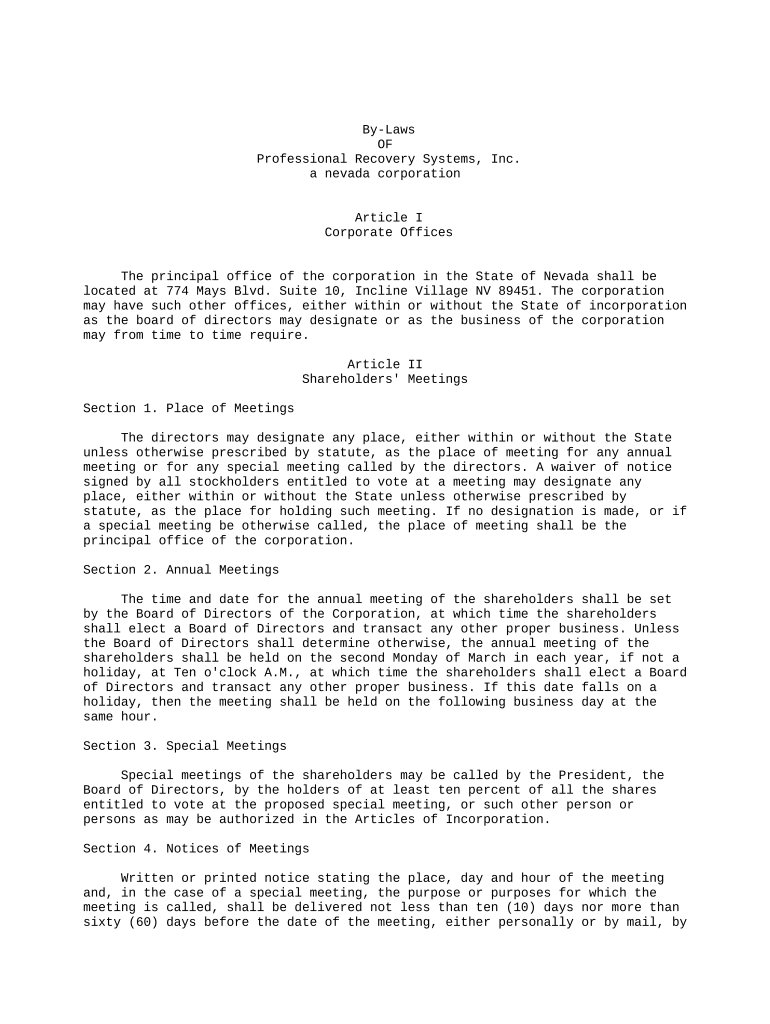
By-Laws OF Professional Recovery Systems, Inc. a nevada corporation Article I Corporate Offices The principal office of the corporation in the State of Nevada shall be located at 774 Mays Blvd. Suite 10, Incline Village NV 89451. The corporation may have such other offices, either within or without the State of incorporation as the board of directors may designate or as the business of the corporation may from time to time require. Article II Shareholders' Meetings Section 1. Place of Meetings The directors may designate any place, either within or without the State unless otherwise prescribed by statute, as the place of meeting for any annual meeting or for any special meeting called by the directors. A waiver of notice signed by all stockholders entitled to vote at a meeting may designate any place, either within or without the State unless otherwise prescribed by statute, as the place for holding such meeting. If no designation is made, or if a special meeting be otherwise called, the place of meeting shall be the principal office of the corporation. Section 2. Annual Meetings The time and date for the annual meeting of the shareholders shall be set by the Board of Directors of the Corporation, at which time the shareholders shall elect a Board of Directors and transact any other proper business. Unless the Board of Directors shall determine otherwise, the annual meeting of the shareholders shall be held on the second Monday of March in each year, if not a holiday, at Ten o'clock A.M., at which time the shareholders shall elect a Board of Directors and transact any other proper business. If this date falls on a holiday, then the meeting shall be held on the following business day at the same hour. Section 3. Special Meetings Special meetings of the shareholders may be called by the President, the Board of Directors, by the holders of at least ten percent of all the shares entitled to vote at the proposed special meeting, or such other person or persons as may be authorized in the Articles of Incorporation. Section 4. Notices of Meetings Written or printed notice stating the place, day and hour of the meeting and, in the case of a special meeting, the purpose or purposes for which the meeting is called, shall be delivered not less than ten (10) days nor more than sixty (60) days before the date of the meeting, either personally or by mail, by the direction of the president, or secretary, or the officer or persons calling the meeting. If mailed, such notice shall be deemed to be delivered when deposited in the United States mail, addressed to the stockholder at his address as it appears on the stock transfer books of the corporation, with postage thereon prepaid. Closing of Transfer Books or Fixing Record Date. (a) For the purpose of determining stockholders entitled to notice of or to vote at any meeting of stockholders or any adjournment thereof, or stockholders entitled to receive payment of any dividend, or in order to make a determination of stockholders for any other proper purpose, the directors of the corporation may provide that the stock transfer books shall be closed for a stated period but not to exceed, in any case twenty (20) days. If the stock transfer books be closed for the purpose of determining stockholders entitled to notice or to vote at a meeting of stockholders, such books shall be closed for at least twenty (20) days immediately preceding such meeting. (b) In lieu of closing the stock transfer books, the directors may prescribe a day not more than sixty (60) days before the holding of any such meeting as the day as of which stockholders entitled to notice of the and to vote at such meeting must be determined. Only stockholders of record on that day are entitled to notice or to vote at such meeting (c) The directors may adopt a resolution prescribing a date upon which the stockholders of record are entitled to give written consent to actions in lieu of meeting. The date prescribed by the directors may not precede nor be more than ten (10) days after the date the resolution is adopted by directors. Section 5. Voting List. The officer or agent having charge of the stock transfer books for the shares of the corporation shall make, at least ten (10) days before each meeting of stockholders, a complete list of stockholders entitled to vote at such meeting, or any adjournment thereof, arranged in alphabetical order, with the address of and number of shares held by each, which list, for a period of ten (10) days prior to such meeting, shall be kept on file at the principal office of the corporation and shall be subject to inspection by any stockholder at any time during usual business hours. Such list shall also be produced and kept open at the time and place of the meeting and shall be subject to the inspection of any stockholder during the whole time of the meeting. The original stock transfer book shall be prima facie evidence as to who are the stockholders entitled to examine such list or transfer books or to vote at the meeting of stockholders. Section 6. Quorum. At any meeting of stockholders, a majority of fifty percent plus one vote, of the outstanding shares of the corporation entitled to vote, represented in person or by proxy, shall constitute a quorum at a meeting of stockholders. If less than said number of the outstanding shares are represented at a meeting, a majority of the outstanding shares so represented may adjourn the meeting from time to time without further notice. At such adjourned meeting at which a quorum shall be present or represented, any business may be transacted which might have been transacted at the meeting originally notified. The stockholders present at a duly organized meeting may continue to transact business until adjournment, notwithstanding the withdrawal of enough stockholders to leave less than a quorum. Section 7. Proxies. At all meetings of the stockholders, a stockholder may vote by proxy executed in writing by the stockholder or by his duly authorized attorney in fact. Such proxy shall be filed with the secretary of the corporation before or at the time of the meeting. Such proxies may be deposited by electronic transmission. Section 8. Voting. Each stockholder entitled to vote in accordance with the terms and provisions of the certificate of incorporation and these by-laws shall be entitled to one vote, in person or by proxy, for each share of stock entitled to vote held by such shareholder. Upon the demand of any stockholder, the vote for directors and upon any question before the meeting shall be by ballot. All elections for directors shall be decided by plurality vote; all other questions shall be decided by majority vote except as otherwise provided by the Certificate of Incorporation or the laws of Nevada. Section 9. Order of Business. The order of business at all meetings of the stockholders, shall be as follows: a. Roll Call. b. Proof of notice of meeting or waiver of notice. c. Reading of minutes of preceding meeting. d. Reports of Officers. e. Reports of Committees. f. Election of Directors. g. Unfinished Business. h. New Business. Section 10. Informal Action by Stockholders. Unless otherwise provided by law, any action required to be taken, or any other action which may be taken, at a meeting of the stockholders, may be taken without a meeting if a consent in writing, setting forth the action so taken, shall be signed by all of the stockholders entitled to vote with respect to the subject matter thereof. Unless otherwise provided by law, any action required to be taken, or any other action which may be taken, at a meeting of the stockholders, may be taken without a meeting if a consent in writing, setting forth the action so taken, shall be signed by a Majority of all of the stockholders entitled to vote with respect to the subject matter thereof at any regular meeting called on notice, and if written notice to all shareholders is promptly given of all action so taken. Section 11. Books and Records. The Books, Accounts, and Records of the corporation, except as may be otherwise required by the laws of the State of Nevada, may be kept outside of the State of Nevada, at such place or places as the Board of Directors may from time to time appoint. The Board of Directors shall determine whether and to what extent the accounts and the books of the corporation, or any of them, other than the stock ledgers, shall be open to the inspection of the stockholders, and no stockholder shall have any right to inspect any account or book or document of this Corporation, except as conferred by law or by resolution of the stockholders or directors. In the event such right of inspection is granted to the Stockholder(s) all fees associated with such inspection shall be the sole expense of the Stockholder(s) demanding the inspection. No book, account, or record of the Corporation may be inspected without the legal counsel and the accountants of the Corporation being present. The fees charged by legal counsel and accountants to attend such inspections shall be paid for by the Stockholder demanding the inspection. Article III Board of Directors Section 1. General Powers. The business and affairs of the corporation shall be managed by its board of directors. The directors shall in all cases act as a board, and they may adopt such rules and regulations for the conduct of their meetings and the management of the corporation, as they may deem proper, not inconsistent with these by-laws and the laws of this State. Section 2. Number, Tenure, and Qualifications. The number of directors of the corporation shall be a minimum of one (l) and a maximum of nine (7), or such other number as may be provided in the Articles of Incorporation, or amendment thereof. Each director shall hold office until the next annual meeting of stockholders and until his successor shall have been elected and qualified. Section 3. Regular Meetings. A regular meeting of the directors, shall be held without other notice than this by-law immediately after, and at the same place as, the annual meeting of stockholders. The directors may provide, by resolution, the time and place for holding of additional regular meetings without other notice than such resolution. Section 4. Special Meetings. Special meetings of the directors may be called by or at the request of the president or any two directors. The person or persons authorized to call special meetings of the directors may fix the place for holding any special meeting of the directors called by them. Section 5. Notice. Notice of any special meeting shall be given at least one day previously thereto by written notice delivered personally, or by telegram or mailed to each director at his business address. If mailed, such notice shall be deemed to be delivered when deposited in the United States mail so addressed, with postage thereon prepaid. The attendance of a director at a meeting shall constitute a waiver of notice of such meeting, except where a director attends a meeting for the express purpose of objecting to the transaction of any business because the meeting is not lawfully called or convened. Section 6. Quorum. At any meeting of the directors fifty (50) percent shall constitute a quorum for the transaction of business, but if less than said number is present at a meeting, a majority of the directors present may adjourn the meeting from time to time without further notice. Section 7. Manner of Acting. The act of the majority of the directors present at a meeting at which a quorum is present shall be the act of the directors. Section 8. Newly Created Directorships and Vacancies. Newly created directorships resulting from an increase in the number of directors and vacancies occurring in the board for any reason except the removal of directors without cause may be filled by a vote of the majority of the directors then in office, although less than a quorum exists. Vacancies occurring by reason of the removal of directors without cause shall be filled by vote of the stockholders. A director elected to fill a vacancy caused by resignation, death or removal shall be elected to hold office for the unexpired term of his predecessor. Section 9. Removal of Directors. Any or all of the directors may be removed for cause by vote of the stockholders or by action of the board. Directors may be removed without cause only by vote of the stockholders. Section 10. Resignation. A director may resign at any time by giving written notice to the board, the president or the secretary of the corporation. Unless otherwise specified in the notice, the resignation shall take effect upon receipt thereof by the board or such officer, and the acceptance of the resignation shall not be necessary to make it effective. Section 11. Compensation. No compensation shall be paid to directors, as such, for their services, but by resolution of the board a fixed sum and expenses for actual attendance at each regular or special meeting of the board may be authorized. Nothing herein contained shall be construed to preclude any director from serving the corporation in any other capacity and receiving compensation therefor. Section 12. Executive and Other Committees. The board, by resolution, may designate from among its members an executive committee and other committees, each consisting of one (l) or more directors. Each such committee shall serve at the pleasure of the board. Article IV Officers Section 1. Number. The officers of the corporation shall be the president, a secretary and a treasurer, each of whom shall be elected by the directors. Such other officers and assistant officers as may be deemed necessary may be elected or appointed by the directors. Section 2. Election and Term of Office. The officers of the corporation to be elected by the directors shall be elected annually at the first meeting of the directors held after each annual meeting of the stockholders. Each officer shall hold office until his successor shall have been duly elected and shall have qualified or until his death or until he shall resign or shall have been removed in the manner hereinafter provided. In the event that no election of officers be held by the directors at that time, the existing officers shall be deemed to have been confirmed in office by the directors. Section 3. Removal. Any officer or agent elected or appointed by the directors may be removed by the directors whenever in their judgement the best interest of the corporation would be served thereby, but such removal shall be without prejudice to contract rights, if any, of the person so removed. Section 4. Vacancies. A vacancy in any office because of death, resignation, removal, disqualification or otherwise, may be filled by the directors for the unexpired portion of the term. Section 5. President. The president shall be the principal executive officer of the corporation and, subject to the control of the directors, shall in general supervise and control all of the business and affairs of the corporation. He shall, when present, preside at all meetings of the stockholders and of the directors. He may sign, with the secretary or any other proper officer of the corporation thereunto authorized by the directors, certificates for shares of the corporation, any deeds, mortgages, bonds, contracts, or other instruments which the directors have authorized to be executed, except in cases where the directors or by these by-laws to some other officer or agent of the corporation, or shall be required by law to be otherwise signed or executed; and in general shall perform all duties incident to the office of president and such other duties as may be prescribed by the directors from time to time. Section 6. Chairman of the Board. In the absence of the president or in the event of his death, inability or refusal to act, the chairman of the board of directors shall perform the duties of the president, and when so acting, shall have all the powers of and be subject to all the restrictions upon the president. The chairman of the board of directors shall perform such other duties as from time to time may be assigned to him by the directors. Section 7. Secretary. The secretary shall keep the minutes of the stockholders' and of the directors' meetings in one or more books provided for that purpose, see that all notices are duly given in accordance with the provisions of these by-laws or as required, be custodian of the corporate records and of the seal of the corporation and keep a register of the post office address of each stockholder which shall be furnished to the secretary by such stockholder, have general charge of the stock transfer books of the corporation and in general perform all the duties incident to the office of secretary and such other duties as from time to time may be assigned to him by the president or by the directors. Section 8. Treasurer. If required by the directors, the treasurer shall give a bond for the faithful discharge of his duties in such sum and with such surety or sureties as the directors shall determine. He shall have charge and custody of and be responsible for all funds and securities of the corporation; receive and give receipts for moneys due and payable to the corporation from any source whatsoever, and deposit all such moneys in the name of the corporation in such banks, trust companies or other depositories as shall be selected in accordance with these by- laws and in general perform all of the duties incident to the office of treasurer and such other duties as from time to time may be assigned to him by the president or by the directors. Section 9. Salaries. The salaries of the officers shall be fixed from time to time by the directors and no officer shall be prevented from receiving such salary by reason of fact that he is also a director of the corporation. Article V Contracts, Loans, Checks and Deposits Section 1. Contracts. The directors may authorize any officer or officers, agent or agents to enter into any contract or execute and deliver any instrument in the name of and on behalf of the corporation, and such authority may be general or confined to specific instances. Section 2. Loans. No loans shall be contracted on behalf of the corporation and no evidences of indebtedness shall be issued in its name unless authorized by a resolution of the directors. Such authority may be general or confined to specific instances. Section 3. Checks, Drafts, etc. All checks, drafts or other orders for the payment of money, notes or other evidences of indebtedness issued in the name of the corporation, shall be signed by such officer or officers, agent or agents of the corporation and in such manner as shall from time to time be determined by resolution of the directors. Section 4. Deposits. All funds of the corporation not otherwise employed shall be deposited from time to time to the credit of the corporation in such banks, trust companies or other depositories as the directors may select. Article VI Fiscal Year The fiscal year of the corporation shall begin on the 1st day of January in each year, or on such other day as the Board of Directors shall fix. Article VII Dividends The directors may from time to time declare, and the corporation may pay, dividends on its outstanding shares in the manner and upon the terms and conditions provided by law. Article VIII Seal The directors may provide a corporate seal which shall have inscribed thereon the name of the corporation, the state of incorporation, year of incorporation and the words, "Corporate Seal". Article IX Waiver of Notice Unless otherwise provided by law, whenever any notice is required to be given to any stockholder or director of the corporation under the provisions of these by-laws or under the provisions of the articles of incorporation, a waiver thereof in writing, signed by the person or persons entitled to such notice, whether before or after the time stated therein, shall be deemed equivalent to the giving of such notice. Article X Amendments These by-laws may be altered, amended or repealed and new by-laws may be adopted in the same manner as their adoption, by the Board of Directors if so adopted; by a vote of the stockholders representing a majority of all the shares issued and outstanding, if so adopted or adopted by the Board of Directors; or, in any case, at any annual stockholders' meeting or at any special stockholders' meeting when the proposed amendment has been set out in the notice of such meeting. CERTIFICATION The Secretary of the Corporation hereby certifies that the foregoing is a true and correct copy of the By-Laws of the Corporation named in the title thereto and that such By-Laws were duly adopted by the Board of Directors of said Corporation on the date set forth below. Executed, and Corporate Seal affixed, this day of July 15, 1999. /s/ J.Dan Sifford -------------------------------------------- J.Dan Sifford President

Practical tips for completing your ‘Bylaws Professional’ online

Are you fed up with the burden of managing paperwork? Look no further than airSlate SignNow, the leading eSignature platform for individuals and businesses. Bid farewell to the monotonous task of printing and scanning documents. With airSlate SignNow, you can conveniently complete and sign documents online. Utilize the robust features embedded in this user-friendly and cost-effective platform to transform your document management approach. Whether you need to approve forms or collect eSignatures, airSlate SignNow simplifies everything with just a few clicks.

Follow this step-by-step guide:

  1. Log into your account or sign up for a free trial with our service.
  2. Click +Create to upload a file from your device, cloud storage, or our form library.
  3. Open your ‘Bylaws Professional’ in the editor.
  4. Click Me (Fill Out Now) to complete the document on your end.
  5. Add and assign fillable fields for other participants (if needed).
  6. Proceed with the Send Invite settings to obtain eSignatures from others.
  7. Download, print your version, or convert it into a reusable template.

Don't worry if you need to work with your teammates on your Bylaws Professional or send it for notarization—our solution has everything you need to achieve those tasks. Sign up with airSlate SignNow today and elevate your document management to the next level!

Here is a list of the most common customer questions. If you can’t find an answer to your question, please don’t hesitate to reach out to us.

Need help? Contact Support

The best way to complete and sign your bylaws professional form

Save time on document management with airSlate SignNow and get your bylaws professional form eSigned quickly from anywhere with our fully compliant eSignature tool.

How to Sign a PDF Online How to Sign a PDF Online

How to fill out and sign documents online

In the past, coping with paperwork took lots of time and effort. But with airSlate SignNow, document management is quick and simple. Our robust and user-friendly eSignature solution enables you to easily fill out and electronically sign your bylaws professional form online from any internet-connected device.

Follow the step-by-step guide to eSign your bylaws professional form template online:

  • 1.Register for a free trial with airSlate SignNow or log in to your account with password credentials or SSO authorization option.
  • 2.Click Upload or Create and import a form for eSigning from your device, the cloud, or our form library.
  • 3.Click on the document name to open it in the editor and utilize the left-side toolbar to fill out all the blank fields accordingly.
  • 4.Drop the My Signature field where you need to approve your form. Provide your name, draw, or upload an image of your regular signature.
  • 5.Click Save and Close to accomplish editing your completed form.

After your bylaws professional form template is ready, download it to your device, export it to the cloud, or invite other individuals to eSign it. With airSlate SignNow, the eSigning process only takes a few clicks. Use our robust eSignature solution wherever you are to handle your paperwork productively!

How to Sign a PDF Using Google Chrome How to Sign a PDF Using Google Chrome

How to complete and sign documents in Google Chrome

Completing and signing documents is easy with the airSlate SignNow extension for Google Chrome. Installing it to your browser is a quick and efficient way to deal with your forms online. Sign your bylaws professional form sample with a legally-binding electronic signature in just a couple of clicks without switching between applications and tabs.

Follow the step-by-step guide to eSign your bylaws professional form template in Google Chrome:

  • 1.Navigate to the Chrome Web Store, search for the airSlate SignNow extension for Chrome, and install it to your browser.
  • 2.Right-click on the link to a form you need to eSign and choose Open in airSlate SignNow.
  • 3.Log in to your account with your credentials or Google/Facebook sign-in option. If you don’t have one, sign up for a free trial.
  • 4.Use the Edit & Sign toolbar on the left to fill out your sample, then drag and drop the My Signature option.
  • 5.Add an image of your handwritten signature, draw it, or simply type in your full name to eSign.
  • 6.Verify all data is correct and click Save and Close to finish modifying your form.

Now, you can save your bylaws professional form sample to your device or cloud storage, email the copy to other individuals, or invite them to electronically sign your document with an email request or a secure Signing Link. The airSlate SignNow extension for Google Chrome enhances your document processes with minimum time and effort. Start using airSlate SignNow today!

How to Sign a PDF in Gmail How to Sign a PDF in Gmail How to Sign a PDF in Gmail

How to complete and sign documents in Gmail

Every time you get an email containing the bylaws professional form for approval, there’s no need to print and scan a document or save and re-upload it to another tool. There’s a better solution if you use Gmail. Try the airSlate SignNow add-on to promptly eSign any documents right from your inbox.

Follow the step-by-step guide to eSign your bylaws professional form in Gmail:

  • 1.Go to the Google Workplace Marketplace and find a airSlate SignNow add-on for Gmail.
  • 2.Set up the tool with a corresponding button and grant the tool access to your Google account.
  • 3.Open an email containing an attached file that needs signing and use the S symbol on the right sidebar to launch the add-on.
  • 4.Log in to your airSlate SignNow account. Opt for Send to Sign to forward the file to other parties for approval or click Upload to open it in the editor.
  • 5.Drop the My Signature field where you need to eSign: type, draw, or import your signature.

This eSigning process saves efforts and only requires a few clicks. Use the airSlate SignNow add-on for Gmail to update your bylaws professional form with fillable fields, sign forms legally, and invite other individuals to eSign them al without leaving your mailbox. Boost your signature workflows now!

How to Sign a PDF on a Mobile Device How to Sign a PDF on a Mobile Device How to Sign a PDF on a Mobile Device

How to complete and sign documents in a mobile browser

Need to rapidly complete and sign your bylaws professional form on a mobile phone while doing your work on the go? airSlate SignNow can help without the need to set up additional software applications. Open our airSlate SignNow solution from any browser on your mobile device and add legally-binding eSignatures on the go, 24/7.

Follow the step-by-step guide to eSign your bylaws professional form in a browser:

  • 1.Open any browser on your device and go to the www.signnow.com
  • 2.Sign up for an account with a free trial or log in with your password credentials or SSO authentication.
  • 3.Click Upload or Create and pick a file that needs to be completed from a cloud, your device, or our form catalogue with ready-to go templates.
  • 4.Open the form and complete the empty fields with tools from Edit & Sign menu on the left.
  • 5.Place the My Signature field to the sample, then enter your name, draw, or add your signature.

In a few easy clicks, your bylaws professional form is completed from wherever you are. As soon as you're finished editing, you can save the file on your device, build a reusable template for it, email it to other individuals, or invite them eSign it. Make your documents on the go speedy and effective with airSlate SignNow!


How to Sign a PDF on iPhone How to Sign a PDF on iPhone

How to fill out and sign paperwork on iOS

In today’s corporate environment, tasks must be done rapidly even when you’re away from your computer. Using the airSlate SignNow application, you can organize your paperwork and approve your bylaws professional form with a legally-binding eSignature right on your iPhone or iPad. Install it on your device to close deals and manage forms from just about anywhere 24/7.

Follow the step-by-step guidelines to eSign your bylaws professional form on iOS devices:

  • 1.Open the App Store, find the airSlate SignNow app by airSlate, and set it up on your device.
  • 2.Open the application, tap Create to import a form, and choose Myself.
  • 3.Select Signature at the bottom toolbar and simply draw your signature with a finger or stylus to eSign the form.
  • 4.Tap Done -> Save after signing the sample.
  • 5.Tap Save or take advantage of the Make Template option to re-use this document later on.

This process is so easy your bylaws professional form is completed and signed in just a couple of taps. The airSlate SignNow app works in the cloud so all the forms on your mobile device remain in your account and are available any time you need them. Use airSlate SignNow for iOS to boost your document management and eSignature workflows!


How to Sign a PDF on Android How to Sign a PDF on Android

How to fill out and sign paperwork on Android

With airSlate SignNow, it’s simple to sign your bylaws professional form on the go. Set up its mobile application for Android OS on your device and start enhancing eSignature workflows right on your smartphone or tablet.

Follow the step-by-step guidelines to eSign your bylaws professional form on Android:

  • 1.Open Google Play, search for the airSlate SignNow app from airSlate, and install it on your device.
  • 2.Log in to your account or register it with a free trial, then import a file with a ➕ option on the bottom of you screen.
  • 3.Tap on the uploaded file and select Open in Editor from the dropdown menu.
  • 4.Tap on Tools tab -> Signature, then draw or type your name to electronically sign the template. Complete empty fields with other tools on the bottom if required.
  • 5.Utilize the ✔ key, then tap on the Save option to finish editing.

With an intuitive interface and full compliance with main eSignature laws and regulations, the airSlate SignNow application is the best tool for signing your bylaws professional form. It even operates without internet and updates all document changes once your internet connection is restored and the tool is synced. Fill out and eSign documents, send them for eSigning, and make multi-usable templates anytime and from anywhere with airSlate SignNow.

Sign up and try Bylaws professional form
  • Close deals faster
  • Improve productivity
  • Delight customers
  • Increase revenue
  • Save time & money
  • Reduce payment cycles







