Establishing secure connection…Loading editor…Preparing document…

California Incorporation

This template is fully customizable. Edit the text, fill out the fields, and send it for signature. Give it a try!
California Incorporation

What California Incorporation Means

California Incorporation is the formal process of forming a business entity under California law by filing required charter documents with the California Secretary of State. For corporations, this typically means submitting Articles of Incorporation and paying the state filing fee; for LLCs, filing Articles of Organization. Incorporation creates a separate legal entity, enables issuance of stock, and triggers state registration requirements such as the initial Statement of Information and franchise tax obligations to the California Franchise Tax Board. The process establishes governance basics and creates a public record of the business.

Why Incorporate in California

Completing a California Incorporation provides legal separation between owners and the business, enables access to capital, and ensures compliance with state filing and tax obligations. Proper incorporation reduces personal liability risk and clarifies governance, ownership, and reporting responsibilities for stakeholders.

Why Incorporate in California

Who Typically Handles Incorporation Tasks

Common users include entrepreneurs, law firms, accountants, and corporate administrators preparing formation documents and compliance filings.

  • Startups and founders organizing equity, issuing shares, and documenting capitalization tables.
  • Small business owners seeking liability protection and formal governance structures.
  • Professional advisors (CPAs, attorneys) preparing filings, advising on tax and registration matters.

Core Components of a Complete Incorporation Package

A professional California Incorporation includes governing documents, registered agent designation, capitalization details, and required state filings plus compliance schedules and ongoing reporting obligations.

Articles

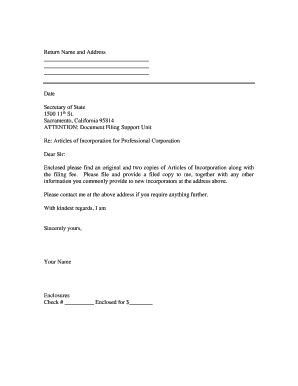
Prepare Articles of Incorporation with corporate name, purpose, agent, and authorized shares. Accuracy in these fields determines legal status, stock issuance limits, and public record information for the Secretary of State.
Bylaws

Adopt corporate bylaws that govern director elections, officer duties, meeting procedures, and quorum rules. Bylaws are internal but essential to corporate governance and resolving disputes among founders or investors.

Registered Agent

Designate a registered agent with a physical California address for service of process. Timely agent updates prevent missed notices and can affect default judgment risks and compliance standing.

Capitalization

Document initial authorized and issued shares, classes, par value, and founder allocations. Clear capitalization schedules prevent future ownership disputes and ease investor due diligence.

Statement Info

File the initial Statement of Information within required period and maintain periodic updates. This keeps corporate contact data current with the California Secretary of State and avoids penalties.

Tax Registration

Register with the California Franchise Tax Board and obtain a federal EIN. Early tax registration ensures proper withholding, franchise tax payments, and timely corporate tax filings.

Step-by-Step: Completing a California Incorporation

Follow these steps to complete a California Incorporation and meet initial state requirements accurately.

  • 01
    Prepare Documents: Draft articles and bylaws with required information.
  • 02
    File with SOS: Submit forms and pay filing fee online or by mail.
  • 03
    Obtain EIN: Apply to IRS for employer identification number.
  • 04
    Register Taxes: Register with CA Franchise Tax Board and local agencies.

How Electronic Filing and eSignatures Fit In

Electronic completion and submission streamline incorporation: prepare PDFs, apply eSignatures, and file with relevant agencies where permitted.

  • Upload Document: Add formation PDFs or DOCX files to the signing platform.
  • Place Fields: Insert signature, date, and text fields for each signer.
  • Authenticate Signers: Use email, SMS, or MFA to verify identity.
  • Store Copies: Save signed PDFs with audit trails for records.

Typical Online Workflow Settings for Incorporation

Typical online workflow settings for California Incorporation filings and eSigning automation to ensure correct routing and retention.

Field Configuration
Pre-fill fields Auto-populate common data
Signer order Sequential or parallel routing
Authentication Email, SMS, or KBA
Retention Audit trail and secure storage

Platform Capabilities to Support Filing and Records

Use platforms that support PDF, DOCX, and common integrations to streamline filing and recordkeeping.

  • Supported Formats: PDF, DOCX, HTML, XLSX
  • Integrations: Salesforce, NetSuite, Microsoft 365, Google Workspace
  • Authentication: Email, SMS code, SSO options

Key Deadlines and Filing Windows

Key deadlines and filing windows relevant to California entity formation and allied federal requirements, including tax and reporting timelines.

Articles filing window:

File upon formation; state processes vary in processing time.

Initial Statement of Information:

Typically due within 90 days for corporations after filing.

EIN application timing:

Apply to IRS immediately after formation to open bank accounts.

Franchise tax payment:

California minimum franchise tax applies annually; timing varies.

Annual statements:

File periodic reports per state schedule to maintain good standing.

Common Penalties and Risks

Filing Errors: Rejection or processing delays.
Late Statement: Penalties and fines.
Incorrect Agent: Missed legal notices.
Tax Noncompliance: Franchise tax penalties.
Misstated Shares: Investor disputes risk.
Missing EIN: Banking delays and withholding.

Security and Compliance Features to Consider

Encryption in Transit: TLS 1.2 / TLS 1.3
Encryption at Rest: AES-256 encrypted storage
Certifications: SOC 2 Type II; ISO 27001
HIPAA Support: BAA required for protected health information
Regulatory Compliance: ESIGN and UETA compliant
Audit Trails: Tamper-evident logs and timestamps

Corporation vs LLC: Filing Document Differences

Comparing Articles of Incorporation and Articles of Organization highlights governance, ownership, and tax distinctions relevant to formation choices in California.

Criteria Corporation LLC
Governance board & officers members or managers
Ownership shares issued membership interests
Taxation corporate tax pass-through or corporate
Filing fee varies by state varies by state

Practical Examples from Real Users

Below are examples showing how online signing and structured formation workflows have supported real-world incorporation activity.

Optica Ventures

Optica streamlined formation paperwork and investor acknowledgments using online workflows.

  • Ease for customers and founders.
  • Brian Fitzgibbons, COO, said: "The interface is simple and easy-to-use for our team; more importantly, it is just as easy for our customers."

Martin Properties

A real estate founder completed entity formation and tenant-related filings remotely.

  • Reduced in-person coordination.
  • Tim Martin, Founder, noted: "I can process and execute all of these documents online with 100% compliance and built-in security. Whether on mobile or working offline, I can get forms back to their necessary parties efficiently."

Milestones from Filing to Good Standing

A sequential view of key incorporation stages helps track critical actions and timing to reach good standing.

01

Prepare and File

Draft articles, select agent, and submit to Secretary of State.

02

Secretary of State Review

State reviews filing and posts the entity to public records.

03

Obtain EIN and Accounts

Apply for EIN and open bank accounts under the new entity.

04

Maintain Compliance

File initial reports and pay franchise taxes to maintain good standing.

Practical Tips for Accurate and Efficient Incorporation

Applying these best practices reduces errors, speed up approvals, and helps maintain compliance after formation.

Use the exact legal entity name
Confirm the precise company name with the California Secretary of State before filing. Minor differences or punctuation errors often cause rejections and delay the formation process, so verify availability and reservation options ahead of submission.
Designate a reliable registered agent
Choose an agent with a stable physical address in California and update the agent promptly if contact information changes. Missed service of process can lead to default judgments and other legal consequences for the entity.
Document capitalization clearly
Record authorized versus issued shares, par value, and founder allocations in formation documents and capitalization schedules. Clear documentation prevents investor disputes and eases later funding rounds and due diligence reviews.
Keep a compliance calendar
Track deadlines for initial Statement of Information, annual reports, and franchise tax payments. Automated reminders and calendar-based workflows reduce the risk of late filings and preserve good standing with state agencies.

Frequently Asked Questions About California Incorporation

Answers to common questions about filing, compliance, eSign validity, and typical post-filing issues users encounter.


Need help? Contact support

eSignature Pricing Comparison Relevant to Incorporation Workflows

Common pricing and feature criteria for eSignature vendors used to execute formation documents and corporate filings; signNow is shown first per comparison conventions.

signNow DocuSign Adobe Sign PandaDoc HelloSign
Starting Price $8/user/mo $15/user/mo $14/user/mo $19/user/mo $15/user/mo
Free Trial 7-day free trial, no credit card required Varies by plan Varies by plan Varies by plan Varies by plan
Bulk Send Yes Yes Yes Yes No
Audit Trail Yes Yes Yes Yes Yes
HIPAA Compliant Yes Yes Yes No No
Envelope Cap No envelope cap 100 envelopes/user/year cap Varies by plan Varies by plan Varies by plan
be ready to get more
Join over 28 million airSlate SignNow users