Establishing secure connection…Loading editor…Preparing document…

California Termination of Dependency Jurisdiction

This template is fully customizable. Edit the text, fill out the fields, and send it for signature. Give it a try!
California Termination of Dependency Jurisdiction

What the California Termination of Dependency Jurisdiction document is

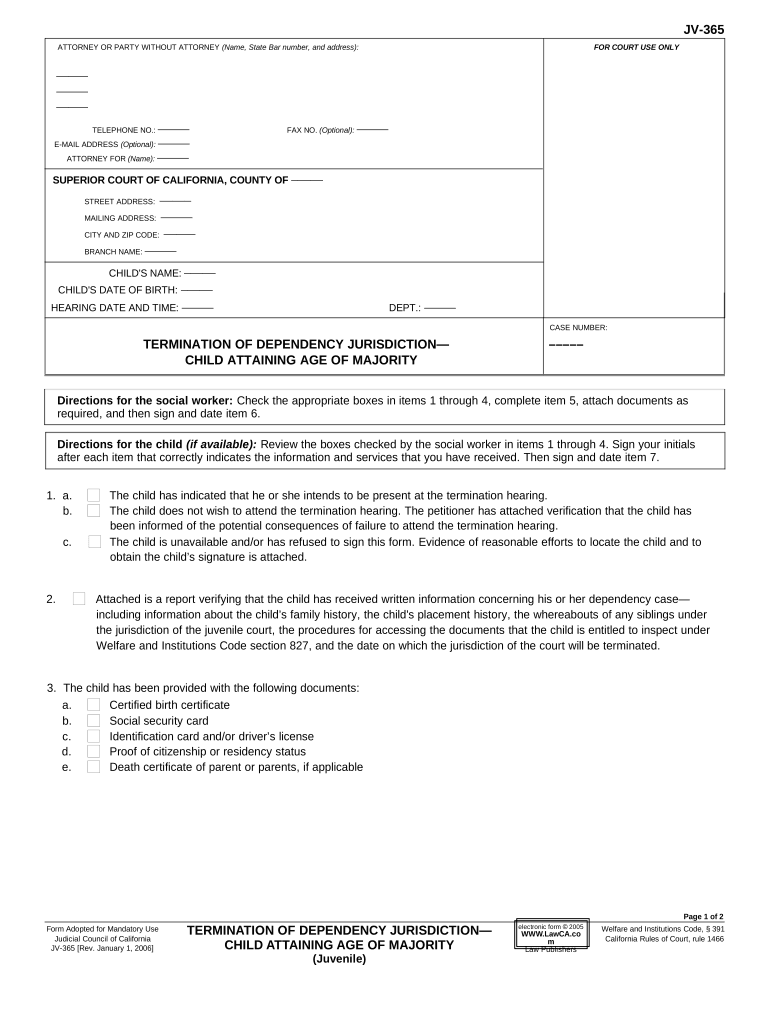
The California Termination of Dependency Jurisdiction is a court filing used to request that a juvenile dependency court end its jurisdiction over a child and return legal control to the parent, guardian, or another adult. It documents facts showing the child no longer needs court supervision because risk factors have been resolved, a permanent plan is in place, or another legal status applies. The form memorializes the parties, case number, current placement, and proposed effective date for termination and provides the court with a factual basis to enter an order terminating dependency jurisdiction.

Why this termination filing matters and its legal basis

Filing a termination of dependency jurisdiction restores parental rights and clarifies custody, placement, and service obligations; it allows the family to exit court supervision when conditions have sufficiently improved. Under federal and state legal frameworks, electronic execution and retention of court filings must satisfy ESIGN (15 U.S.C. §7001) and California rules; some court submissions remain paper-only or require court-specific e-filing protocols.

Why this termination filing matters and its legal basis

Who typically prepares and files this termination request

Social workers, child welfare attorneys, probation officers, guardians ad litem, and parents frequently prepare or request the termination of dependency jurisdiction to end court oversight.

  • County child welfare agencies or social workers preparing factual reports for the court.
  • Attorneys for parents or children seeking restoration of custody or removal of court supervision.
  • Pro se parents or guardians who meet the statutory criteria and file the motion themselves.

The party preparing the document should coordinate with the court clerk and opposing counsel to confirm required attachments, hearing settings, and any mandated reports.

Authorized signers and filing representatives

County Social Worker

A designated social worker may draft the motion and sign agency reports attached to the termination filing; the agency must follow local court e-filing rules and include caseworker declarations where required.

Parent or Attorney

Parents or their counsel may submit the termination petition or stipulation; when counsel signs, provide a signed declaration confirming consent and factual assertions supporting termination.

Key components to include in a professional termination filing

A complete petition or stipulation should present the case caption, party identities, case number, factual basis for termination, attachments, and a proposed order for the judge to sign.

Case Caption

Full court name, case number, style of the case and identification of the child(ren) and parties appearing on the petition.
Factual Statement

Clear, concise chronology of improvements, services completed, and evidence that removal of jurisdiction is in the child’s best interest.

Legal Grounds

Cite applicable California Welfare & Institutions Code sections and explain which statutory standard supports termination.

Attachments

Include social worker reports, reunification certificates, progress notes, school or medical documentation, and signed stipulations if applicable.

Proposed Order

A separate, judge-ready proposed order terminating jurisdiction with the effective date and any continuing obligations.

Service Proof

Proof of service on all interested parties (form and method) and proof of notice for hearings where required.

Step-by-step: completing and filing the termination request

Follow these sequential steps to prepare and submit the Termination of Dependency Jurisdiction to minimize return-for-correction risk and to satisfy service rules.

  • 01
    1. Gather Documents: Collect social worker reports, school/medical records, and any signed stipulations supporting termination.
  • 02
    2. Draft Petition: Prepare the petition or stipulation with clear factual recitation and a proposed order for the judge.
  • 03
    3. Serve Parties: Serve all required parties per California Code of Civil Procedure and file proof of service before the hearing.
  • 04
    4. File with Court: File via the court’s e-filing system or clerk’s office and obtain a stamped conformed copy for records.

Configuring online completion and e-filing workflow

Set up a predictable, auditable workflow for document preparation, signature capture, and electronic filing to meet court and agency requirements.

Field Configuration
Document Template Create a form template with locked text and fillable fields for dates, names, and factual statements.
Signer Sequence Set signing order to collect agency, parent, and attorney signatures in the required order.
Authentication Use email plus SMS code or identity verification for adult signers when required by agency policy.
Export Format Save as flattened PDF/A for court submission where the clerk requires non-editable documents.

Where to file and how the submission moves through the system

The filing pathway depends on local court rules: many California juvenile courts accept e-filing while others require in-person submission or clerk-assisted intake.

  • Prepare Package: Compile petition/stipulation, exhibits, and proposed order into a single PDF with bookmarks for exhibits.
  • E-File or Deliver: Submit via the court’s electronic filing service or deliver to the clerk per local rules.
  • Clerk Review: Court clerk checks for completeness, assigns a hearing date if required, and returns a conformed copy when accepted.
  • Judge’s Ruling: Judge reviews evidence at hearing or on papers and signs an order terminating jurisdiction if statutory criteria are met.

Distribution channels and eSubmission technical needs

Use secure, auditable channels that meet court e-filing and agency privacy requirements when distributing the filing package.

  • Court e-Filing: PDF/A output, clickable bookmarks, and required cover sheet formats.
  • Secure Email: Encrypted email or secure portal for transmitting sensitive attachments to parties and counsel.
  • Cloud Storage: Use vetted cloud repositories compatible with court exhibit retrieval and long-term retention.

Confirm the receiving court or agency accepts electronic submissions and verify required file formats, page limits, and naming conventions before sending.

Time-sensitive dates and common scheduling rules

Timelines vary by county and case stage. Plan early for service timelines, hearing notices, and any required continuance periods to avoid delays.

Hearing Notice:

File proof of service per local rules, typically 15–30 days before hearing if not stipulated.

Service Timeline:

Personal or mailed service requirements differ; check local juvenile court rules for exact deadlines.

Clerk Processing:

Allow several business days for clerk intake and docketing after submission.

Agency Reports:

Submit updated social worker or agency reports at least 5–7 days prior to hearing if required.

Appeal Window:

If an order is entered, appeal or post-order motions follow state appellate timelines; consult counsel for exact dates.

Key milestones from filing to court order

A sequential milestone view helps track progress and identify where delays commonly occur in the termination process.

01

Document Preparation

Draft petition, assemble exhibits, and prepare proposed order for signature and filing.

02

Service and Notice

Properly serve parties and file proofs of service to establish jurisdiction over respondents.

03

Clerk Acceptance

Clerk reviews documents, assigns hearing date, and returns conformed copies if accepted.

04

Hearing and Order

Judge hears evidence or approves stipulation and signs order terminating dependency jurisdiction.

Common mistakes that delay termination filings

  • Using incorrect case numbers or misnamed parties which causes clerk rejection and re-filing delays.
  • Failing to attach mandatory agency reports or not filing proof of completed services required by the court.
  • Improper service on all necessary parties, leading to continuances or the need to re-serve.
  • Submitting editable document formats when the court requires non-editable PDF/A or specific e-file templates.

Consequences of errors or improper procedure

Rejection or Return: Clerk may reject incomplete filings, causing delays in hearings and additional filing steps.
Continuance: Missing service or exhibits often results in the court continuing the matter to allow proper notice.
Loss of Relief: Failure to prove statutory grounds can result in denial of termination and continued supervision.
Confidentiality Breach: Improperly shared records may violate privacy obligations under federal or state law.
Appeal Risk: Procedural defects may form the basis for future appeal or collateral challenge.
Administrative Fines: Jurisdictional errors can trigger agency-level compliance reviews or sanctions in extreme cases.

Real-world examples of termination filings and outcomes

Two brief examples illustrate typical scenarios where termination of dependency jurisdiction was sought and granted.

County Agency Petition

A county social worker filed a petition documenting completed reunification services and stable placement for the child

  • The parents completed court-ordered services and provided stable housing
  • The court reviewed reports, found the statutory criteria met, and signed an order terminating jurisdiction, restoring custody to the parent with agency monitoring closed.

Stipulation by Parties

Parents and child’s attorney submitted a stipulation supporting termination due to caregiver change and new guardianship arrangements

  • All parties provided declarations and signed the proposed order
  • The judge approved the stipulation at the hearing and entered a termination order with special conditions for follow-up services.

Data handling, privacy, and security considerations

Encryption: TLS 1.2/1.3 in transit, AES-256 at rest
HIPAA: Compliant where a BAA is executed
Audit Trail: Comprehensive timestamp, IP, and action logs
Access Controls: Role-based access and SSO options
Certifications: SOC 2 Type II, ISO 27001
Accessibility: WCAG 2.0 Level AA support

Comparing eSignature pricing and key features for filing and signatures

Cost and capability vary across vendors; signNow is listed first per table rules. Compare starting prices, trial options, bulk send, audit trails, HIPAA compliance, and envelope limits when selecting a provider for document signing and retention.

signNow DocuSign Adobe Sign PandaDoc HelloSign
Starting Price $8/user/mo $15/user/mo $14/user/mo $19/user/mo $15/user/mo
Free Trial 7-day free trial Varies Varies Varies Varies
Bulk Send Yes Yes Yes Yes Yes
Audit Trail Yes Yes Yes Yes Yes
HIPAA Compliant Yes Yes Yes No No

Frequently asked questions about preparing and filing termination of dependency jurisdiction

Answers to common procedural and technical questions when preparing this filing in California juvenile courts.


Need help? Contact support

be ready to get more
Join over 28 million airSlate SignNow users