Establishing secure connection…Loading editor…Preparing document…

California Disclaimer of Beneficiary Rights Under Trust

This template is fully customizable. Edit the text, fill out the fields, and send it for signature. Give it a try!
California Disclaimer of Beneficiary Rights Under Trust

What the California Disclaimer of Beneficiary Rights Under Trust Is

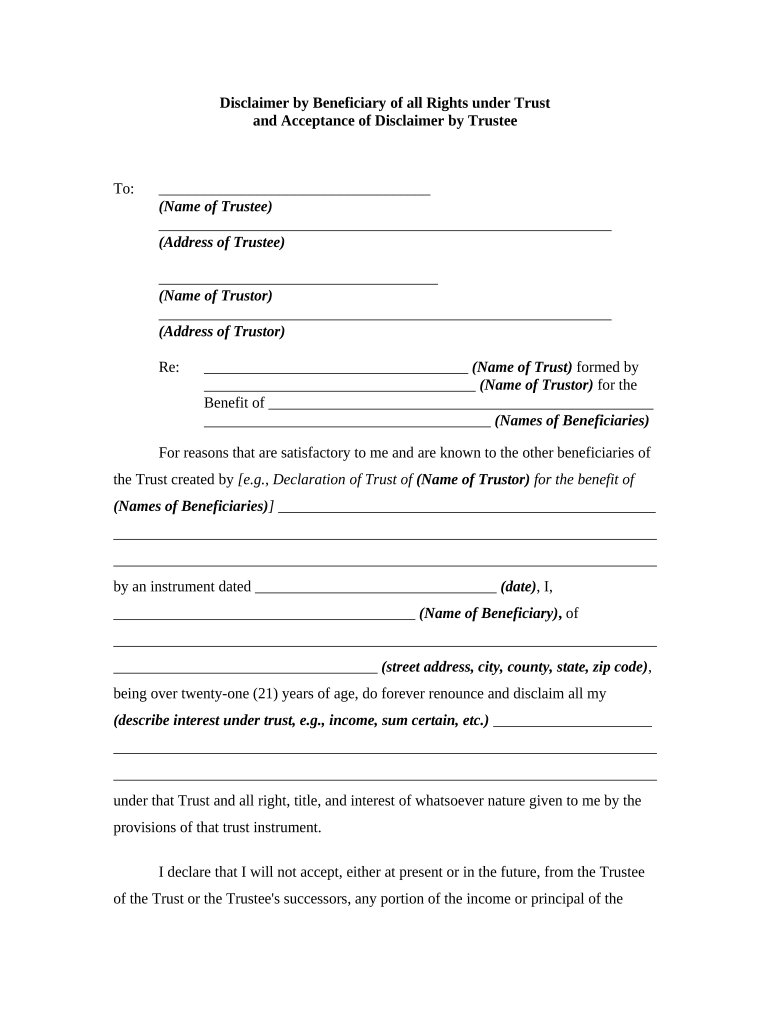
A California Disclaimer of Beneficiary Rights Under Trust is a written statement by a named beneficiary declining, refusing, or disclaiming all or part of an interest they would otherwise receive under a trust. The disclaimer redirects the disclaimed interest according to the trust terms or applicable succession rules, and it is used to address tax planning, creditor exposure, or distribution timing concerns. The document should clearly identify the trust, the beneficiary, the interest being disclaimed, and the effective date; execution and delivery practices determine whether the disclaimer is legally effective under state and federal rules.

Why a Disclaimer May Be Useful in Trust Administration

A formal disclaimer lets a beneficiary decline an interest without accepting it first, which can preserve estate and gift tax benefits, protect assets from creditors, and allow distributions to pass to contingent beneficiaries per the trust terms.

Why a Disclaimer May Be Useful in Trust Administration

Who Typically Prepares or Signs a Trust Disclaimer

Common participants include beneficiaries who wish to decline an interest, trustees who receive notices, and attorneys advising on tax or creditor implications.

  • Beneficiaries reviewing tax or creditor exposure before accepting distributions.
  • Trustees confirming delivery, acceptance, and administrative effects of a disclaimer.
  • Estate attorneys preparing language to protect tax or family planning objectives.

Coordination among the beneficiary, trustee, and counsel reduces the risk of invalid execution or unintended tax consequences.

Representative Users and Their Roles

Estate Attorney

An attorney drafts or reviews the disclaimer to ensure it meets legal and tax requirements, advises on timing and delivery, and coordinates with the trustee to document acceptance and follow-through with beneficiaries or contingent recipients.

Named Beneficiary

A beneficiary who declines all or part of their interest signs and delivers the disclaimer, often after consulting counsel about tax repercussions, creditor exposure, and how the disclaimer affects successor distributions.

Essential Elements of a Professional Disclaimer

A clear disclaimer includes identification, a precise statement of the interest disclaimed, an effective date, delivery details, and any acknowledgments by the trustee or notary where required.

Beneficiary ID

Full legal name and contact information for the disclaiming beneficiary, matching government identification to avoid disputes about identity.
Trust Identification

Trust name, date, and trustee contact details so the disclaimer applies to the correct instrument without ambiguity.

Scope of Disclaimer

Precise description of the interest being disclaimed (percentage, principal, income stream, or specific property).

Effective Date

Date on which the disclaimer takes effect and governs tax timing or successor entitlement rules.

Delivery Statement

How and when the disclaimer was delivered to the trustee, including physical delivery, email with PDF attachment, or recorded mailing details.

Trustee Acknowledgment

Space for trustee acknowledgment or acceptance and, where required, notarization or witness blocks to satisfy state rules.

Step-by-Step: How to Execute a Valid Disclaimer

Follow these sequential steps to prepare, sign, and deliver a disclaimer that is more likely to be recognized by trustees and authorities.

  • 01
    Confirm Intent: Discuss objectives with counsel and confirm the decision to disclaim.
  • 02
    Draft Disclaimer: Prepare precise language describing the disclaimed interest.
  • 03
    Sign and Notarize: Sign in required presence of notary or witnesses when state rules dictate.
  • 04
    Deliver to Trustee: Send the executed document to trustee with proof of delivery.

Typical Administrative Flow After a Disclaimer

This sequence shows how the trustee and other parties process the disclaimer once executed and delivered.

  • Receipt by Trustee: Trustee records delivery, evaluates terms, and determines successor disposition.
  • Acceptance or Acknowledgment: Trustee may sign an acknowledgment or note the disclaimer in trust records.
  • Distribution Adjustment: Trustee redirects disclaimed interest per trust terms or applicable succession law.
  • Recordkeeping: Trustee retains executed disclaimer with trust files and updates beneficiary lists.

Recommended Digital Workflow Settings for Online Completion

Configure a secure e-signing workflow to capture intent, authentication, and a reproducible audit trail for the disclaimer.

Field Configuration
Authentication Email link plus SMS code or ID verification for higher assurance
Signing Order Beneficiary signs first, then trustee acknowledges
Notary Include remote notarization option where allowed
Audit Trail Capture IP, timestamps, and file hash for evidentiary value

Technical Considerations for eSigning and Storage

Choose a platform that supports secure authentication, PDF/A output, and a preserved audit trail when completing disclaimers online.

  • File Formats: PDF, DOCX supported; export to PDF/A for long-term retention.
  • Integrations: Connectors such as Microsoft 365, Google Workspace, NetSuite support document routing.
  • Authentication: SMS codes, knowledge-based verification, or ID credential analysis increase signer assurance.

Maintain access controls and encrypted storage to protect sensitive trust and beneficiary data, and ensure audit logs remain retrievable for compliance or dispute resolution.

Security and Compliance Essentials for Electronic Disclaimers

In-Transit Encryption: TLS 1.2/1.3
At-Rest Encryption: AES-256
Audit Trail: Timestamp, IP, and action log
Regulatory Compliance: ESIGN and UETA support
Health Data: HIPAA available with BAA
Certifications: SOC 2 Type II and ISO 27001

Key Risks and Potential Consequences

Loss of Rights: Mistimed disclaimer may be ineffective
Tax Consequences: Incorrect timing can affect gift/estate tax treatment
Creditor Claims: Creditors may challenge disclaimers in insolvency
Invalid Execution: Missing notarization or witness could void it
Recordkeeping Gaps: Absent proof of delivery undermines enforceability
Professional Liability: Advice errors expose advisors to claims

Common Mistakes to Avoid When Preparing a Disclaimer

  • Using vague language that fails to specify the exact interest being disclaimed, which creates ambiguity about what passes to successors.
  • Delivering the disclaimer late or without proof of delivery, reducing the likelihood it meets statutory or administrative timing rules.
  • Signing before understanding tax implications—failure to consult a tax advisor can negate intended tax outcomes.
  • Omitting witness or notary steps required by state law, causing trustees or courts to reject the disclaimer.

Practical Timing Considerations for Effective Disclaimers

Although state rules vary, act promptly and obtain proof of delivery to maximize the chance the disclaimer is honored for administrative and tax purposes.

Immediate Decision:

Make the disclaimer decision before accepting benefits or property.

Prompt Delivery:

Deliver executed disclaimer to trustee with tracking within days of signing.

Tax Timing:

Confirm federal tax timing rules with counsel for qualified disclaimer questions.

Trustee Acknowledgment:

Request written acknowledgment from trustee to document acceptance.

Record Retention:

Keep proofs of delivery and trustee correspondence for several years.

Practical Tips for Accurate and Efficient Completion

Adopt consistent practices and use clear templates to reduce errors and speed processing.

Use Clear Language
Draft precise scope and effective date language to avoid interpretive disputes.
Proof of Delivery
Always provide certified mail or electronic delivery with receipt for the trustee.
Coordinate with Trustee
Inform the trustee in advance so they can prepare acceptance and administrative adjustments.
Document Review
Have counsel review tax or creditor-sensitive disclaimers before signing.

Real-World Examples of Electronic Documents in Estate Workflows

These customer examples show how organizations use e-signature platforms to manage legal documents and maintain compliance.

Optica Ventures — COO

The interface is simple and easy-to-use for our team; more importantly, it is just as easy for our customers.

  • The platform reduced turnaround time.
  • The result was faster document circulation, fewer execution errors, and clearer records for trust administration and client communication.

Martin Properties — Founder

I can process and execute all of these documents online with 100% compliance and built-in security.

  • Mobile and offline signing helped.
  • Whether on mobile or working offline, I can get forms back to necessary parties efficiently, improving estate administration responsiveness.

Representative eSignature Vendor Comparison for Executing Disclaimers

Compare common vendor attributes relevant to securely signing and retaining trust disclaimers; signNow is shown first for platform reference.

signNow DocuSign Adobe Sign PandaDoc HelloSign
Starting Price $8/user/mo $15/user/mo $14/user/mo $19/user/mo $15/user/mo
Free Trial 7-day free trial Trial available Trial available Trial available Trial available
Bulk Send Yes Yes Yes Yes No
Audit Trail Yes Yes Yes Yes Yes
HIPAA Compliant Yes Yes Yes No No
Envelope Cap No cap 100 envelopes/user/year Varies by plan Varies by plan Varies by plan

Frequently Asked Questions About Disclaimers and Electronic Execution

Answers to common questions about validity, notarization, tax effects, and how to use electronic platforms to execute a disclaimer.


Need help? Contact support

be ready to get more
Join over 28 million airSlate SignNow users