Establishing secure connection…Loading editor…Preparing document…

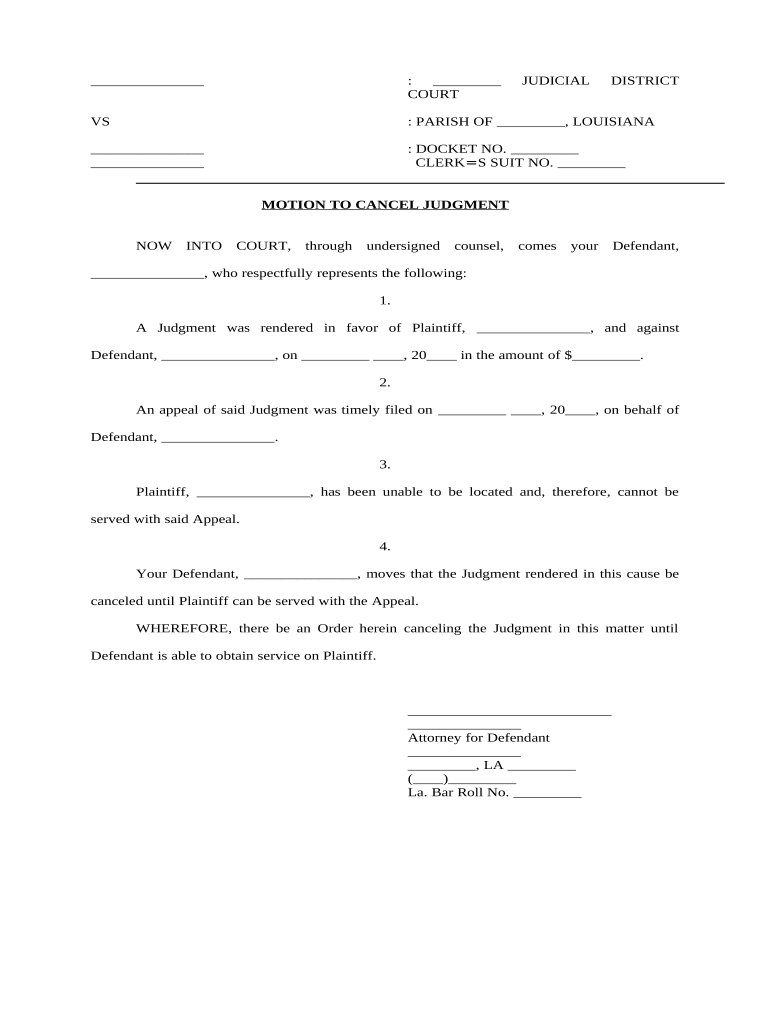
Louisiana Motion to Cancel Judgment

This template is fully customizable. Edit the text, fill out the fields, and send it for signature. Give it a try!
Louisiana Motion to Cancel Judgment

What the Louisiana Motion to Cancel Judgment Is and when it applies

A Louisiana Motion to Cancel Judgment is a court filing seeking to set aside, annul, or cancel a previously entered civil judgment in a Louisiana court. Common grounds include lack of proper service, a clerical error, fraud, mistake, jurisdictional defects, or that the judgment was satisfied but not marked vacated. The motion must identify the original judgment, explain the factual and legal basis for cancellation, and request specific relief. Louisiana procedures follow state civil rules and local court rules; parties should confirm parish-specific filing requirements.

Why a Motion to Cancel Judgment matters

Cancelling a judgment clears legal liabilities, stops post-judgment collection, and corrects official records when the judgment is invalid, satisfied, or procured by error or fraud.

Why a Motion to Cancel Judgment matters

Who typically prepares or files this motion

The motion is used by parties seeking relief from an existing judgment or their attorneys in civil litigation.

  • Judgment debtor seeking to remove an improper or satisfied judgment and stop enforcement actions.
  • Judgment creditor or interested party correcting clerical errors or confirming satisfaction of debt.
  • Civil litigation attorneys filing procedural motions, supporting affidavits, and proposed orders on behalf of clients.

Courts, clerks, and opposing parties will review the motion for procedural sufficiency, jurisdictional grounds, and supporting evidence before scheduling relief.

Primary signers and filers

Judgment Debtor

An individual or entity named in the judgment who asserts the judgment is void, satisfied, or entered in error. They must provide factual support and may need to attend hearings or submit sworn affidavits.

Attorney for Creditor

A licensed attorney representing a judgment creditor or interested party who may file a responsive pleading, support a correction, and submit procedural documents under Louisiana civil procedure rules.

Essential information to include on the form

Case Caption: Plaintiff v. Defendant
Court Identifier: Parish and court division
Docket Number: Full docket or case number
Judgment Date: MM/DD/YYYY
Grounds Stated: Legal basis for cancellation
Relief Requested: Specific remedy sought

Step-by-step: preparing and filing the motion

Follow a concise sequence to prepare, file, serve, and pursue the motion through hearing or clerk disposition.

  • 01
    Draft Motion: Describe judgment, grounds, and requested order.
  • 02
    Attach Evidence: Include affidavits, receipts, and judgment copies.
  • 03
    File With Clerk: Submit per parish e-filing or in-person rules.
  • 04
    Serve Parties: Serve all parties using court-approved methods.

Customize and submit the motion through an e‑filing or eSignature workflow

Set up a digital workflow that collects signatures, attaches supporting exhibits, and routes the motion to the clerk and opposing counsel.

Field Configuration
Signature Type Typed name, drawn signature, or digital certificate
Authentication Email link, SMS code, or multi-factor
Document Format PDF/A recommended for court submissions
Routing Sequential signer order and clerk copy

Where to file and how the routing typically works

Filing and service follow local court rules: determine the correct clerk’s office, whether e-filing is allowed, and required service methods.

  • Filing Destination: Parish court clerk or authorized e-filing portal
  • Method of Filing: E-file or deliver paper per local rules
  • Service to Parties: Personal service, certified mail, or e-service as allowed
  • Clerk Processing: Clerk reviews and assigns a hearing or ruling date

Digital delivery and eSignature considerations

Electronic submission requires compatible file formats, signer authentication, and an audit trail for court acceptance.

  • Formats Supported: PDF, DOCX, flattened PDF/A
  • Authentication: Email, SMS, or advanced methods
  • Integrations: Plug-ins for NetSuite, Microsoft 365, Google Workspace

Use an eSignature provider that preserves an audit trail (timestamps, IP addresses) and produces court-ready signed PDFs; confirm the court accepts electronically signed filings.

Typical timelines and response expectations

Deadlines vary by parish and local rules; plan for immediate service and timely response to avoid waiver of relief.

Service Period:

Serve opposing parties per La. C.C.P. or local rules

Opposition Deadline:

Often 10–30 days to respond depending on motion type

Hearing Scheduling:

Clerk may set hearing within 14–60 days

Clerk Processing:

Processing times vary by county clerk workload

Emergency Relief:

Seek ex parte or expedited hearing for urgent matters

Key milestones from filing to final disposition

A clear timeline helps track filing, service, response, hearing, and final disposition of the motion.

01

Draft and Verify

Prepare motion and confirm docket and judgment details.

02

File with Clerk

Submit motion through e-file or in-person filing.

03

Serve Opposing Parties

Provide proof of service per the court’s rules.

04

Hearing and Order

Attend hearing or await clerk’s ruling and record the order.

Common preparation mistakes to avoid

  • Using an incorrect docket number or case caption, which can cause misfiling or delayed processing by the clerk.
  • Failing to attach the underlying judgment or proof of satisfaction, reducing the motion’s evidentiary weight before the court.
  • Neglecting to follow parish-specific e-filing, signature, or service rules, resulting in procedural rejection or denial.
  • Omitting a sworn affidavit when verification is required by court rule, which can lead to dismissal without prejudice.

Consequences and procedural risks of incorrect motions

Dismissal Risk: Motion may be dismissed
Sanctions: Court may impose sanctions
Default Enforcement: Judgment remains enforceable
Delay: Enforcement or appeals delayed
Costs: Potential fee and attorney costs
Record Error: Judgment entry remains on record

Practical examples of when the motion is used

These short scenarios illustrate typical uses and the motion’s practical effect in removing improper entries.

Municipal Clerk Correction

A clerk recorded a judgment under a misspelled name causing enforcement errors

  • The plaintiff agreed to correct the record
  • The motion attached the corrected judgment, proof of notice, and the clerk issued an amended entry removing the incorrect record and stopping enforcement actions.

Debtor Satisfied Judgment

A debtor produced receipts showing full payment after the judgment was entered

  • The creditor failed to mark satisfaction
  • The motion attached proof of payment and requested cancellation

Court signed an order cancelling the judgment and directed the clerk to update the public record.

eSignature vendor comparison for filing and signing motions

Compare typical vendor pricing and compliance features relevant to executing and delivering court filings and sworn affidavits; signNow is listed first as a vendor option.

signNow DocuSign Adobe Sign PandaDoc HelloSign
Starting Price $8/user/mo $15/user/mo $14/user/mo $19/user/mo $15/user/mo
Free Trial 7-day trial Varies Varies Varies Varies
Bulk Send Yes Yes Yes Yes No
Audit Trail Yes Yes Yes Yes Yes
HIPAA Compliant Yes Yes Yes No No

FAQs and troubleshooting for the Louisiana Motion to Cancel Judgment

Answers to common procedural and technical questions about preparing, filing, and serving a motion to cancel a judgment in Louisiana.


Need help? Contact support

be ready to get more
Join over 28 million airSlate SignNow users