Establishing secure connection… Loading editor… Preparing document…
Navigation

Fill and Sign the Charlotte Immigration Court Department of Justice Form
Fill and Sign the Charlotte Immigration Court Department of Justice Form

How it works

Open the document and fill out all its fields.
Apply your legally-binding eSignature.
Save and invite other recipients to sign it.

Rate template

4.5
64 votes
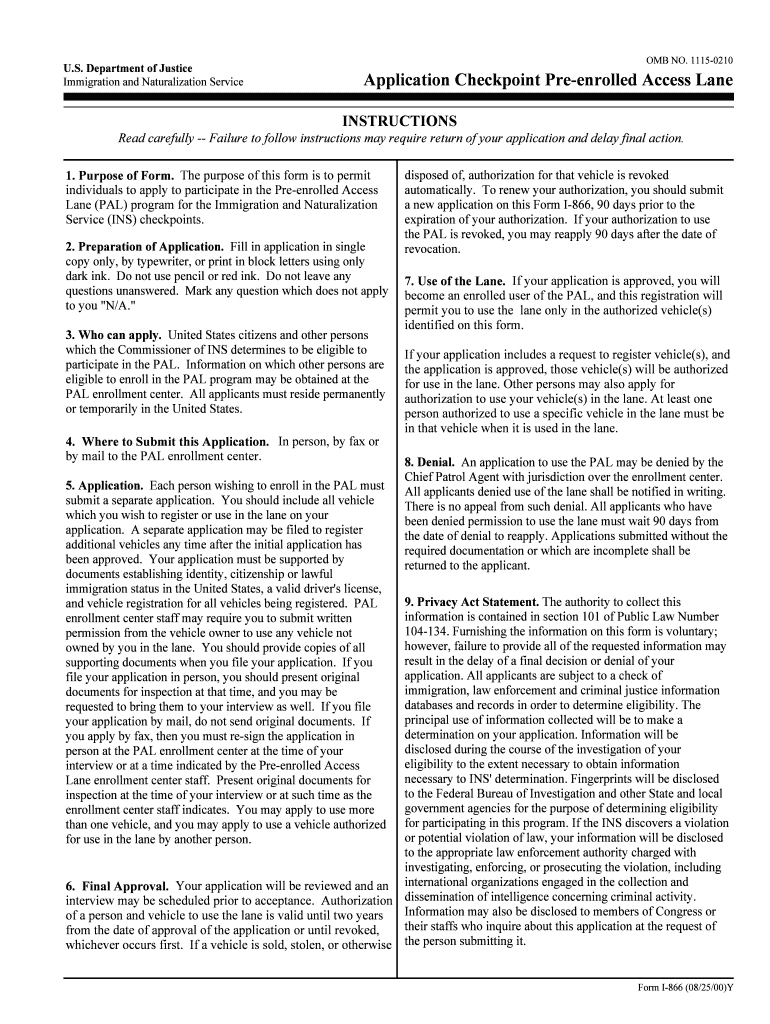
OMB NO. 1115-0210 Application Checkpoint Pre-enrolled Access Lane INSTRUCTIONS U.S. Department of Justice Immigration and Naturalization Service Read carefully -- Failure to follow instructions may require return of your application and delay final action. 1. Purpose of Form. The purpose of this form is to permit individuals to apply to participate in the Pre-enrolled Access Lane (PAL) program for the Immigration and Naturalization Service (INS) checkpoints. disposed of, authorization for that vehicle is revoked automatically. To renew your authorization, you should submit a new application on this Form I-866, 90 days prior to the expiration of your authorization. If your authorization to use the PAL is revoked, you may reapply 90 days after the date of revocation. 2. Preparation of Application. Fill in application in single copy only, by typewriter, or print in block letters using only dark ink. Do not use pencil or red ink. Do not leave any questions unanswered. Mark any question which does not apply to you "N/A." 3. Who can apply. United States citizens and other persons which the Commissioner of INS determines to be eligible to participate in the PAL. Information on which other persons are eligible to enroll in the PAL program may be obtained at the PAL enrollment center. All applicants must reside permanently or temporarily in the United States. 4. Where to Submit this Application. In person, by fax or by mail to the PAL enrollment center. 5. Application. Each person wishing to enroll in the PAL must submit a separate application. You should include all vehicle which you wish to register or use in the lane on your application. A separate application may be filed to register additional vehicles any time after the initial application has been approved. Your application must be supported by documents establishing identity, citizenship or lawful immigration status in the United States, a valid driver's license, and vehicle registration for all vehicles being registered. PAL enrollment center staff may require you to submit written permission from the vehicle owner to use any vehicle not owned by you in the lane. You should provide copies of all supporting documents when you file your application. If you file your application in person, you should present original documents for inspection at that time, and you may be requested to bring them to your interview as well. If you file your application by mail, do not send original documents. If you apply by fax, then you must re-sign the application in person at the PAL enrollment center at the time of your interview or at a time indicated by the Pre-enrolled Access Lane enrollment center staff. Present original documents for inspection at the time of your interview or at such time as the enrollment center staff indicates. You may apply to use more than one vehicle, and you may apply to use a vehicle authorized for use in the lane by another person. 7. Use of the Lane. If your application is approved, you will become an enrolled user of the PAL, and this registration will permit you to use the lane only in the authorized vehicle(s) identified on this form. If your application includes a request to register vehicle(s), and the application is approved, those vehicle(s) will be authorized for use in the lane. Other persons may also apply for authorization to use your vehicle(s) in the lane. At least one person authorized to use a specific vehicle in the lane must be in that vehicle when it is used in the lane. 8. Denial. An application to use the PAL may be denied by the Chief Patrol Agent with jurisdiction over the enrollment center. All applicants denied use of the lane shall be notified in writing. There is no appeal from such denial. All applicants who have been denied permission to use the lane must wait 90 days from the date of denial to reapply. Applications submitted without the required documentation or which are incomplete shall be returned to the applicant. 9. Privacy Act Statement. The authority to collect this information is contained in section 101 of Public Law Number 104-134. Furnishing the information on this form is voluntary; however, failure to provide all of the requested information may result in the delay of a final decision or denial of your application. All applicants are subject to a check of immigration, law enforcement and criminal justice information databases and records in order to determine eligibility. The principal use of information collected will be to make a determination on your application. Information will be disclosed during the course of the investigation of your eligibility to the extent necessary to obtain information necessary to INS' determination. Fingerprints will be disclosed to the Federal Bureau of Investigation and other State and local government agencies for the purpose of determining eligibility for participating in this program. If the INS discovers a violation or potential violation of law, your information will be disclosed to the appropriate law enforcement authority charged with investigating, enforcing, or prosecuting the violation, including international organizations engaged in the collection and dissemination of intelligence concerning criminal activity. Information may also be disclosed to members of Congress or their staffs who inquire about this application at the request of the person submitting it. 6. Final Approval. Your application will be reviewed and an interview may be scheduled prior to acceptance. Authorization of a person and vehicle to use the lane is valid until two years from the date of approval of the application or until revoked, whichever occurs first. If a vehicle is sold, stolen, or otherwise Form I-866 (08/25/00)Y Form I-866 (08/25/00)Y Page 2 10. Penalties for False Statements in Applications. Severe penalties are provided by law for knowingly and willfully falsifying or concealing a material fact or using any false document in the submission of this application. Also, a false representation may result in the denial of this application and any other application you may make for any benefit under the immigration laws of the United States. 11. Compliance Checks. Checks may be conducted at the PAL to ensure compliance with applicable laws and the conditions of the program . 12. Reporting Burden. You do not have to complete this form unless it displays a currently approved OMB control number. We try to create forms and instructions that are accurate, can be easily understood, and which impose the least possible burden on you to provide us with information. Often this is difficult because some immigration laws are very complex. Accordingly, the reporting burden for this collection of information is computed as follows: 1) learning about the form, 20 minutes; 2) completing the form, 8 minutes; and 3) assembling and mailing the application, 4 minutes, for an estimated average of 32 minutes per response. If you have comments regarding the accuracy of this estimate, or suggestions for making this form simpler, you can write to the Immigration and Naturalization Service, HQPDI, 425 I Street, N.W; Room 4034, Washington, D.C. 20536. DO NOT MAIL YOUR COMPLETED APPLICATION TO THIS ADDRESS. Application Acknowledgments and Questions 1. Applicant acknowledges and agrees that the applicant's participation in the Pre-enrolled Access Lane program is voluntary and that by applying, he or she gives all the information collected pursuant to Immigration and Naturalization Service (INS) regulations and this form voluntarily. Applicant further acknowledges that he or she is a United States citizen or a member of a class of other persons which the Commissioner of INS has determined to be eligible to participate in the Pre-enrolled Access Lane. Applicant further acknowledges and agrees that he or she will inform the Pre-enrolled Access Lane enrollment center at which he or she filed the application in writing of any change in his or her immigration status. 2. Applicant acknowledges and agrees that he or she authorizes INS to check immigration, law enforcement, and criminal justice information records and databases for information on the applicant and any vehicle he or she applies to register, and authorizes any agency having such information to release it to INS. Applicant further acknowledges and agrees that by submitting this application he or she freely consents to having INS collect his or her fingerprints and submit them to other agencies for this purpose. 3. Applicant acknowledges and agrees to a full inspection by INS of any vehicle he or she applies to register. Applicant acknowledges and agrees that the vehicle(s) identified on this form is/are lawfully owned and registered to him/her, or that he or she has permission from the vehicle owner to use the vehicle(s) in the lane. Applicant further acknowledges and agrees that it is the responsibility of the applicant to give written notice to the Pre- enrolled Access Lane enrollment center, in person or by facsimile transmission, within 24 hours of when the vehicle(s) identified on this form are stolen or within seven days of when such vehicle(s) are sold or otherwise disposed or license plates are changed. Applicant acknowledges and agrees that valid vehicle registration and, if required upon written notice from INS, permission from the registered owner to use the vehicle shall be in the vehicle at all times during use of a Pre-enrolled Access Lane. 4. Applicant acknowledges and agrees that when using the Pre-enrolled Access Lane, he or she may carry passengers 5. Applicant acknowledges and agrees that prior to each arrival at the Pre-enrolled Access Lane, the applicant will make him or herself aware of the contents of the vehicle in which he or she is an occupant and ascertain that transporting all occupants and contents of the vehicle is permissible by law. Applicant further acknowledges and agrees that he or she is subject to all federal, state and local laws regarding the transport of the occupants and contents of any vehicle in which he or she is an occupant in a Pre-enrolled Access Lane and may be liable for any violation(s) of these laws when using a Pre-enrolled Access Lane. 6. Applicant acknowledges and agrees that vehicles approved for use in the Pre-enrolled Access Lane, and all occupants, will be subject to compliance checks at the INS checkpoint by INS, and that all authorized vehicles remain subject to being stopped and occupants questioned during the use of the lane in order to ensure compliance with applicable laws and the conditions for use of the lane. 7. Applicant acknowledges and agrees that if he or she violates any condition of this program, or any applicable law or regulation, his/her authorization to participate in this program may be revoked, and he or she may be subject to other applicable sanctions. Applicant acknowledges and agrees that he or she must comply with all procedures established for use of the lane, including any signs in the lane. 8. U.S. Department of Justice Immigration and Naturalization Service OMB NO. 1115-0210 Application -Checkpoint Pre-enrolled Access Lane who are not enrolled in the Pre-enrolled Access Lane program in an authorized vehicle, but only if the passengers are either United States citizens, lawful permanent residents of the United States, or rightful holders of valid nonimmigrant United States visas. Applicant acknowledges and agrees that this program confers no immigration benefit or status and no substantive or procedural right enforceable in law or equity by any party in any matter. Form I-866 (08/25/00)Y Page 3 OMB NO. 1115-0210 Application -Checkpoint Pre-enrolled Access Lane Check here if you are approved to participate in any of the following: INSPASS Land Border APP INSPASS Airport DCL 1. Full Name: (Family Name in CAPS) (First) (Middle) 2. Other Names Used (Include Maiden Name): 3. Date of Birth (MM/DD/YYYY) : Gender Male Female 4. Place of Birth: (City) (State) (Country) 5. Address: (Street Number, Apartment) (City) (State) (Zip Code) 6. Permanent Address (Street number and name): (Apartment Number) (State/Province/Country) (Zip/Postal Code) (City) 7. Country of Citizenship: 8. Drivers License Information: (Issuing State) (Number) (Expiration Date) 9. Employer: (Address) (Telephone Number) 10. Citizenship and Immigration Status Yes No If not a Citizen, state your Immigration Status: Alien Registration Number: Name on Alien Registration Receipt Card: (First) (Middle) Date (MM/DD/YYYY) and place of most recent entry into the United States Date (MM/DD/YYYY ) upon which authorized period of stay expires Visa Type: Visa Number: Date of Visa issuance: Place of Visa issuance: Expiration Date of Visa: 11. Criminal History: (Please check yes or no for each question) Have you ever been: a. Convicted of a criminal offense? Yes No b. Arrested for any reason? Yes No c. Found to be in violation of any immigration law? Yes No d. Refused admission to the United States? Yes No e. Denied any other immigration benefit, whether you applied for the Yes No benefit directly, or the benefit was sought on your behalf? If yes to any of the above, please explain (use additional paper if necessary). U.S. Department of Justice Immigration and Naturalization Service Are you a United States Citizen? Form I-866 (08/25/00)Y Page 4 (Family Name) Vehicle Identification Number: Vehicle Year: 12. Vehicle information Vehicle Number 1: License Plate Number, State: Vehicle Color: Vehicle Make/Model: Vehicle Owner: 13. CERTIFICATION. I certify that I have read and understand all statements contained in this application. I certify that I have read and understand all acknowledgements in this application and agree to be bound by their content. I certify, under penalty of perjury under the laws of the United States of America, that this application and the evidence submitted with it is all true and correct. I authorize any agency having information relevant to determining my eligibility for the PAL Program to release that information to the Immigration and Naturalization Service. I understand that all information provided on this application may be shared with other government agencies as described in the Privacy Act Statement contained in this form. (Date) (Signature of Applicant) (Telephone Number) 14. SIGNATURE OF PERSON PREPARING FORM, IF OTHER THAN APPLICANT. I declare that I prepared this document at the request of the above person and that it is based on all information of which I have knowledge. Print Name: Signature: Date: Address: Owner's Relation to Applicant: Vehicle Identification Number: Vehicle Year: Vehicle Color: Vehicle Make/Model: Vehicle Owner: Owner's Relation to Applicant: Vehicle Color: Vehicle Make/Model: Vehicle Owner: Owner's Relation to Applicant: Vehicle Identification Number: Vehicle Year: Vehicle Number 2: License Plate Number, State: Vehicle Number 3: License Plate Number, State: Form I-866 (08/25/00)Y Page 5 You are responsible for ensuring that only United States citizens, lawful permanent residents of the United States, and/or rigtful holders of valid non-immigrant United States visas are occupants of any vehicle you use, as a driver or passenger, in the PAL.

Valuable advice on finishing your ‘Charlotte Immigration Court Department Of Justice’ digitally

Are you fed up with the complications of handling paperwork? Look no further than airSlate SignNow, the leading eSignature platform for individuals and small to medium-sized businesses. Bid farewell to the lengthy procedure of printing and scanning documents. With airSlate SignNow, you can effortlessly finalize and sign paperwork online. Utilize the robust features embedded in this intuitive and cost-effective platform to transform your method of document administration. Whether you need to approve documents or gather eSignatures, airSlate SignNow manages it all efficiently, needing just a handful of clicks.

Adhere to this comprehensive guide:

  1. Sign in to your account or initiate a free trial with our service.
  2. Select +Create to upload a document from your device, cloud storage, or our form library.
  3. Access your ‘Charlotte Immigration Court Department Of Justice’ in the editor.
  4. Click Me (Fill Out Now) to finish the document on your end.
  5. Include and assign fillable fields for others (if necessary).
  6. Proceed with the Send Invite settings to solicit eSignatures from others.
  7. Download, print your version, or convert it into a multi-usable template.

Don’t fret if you need to collaborate with your team on your Charlotte Immigration Court Department Of Justice or send it for notarization—our solution offers everything you need to accomplish such tasks. Create an account with airSlate SignNow today and enhance your document management to new heights!

Here is a list of the most common customer questions. If you can’t find an answer to your question, please don’t hesitate to reach out to us.

Need help? Contact Support

The best way to complete and sign your charlotte immigration court department of justice form

Save time on document management with airSlate SignNow and get your charlotte immigration court department of justice form eSigned quickly from anywhere with our fully compliant eSignature tool.

How to Sign a PDF Online How to Sign a PDF Online

How to complete and sign forms online

In the past, working with paperwork required pretty much time and effort. But with airSlate SignNow, document management is quick and easy. Our powerful and easy-to-use eSignature solution allows you to easily complete and eSign your charlotte immigration court department of justice form online from any internet-connected device.

Follow the step-by-step guidelines to eSign your charlotte immigration court department of justice form template online:

  • 1.Sign up for a free trial with airSlate SignNow or log in to your account with password credentials or SSO authentication.
  • 2.Click Upload or Create and add a file for eSigning from your device, the cloud, or our form catalogue.
  • 3.Click on the file name to open it in the editor and utilize the left-side toolbar to fill out all the blank fields properly.
  • 4.Put the My Signature field where you need to eSign your form. Provide your name, draw, or import a picture of your handwritten signature.
  • 5.Click Save and Close to accomplish editing your completed form.

After your charlotte immigration court department of justice form template is ready, download it to your device, save it to the cloud, or invite other people to eSign it. With airSlate SignNow, the eSigning process only requires a few clicks. Use our robust eSignature solution wherever you are to handle your paperwork successfully!


How to Sign a PDF Using Google Chrome How to Sign a PDF Using Google Chrome

How to complete and sign forms in Google Chrome

Completing and signing documents is simple with the airSlate SignNow extension for Google Chrome. Adding it to your browser is a fast and productive way to manage your paperwork online. Sign your charlotte immigration court department of justice form sample with a legally-binding eSignature in just a few clicks without switching between programs and tabs.

Follow the step-by-step guide to eSign your charlotte immigration court department of justice form in Google Chrome:

  • 1.Go to the Chrome Web Store, find the airSlate SignNow extension for Chrome, and install it to your browser.
  • 2.Right-click on the link to a form you need to approve and select Open in airSlate SignNow.
  • 3.Log in to your account using your password or Google/Facebook sign-in option. If you don’t have one, sign up for a free trial.
  • 4.Utilize the Edit & Sign toolbar on the left to fill out your template, then drag and drop the My Signature field.
  • 5.Add a picture of your handwritten signature, draw it, or simply enter your full name to eSign.
  • 6.Make sure all data is correct and click Save and Close to finish editing your form.

Now, you can save your charlotte immigration court department of justice form template to your device or cloud storage, send the copy to other individuals, or invite them to eSign your document via an email request or a secure Signing Link. The airSlate SignNow extension for Google Chrome improves your document workflows with minimum time and effort. Try airSlate SignNow today!


How to Sign a PDF in Gmail How to Sign a PDF in Gmail How to Sign a PDF in Gmail

How to fill out and sign paperwork in Gmail

Every time you get an email with the charlotte immigration court department of justice form for approval, there’s no need to print and scan a file or save and re-upload it to a different program. There’s a better solution if you use Gmail. Try the airSlate SignNow add-on to quickly eSign any paperwork right from your inbox.

Follow the step-by-step guidelines to eSign your charlotte immigration court department of justice form in Gmail:

  • 1.Go to the Google Workplace Marketplace and find a airSlate SignNow add-on for Gmail.
  • 2.Install the tool with a corresponding button and grant the tool access to your Google account.
  • 3.Open an email with an attachment that needs approval and utilize the S sign on the right sidebar to launch the add-on.
  • 4.Log in to your airSlate SignNow account. Choose Send to Sign to forward the document to other parties for approval or click Upload to open it in the editor.
  • 5.Drop the My Signature field where you need to eSign: type, draw, or import your signature.

This eSigning process saves time and only takes a few clicks. Use the airSlate SignNow add-on for Gmail to adjust your charlotte immigration court department of justice form with fillable fields, sign forms legally, and invite other individuals to eSign them al without leaving your mailbox. Boost your signature workflows now!


How to Sign a PDF on a Mobile Device How to Sign a PDF on a Mobile Device How to Sign a PDF on a Mobile Device

How to fill out and sign paperwork in a mobile browser

Need to rapidly submit and sign your charlotte immigration court department of justice form on a smartphone while working on the go? airSlate SignNow can help without needing to set up extra software applications. Open our airSlate SignNow solution from any browser on your mobile device and add legally-binding electronic signatures on the go, 24/7.

Follow the step-by-step guidelines to eSign your charlotte immigration court department of justice form in a browser:

  • 1.Open any browser on your device and follow the link www.signnow.com
  • 2.Create an account with a free trial or log in with your password credentials or SSO authentication.
  • 3.Click Upload or Create and add a file that needs to be completed from a cloud, your device, or our form catalogue with ready-made templates.
  • 4.Open the form and fill out the empty fields with tools from Edit & Sign menu on the left.
  • 5.Add the My Signature area to the form, then enter your name, draw, or upload your signature.

In a few easy clicks, your charlotte immigration court department of justice form is completed from wherever you are. As soon as you're done with editing, you can save the document on your device, create a reusable template for it, email it to other people, or invite them electronically sign it. Make your documents on the go fast and productive with airSlate SignNow!


How to Sign a PDF on iPhone How to Sign a PDF on iPhone

How to complete and sign documents on iOS

In today’s business community, tasks must be completed quickly even when you’re away from your computer. With the airSlate SignNow app, you can organize your paperwork and approve your charlotte immigration court department of justice form with a legally-binding eSignature right on your iPhone or iPad. Install it on your device to close deals and manage forms from anywhere 24/7.

Follow the step-by-step guidelines to eSign your charlotte immigration court department of justice form on iOS devices:

  • 1.Go to the App Store, search for the airSlate SignNow app by airSlate, and install it on your device.
  • 2.Open the application, tap Create to import a form, and choose Myself.
  • 3.Select Signature at the bottom toolbar and simply draw your autograph with a finger or stylus to eSign the sample.
  • 4.Tap Done -> Save after signing the sample.
  • 5.Tap Save or use the Make Template option to re-use this document later on.

This process is so easy your charlotte immigration court department of justice form is completed and signed within a couple of taps. The airSlate SignNow application works in the cloud so all the forms on your mobile device remain in your account and are available any time you need them. Use airSlate SignNow for iOS to improve your document management and eSignature workflows!


How to Sign a PDF on Android How to Sign a PDF on Android

How to fill out and sign documents on Android

With airSlate SignNow, it’s simple to sign your charlotte immigration court department of justice form on the go. Install its mobile application for Android OS on your device and start improving eSignature workflows right on your smartphone or tablet.

Follow the step-by-step guidelines to eSign your charlotte immigration court department of justice form on Android:

  • 1.Navigate to Google Play, search for the airSlate SignNow app from airSlate, and install it on your device.
  • 2.Log in to your account or create it with a free trial, then add a file with a ➕ key on the bottom of you screen.
  • 3.Tap on the uploaded document and select Open in Editor from the dropdown menu.
  • 4.Tap on Tools tab -> Signature, then draw or type your name to eSign the template. Fill out empty fields with other tools on the bottom if necessary.
  • 5.Use the ✔ key, then tap on the Save option to finish editing.

With an easy-to-use interface and total compliance with main eSignature requirements, the airSlate SignNow app is the perfect tool for signing your charlotte immigration court department of justice form. It even operates offline and updates all form adjustments when your internet connection is restored and the tool is synced. Complete and eSign forms, send them for approval, and make multi-usable templates anytime and from anywhere with airSlate SignNow.

Sign up and try Charlotte immigration court department of justice form
  • Close deals faster
  • Improve productivity
  • Delight customers
  • Increase revenue
  • Save time & money
  • Reduce payment cycles

