Establishing secure connection…Loading editor…Preparing document…

Checklist for Sale of a Business

This template is fully customizable. Edit the text, fill out the fields, and send it for signature. Give it a try!
Checklist for Sale of a Business

What the Checklist for Sale of a Business Covers

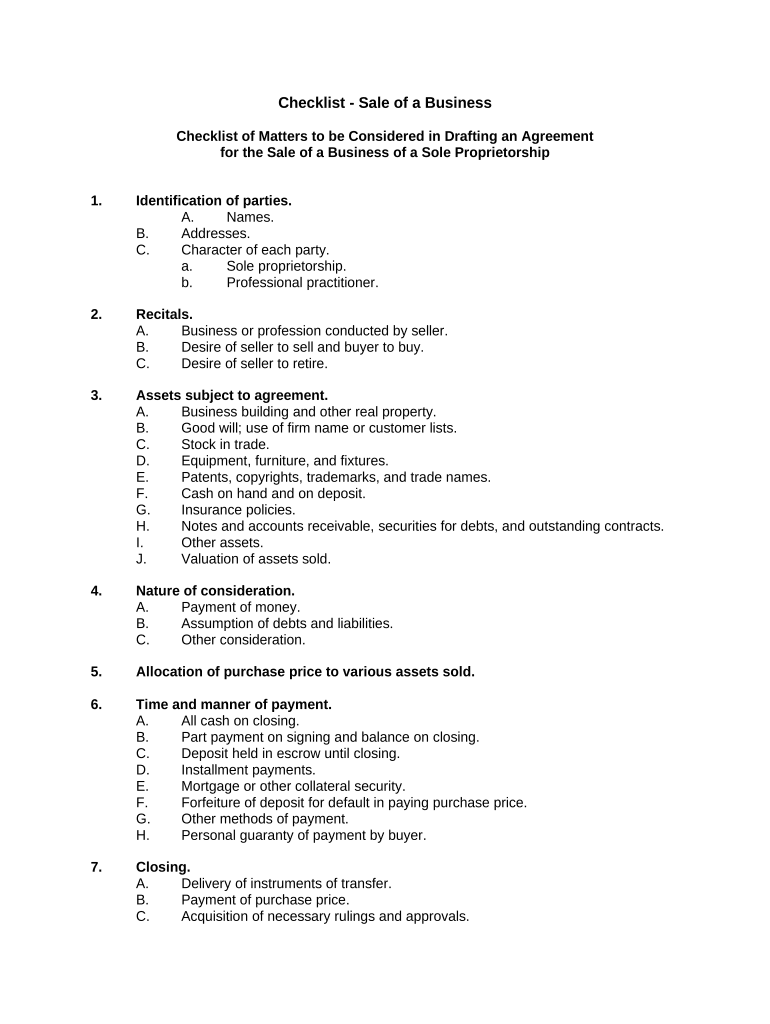
A Checklist for Sale of a Business is a structured, itemized document that organizes the tasks, documents, and approvals needed to complete a business sale. It typically covers due diligence, contracts and schedules, asset transfer steps, employee and benefit transitions, tax and regulatory filings, escrow and closing logistics, and post-closing obligations. The checklist helps buyers, sellers, brokers, lenders, and counsel track milestones, confirm required records and signatures, and reduce the risk of overlooked items that can delay or invalidate portions of the transaction.

Why a Checklist Matters for Business Sales

A clear checklist reduces transactional friction by centralizing required documents, decision points, and deadlines so all parties know what remains outstanding.

Why a Checklist Matters for Business Sales

Who Typically Uses This Checklist

Assign clear owners for each line item to avoid responsibility gaps during the sale process.

  • Buyers and buyer counsel coordinating due diligence and closing conditions.
  • Sellers and internal finance teams assembling contracts, tax data, and asset lists.
  • Escrow agents and lenders verifying funds flow and security document completion.

Core Sections to Include in a Professional Checklist

Organize the checklist into logical groups so reviewers find items quickly. Typical sections include transaction summary, due diligence deliverables, contract schedules and exhibits, transfer and assignment mechanics, regulatory and tax filings, and closing logistics with escrow instructions.

Transaction Summary

High-level sale terms, parties, and closing date details to orient reviewers and link to primary agreements.
Due Diligence Items

Lists of financial statements, contracts, licenses, permits, leases, and third-party consents to be collected and reviewed.

Schedules & Exhibits

Reference and track each contract schedule, IP assignment, employee list, and assumed liabilities schedule.

Transfer Mechanics

Asset assignment steps, bill of sale, UCC-1 financing statement terminations and successor paperwork.

Regulatory Filings

State and federal notices, tax forms, transfer of licenses, and any industry-specific filings to complete pre- or post-closing.

Closing Logistics

Escrow instructions, funding conditions, signatures required, and distribution of executed originals to stakeholders.

Essential Information and Fields to Capture

Seller Legal Name: Exact registered entity name
Buyer Legal Name: Exact registered entity name
Effective Date: MM/DD/YYYY format
Purchase Price: Numeric amount and currency
Assets Included: Concise asset list
Signatory Authority: Name and title of signer

Step-by-Step: Complete the Checklist Before Closing

Follow these sequential steps to prepare the checklist, collect documents, confirm approvals, and coordinate closing logistics.

  • 01
    Assemble Team: Identify buyer, seller, counsel, accountant, and escrow contacts.
  • 02
    Collect Documents: Gather financials, contracts, permits, licenses, and IP records.
  • 03
    Obtain Consents: Request and receive third-party approvals and landlord consents as needed.
  • 04
    Finalize Closing: Confirm funding, sign documents, and record transfers post-closing.

How to Configure an Online Checklist Workflow

Set up a digital workflow that assigns tasks, routes documents, and enforces signing order for a reliable closing process.

Field Configuration
Owner Assignment Set responsible party and backup contact
Due Dates Enforce target dates with reminders
Conditional Steps Show tasks only if specific conditions are met
Final Deliverable Route executed files to escrow and archives

Where to Send Checklist Items and Final Documents

Distribute documents according to role so each party receives the materials they need for review, signature, or filing.

  • Buyer and Seller Representatives: Provide copies to counsel, CFO, and authorized signers
  • Escrow Agent: Send final signed originals and funding instructions
  • Secretary of State: File UCC or entity transfer forms where required
  • County Recorder: Record deeds or real property transfers if applicable

Digital Signing and File Format Essentials

Confirm the platform provides an audit trail and long-term export options for archiving and regulatory review.

  • File Types: PDF, DOCX, and scanned images accepted
  • Authentication: Email, SMS code, or stronger methods
  • Integrations: CRM, cloud storage, and accounting systems

Common Deadlines and Timing Expectations

Identify fixed dates and soft deadlines to coordinate due diligence, consents, and closing tasks so the sale proceeds on schedule.

Due Diligence Period:

Typically 30 to 60 days unless negotiated otherwise

Third-Party Consent Windows:

Allow 2 to 4 weeks for vendor or landlord approvals

Closing Date:

Mutually agreed date when funds transfer and documents execute

Post-Closing Deliverables:

Schedules, final lien releases, and tax forms due after closing

Tax Reporting:

Prepare for required forms and year-end reporting obligations

Common Mistakes to Avoid When Preparing the Checklist

  • Failing to verify signatory authority for entities, which can delay closing when signatures are rejected by counterparties or registries.
  • Omitting third-party consents or assuming automatic assignability of contracts, causing breaches or late closing conditions.
  • Using inconsistent naming or allocation of purchase price across schedules, which complicates tax reporting and post-closing adjustments.
  • Neglecting record retention and final distribution plans, increasing risk of noncompliance with tax and regulatory audits.

Penalties and Legal Risks of an Incomplete Checklist

Tax Exposure: Incorrect reporting
Contractual Breach: Missed closing conditions
Regulatory Fines: Industry-specific penalties
Title Problems: Unreleased liens
Delay Costs: Carried interest and financing fees
Reputational Risk: Damaged buyer or seller trust

Real-World Examples of Checklist Use in Transactions

These brief examples show how organizations used a checklist-style workflow to coordinate closing steps and capture executed documents.

Martin Properties

The team moved to online execution for closing docs to avoid scheduling delays.

  • They reduced in-person signing needs.
  • As a result, they consistently closed property-related transfers on the agreed closing date and maintained a single repository of executed agreements for audits and lender review.

Optica Ventures

Optica standardized checklists across portfolio exits to ensure consistent due diligence.

  • The checklist centralized financial and contract schedules.
  • This approach improved internal review speed and provided clear handoffs to buyer counsel, minimizing last-minute document requests at closing.

eSignature Pricing and Feature Comparison for Checklist Workflows

Compare common plan starting prices and capabilities relevant to executing a Checklist for Sale of a Business; signNow is listed first per vendor comparison conventions.

signNow DocuSign Adobe Sign PandaDoc HelloSign
Starting Price $8/user/mo $15/user/mo $14/user/mo $19/user/mo $15/user/mo
Free Trial 7-day free trial, no credit card required Varies by plan Varies by plan Varies by plan Varies by plan
Bulk Send Yes Yes Yes Yes No
Audit Trail Yes Yes Yes Yes Yes
HIPAA Compliant Yes Yes Yes No No
Envelope Cap No envelope cap 100 envelopes/user/year Varies by plan Varies by plan Varies by plan

Frequently Asked Questions About Using the Checklist

Answers to common questions about legal validity, signing authority, notarization, and recordkeeping when using a checklist for a business sale.


Need help? Contact support

be ready to get more
Join over 28 million airSlate SignNow users