Establishing secure connection…Loading editor…Preparing document…

Colorado Irrevocable Power of Attorney Designating Clerk of Court as Agent for Service of Process

This template is fully customizable. Edit the text, fill out the fields, and send it for signature. Give it a try!
Colorado Irrevocable Power of Attorney Designating Clerk of Court as Agent for Service of Process

Overview: Colorado Irrevocable Power of Attorney Designating Clerk of Court as Agent for Service of Process

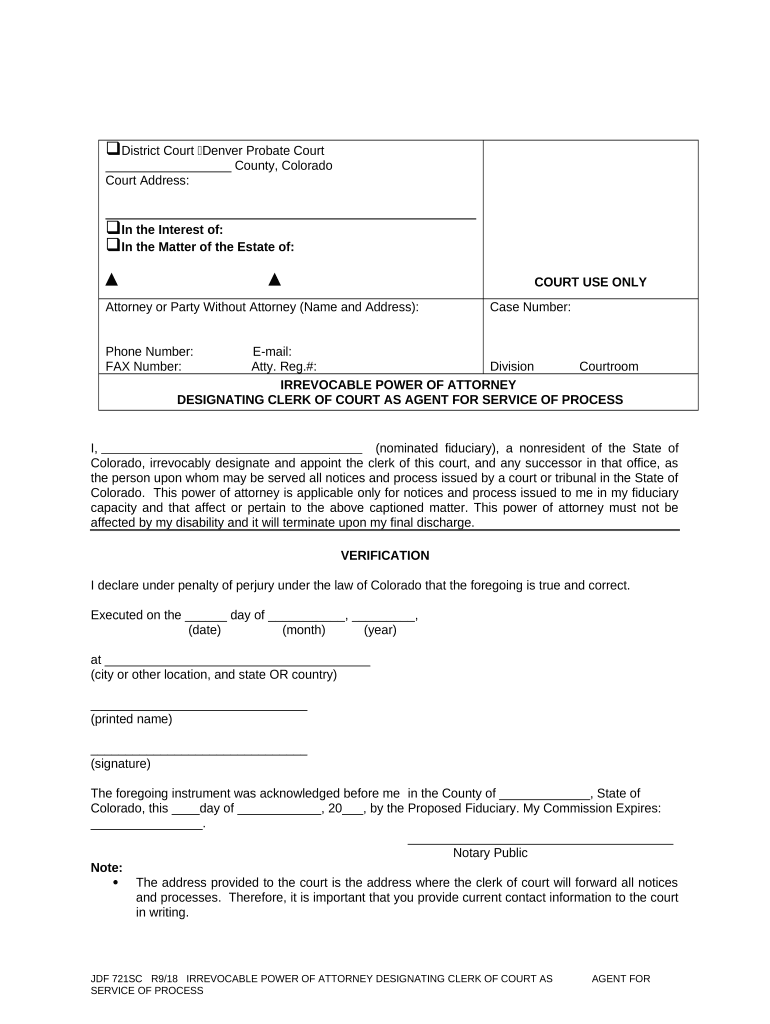
A Colorado Irrevocable Power of Attorney Designating Clerk of Court as Agent for Service of Process is a durable, limited power of attorney by which a principal irrevocably appoints the county clerk of a designated Colorado court to accept service of process on the principal’s behalf. The instrument is typically used when a party does not maintain a registered agent in Colorado or when the principal anticipates litigation and needs a local, reliable recipient for court papers. Although titled a power of attorney, its primary function is to provide an effective agent for service of summonses, complaints, and related court filings.

Why this form matters for out-of-state parties and businesses

Designating a clerk of court ensures local receipt of legal papers, reduces missed service risks, and creates a clear chain of notification for Colorado proceedings.

Why this form matters for out-of-state parties and businesses

Who commonly completes this Colorado irrevocable POA

The document is not a substitute for registered-agent filings for corporate compliance; consult counsel when in doubt.

  • Out-of-state corporations and LLCs needing a local agent for litigation
  • Nonresident individuals with Colorado property or business exposure
  • Plaintiffs or defendants arranging service before litigation begins

Core elements included in a professional irrevocable POA for service of process

A complete document clearly defines the principal, the clerk-of-court agent, the scope of authority limited to receiving service, the irrevocable nature, effective date, governing law, and signature and notarization blocks for execution.

Principal ID

Full legal name, entity type (individual/corporation/LLC), state of formation, and government-issued ID or EIN for entities.
Agent Designation

Exact clerk of court name and court location (county and court name) that will accept process.

Scope of Authority

Explicitly limits authority to acceptance of service of process and related notifications only.

Irrevocability Clause

Language stating the appointment is irrevocable for a defined period or until conditions are met.

Governing Law

Specify Colorado as governing state to reduce choice-of-law disputes and to tie enforcement to Colorado statutes.

Execution Blocks

Signature, printed name, date, and notarization lines to satisfy Colorado notarial requirements.

Step-by-step: completing and executing the form

Use this sequential checklist to prepare, sign, and validate the irrevocable POA so it will be accepted for service of process in Colorado.

  • 01
    Prepare Information: Gather legal names, EIN/SSN, and the clerk’s full office details.
  • 02
    Draft Clear Scope: Limit the agent’s authority strictly to accepting service of process.
  • 03
    Sign and Notarize: Sign before a Colorado-commissioned notary or follow RON rules if applicable.
  • 04
    Retain and Distribute: Keep original and send certified copies to opposing counsel or filing parties.

How service through the clerk of court functions in practice

This flow describes the principal steps once the clerk is appointed to accept process.

  • Filing by Opposing Party: Plaintiff files a complaint and arranges service to the designated clerk office.
  • Clerk Accepts Papers: Clerk of court accepts the summons/complaint and logs receipt.
  • Notification to Principal: Clerk or process server notifies the principal per the directions in the POA.
  • Proof of Service: Clerk files proof or affidavit of service in the court record.

Configuring a digital workflow to execute this POA

If completing the form electronically, set up fields and authentication carefully to satisfy execution and recordkeeping standards.

Field Configuration
Principal Name Required text field with validation against ID
Clerk Office Required text field; include county dropdown
Notary Block Place for digital notary OR instructions for in-person notarization
Signature Signature field with date stamp and audit trail

Digital signing and evidence: platform and file needs

Maintain an unalterable copy and a searchable audit record to support admissibility in court.

  • File Formats: Use PDF/A or PDF with embedded signature metadata for long-term fidelity.
  • Authentication: Use email + SMS or stronger methods for signer attribution and audit reliability.
  • Audit Trail: Capture timestamp, IP, signer email, and certificate of completion for admissibility.

Security and compliance considerations for electronic execution

Encryption: TLS 1.2/1.3 in transit; AES-256 at rest
Regulatory Compliance: ESIGN and UETA compliance for e-signature validity
Healthcare: HIPAA compliance available with a signed BAA
Audit Trail: Comprehensive event log including timestamps and IP addresses
Standards: SOC 2 Type II and ISO 27001 certifications
FDA/21CFR: 21 CFR Part 11 controls available where required

Common legal risks and consequences when the POA is incorrect

Invalid Service: Service may be ineffective if the clerk is not properly identified or the POA lacks required execution.
Default Judgment: Missed or defective service can lead to default judgment against the principal.
Enforceability Challenge: Courts may void unclear irrevocability clauses or ambiguous scope language.
Notarization Defect: Improper notarization can render the instrument inadmissible.
Jurisdictional Conflict: Choice-of-law errors can expose the principal to unexpected procedural rules.
Cost Exposure: Additional litigation costs and attorney fees to cure defects or re-serve documents.

Frequent preparation mistakes to avoid

  • Using informal clerk descriptions instead of precise court or county names
  • Failing to notarize or omitting notary details required by Colorado
  • Neglecting to state an effective date or duration for irrevocability
  • Entering mismatched principal names compared with corporate formation records

Practical tips for accurate and efficient completion

Adopt these steps to improve acceptance, reduce disputes, and simplify later enforcement.

Verify Clerk Details
Confirm the official clerk office name and mailing address with the relevant Colorado county court before execution.
Use Clear Irrevocability Language
State a fixed term or clearly defined condition to avoid later interpretation issues.
Match Entity Records
Ensure the principal’s name and formation details match state registration or operating agreement records.
Keep Originals Secure
Store the notarized original in a secure location and retain certified copies for distribution to counsel and counterparties.

Real-world scenarios where this irrevocable POA is used

These two illustrative scenarios show how the document functions in common situations.

Out-of-State Landowner

A nonresident property owner designates the county clerk to accept service for trespass litigation

  • Clerk receives complaint on owner’s behalf
  • The owner avoids missed notices and can promptly instruct counsel to respond, reducing risk of default judgment.

Foreign LLC with Colorado Exposure

An LLC formed outside Colorado appoints a local clerk to accept service for contract disputes

  • Plaintiffs serve the clerk per the POA
  • The LLC receives timely notice and can engage local counsel without delay, improving procedural compliance.

Who has authority to sign this document

Individual Principal

The principal (natural person) must sign personally. If the principal is incapacitated, a court-appointed guardian or conservator may sign only if authorized by the court order.

Entity Principal

An authorized officer, manager, or other signatory under the entity’s governing documents may sign. Confirm corporate resolutions or operating agreements authorizing the execution.

How to amend or update the appointment

Modifications require careful drafting to avoid claims that revocation was ineffective given the irrevocable language.

01

Review Irrevocability:

Check whether the POA expressly permits amendment or sets conditions for termination.
02

Draft Amendment:

Prepare a documented amendment signed and notarized like the original.
03

Notify Interested Parties:

Serve counterparts and file notice with the clerk if filing rules require it.
04

Record Retention:

Keep both original and amendment with clear versioning.
05

Seek Counsel:

Consult an attorney for disputes over enforceability or revocation.
06

File if Required:

Follow county or court filing procedures when formal notice is necessary.

Timing considerations and procedural deadlines

Timing matters: execute, notarize, and distribute the POA well before any anticipated litigation or service events.

Execution Date:

Sign and notarize before any expected filing or service to ensure validity.

Distribution:

Provide copies to counsel and counterparties promptly after execution.

Filing with Court:

File proof of appointment only if required by local rule or the opposing party requests it.

Retention Start:

Retention begins on the execution date for recordkeeping and statute of limitations purposes.

Review Cycle:

Revisit the instrument at least annually if litigation risk remains.

eSignature vendor comparison: pricing and feature snapshot

Listed below are common vendor pricing and feature points relevant when choosing an e-signature provider for executing notarized or legally-sensitive POAs.

signNow DocuSign Adobe Sign PandaDoc HelloSign
Starting Price $8/user/mo $15/user/mo $14/user/mo $19/user/mo $15/user/mo
Free Trial 7-day free trial Free trial available Free trial available Free trial available Free trial available
Bulk Send Yes Yes Yes Yes No
Audit Trail Yes Yes Yes Yes Yes
HIPAA Compliant Yes Yes Yes No No
Envelope Cap No envelope cap 100 envelopes/user/year No cap No cap No cap

Frequently asked questions and troubleshooting

Answers to common execution, notarization, and service concerns for the Colorado irrevocable POA.


Need help? Contact support

be ready to get more
Join over 28 million airSlate SignNow users