Establishing secure connection…Loading editor…Preparing document…

Conservatorship Form

This template is fully customizable. Edit the text, fill out the fields, and send it for signature. Give it a try!
Conservatorship Form

What the Conservatorship Form Is and When It’s Used

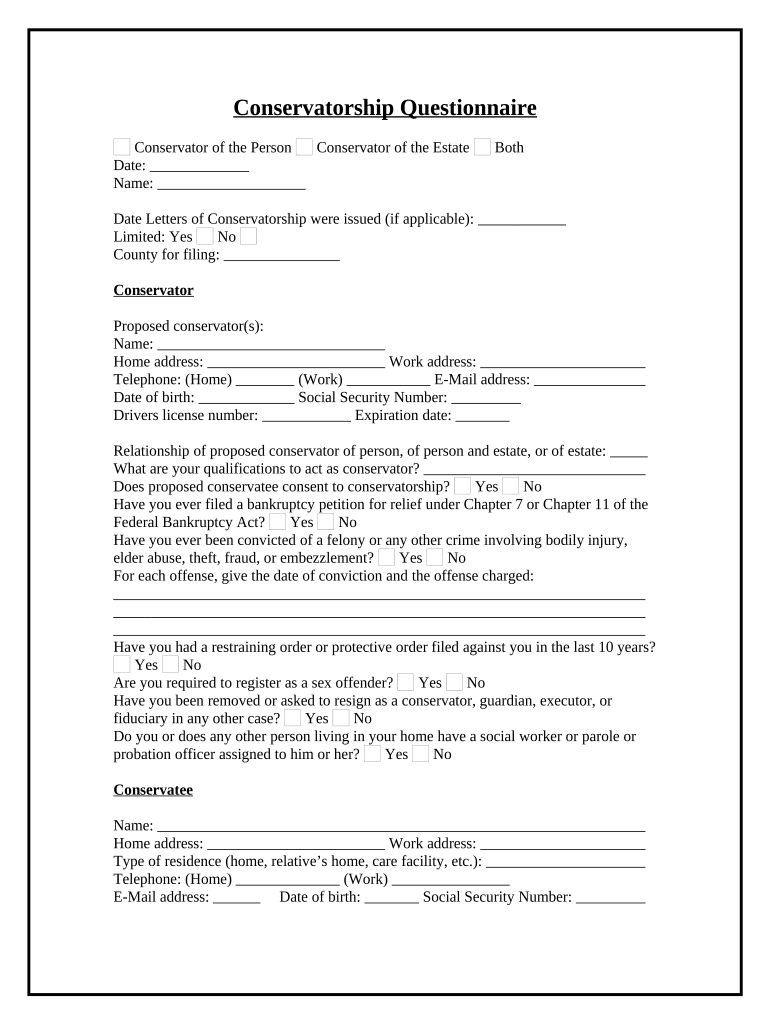
A Conservatorship Form is a court petition used to request appointment of a conservator for an adult who cannot manage personal care or financial affairs. It typically identifies the proposed conservatee, describes the incapacity or disability, lists assets and income, and specifies the powers requested for the conservator. The form initiates probate- or family-court proceedings, triggers court investigation or hearing, and becomes part of the public court record after filing. State statutes and local probate rules govern form structure, supporting documents, and required notarization or witness steps.

Why a Proper Conservatorship Form Matters

A complete, accurate form helps the court evaluate capacity, protects the conservatee’s rights, and speeds case scheduling. Correct forms reduce hearings, avoid delays, and limit contested proceedings.

Why a Proper Conservatorship Form Matters

Who Typically Prepares and Signs This Form

The Conservatorship Form is prepared by petitioners, attorneys, or agency representatives to start court oversight for an incapacitated adult.

  • Family members petition when an adult can no longer handle finances or medical decisions.
  • Licensed attorneys file on behalf of petitioners and ensure statutory compliance and evidence submission.
  • Public guardians or agency representatives file for adults without family or private caregivers.

Primary Participants and Their Roles

Court Petitioner

A family member or interested party who files the petition and provides factual statements about the conservatee’s condition, living situation, and need for protective oversight. The petitioner is responsible for serving notices and attending required hearings.

Attorney / Guardian

An attorney or proposed conservator advises on legal strategy, completes court-required inventories and reports, and represents the conservator at hearings. Counsel ensures filings meet statutory form, notice, and service requirements under state probate code.

Security, Privacy, and Legal Standards to Observe

Encryption: TLS 1.2/1.3 in transit, AES-256 at rest
eSignature Law: ESIGN and UETA compliance expected
HIPAA Consideration: BAA required for PHI-containing records
Audit Trail: Timestamp, IP, and action log retained
Access Controls: Role-based permissions recommended
Record Integrity: Tamper-evident storage and versioning

Step-by-Step: Completing the Core Sections

Follow these sequential steps to prepare a Conservatorship Form before filing with the probate or family court.

  • 01
    Identify Parties: Enter full legal names and contact information for conservatee and petitioner.
  • 02
    Describe Incapacity: Summarize medical facts, diagnoses, and supporting evidence briefly.
  • 03
    Inventory Assets: List major assets, accounts, real property, and estimated values.
  • 04
    Request Powers: Specify financial and personal-care powers sought and any limitations.

Typical Digital Workflow Settings for Online Completion

Configure a reliable workflow for drafting, review, notarization, and court delivery to reduce processing errors.

Field Configuration
Document Format Use PDF or PDF/A for court filing and archival
Signer Authentication Enable ID check and two-factor authentication
Kiosk / In-person Support in-person signing for witnesses and notary
Retention Policy Preserve signed copy and audit trail securely

End-to-End Process from Drafting to Filing

This sequence summarizes the common stages from form creation through court submission and record retention.

  • Draft: Prepare petition and compile supporting documents
  • Review: Attorney or reviewer checks compliance and evidence
  • Sign & Notarize: Signers complete signatures with required notarization
  • File with Court: Submit petition as a court filing per local rules

Essential Elements Included in a Professional Conservatorship Form

A well-structured form groups identity, incapacity evidence, asset detail, requested powers, and procedural consents clearly for court review.

Petition Header

Identifies court, case number (if known), petitioner, and the conservatee; sets venue and contains statutory references or code sections relied on in the request.
Conservatee Details

Full legal name, date of birth, current address, last known residence, and any guardianship or conservatorship history needed for court background checks and service.

Functional Findings

Clear description of cognitive or physical limitations, examples of impaired decision-making, and attached medical affidavits or evaluations that support the need for conservatorship.

Asset Inventory

Concise inventory of bank accounts, investments, real property, liabilities, and monthly income showing the scope of estate management the court must oversee.

Requested Authority

Specific powers asked for, such as paying bills, selling property, consenting to medical treatment, and whether the petition requests immediate or limited emergency powers.

Notices & Consents

Proof of notice to interested parties, proposed conservator statements, and any waivers or consents required by statute; includes signature, date, and notarization when applicable.

Common Preparation and Filing Pitfalls to Avoid

  • Incomplete medical evidence or unsigned physician declarations that leave the court without a factual basis for incapacity findings.
  • Mismatched names, incorrect addresses, or missing dates that delay service and require amended filings or re-noticing.
  • Failure to attach required inventories, bond forms, or notice proofs, causing clerk rejection or scheduling postponement.
  • Notarization or witness errors—wrong notary acknowledgement format or missing witness statements—leading to contested admissibility.

Consequences of Incorrect or Incomplete Filings

Case Delay: Court may continue or dismiss hearing
Service Failure: Requires re-service and new filing dates
Financial Risk: Unauthorised transactions risk liability
Sanctions: Court may impose costs or sanctions
Estate Exposure: Assets may remain unsecured or mismanaged
Increased Legal Cost: Additional counsel fees for corrections

Real-World Examples and Typical Outcomes

These concise case sketches illustrate how properly completed Conservatorship Forms move through court intake and review.

Family Petition Example

A daughter filed a petition after repeated hospitalizations and documented cognitive decline, including two physician affidavits and a financial inventory.

  • Court granted limited financial powers pending full hearing.
  • The conservatorship allowed immediate bill payment and bank account oversight while preserving the conservatee’s right to counsel and future review.

Agency Petition Example

A county adult services agency filed for a homeless adult with severe impairment, submitting medical reports and service contact logs.

  • Judge appointed a public guardian and ordered initial inventory.
  • The appointment enabled coordinated care, temporary housing placement, and court-ordered oversight of benefit payments for the conservatee’s support.

Practical Tips for Accurate and Efficient Completion

Follow these best practices to minimize delays, protect parties, and meet legal requirements.

Use exact legal names
Enter full legal names as shown on government-issued identification and cross-check across attachments; accurate naming reduces service errors and avoids the need for amended petitions or supplemental filings with the court.
Attach supporting evidence
Include medical affidavits, physician declarations, and recent medical records with the petition to provide a clear factual basis for incapacity findings and reduce the need for additional discovery or court continuances.
Confirm notarization rules
Verify whether your jurisdiction accepts remote online notarization (RON) or requires in-person acknowledgement, and ensure the notary journal and certificate meet state notary standards before filing with the court.
Keep clear inventories
Prepare a concise but complete asset inventory with estimated values and supporting statements; courts rely on inventories for bond amounts, oversight, and future accountings to prevent mismanagement.

eSignature Pricing Snapshot for Conservatorship Document Workflows

The right eSignature vendor affects cost, compliance, and notarization options. Below is a focused comparison with signNow listed first for reference.

signNow DocuSign Adobe Sign PandaDoc HelloSign
Starting Price $8/user/mo $15/user/mo $14/user/mo $19/user/mo $15/user/mo
Free Trial 7-day trial Varies by plan Varies by plan Varies by plan Varies by plan
Bulk Send Yes Yes Yes Yes Varies
Audit Trail Yes Yes Yes Yes Yes
HIPAA Compliant Yes Yes Yes No No

Frequently Asked Questions: Common Conservatorship Form Issues

Answers to frequently encountered questions related to form completion, notarization, eSign, and court filing.


Need help? Contact support

be ready to get more
Join over 28 million airSlate SignNow users