Establishing secure connection… Loading editor… Preparing document…
Navigation

Fill and Sign the Construction Contract New Form
Fill and Sign the Construction Contract New Form

How it works

Open the document and fill out all its fields.
Apply your legally-binding eSignature.
Save and invite other recipients to sign it.

Rate template

4.7
39 votes
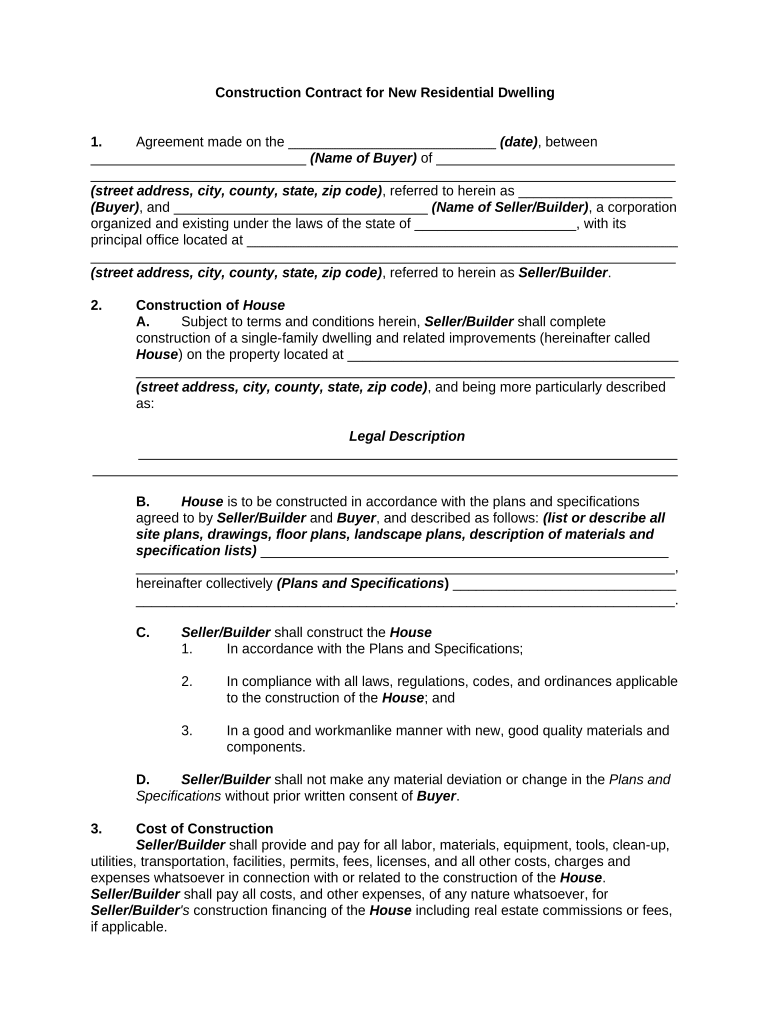
Construction Contract for New Residential Dwelling 1. Agreement made on the ___________________________ (date) , between ____________________________ (Name of Buyer) of _______________________________ ____________________________________________________________________________ (street address, city, county, state, zip code) , referred to herein as ____________________ (Buyer) , and _________________________________ (Name of Seller/Builder) , a corporation organized and existing under the laws of the state of _____________________, with its principal office located at ________________________________________________________ ____________________________________________________________________________ (street address, city, county, state, zip code) , referred to herein as Seller/Builder . 2. Construction of House A. Subject to terms and conditions herein, Seller/Builder shall complete construction of a single-family dwelling and related improvements (hereinafter called House ) on the property located at ___________________________________________ ______________________________________________________________________ (street address, city, county, state, zip code) , and being more particularly described as: Legal Description ______________________________________________________________________ ____________________________________________________________________________ B. House is to be constructed in accordance with the plans and specifications agreed to by Seller/Builder and Buyer , and described as follows: (list or describe all site plans, drawings, floor plans, landscape plans, description of materials and specification lists) _____________________________________________________ ______________________________________________________________________, hereinafter collectively (Plans and Specifications ) _____________________________ ______________________________________________________________________. C. Seller/Builder shall construct the House 1. In accordance with the Plans and Specifications; 2. In compliance with all laws, regulations, codes, and ordinances applicable to the construction of the House ; and 3. In a good and workmanlike manner with new, good quality materials and components. D. Seller/Builder shall not make any material deviation or change in the Plans and Specifications without prior written consent of Buyer . 3. Cost of Construction Seller/Builder shall provide and pay for all labor, materials, equipment, tools, clean-up, utilities, transportation, facilities, permits, fees, licenses, and all other costs, charges and expenses whatsoever in connection with or related to the construction of the House . Seller/Builder shall pay all costs, and other expenses, of any nature whatsoever, for Seller/Builder 's construction financing of the House including real estate commissions or fees, if applicable. 4. Purchase Price shall be $__________________. 5. Method of Payment A. The Purchase Price shall be paid as follows: [ ] Cash; or [ ] Subject to Financing. B. Financing to be obtained by: [ ] Conventional [ ] Seller/Builder [ ] VA [ ] FHA [ ] Other terms: 6. Earnest Money A. This offer is accompanied by an earnest money deposit of $______________. Buyer and Seller/Builder authorize __________________________________ (Name) , as Escrow Agent, to hold and disburse earnest money according to the terms of this Agreement. Earnest money paid by: [ ] Cash, [ ] Check, or [ ] Other. B. Broker does not guarantee payment of a check or checks accepted as earnest money. All escrow money received shall be deposited as required by _______________ (State) law and ____________________ (State) Real Estate Commission Rules and Regulations. At the consummation of this sale, the earnest money deposit shall be credited to the Buyer . THE PARTIES UNDERSTAND THAT, UNDER ALL CIRCUMSTANCES, INCLUDING DEFAULT, THE BROKER HOLDING THE EARNEST MONEY DEPOSIT WILL NOT DISBURSE IT TO EITHER PARTY UNTIL BOTH PARTIES HAVE EXECUTED AN AGREEMENT AUTHORIZING THE DISBURSEMENT OR UNTIL A COURT OF COMPETENT JURISDICTION HAS DIRECTED A DISBURSEMENT. 7. Loan Processing and Application A. Buyer 's obligation under this agreement is contingent on Buyer obtaining said loan. Buyer shall apply for a ______% loan (loan-to-value ratio) within _____days from the execution of this Agreement and shall provide Seller/Builder with satisfactory loan approval within days. Time is of the essence. Should the Buyer fail to make loan application or receive approval within said period, and to diligently pursue the application, the Seller/Builder shall have the option to terminate this Agreement, with written notice. Buyer also agrees to provide all documents or information requested by the lending company in a prompt and timely manner. Buyer will take any action that is needed or requested by Lender to process the loan application. Buyer further hereby gives permission to Lender to disclose pertinent information concerning the Buyer 's credit-worthiness or any other information needed for the loan processing to the listing or cooperating broker(s) or agent(s). If Buyer fails to comply with these above conditions, Buyer shall be in default of this agreement subject to the terms of Paragraph B. FHA Mortgage Insurance: [ ] will [ ] will not be added to the mortgage. C. VA funding fee [ ] will [ ] will not be added to the mortgage. 8. CONVEYANCE SHALL BE MADE: Conveyance shall be made subject to all easements as well as covenants of record (provided they do not make the title unmarketable) and to all governmental statutes, ordinances, rules and regulations. Seller/Builder agrees to convey by marketable title and deliver a proper general warranty deed, if applicable, free of encumbrances, except as herein stated. Seller/Builder agrees to pay all statutory deed recording fees. The deed shall be delivered at the stipulated place of closing, and transaction closed on or before _______________________ (date) , and no later than _____________________________ (date and time of day) . Time is of the essence. Seller/Builder and Buyer authorize their respective attorneys and the settlement agent to furnish to Listing Broker and Selling Broker copies of the final HUD-1 settlement statement for the transaction for their review prior to closing. 9. CLOSING COSTS: A. Unless otherwise agreed, closing costs, including all loan charges and prepaid recurring items, shall be paid as follows: 1. Seller/Builder shall provide or pay for preparation of deed, any recording charge based on value of property, and all costs necessary to deliver a marketable title, including recording of satisfactions and property taxes to the day of closing. 2. BUYER shall pay, unless otherwise agreed herein, the cost of the Buyer ’s credit report, property insurance, appraisal, survey, cost of obtaining loan, discount points, title examination, escrow deposits, and prepaid expenses. The Buyer shall also pay, if applicable, interim interest and mortgage insurance premium or VA funding fee. Buyer’s hazard insurance policy shall provide coverage as required by lender. 10. Home Protection Plan Coverage: A. Both parties understand that a third party Home Warranty Plan: [ ] will [ ] will not be issued at closing. B. If applicable, the warranty premium will be paid at closing by the: [ ] Buyer or [ ] Seller/Builder not to exceed $ _________________. 11. Completion of Construction Seller/Builder shall diligently pursue the construction of the House , and shall complete construction of the House as a "turn-key" job on or before the closing. If Seller/Builder is delayed at any time in the progress of construction by (1) any act or neglect of Buyer , (2) any changes ordered in construction, (3) material shortages, adverse weather conditions, or delays in transportation which were not reasonably anticipated or (4) acts of God, then the time for completion of construction of the House and the closing shall be extended automatically by a reasonable time to account for the delay experienced. Seller/Builder shall notify Buyer in writing within ten (10) days after the commencement of the delay; otherwise the right to an extension shall be waived. The construction of the House shall be deemed completed when (i) the House has been completed in accordance with the Plans and Specifications and is broom- clean; and (ii) a certificate of compliance has been issued by the appropriate governmental authority having jurisdiction over the construction of the House . If not closed by _____________________ (date) , a penalty of $ ___________ per day will be due from Seller/Builder . 12. Purchase Price and Allowances: The purchase price in Paragraph 4 above includes the purchase price of the House and all allowances stated in Paragraph 20 of this Agreement. Whenever the final cost for allowances is more or less than the allowances stated in Paragraph 20 of this Agreement. the difference shall be adjusted between the parties at or prior to closing. 13. Inspections: Buyer or Buyer 's designated representative may enter and inspect the House at reasonable times and in such manner as not to interfere with the progress of construction for the limited purpose of determining whether the work performed or being performed conforms to the Plans and Specifications and the terms of this offer to purchase. In the event that during construction the Buyer shall reasonably determine that such construction is not proceeding in accordance with this offer to purchase, Buyer shall give written notice to Seller/Builder specifying that particular deviation, deficiency, or omission, and the Seller/Builder shall forthwith correct such deviation, deficiency, or omission. Buyer's rights under this paragraph shall not release Seller/Builder from any of Seller/Builder 's obligations for the construction of the House in accordance with the Plans and Specifications and this offer. 14. Insurance: Seller/Builder shall purchase and maintain "All Risks" Builders' Risk Insurance coverage, including Theft and Vandalism and Malicious Mischief, upon the House on a "Completed Value" basis, while the House is in the course of construction. "Completed Value" shall mean the full value of the House as of the date that all construction is completed, including the Seller/Builder 's total cost plus profit, but excluding the cost of land. In the event that construction is fully completed prior to sale of the Property, Seller/Builder shall purchase and maintain Permanent "All Risks" Property Insurance coverage on the House , including Theft and Vandalism and Malicious Mischief on a "Replacement Cost" basis. "Replacement Cost" shall mean the full cost of replacement of structure or structures at the same site with new material of like kind and quality without deduction for depreciation. In addition, Seller/Builder shall purchase and maintain Third Party Liability Insurance coverage on the premises of the Property during the course of construction and after construction is completed. Seller/Builder shall assume the obligation and cost of restoring, rebuilding, repairing, and replacing the House . Such risk of loss or damage assumed by Seller/Builder shall continue until the closing in accordance with the terms of this offer. 15. Change Orders: The Buyer , without invalidating this offer, may order changes in the construction of the House within the general scope of the Plans and Specifications, consisting of additions, deletions, or other revisions, and the purchase price and closing shall be adjusted accordingly. All such changes shall be made only by a change order which shall be in writing and signed by both Buyer and Seller/Builder . 16. Warranties – Limited Warranty of Construction Unless otherwise provided for herein, Seller/Builder hereby warrants that for a period of one (1) year from the date of closing or the date Buyer occupies the House , whichever comes first, Seller/Builder will make all necessary repairs and corrections to the House , either interior or exterior, structural or nonstructural, that shall become necessary by reason of faulty construction, labor or materials or non-conformity of construction to the Plans and Specifications. At Seller/Builder 's sole option, Seller/Builder may either (1) make such repairs or corrections, (2) replace any faulty or non-conforming item or condition or (3) pay to Buyer the reasonable cost of such repair, correction, or replacement. This limited warranty: (1) is for the benefit of Buyer only and may not be assigned nor shall it inure to the benefit of any other person or entity; (2) shall survive closing and the delivery of the deed; and (3) is in lieu of all other warranties, oral or written, express or implied, except such other express written warranties as Seller/Builder may provide to Buyer and the warranties described below. 17. Warranties of Components Seller/Builder shall assign and deliver to Buyer at closing all guarantees and warranties of all components comprising the House to the extent the same are assignable. Buyer shall be responsible for compliance with any notice and claim procedures set forth therein. 18. Disclaimer by Broker and Agents: The parties acknowledge that the Listing and Cooperating Broker(s) and their Agent(s): A. Give no guaranty or warranty of any kind, express or implied, as to the physical condition of the House ; B. Give no warranty, express or implied, as to the habitability or workmanlike service of the House and any implied warranty hereby disclaimed; C. Give no guaranty on warranty concerning (i) any certification or inspection concerning the condition of the House , and (ii) the accuracy of the published square footage of the property; D. Buyer acknowledges that Seller/Builder and Seller/Builder 's Agents have not made any oral or written commitments to Buyer regarding (i) projected income or economic benefit for Buyer from rentals; (ii) rental arrangements except that Buyer may rent the unit if Buyer so desires or (iii) other economic benefits to the Buyer . 19. Schedule of Allowances NOTE: Reference should be made to the Plan and Specifications for a more detailed description of the items and allowances and where the items are to be located. The amount of the allowance indicated below includes the labor and materials to install them unless otherwise indicated. 20. Item Amount of Allowance A. Wallpaper:  Kitchen $__________ per roll;  Bathrooms $__________ per roll;  Other $__________ per roll. B. Carpet and Pad $__________ per sq. yd. C. Marble or Ceramic tile $__________ per sq. ft. D. Vinyl/floor covering $__________ per sq. yd. E. Light fixtures (includes fixtures, bulbs, spots, floods, door chimes, and recessed fixtures) $__________. F. Hardware for doors $__________. G. Cabinets:  Kitchen $__________  Bathrooms $__________  Other $__________ H. Paneled walls $__________ per 4x8 sheet. I. Appliances  Stove $__________  Refrigerator $__________  Dishwasher $_________  Disposal $__________ J. Bathrooms  Mirrors and Medicine Cabinets $__________  Accessories (such as paper and towel bars) $__________ K. Ceiling Fan(s) $__________ L. Landscaping to include trees and shrubs $__________ M. Other: $__________ 21. Mandatory Arbitration Any dispute under this Agreement shall be required to be resolved by binding arbitration of the parties hereto. If the parties cannot agree on an arbitrator, each party shall select one arbitrator and both arbitrators shall then select a third. The third arbitrator so selected shall arbitrate said dispute. The arbitration shall be governed by the rules of the American Arbitration Association then in force and effect. Notwithstanding the foregoing, t he following matters are excluded from mediation hereunder: (a) judicial or non-judicial foreclosure or other action or proceeding to enforce a deed of trust, mortgage, or land contract; (b) an unlawful detainer action; (c) the filing or enforcement of a mechanic's lien; (d) any matter which is within the jurisdiction of a probate court; (e) the filing of a interpleader action to resolve earnest money disputes. The filing of a judicial action to enable the recording of a notice of pending action, for order of attachment, receivership, injunction, or other provisional remedies, shall not constitute a waiver of the right to mediate under this provision, nor shall it constitute a breach of the duty to mediate. 22. No Waiver The failure of either party to this Agreement to insist upon the performance of any of the terms and conditions of this Agreement, or the waiver of any breach of any of the terms and conditions of this Agreement, shall not be construed as subsequently waiving any such terms and conditions, but the same shall continue and remain in full force and effect as if no such forbearance or waiver had occurred. 23. Governing Law This Agreement shall be governed by, construed, and enforced in accordance with the laws of the State of ________________. 24. Notices Any notice provided for or concerning this Agreement shall be in writing and shall be deemed sufficiently given when sent by certified or registered mail if sent to the respective address of each party as set forth at the beginning of this Agreement. 25. Attorney’s Fees In the event that any lawsuit is filed in relation to this Agreement, the unsuccessful party in the action shall pay to the successful party, in addition to all the sums that either party may be called on to pay, a reasonable sum for the successful party's attorney fees. 26. Entire Agreement This Agreement shall constitute the entire agreement between the parties and any prior understanding or representation of any kind preceding the date of this Agreement shall not be binding upon either party except to the extent incorporated in this Agreement. 27. Modification of Agreement Any modification of this Agreement or additional obligation assumed by either party in connection with this Agreement shall be binding only if placed in writing and signed by each party or an authorized representative of each party. 28. Assignment of Rights The rights of each party under this Agreement are personal to that party and may not be assigned or transferred to any other person, firm, corporation, or other entity without the prior, express, and written consent of the other party. 29. Counterparts This Agreement may be executed in any number of counterparts, each of which shall be deemed to be an original, but all of which together shall constitute but one and the same instrument. WITNESS our signatures as of the day and date first above stated. ___________________________________ (Name of Seller/Builder) ______________________________ By:_______________________________ ______________________________ __________________________________ (P rinted name & Signature of Buyer (P rinted Name & Office in Corporation) _______________________________ (Signature of Officer)

Practical Advice for Completing Your ‘Construction Contract New’ Online

Are you fed up with the inconvenience of handling documents? Look no further than airSlate SignNow, the premier eSignature option for individuals and businesses. Bid farewell to the lengthy process of printing and scanning files. With airSlate SignNow, you can easily complete and sign documents online. Take advantage of the powerful features offered by this user-friendly and cost-effective platform and transform your document management strategy. Whether you need to authorize forms or collect signatures, airSlate SignNow manages everything seamlessly, needing just a few clicks.

Adhere to these comprehensive instructions:

  1. Access your account or register for a complimentary trial with our service.
  2. Select +Create to upload a document from your device, cloud storage, or our template library.
  3. Edit your ‘Construction Contract New’ in the editor.
  4. Click Me (Fill Out Now) to finalize the form on your end.
  5. Insert and designate fillable fields for additional parties (if needed).
  6. Proceed with the Send Invite options to solicit eSignatures from others.
  7. Save, print your version, or convert it into a reusable template.

Don't be concerned if you need to collaborate with your colleagues on your Construction Contract New or send it for notarization—our solution provides all the tools necessary to achieve such aims. Sign up with airSlate SignNow today and elevate your document management to a new standard!

Here is a list of the most common customer questions. If you can’t find an answer to your question, please don’t hesitate to reach out to us.

Need help? Contact Support

The best way to complete and sign your construction contract new form

Save time on document management with airSlate SignNow and get your construction contract new form eSigned quickly from anywhere with our fully compliant eSignature tool.

How to Sign a PDF Online How to Sign a PDF Online

How to complete and sign forms online

Previously, working with paperwork took lots of time and effort. But with airSlate SignNow, document management is fast and easy. Our robust and user-friendly eSignature solution allows you to easily complete and eSign your construction contract new form online from any internet-connected device.

Follow the step-by-step guide to eSign your construction contract new form template online:

  • 1.Sign up for a free trial with airSlate SignNow or log in to your account with password credentials or SSO authorization option.
  • 2.Click Upload or Create and import a file for eSigning from your device, the cloud, or our form collection.
  • 3.Click on the file name to open it in the editor and utilize the left-side menu to complete all the blank areas properly.
  • 4.Place the My Signature field where you need to approve your sample. Provide your name, draw, or import a picture of your regular signature.
  • 5.Click Save and Close to accomplish editing your completed form.

Once your construction contract new form template is ready, download it to your device, save it to the cloud, or invite other people to eSign it. With airSlate SignNow, the eSigning process only requires a couple of clicks. Use our robust eSignature solution wherever you are to deal with your paperwork successfully!


How to Sign a PDF Using Google Chrome How to Sign a PDF Using Google Chrome

How to complete and sign paperwork in Google Chrome

Completing and signing paperwork is simple with the airSlate SignNow extension for Google Chrome. Adding it to your browser is a fast and effective way to manage your forms online. Sign your construction contract new form sample with a legally-binding eSignature in a few clicks without switching between programs and tabs.

Follow the step-by-step guidelines to eSign your construction contract new form template in Google Chrome:

  • 1.Navigate to the Chrome Web Store, search for the airSlate SignNow extension for Chrome, and add it to your browser.
  • 2.Right-click on the link to a document you need to sign and select Open in airSlate SignNow.
  • 3.Log in to your account using your credentials or Google/Facebook sign-in buttons. If you don’t have one, sign up for a free trial.
  • 4.Utilize the Edit & Sign toolbar on the left to complete your template, then drag and drop the My Signature option.
  • 5.Add a picture of your handwritten signature, draw it, or simply type in your full name to eSign.
  • 6.Make sure all data is correct and click Save and Close to finish editing your form.

Now, you can save your construction contract new form sample to your device or cloud storage, email the copy to other individuals, or invite them to eSign your document with an email request or a protected Signing Link. The airSlate SignNow extension for Google Chrome improves your document processes with minimum time and effort. Try airSlate SignNow today!


How to Sign a PDF in Gmail How to Sign a PDF in Gmail How to Sign a PDF in Gmail

How to complete and sign forms in Gmail

Every time you receive an email containing the construction contract new form for approval, there’s no need to print and scan a document or download and re-upload it to a different program. There’s a better solution if you use Gmail. Try the airSlate SignNow add-on to promptly eSign any documents right from your inbox.

Follow the step-by-step guidelines to eSign your construction contract new form in Gmail:

  • 1.Go to the Google Workplace Marketplace and find a airSlate SignNow add-on for Gmail.
  • 2.Set up the program with a corresponding button and grant the tool access to your Google account.
  • 3.Open an email containing an attachment that needs approval and utilize the S key on the right sidebar to launch the add-on.
  • 4.Log in to your airSlate SignNow account. Choose Send to Sign to forward the file to other people for approval or click Upload to open it in the editor.
  • 5.Place the My Signature field where you need to eSign: type, draw, or upload your signature.

This eSigning process saves time and only requires a few clicks. Utilize the airSlate SignNow add-on for Gmail to update your construction contract new form with fillable fields, sign documents legally, and invite other individuals to eSign them al without leaving your mailbox. Improve your signature workflows now!


How to Sign a PDF on a Mobile Device How to Sign a PDF on a Mobile Device How to Sign a PDF on a Mobile Device

How to fill out and sign paperwork in a mobile browser

Need to quickly complete and sign your construction contract new form on a mobile phone while working on the go? airSlate SignNow can help without the need to set up extra software apps. Open our airSlate SignNow tool from any browser on your mobile device and add legally-binding eSignatures on the go, 24/7.

Follow the step-by-step guidelines to eSign your construction contract new form in a browser:

  • 1.Open any browser on your device and go to the www.signnow.com
  • 2.Create an account with a free trial or log in with your password credentials or SSO authentication.
  • 3.Click Upload or Create and import a file that needs to be completed from a cloud, your device, or our form catalogue with ready-made templates.
  • 4.Open the form and fill out the blank fields with tools from Edit & Sign menu on the left.
  • 5.Place the My Signature area to the form, then enter your name, draw, or upload your signature.

In a few simple clicks, your construction contract new form is completed from wherever you are. As soon as you're finished editing, you can save the document on your device, generate a reusable template for it, email it to other individuals, or invite them electronically sign it. Make your documents on the go speedy and efficient with airSlate SignNow!


How to Sign a PDF on iPhone How to Sign a PDF on iPhone

How to fill out and sign documents on iOS

In today’s corporate environment, tasks must be accomplished quickly even when you’re away from your computer. With the airSlate SignNow application, you can organize your paperwork and approve your construction contract new form with a legally-binding eSignature right on your iPhone or iPad. Install it on your device to conclude contracts and manage forms from anywhere 24/7.

Follow the step-by-step guide to eSign your construction contract new form on iOS devices:

  • 1.Go to the App Store, search for the airSlate SignNow app by airSlate, and install it on your device.
  • 2.Launch the application, tap Create to import a form, and choose Myself.
  • 3.Choose Signature at the bottom toolbar and simply draw your autograph with a finger or stylus to eSign the form.
  • 4.Tap Done -> Save after signing the sample.
  • 5.Tap Save or use the Make Template option to re-use this document in the future.

This method is so easy your construction contract new form is completed and signed in a few taps. The airSlate SignNow app works in the cloud so all the forms on your mobile device are kept in your account and are available whenever you need them. Use airSlate SignNow for iOS to improve your document management and eSignature workflows!


How to Sign a PDF on Android How to Sign a PDF on Android

How to complete and sign forms on Android

With airSlate SignNow, it’s simple to sign your construction contract new form on the go. Set up its mobile app for Android OS on your device and start boosting eSignature workflows right on your smartphone or tablet.

Follow the step-by-step guide to eSign your construction contract new form on Android:

  • 1.Go to Google Play, find the airSlate SignNow app from airSlate, and install it on your device.
  • 2.Log in to your account or register it with a free trial, then upload a file with a ➕ option on the bottom of you screen.
  • 3.Tap on the uploaded document and select Open in Editor from the dropdown menu.
  • 4.Tap on Tools tab -> Signature, then draw or type your name to eSign the template. Complete blank fields with other tools on the bottom if necessary.
  • 5.Utilize the ✔ key, then tap on the Save option to finish editing.

With an easy-to-use interface and full compliance with main eSignature laws and regulations, the airSlate SignNow app is the best tool for signing your construction contract new form. It even works without internet and updates all record changes once your internet connection is restored and the tool is synced. Complete and eSign forms, send them for eSigning, and generate re-usable templates anytime and from anyplace with airSlate SignNow.

Sign up and try Construction contract new form
  • Close deals faster
  • Improve productivity
  • Delight customers
  • Increase revenue
  • Save time & money
  • Reduce payment cycles

