Establishing secure connection…Loading editor…Preparing document…

Letter Requesting Enrollment of Abstract Judgment

This template is fully customizable. Edit the text, fill out the fields, and send it for signature. Give it a try!
Letter Requesting Enrollment of Abstract Judgment

What the Letter Requesting Enrollment of Abstract Judgment Is

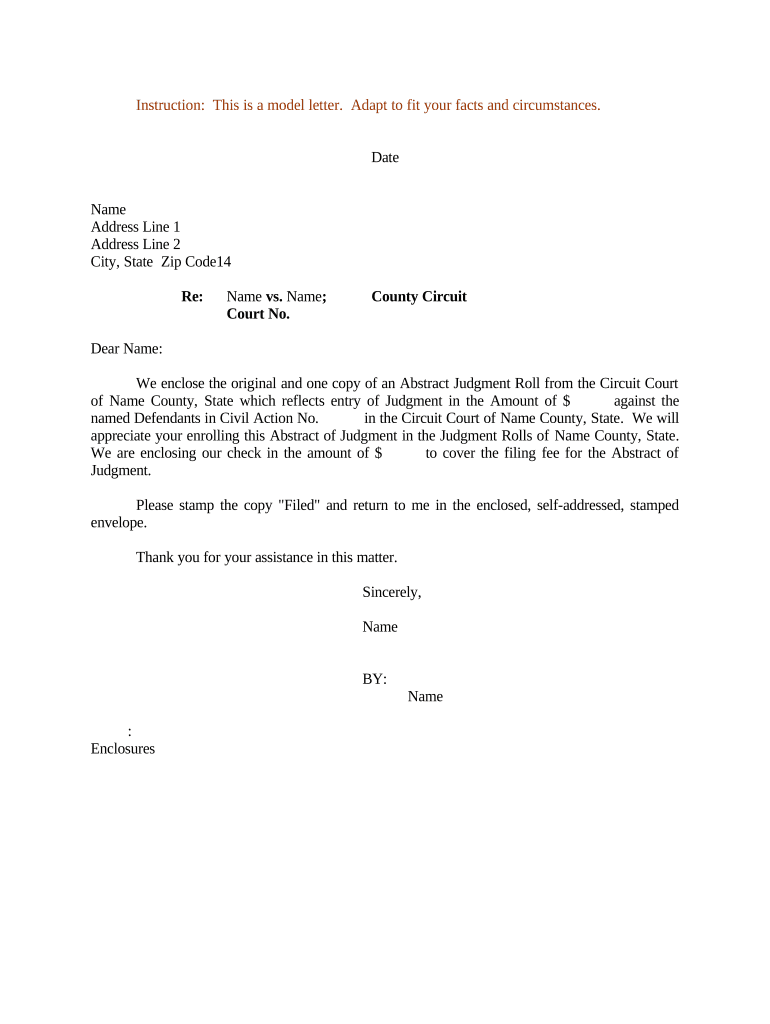
Letter Requesting Enrollment of Abstract Judgment is a formal written request used by a judgment creditor or their attorney to ask a court clerk or county recorder to enroll an abstract of judgment. Enrollment creates a public record that can act as a lien on real property in the jurisdiction where it is filed, supporting post-judgment collection steps such as levy or sale. The letter typically references the judgment, court case number, judgment amount, date of entry, and the parties, and identifies the office where the abstract should be recorded.

Why You Would Use This Enrollment Letter

Use a Letter Requesting Enrollment of Abstract Judgment to establish a public lien, preserve priority against subsequent creditors, and document collection intent. Timely enrollment can improve enforceability of a money judgment and supports downstream actions like property levy or garnishment.

Why You Would Use This Enrollment Letter

Who Prepares and Sends the Enrollment Letter

Judgment creditors, collection attorneys, and debt recovery professionals commonly prepare and send this letter when seeking to enroll an abstract of judgment in a county office.

  • Judgment creditors who need a public lien to secure collection against real property.
  • Collection or enforcement attorneys preparing the required filing and verifying recording procedures.
  • Title companies or lien search professionals confirming encumbrances before sale or refinancing.

Core Elements to Include in a Professional Enrollment Letter

A well-formed Letter Requesting Enrollment of Abstract Judgment presents case facts, attachments, filing direction, and authorized signatures to ensure clerks can record the abstract without delay.

Case Details

Include court name, docket number, judge, and date of judgment; precise legal citations help clerks match records and reduce processing delays.
Judgment Data

State exact judgment amount, accrued post-judgment interest or fees, and any crediting or partial payments to provide a clear enforceable amount.

Debtor ID

Provide debtor's full legal name, aliases, last known address, and property descriptions when available to ensure accurate indexing and lien placement.

Attachments

Attach a certified abstract of judgment, certified judgment copy, or court clerk certificate, and include self-addressed return envelope if required by the recorder.

Filing Instructions

Specify county recorder name, mailing or e-filing address, requested document title, number of originals, and applicable recording fee or payment method.

Signature & Notary

Identify authorized signer with printed name and title; include notary acknowledgment adhering to state requirements or RON session details if used.

Step-by-Step: Prepare and File the Enrollment Letter

Follow these steps to prepare, sign, and submit a Letter Requesting Enrollment of Abstract Judgment to the recording office.

  • 01
    Prepare Letter: Reference judgment, case number, entry date, and judgment amount.
  • 02
    Attach Abstract: Attach the court's abstract of judgment or certificate of judgment.
  • 03
    Sign & Notarize: Signer signs; notarize if state or recorder requires.
  • 04
    File with Recorder: Deliver to county recorder or clerk per local submission rules.

How to Configure an Online Enrollment Workflow

Configure an online workflow to collect accurate data, attach the abstract, obtain signatures, and route the recorded document to relevant parties.

Field Configuration
Upload Document PDF or DOCX; ensure full readable court stamp
Signature Method E-signature, ink signature, or notarization as required
Authentication Email link with optional SMS or KBA verification
Delivery Method E-file portal, certified mail, or physical delivery

Where to File and What Happens Next

Overview of filing routes, recipient roles, and immediate post-filing steps for a Letter Requesting Enrollment of Abstract Judgment.

  • Destination: County recorder or court clerk's recording office.
  • Copies: Send to judgment creditor and debtor per service rules.
  • Processing: Recorder indexes and returns stamped copy.
  • Enforcement: Use recorded abstract to support lien enforcement.

Distribution, eSubmission, and Platform Technical Needs

Choose a platform that supports e-signing, secure storage, and accepted file formats for recorder submission.

  • File Formats: PDF, PDF/A, DOCX accepted by many recorders.
  • Integrations: Connectors: Salesforce, NetSuite, Google Workspace, Box.
  • Authentication: Supports email, SMS codes, and advanced identity proofing.

Timing Considerations and Expected Processing Windows

Key timing considerations, filing windows, and typical recorder processing durations to set expectations for enrollment and collection actions.

Immediate Action:

Prepare and submit letter promptly to preserve lien priority.

Recorder Processing:

Varies by county; commonly several days to a few weeks.

Notarization Window:

Obtain notary before submission if required by recorder.

Effect on Priority:

Recording date generally establishes priority against subsequent liens.

Challenge Period:

Debtor may contest lien under state procedures within statutory period.

Common Errors That Delay Enrollment

  • Using an incorrect case number or partial docket identifier which prevents the clerk from matching the abstract to the underlying judgment and delays recording.
  • Failing to include the exact judgment amount or omitting post-judgment interest calculations that affect enforcement and collection totals.
  • Sending the letter to the wrong county recorder or using an incorrect recording office address, resulting in misfiling and loss of lien priority.
  • Not confirming local notarization, witness, or electronic filing requirements before submission, causing rejection or need for re-filing.

Consequences of Incorrect or Incomplete Enrollment

Recording Rejection: Missing required notarization.
Lost Priority: Delayed filing reduces lien priority.
Inaccurate Party: Mismatched names create enforceability risk.
Wrong County: Lien may not attach to property.
Expired Statute: Statute of limitations may bar enforcement.
Unauthorized Filing: Invalid if signer lacks authority.

Data Security and Legal Frameworks to Consider

Encryption: TLS 1.2/1.3 in transit; AES-256 at rest.
Certifications: SOC 2 Type II, ISO 27001, PCI DSS.
HIPAA: BAA required for protected health information.
ESIGN / UETA: Recognized framework for e-signature legality.
Access Controls: Role-based access and SSO options.
Audit Trail: Detailed timestamps, IP, and action logs.

Supporting Documents and Recommended File Exports

Which documents to include and how to export the final package for recording and long-term storage.

Supporting Documents

Certified abstract of judgment, certified judgment copy, proof of entry, power of attorney if an agent files, and any county-specific cover sheets required by the recorder.

Certified Copies

Request certified copies from the clerk when possible; these are accepted as authoritative evidence of the judgment and speed recorder acceptance.

File Formats

Export the final package to PDF/A when possible; many recorders accept PDF or DOCX but PDF/A preserves formatting and supports archiving standards.

Backup Copies

Store signed, stamped, and digital copies in encrypted cloud storage and a secondary offline backup to satisfy retention and audit expectations.

Practical Examples of Enrollment in Collection Scenarios

Real-world examples show how enrollment preserves lien priority and supports collection tactics across property and commercial judgment scenarios.

Commercial Judgment Enrollment

A lender enrolled an abstract after obtaining a money judgment against a debtor who owned multiple investment properties, seeking to secure repayment.

  • Enroll promptly to protect lien priority.
  • The recorded abstract prevented subsequent purchasers from obtaining clear title without addressing the judgment; during refinancing the lien appeared in the title search and compelled settlement or payoff negotiations.

Judgment Against Business Owner

An attorney filed an enrollment letter with a certified abstract to attach a corporate judgment to the owner's personally held properties.

  • Use certified abstracts and exact legal names.
  • Accurate filing led to successful levy on a titled vehicle and settlement negotiations; attorney fees for enrollment were modest compared to recovery achieved.

Practical Tips to Ensure Smooth Enrollment

Practical tips to avoid filing errors, speed processing, and preserve lien strength when enrolling an abstract of judgment.

Verify court records and case numbers
Confirm the judgment entry in the court docket and retrieve certified copies. Reconcile the case number in your letter with the court record and abstract to prevent misfiling or clerk rejection, which can delay lien recording and enforcement.
Confirm recorder requirements before filing
Check county recorder rules for acceptable formats, required attachments, notarization, witness counts, and electronic submission guidelines. Many counties post recording instructions online; follow their checklist to avoid rejections or additional fees.
Use precise debtor identifiers and property descriptions
Provide full legal names, aliases, tax parcel numbers, and street addresses. For real property, include legal descriptions or parcel IDs to ensure the abstract links to the correct parcels and avoids disputes during title searches.
Keep proof of recording and certified copies
Retain stamped copies, receipts, and proof of service. These documents support lien enforcement, priority disputes, and debtor challenges. Store digital and physical copies in secure, backed-up systems and note retention schedules per legal requirements.

Sample eSignature Vendor Pricing and Feature Snapshot

Vendor pricing and feature summary to assist platform selection for e-signing enrollment letters; signNow is listed first in the comparison.

signNow DocuSign Adobe Sign PandaDoc HelloSign
Starting Price $8/user/mo $15/user/mo $14/user/mo $19/user/mo $15/user/mo
Free Trial 7-day free trial Varies Varies Varies Varies
Bulk Send Yes Yes Yes Yes No
Audit Trail Yes Yes Yes Yes Yes
HIPAA Compliant Yes Yes Yes No No

Frequently Asked Questions About Enrollment Letters

Answers to common questions about preparing, filing, and validating a Letter Requesting Enrollment of Abstract Judgment.


Need help? Contact support

be ready to get more
Join over 28 million airSlate SignNow users