Establishing secure connection…Loading editor…Preparing document…

Mississippi Complaint for Damages and Declaratory Judgment

This template is fully customizable. Edit the text, fill out the fields, and send it for signature. Give it a try!
Mississippi Complaint for Damages and Declaratory Judgment

What this Mississippi Complaint for Damages and Declaratory Judgment is

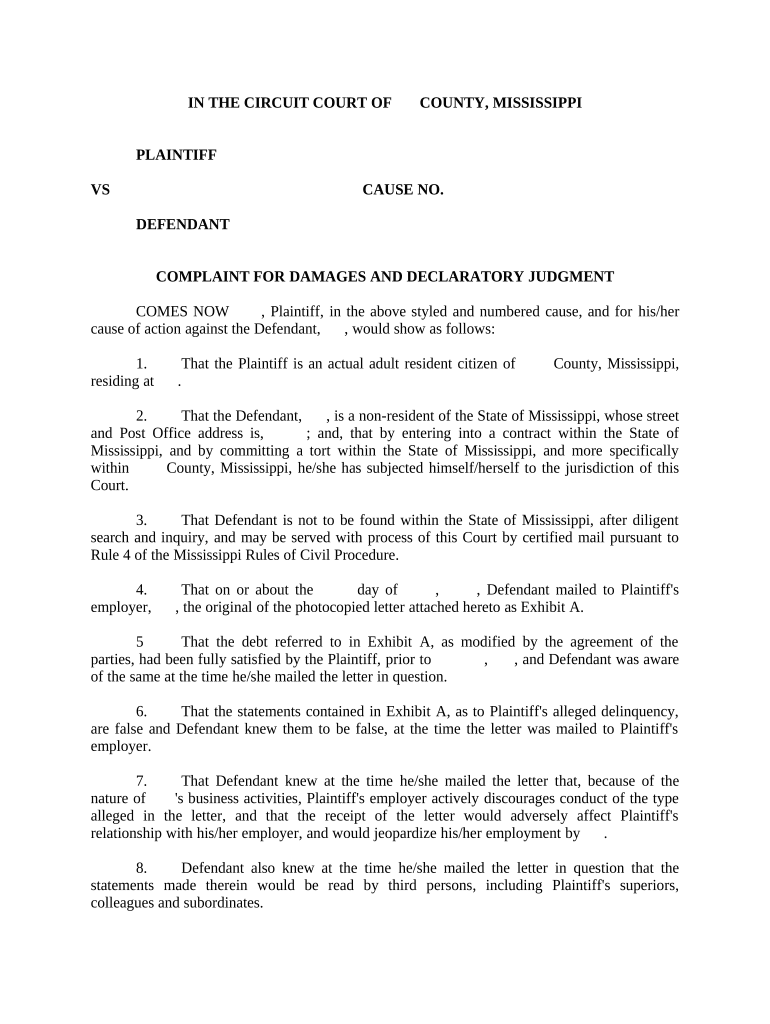
The Mississippi Complaint for Damages and Declaratory Judgment is a civil pleading filed to seek monetary relief plus a court declaration about the parties’ rights or legal status. It combines traditional damage claims (for breach, negligence, or contract violations) with a request that the court resolve a legal question by issuing a declaratory judgment under Mississippi procedure. The document establishes the parties, concise factual allegations, the legal bases for recovery, a damages schedule or estimate, and an explicit request that the court enter declaratory relief and any ancillary injunctive or equitable remedies.

Why you might use a combined damages and declaratory complaint

A joint complaint lets a plaintiff obtain both monetary relief and a definitive judicial ruling about legal rights or contract interpretation in one action, reducing litigation complexity and clarifying future obligations.

Why you might use a combined damages and declaratory complaint

Who commonly prepares and files this complaint

Typical filers include plaintiff attorneys, corporate counsel, and self-represented plaintiffs who need both damages and a declaration of rights.

  • Plaintiff attorneys working on tort, contract, or consumer claims who want immediate legal clarity and money damages.
  • In-house or outside corporate counsel when contractual ambiguity risks ongoing liability or recurring disputes.
  • Self-represented litigants (pro se) asserting private rights where a declaratory ruling avoids future lawsuits.

Use the form where the legal issue affects ongoing relationships or future conduct and a monetary remedy is also sought.

Representative signers and filers

Plaintiff Attorney

An attorney representing the plaintiff prepares and signs the complaint, certifies service and factual bases, and typically files using the county circuit or chancery court e-filing system; counsel must ensure venue, jurisdiction, and claim elements are pleaded correctly to avoid dismissal or sanctions.

Pro Se Plaintiff

A self-represented individual files the complaint personally or through court e-filing, must follow local civil procedure rules, and should verify caption, addresses, damage calculations, and any verification/affidavit requirements to prevent administrative rejection or default risk.

Essential components to include in the complaint

A complete Mississippi Complaint for Damages and Declaratory Judgment contains specific structural elements and supporting exhibits to be accepted and advanced by the court.

Caption and Parties

List the court name, county, case number if known, plaintiff(s) and defendant(s) with full legal names and service addresses.
Jurisdiction and Venue

State the basis for Mississippi jurisdiction and the correct county venue tied to the claims or defendant residence.

Statement of Facts

Concise chronological facts supporting both the damages claim and the legal question requiring a declaratory ruling.

Causes of Action

Numbered counts describing specific tort or contract claims and a separate declaratory judgment claim with statutory or common-law citation.

Damages and Relief

Itemize claimed damages, specify compensatory/treble/punitive sums if sought, and state the exact declaratory relief requested.

Signature and Verification

Signature block for counsel or pro se filer, date, and any required verification or affidavit per local rule.

Step-by-step: preparing and filing the complaint

Follow these core steps in order to prepare a complete pleading and avoid procedural defects.

  • 01
    Draft Complaint: Create caption, facts, counts, and demand for relief.
  • 02
    Assemble Exhibits: Attach contracts, correspondence, and evidence supporting damages.
  • 03
    Verify and Sign: Have counsel or plaintiff sign and date the pleading.
  • 04
    File and Serve: File via court e-filing or clerk and serve defendants per rule.

Recommended e-filing and e-sign workflow settings

Configure these settings for efficient online preparation, signature, filing, and storage of the complaint.

Field Configuration
Template Create reusable complaint template with required captions and signature blocks.
Signing Order Set for plaintiff/counsel first, then co-counsel or client as needed.
Authentication Use email + SMS code or stronger ID verification for signers.
Notifications Enable completed-signature and filing confirmations to all parties.

Digital delivery and platform considerations

Electronic preparation and signatures can speed completion, but must match court e-filing and evidence rules.

  • Integrations: Connectors for case management (e.g., Clio), cloud storage (Box, Google Drive), and workflow tools ease document routing.
  • File Formats: Use PDF/X or court-accepted PDF; include searchable text and flattened signature appearances.
  • Authentication: Choose appropriate signer ID method (email, SMS code, or advanced verification) per court or internal policy.

Ensure your chosen platform supports secure storage, audit trails, and produces court-ready PDF output accepted by local e-filing systems.

Filing flow from document to court docket

This concise sequence describes the typical path from drafting to court docketing.

  • Prepare Document: Draft complaint and attach exhibits in a single PDF file.
  • Sign and Verify: Obtain signatures and required verifications or affidavits.
  • File with Clerk: Submit via e-filing or deliver to clerk’s office with filing fee.
  • Serve Defendants: Complete service per Mississippi rule and file return of service.

Key timeframes to track after filing

Timely responses and procedural deadlines vary by claim and local rules; monitor these typical milestones closely.

Answer or Responsive Pleading:

Usually within 20–30 days after service; check local rule for exact period.

Service Deadline:

Serve defendants promptly; many courts expect service within 90 days of filing.

Default Judgment Window:

If no response, plaintiff may seek default judgment following clerk procedures.

Discovery Period:

Discovery schedules are set by court order or local rules following initial case management.

Appeal Timetable:

Post-judgment appeal periods commonly run 30 days from entry of final judgment.

Milestone timeline from filing to resolution

Major litigation stages and what to expect at each milestone.

01

Filing

Complaint submitted to clerk and docketed; triggers service obligations.

02

Service of Process

Defendants are served and proof of service is filed with the court.

03

Responsive Pleadings

Defendant files answer, motion to dismiss, or defaults; court rules guide timing.

04

Discovery and Motions

Parties exchange evidence, file dispositive motions, or seek declaratory relief rulings.

Common drafting mistakes to avoid

  • Misidentifying the proper party or using trade names instead of legal entity names often leads to defective service or later amendment motions.
  • Failing to attach key exhibits or attaching unreadable scans causes delays and may force re-filing or evidentiary disputes.
  • Vague damage calculations such as 'reasonable' without supporting basis increase discovery costs and reduce credibility at motion practice.
  • Omitting a clear request for declaratory relief or the specific legal question wastes judicial resources and can forfeit relief.

Risks and potential procedural consequences

Dismissal Risk: Incorrect venue may lead to dismissal or transfer.
Default Judgment: Failure to effect service can lead to default.
Sanctions: Frivolous pleading can trigger attorney fees or court sanctions.
Evidence Exclusion: Missing attachments may be excluded at trial.
Increased Costs: Defective filings increase attorney and court costs.
Statute Limitations: Late claims may be time-barred and irrecoverable.

Security and compliance considerations for electronic documents

Encryption in Transit: TLS 1.2/1.3
Encryption at Rest: AES-256
Major Certifications: SOC 2 Type II, ISO 27001
Regulatory Compliance: ESIGN, UETA, HIPAA (BAA optional)
Audit Trail: Detailed timestamped signing records
Accessibility: WCAG 2.0 Level AA

Practical examples showing how the complaint is used

These short scenarios illustrate common factual patterns for combined damages and declaratory relief actions.

Contract Interpretation Dispute

A business alleges breach of a supply contract and seeks declaratory relief on contract scope

  • Immediate injunctive risk prevents performance
  • The complaint included the contract as Exhibit A, itemized damages, and a request the court declare the contract party obligations to avoid repeated disputes and future litigation costs.

Insurance Coverage Question

A claimant sues insurer for denied claim and asks for a declaration of coverage obligations

  • Coverage dispute affects multiple policyholders
  • The complaint attached the policy, denial letter, and proof of loss, and sought compensatory damages plus a declaratory ruling on coverage interpretation to resolve related claims.

Practical drafting tips for accuracy and efficiency

Adopt these practices to reduce rework, expedite service, and strengthen your initial pleading.

Use Precise Party Names
Always use the defendant’s legal entity name as registered with the state; verify via Secretary of State records to ensure service targets the correct entity and avoid amendment motions.
Attach Key Evidence
Include contracts, invoices, and correspondence as numbered exhibits to support factual allegations and damage claims and to limit discovery disputes about missing documents.
State Clear Declaratory Question
Frame the legal question for declaratory relief precisely (e.g., interpretation of section X of the agreement) to help the court resolve the dispute without unnecessary briefing.
Confirm Filing and Service Rules
Review local court e-filing requirements, signature rules, and service mechanics before filing to avoid administrative rejections and needless delays.

Comparing eSignature platforms for completing and filing the complaint

Basic pricing and feature considerations for platforms that support document preparation, e-signature, and secure storage when assembling pleadings and exhibits.

signNow DocuSign Adobe Sign PandaDoc HelloSign
Starting Price $8/user/mo $15/user/mo $14/user/mo $19/user/mo $15/user/mo
Free Trial 7-day free trial No No No No
Bulk Send Yes Yes Yes Yes No
Audit Trail Yes Yes Yes Yes Yes
HIPAA Compliant Yes Yes Yes No No
Envelope Cap No cap 100 envelopes/user/year Varies by plan Varies by plan Varies by plan

Frequently asked questions about filing and e-signing

Answers to common procedural and e-signature questions about a Mississippi Complaint for Damages and Declaratory Judgment.


Need help? Contact support

be ready to get more
Join over 28 million airSlate SignNow users