Establishing secure connection… Loading editor… Preparing document…
Navigation

Fill and Sign the Dc Corporation Form
Fill and Sign the Dc Corporation Form

How it works

Open the document and fill out all its fields.
Apply your legally-binding eSignature.
Save and invite other recipients to sign it.

Rate template

4.5
51 votes
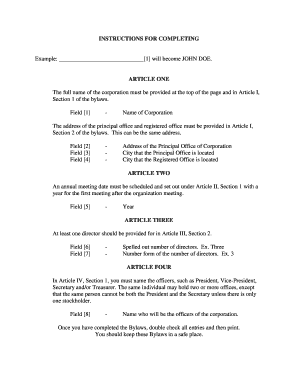
INSTRUCTIONS FOR COMPLETING Example: _____________________________[1] will become JOHN DOE. ARTICLE ONE The full name of the corporation must be provided at the top of the page and in Article I, Section 1 of the bylaws. Field [1] - Name of Corporation The address of the principal office and registered office must be provided in Article I , Section 2 of the bylaws. This can be the same address. Field [2] - Address of the Principal Office of Corporation Field [3] - City that the Principal Office is located Field [4] - City that the Registered Office is located ARTICLE TWO An annual meeting date must be scheduled and set out under Article II, Section 1 with a year for the first meeting after the organization meeting. Field [5] - Year ARTICLE THREE At least one director should be provided for in Article III, Section 2. Field [6] - Spelled out number of directors. Ex. Three Field [7] - Number form of the number of directors. Ex. 3 ARTICLE FOUR In Article IV, Section 1, you must name the officers, such as President, Vice-Pres ident, Secretary and/or Treasurer. The same individual may hold two or more offices, except that the same person cannot be both the President and the Secretary unless there is only one stockholder. Field [8] - Name who will be the officers of the corporation. Once you have completed the Bylaws, double check all entries and then print. You should keep these Bylaws in a safe place. -1- BY -LAWS OF _______________________________ ARTICLE I. NAME AND LOCATION SECTION 1. The name of this corporation shall be_________________________[1]. SECTION 2. The Principal office of the corporation in the State of District of Columbia shall be___________________________[2],______________[3], District of Columbia and its initial registered office in the State of District of Columbia shal l be________________________[4], District of Columbia. The corporation may have such other offices, either within or without the District of Columbia as the Board of Directors may designa te or as the business of the corporation may require from time to time. ARTICLE II. SHAREHOLDERS SECTION 1. Annual Meeting. The annual meeting of the shareholders shall be held on the second Tuesday of the month of December in each year, beginning with the year________[5] at the time designated by the Board of Directors, for the purpose of electing Directors and for the transaction of such other business as may come before the meeting. If the day fixed for the annual meeting shall be a legal holiday in the District of Columbia, such meeting shal l be held on the next succeeding business day. If the election of Directors shall not be held on the day designated herein for any annual meeting of the shareholders, or at any adjournm ent thereof, the Board of Directors shall cause the election to be held at a special m eeting of the shareholders as soon thereafter as convenient. SECTION 2. Special Meeting. Special meetings of the shareholders , for any purpose or purposes, unless otherwise prescribed by statute, may be called by resolution of the Board of Directors or by the President at the request of the holders of not les s than a majority of all the outstanding shares of the corporation entitled to vote on any issue proposed to be considered at the meeting, provided said shareholders sign, date and deliver to the corporate Secretary one or more written demands for the meeting describing the purpose or purposes for which it is to be held. Only business within the purpose or purposes described in the meeting noti ce required by Article II, Section 5 of these By-Laws may be conducted at a spe cial shareholders meeting. In addition, such meeting may be held at any time without call or notice upon unanimous consent of shareholders. -2- SECTION 3. Place of Meeting. The Board of Directors may designa te any place, either within or without the District of Columbia unless otherwise prescribed by stat ute as the place of meeting for any annual meeting or for any special meeting of sharehol ders. A waiver of notice signed by all shareholders entitled to vote at a meeting may desi gnate any place, either within or without the District of Columbia, unless otherwise prescribed by statute, as the place for the holding of such meeting. If no designation is made, or if a special me eting be otherwise called, the place of meeting shall be the principal office of the corporation in the District of Columbia. SECTION 4. Notice of Meeting. Written or printed notice stating the place, day and hour of the meeting shall be delivered not less than ten (10) nor more than sixty (60) days before the date of the meeting, either personally or by mail, by or at the direction of the President, or the Secretary, or the officer or persons calling the meeting, to each shareholde r of record entitled to vote at such meeting. If mailed, such notice shall be deemed to be de livered when deposited in the United States mail, addressed to the shareholder at his address as it appears on the stock transfer books of the corporation, with postage thereon prepaid. Notice of a special meeting shall include a description of the purpose or purposes for which the meeting is called. SECTION 5. Closing of Transfer Books or Fixing of Record Date. For the purpose of determining shareholders entitled to notice of or to vote at any meeti ng of shareholders or any adjournment thereof, or shareholders entitled to receive payment of any dividend, or in order to make a determination of shareholders for any other proper purpose, the Board of Direct ors of the corporation may provide that the stock transfer books shall be closed for a st ate d period but not to exceed, in any case, seventy (70) days. If the stock transfer books shal l be closed for the purpose of determining shareholders entitled to notice of or to vote at a mee ting of shareholders, such books shall be closed for at least ten (10) days immediately pre ceding such meeting. In lieu of closing the stock transfer books, the Board of Directors may fix in advanc e a date as the record date for any determination of shareholders, such date in any case to be not more than seventy (70) days and, in case of a meeting of shareholders, not less than ten (10) days prior to the date on which the particular action, requiring such determination of s hareholders, is to be taken. If the stock transfer books are not closed and no record date is fixe d fo r the determination of shareholders entitled to notice of or to vote at a meeting of shareholders , or shareholders entitled to receive payment of a dividend, the date on which notice of the meeting is mailed or the date on which resolution of the Board of Directors declaring such divide nd is adopted, as the case may be, shall be the record date for such determination of shareholde rs. When a determination of shareholders entitled to vote at any meeting of share holders has been made as provided in this section, such determination shall apply to any adjournment thereof. SECTION 6. Shareholders' List. After fixing a record date, the offic er or agent having charge of the share ledger of the corporation shall prepare an alphabetical l ist of all persons en titled to notice and to represent shares at such meeting, or any adjournme nt thereof, and said list shall be arranged by voting group and shall show the address of and the number of shares held by each shareholder or representative. The shareholders' list shall be a vailable for inspection and copying during usual business hours by any shareholder beginning two (2) business days after notice of the meeting is given for which the l ist was prepared and continuing through the meeting, at the corporation's principal office or at a place ide ntified in the meeting notice. Such list shall be available during the meeting and any shareholder, his agent or attorney -3- is entitled to inspect the list at any time during the meeting or any adjournment thereof. The original stock transfer book shall be prime facia evidence as to who ar e the shareholders entitled to examine such list or transfer book or to vote at any meeting of shareholders. SECTION 7. Quorum. A majority of the outstanding shares of the corporat ion entitled to vote, represented in person or by proxy, shall constitute a quorum at a mee ting of shareholders. If less than a majority of the shares are represented at a meeting, a majority of the shares so represented may adjourn the meeting from time to time without further notice. At such adjourned meeting in which a quorum shall be present or represented, any busines s may be transacted which might have been transacted at the meeting as origi nally notified. The shareholders present at a duly organized meeting may continue to transac t business until adjournment, notwithstanding the withdrawal of enough shareholders to leave l ess than a quorum. SECTION 8. Proxies. At all meetings of shareholders, a shareholder m ay vote by proxy executed in writing by the shareholder or by his duly authorized attorney-in-fact. Such proxy shall be filed with the Secretary of the corporation before or at the time of the meeti ng. SECTION 9. Voting of Shares. Subject to the provisions of Section 12 of this Article II, each outstanding share entitled to vote shall be entitled to one vote upon each matter submit ted to a vote at a meeting of shareholders. The affirmative vote of a m ajority of the outstanding shares represented at a shareholders' meeting at which a quorum is present shall be the act of the shareholders of the corporation. SECTION 10. Voting of Share by Certain Holders. Shares standing in th e name of another corporation may be voted by such officer, agent or proxy as the By-Laws of such corporation may preserve, or, in the absence of such provision, as the Board of Di rectors of such corporation may determine. Shares held by an administrator, executor, guardian or conservatory may be vot ed by him either in person or by proxy, without a transfer of such shares into his name . Shares standing in the name of a trustee may be voted by him, either in person or by proxy, bu t no trustee shall be entitled to vote shares held by him without a transfer of such shares into his name. Shares standing in the name of a receiver may be voted by such rec eiver, and shares held by or under the control of a receiver may be voted by such receiver w ithout the transfer thereof into his name if authority so to do be contained in appropriate order of the court by which such receiver was appointed. A shareholder whose shares are pledged shall be entitled to vote such sha res until the sh ares have been transferred into the name of the pledgee, and thereafter t he pledgee shall be entitled to vote the shares so transferred. Shares of its own stock belonging to the corporation or held by it in a fi duciary capacity shall not be voted, directly or indirectly, at any meeting, and shall not be counted in determining the total number of outstanding shares at any given time. -4- SECTION 11. Informal Action by Shareholders. Unless otherwise provided by l aw, any action required to be taken at a meeting of the shareholders, or any other action which may be taken at a meeting of the shareholders, may be taken without a meeti ng if a consent in writing, setting forth the action so taken, shall be signed by all of the sha reholders entitled to vote with re spect to the subject matter thereof. SECTION 12. Cumulative Voting. Unless otherwise provided by law, a t each election for Directors every shareholder entitled to vote, in person or by proxy, shall have the right to vote at such election the number of shares owned by him for as many pers ons as there are Directors to be elected and for whose election he has a right to v ote, or to cumulate his votes by giving one candidate as many votes as the number of such Directors multiplied by the number of his shares shall equal, or by distributing such votes on the same princ iple among any number of candidates. ARTICLE III. BOARD OF DIRECTORS SECTION 1. General Powers. The business and affairs of the corpora tion shall be managed by its Board of Directors except as otherwise herein provided. SECTION 2. Number, Tenure and Qualifications. The number of Directors of the corporation shall be________________[6] (______[7]). Each Director shall hold office until th e next annual meeting of shareholders and until his successor shall have bee n elected and qualified. Directors may be re-elected. The Directors need not be a re sident of this state or a shareholder. SECTION 3. Regular Meetings. A regular meeting of the Board of Dire ctors shall be held without other notice than this By-Law immediately after, and at the same place as the annual meeting of shareholders. The Board of Directors may also provide, by resoluti on, the time and place for the holding of additional regular meetings without oth er notice than such resolution. SECTION 4. Special Meetings. Special meetings of the Board of D irectors may be called by or at the request of the President or any Director. The person or persons authorized to call special meetings of the Board of Directors may fix the place for holding any special meeting of the Board of Directors called by them. SECTION 5. Notice. Notice of any special meeting shall be given at least five (5) days previously thereto by notice personally given or mailed to each Director at his business address, or by telegram. If mailed, such notice shall be deemed to be deli vered when deposited in the United States mail so addressed, with postage thereon prepaid. If noti ce be given by telegram, such notice shall be deemed to be delivered when the telegram is d elivered to the telegraph company. Any Director may waive notice of any meeting. The atte ndance of a Director at a meeting shall constitute a waiver of notice of such meeting, exc ept where a Director attends a meeting for the express purpose of objecting to the transaction of any busi ness because the -5- meeting is not lawfully called or convened, and does not thereafter v ote for or assent to action taken at the meeting. SECTION 6. Quorum. A majority of the number of Directors fixed by Sect ion 2 of this Article III shall constitute a quorum for the transaction of business at any meeting of the Board of Directors, but if less than a majority is present at a meeting, a majority of the D irectors present may adjourn the meeting from time to time without further notice. SECTION 7. Manner of Acting. The act of the majority of the Di rectors present at a meeting at which a quorum is present shall be the act or the Board of Directors. SECTION 8. Compensation. By resolution of the Board of Directors, the Directors may be paid their expenses, if any, of attendance at each meeting of the Board of Directors and may be paid a fixed sum for attendance at each meeting of the Board of D irectors or a stated salary as Director. No such payment shall preclude any Director from serving the corporation in any other capacity and receiving compensation therefore. SECTION 9. Presumption of Assent. A Director of the corporation who is pres ent at a meeting of the Board of Directors at which action on any corporate matter is taken shall be presumed to have assented to the action taken unless his dissent shall be entered in the minutes of the meeting or unless he shall file his written dissent to such a ction wit h the person acting as Secretary of the meeting before the adjournment thereof or shall forward such di ssent by registered mail to the Secretary of the corporation immediately a fter the adjournment of the meeting. Such right to dissent shall not apply to a Director who voted in favor of such action. SECTION 10. Informal Action by Board of Directors. Unless otherwise provide d by law, any action required to be taken at a meeting of the Directors, or any other action which may be taken at a meeting of the Directors, may be taken without a meet ing if a consent in writing, setting forth the action so taken, shall be signed by each director, a nd included in the minutes or filed with the corporate records reflecting the action taken. ARTICLE IV. OFFICERS SECTION 1. Number. The officers of the corporation shall be a ________________[8] [President, one or more Vice-Presidents and a Secretary], each of whom shal l be elected by the Board of Directors. Such other officers and assistant officers as may be deemed necessary may be elected or appointed by the Board of Directors. SECTION 2. Election and Term of Office. The officers of the corporat ion to be elected by the Board of Directors shall be elected annually by the Board of Directors at the first meeting of the Board of Directors held after each annual meeting of the shareho lders. If the election of officers shall not be held at such meeting, such election shall be he ld as soon thereafter as conveniently may be. Each officer shall hold office until his successor shall have been duly elected and shall have qualified or until he shall resign or shall hav e been removed in the manner hereinafter provided. The initial officers may be elected at the first meeting of the Board of Directors. -6- SECTION 3. Removal. Any officer or agent elected or appointed by the Board of Directors may be removed by the Board of Directors whenever in its judgm ent, the best interest of the corporation would be served thereby, but such removal shall be without prejudice to the contract rights, if any, of the person so removed. SECTION 4. Vacancies. A vacancy in any office because of de ath, resignation, removal, disqualification or otherwise, may be filed by the Board of Directors for the unexpired portion of the term. SECTION 5. President. The President shall be the principal execut ive officer of the corporation and, subject to the control of the Board of Directors, shall in general s upervise and control all of the business and affairs of the corporation. He shall, when present, preside at all meetings of the shareholders and of the Board of Directors. He may s ign certificates for shares of the corporation, any deeds, mortgages, bonds, contracts, or other instruments whi ch the Board of Directors has authorized to be executed except in cases where the sig ning and execution thereof shall be expressly delegated by the Board of Directors, or by these By-Laws, to some other officer or agent of the corporation, or shall be required by law to be othe rwise signed or executed; and in general shall perform all duties incident to the office of President and s uch other duties as may be prescribed by the Board of Directors from time to time. SECTION 6. Vice-President. The Board of Directors may determine when there is a need for a Vice-President or Vice- Presidents. In the absence of the President or in event of his death, unavailability of or refusal to act, a Vice-President shall perform the duties of the President, and when so acting, shall have all the powers of and be subj ect to all the restrictions upon the President. A Vice-President shall perform such other duties a s from time to time may be assigned to him by the President or the Board of Directors. SECTION 7. Secretary. The Secretary shall: (a) keep the minutes of the shareholders and of the Board of Directors meetings in one or more books provided for the purpose; (b) be custodian of the corporate records and of the seal of the corporation and see t hat the seal of the corporation is affixed to all documents, the execution of which on behalf of the corporation under its seal is duly authorized; (c) see that all notices are duly given in accordance with the provisions of these By-Laws or as required by law; (d) keep a register of the post office address of each shareholder which shall be furnished to the Secretary by suc h shareholder; (e) have general charge of the stock transfer books of the corporation; (f) have charge and custody of and be responsible for all funds and securities of the corporation, receive and give receipts for moni es due and payable to the corporation from any source whatsoever, and deposit all s uch monies in the name of the corporation in such banks, trust companies or other depositories as shall be selected in accordance with the provisions of Article V of these By-Laws; and (g) in general perform all of the duties incident to the Office of Secretary and such other duties as from time to time may be assigned to him by the President or by the Board of Direct ors. If required by the Board of Directors, the Secretary shall give a bond for the faithful discha rge of his duties in such sum with such surety or sureties as the Board of Directors shall determine. -7- SECTION 8. Salaries. The salaries, compensation and other benefit s, if any, of the officers shall be fixed from time to time by the Board of Directors, and no officer shall be prevented from receiving such salary by reason of the fact that he is also a Director of the corporation. ARTICLE V. CONTRACTS, LOANS, CHECKS AND DEPOSITS SECTION 1. Contracts. The Board of Directors may authorize any officer or officers, agent or agents, to enter into any contract or execute and deliver any instrument in the name of and on behalf of the corporation, and such authority may be general or confined to specific instances. SECTION 2. Loans. No loans shall be contracted on behalf of the corpora tion and no evidence of indebtedness shall be issued in its name unless authorized by a resolution of the Board of Directors. Such authority may be general or confined to specific instances. SECTION 3. Checks, Drafts, etc. All checks, drafts, or other orders for the payment of money, notes or other evidences of indebtedness issued in the name of the corporation shall be signed by such officer or officers, agent or agents of the corporation and in s uch manner as shall from time to time be determined by resolution of the Board of Directors. SECTION 4. Deposits. All funds of the corporation not otherwise employed sha ll be deposited from time to time to the credit of the corporation in such banks, trust companies or other depositories as the Board of Directors may select. ARTICLE VI. CERTIFICATES FOR SHARES AND THEIR TRANSFER SECTION 1. Certificates for Shares. Certificates representing sha res of the corporation shall be in such form as shall be determined by the Board of Directors. Such certificates shall be signed by the President and by the Secretary or by such other officers authorized by law and by the Board of Directors so to do. All certificates for shares shall be consecutively numbered or otherwise identified. The name and address of the person to whom the shares represented thereby are issued, with the number of shares and date of issuance, shall be entered on the stock transfer books of the corporation. All certificates surrendered to the corporation for transfer shall be canceled and no new certificate shall be issued until the former c ertificate for a like number of shares shall have been surrendered and canceled, except that in case of a lost, destroyed or mutilated certificate, a new one may be issued therefore upon such t erms and indemnity to the corporation as the Board of Directors may prescribe. SECTION 2. Transfer of Shares. Transfer of shares of the corporation shall be made only on the stock transfer books of the corporation by the holder of record thereof or by his legal representative, who shall furnish proper evidence of authority to transfer, or by his attorney thereunto authorized by power of attorney duly executed and filed with the Secretary of the corporation, and on surrender for cancellation of the certificate of such shares, a nd also, any transfer is subject to the limitations set forth in the Articles of Incorporation, reference to which -8- is hereby made. The person in whose name shares stand on the books of the corporation shall be deemed by the corporation to be the owner thereof for all purposes. ARTICLE VII. FISCAL YEAR The fiscal year of the corporation shall begin on the 1st day of Januar y and end on the 31st day of December in each year. ARTICLE VIII. DIVIDENDS The Board of Directors may from time to time declare, and the corporati on may pay dividends on its outstanding shares in the manner and upon the terms and conditions provided by law and its Articles of Incorporation. ARTICLE IX. SEAL The Board of Directors shall provide a corporate seal which shall be circ ular in form and shall have inscribed thereon the name of the corporation and the state of incorporation and the words "Corporate Seal." ARTICLE X. WAIVER OF NOTICE Unless otherwise provided by law, whenever any notice is required to be g iven to any shareholder or Director of the corporation under the provisions of these By-La ws or under the provisions of the Articles of Incorporation, a waiver thereof in writing, si gned by the person or persons entitled to such notice, whether before or after the time s tated therein, shall be equivalent to the giving of such notice. ARTICLE XI. AMENDMENTS These By-Laws may be altered, amended or repealed and new By-Law s may be adopted by a majority vote of the Board of Directors at any annual Board of Direc tors meeting or at any special Board of Directors meeting when the proposed amendment has been s et out in the notice of such meeting. These By-Laws may also be altered, amended or repe aled by a majority vote of the shareholders notwithstanding that these By-Laws may also be ame nded or repealed by the Board of Directors.

Practical tips for completing your ‘Dc Corporation’ online

Are you fed up with the inconvenience of managing paperwork? Look no further than airSlate SignNow, the premier electronic signature service for individuals and organizations. Bid farewell to the lengthy process of printing and scanning documents. With airSlate SignNow, you can seamlessly complete and sign documents online. Utilize the comprehensive tools available in this user-friendly and budget-friendly platform to transform your document management approach. Whether you need to approve forms or collect electronic signatures, airSlate SignNow does it all effortlessly, needing just a few clicks.

Follow this comprehensive guide:

  1. Access your account or sign up for a free trial with our service.
  2. Select +Create to upload a file from your computer, cloud storage, or our form library.
  3. Open your ‘Dc Corporation’ in the editor.
  4. Click Me (Fill Out Now) to set up the document on your side.
  5. Add and designate fillable fields for others (if necessary).
  6. Continue with the Send Invite settings to request eSignatures from others.
  7. Download, print your copy, or convert it into a reusable template.

Don’t fret if you need to collaborate with your colleagues on your Dc Corporation or send it for notarization—our solution provides everything you require to complete such tasks. Sign up with airSlate SignNow today and take your document management to a new height!

Here is a list of the most common customer questions. If you can’t find an answer to your question, please don’t hesitate to reach out to us.

Need help? Contact Support

The best way to complete and sign your dc corporation form

Save time on document management with airSlate SignNow and get your dc corporation form eSigned quickly from anywhere with our fully compliant eSignature tool.

How to Sign a PDF Online How to Sign a PDF Online

How to complete and sign documents online

Previously, working with paperwork took pretty much time and effort. But with airSlate SignNow, document management is easy and fast. Our robust and user-friendly eSignature solution enables you to effortlessly fill out and electronically sign your dc corporation form online from any internet-connected device.

Follow the step-by-step guidelines to eSign your dc corporation form template online:

  • 1.Sign up for a free trial with airSlate SignNow or log in to your account with password credentials or SSO authentication.
  • 2.Click Upload or Create and import a form for eSigning from your device, the cloud, or our form catalogue.
  • 3.Click on the file name to open it in the editor and utilize the left-side menu to complete all the empty areas properly.
  • 4.Drop the My Signature field where you need to eSign your form. Provide your name, draw, or upload an image of your handwritten signature.
  • 5.Click Save and Close to accomplish modifying your completed form.

As soon as your dc corporation form template is ready, download it to your device, save it to the cloud, or invite other people to electronically sign it. With airSlate SignNow, the eSigning process only requires a couple of clicks. Use our robust eSignature solution wherever you are to deal with your paperwork effectively!


How to Sign a PDF Using Google Chrome How to Sign a PDF Using Google Chrome

How to fill out and sign paperwork in Google Chrome

Completing and signing documents is simple with the airSlate SignNow extension for Google Chrome. Adding it to your browser is a quick and effective way to manage your paperwork online. Sign your dc corporation form template with a legally-binding electronic signature in just a few clicks without switching between applications and tabs.

Follow the step-by-step guide to eSign your dc corporation form in Google Chrome:

  • 1.Navigate to the Chrome Web Store, locate the airSlate SignNow extension for Chrome, and add it to your browser.
  • 2.Right-click on the link to a document you need to sign and choose Open in airSlate SignNow.
  • 3.Log in to your account with your password or Google/Facebook sign-in option. If you don’t have one, sign up for a free trial.
  • 4.Use the Edit & Sign menu on the left to complete your template, then drag and drop the My Signature option.
  • 5.Insert an image of your handwritten signature, draw it, or simply type in your full name to eSign.
  • 6.Make sure all data is correct and click Save and Close to finish modifying your paperwork.

Now, you can save your dc corporation form template to your device or cloud storage, send the copy to other individuals, or invite them to eSign your form via an email request or a secure Signing Link. The airSlate SignNow extension for Google Chrome improves your document workflows with minimum time and effort. Try airSlate SignNow today!


How to Sign a PDF in Gmail How to Sign a PDF in Gmail How to Sign a PDF in Gmail

How to fill out and sign paperwork in Gmail

Every time you receive an email with the dc corporation form for approval, there’s no need to print and scan a file or download and re-upload it to a different program. There’s a better solution if you use Gmail. Try the airSlate SignNow add-on to rapidly eSign any paperwork right from your inbox.

Follow the step-by-step guide to eSign your dc corporation form in Gmail:

  • 1.Visit the Google Workplace Marketplace and locate a airSlate SignNow add-on for Gmail.
  • 2.Set up the program with a corresponding button and grant the tool access to your Google account.
  • 3.Open an email containing an attached file that needs approval and utilize the S symbol on the right sidebar to launch the add-on.
  • 4.Log in to your airSlate SignNow account. Choose Send to Sign to forward the file to other people for approval or click Upload to open it in the editor.
  • 5.Drop the My Signature option where you need to eSign: type, draw, or import your signature.

This eSigning process saves efforts and only takes a couple of clicks. Take advantage of the airSlate SignNow add-on for Gmail to update your dc corporation form with fillable fields, sign documents legally, and invite other individuals to eSign them al without leaving your inbox. Improve your signature workflows now!


How to Sign a PDF on a Mobile Device How to Sign a PDF on a Mobile Device How to Sign a PDF on a Mobile Device

How to complete and sign paperwork in a mobile browser

Need to quickly submit and sign your dc corporation form on a mobile phone while doing your work on the go? airSlate SignNow can help without the need to set up additional software programs. Open our airSlate SignNow solution from any browser on your mobile device and add legally-binding eSignatures on the go, 24/7.

Follow the step-by-step guide to eSign your dc corporation form in a browser:

  • 1.Open any browser on your device and go to the www.signnow.com
  • 2.Register for an account with a free trial or log in with your password credentials or SSO authentication.
  • 3.Click Upload or Create and add a file that needs to be completed from a cloud, your device, or our form collection with ready-to go templates.
  • 4.Open the form and fill out the blank fields with tools from Edit & Sign menu on the left.
  • 5.Add the My Signature field to the sample, then type in your name, draw, or upload your signature.

In a few easy clicks, your dc corporation form is completed from wherever you are. As soon as you're done with editing, you can save the document on your device, create a reusable template for it, email it to other people, or invite them eSign it. Make your documents on the go fast and efficient with airSlate SignNow!


How to Sign a PDF on iPhone How to Sign a PDF on iPhone

How to fill out and sign paperwork on iOS

In today’s corporate environment, tasks must be done quickly even when you’re away from your computer. Using the airSlate SignNow application, you can organize your paperwork and sign your dc corporation form with a legally-binding eSignature right on your iPhone or iPad. Install it on your device to conclude agreements and manage documents from just about anywhere 24/7.

Follow the step-by-step guidelines to eSign your dc corporation form on iOS devices:

  • 1.Open the App Store, find the airSlate SignNow app by airSlate, and set it up on your device.
  • 2.Open the application, tap Create to add a form, and select Myself.
  • 3.Opt for Signature at the bottom toolbar and simply draw your signature with a finger or stylus to eSign the sample.
  • 4.Tap Done -> Save right after signing the sample.
  • 5.Tap Save or utilize the Make Template option to re-use this document in the future.

This process is so simple your dc corporation form is completed and signed within a few taps. The airSlate SignNow application works in the cloud so all the forms on your mobile device remain in your account and are available whenever you need them. Use airSlate SignNow for iOS to enhance your document management and eSignature workflows!


How to Sign a PDF on Android How to Sign a PDF on Android

How to complete and sign forms on Android

With airSlate SignNow, it’s easy to sign your dc corporation form on the go. Install its mobile application for Android OS on your device and start improving eSignature workflows right on your smartphone or tablet.

Follow the step-by-step guidelines to eSign your dc corporation form on Android:

  • 1.Go to Google Play, search for the airSlate SignNow application from airSlate, and install it on your device.
  • 2.Sign in to your account or register it with a free trial, then import a file with a ➕ key on the bottom of you screen.
  • 3.Tap on the imported document and select Open in Editor from the dropdown menu.
  • 4.Tap on Tools tab -> Signature, then draw or type your name to electronically sign the form. Fill out blank fields with other tools on the bottom if needed.
  • 5.Use the ✔ button, then tap on the Save option to end up with editing.

With an easy-to-use interface and full compliance with primary eSignature laws and regulations, the airSlate SignNow application is the best tool for signing your dc corporation form. It even works offline and updates all document adjustments when your internet connection is restored and the tool is synced. Complete and eSign forms, send them for approval, and make re-usable templates anytime and from anyplace with airSlate SignNow.

Sign up and try Dc corporation form
  • Close deals faster
  • Improve productivity
  • Delight customers
  • Increase revenue
  • Save time & money
  • Reduce payment cycles


