Establishing secure connection…Loading editor…Preparing document…

Declaration Regarding Administration of Oath and Confirmation of Identity and Social Security Number

This template is fully customizable. Edit the text, fill out the fields, and send it for signature. Give it a try!
Declaration Regarding Administration of Oath and Confirmation of Identity and Social Security Number

What this declaration is and when it applies

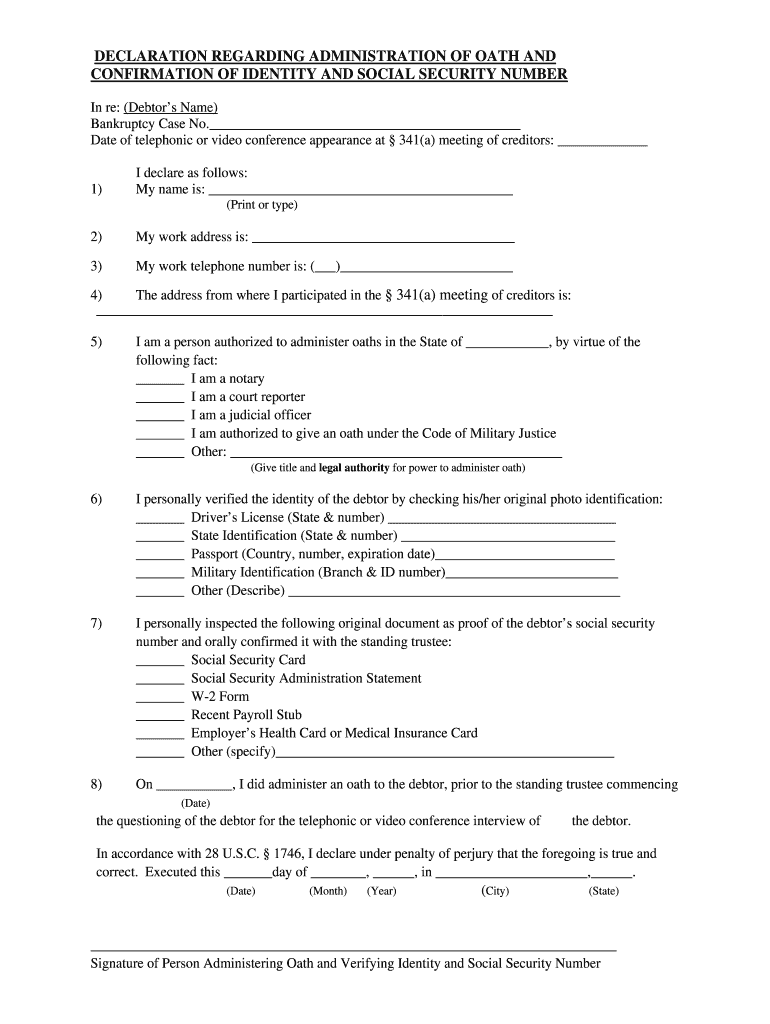
The Declaration Regarding Administration of Oath and Confirmation of Identity and Social Security Number is a signed statement completed when an authorized official administers an oath and records a signer’s identity and Social Security Number for legal or administrative purposes. It documents the oath administration, the identification method used (government ID, electronic identity proofing, or in-person verification), and the confirmatory SSN or tax identification provided by the declarant. The form is used by employers, government agencies, legal professionals, and other organizations that must verify identity and tax identification for compliance, onboarding, benefits, or sworn testimony.

Why accurate administration and confirmation matter

A clear, complete declaration reduces legal risk, supports regulatory compliance for identity and tax reporting, and creates a reliable audit trail for future verification.

Why accurate administration and confirmation matter

Typical users and signers

The declaration is most often completed by HR, notaries, legal staff, and government or benefits administrators when identity or SSN confirmation is required.

  • Employers and HR teams responsible for I-9 and payroll onboarding, completing records for new hires or contractors.
  • Notaries and oath administrators who record sworn statements and verify identity in-person or via remote online notarization.
  • Government agencies and benefits administrators collecting identity and SSN confirmation for eligibility and recordkeeping.

Each participant has distinct responsibilities: the administrator must verify identity and record method, the signer must provide accurate SSN and ID, and the custodian must retain the record per applicable retention rules.

Who can sign and administer

Authorized Oath Administrator

A notary public, authorized officer, or designated official who is legally empowered to administer oaths and confirm identity. The administrator documents the identification method used, records badge or credential details if applicable, and signs to certify proper administration under state notary or agency rules.

Declarant / Signer

The individual taking the oath who provides a Social Security Number or TIN and government-issued identification. The signer must affirm identity truthfully, sign the declaration, and may be required to supply supporting ID or complete remote identity-proofing steps.

Step-by-step: completing the declaration

Complete fields in order, verify identity before collecting SSN, have the administrator complete their section, and retain the signed record per retention rules.

  • 01
    Step 1: Collect government-issued ID and verify name matches the SSN record.
  • 02
    Step 2: Enter the SSN in nine-digit format and confirm with the signer.
  • 03
    Step 3: Administrator completes oath section, records ID method, and signs.
  • 04
    Step 4: Store the signed declaration and audit trail in the organization’s records system.

Digital workflow settings to capture required data

Configure fields and authentication to ensure identity proofing and auditability for electronic completion.

Field Configuration
SSN Field Masked input, nine-digit numeric only
Identity Method Dropdown with ID, RON, KBA, credential analysis
Admin Signature Required signer with role-based authentication
Audit Trail Enable IP, timestamp, and verification log capture

Typical eSubmission flow for the declaration

A standard digital workflow captures identity verification, signer consent, and an auditable completion record in sequence.

  • Upload: Sender uploads the blank declaration and maps fields.
  • Assign: Assign signer and administrator roles with email or signing link.
  • Authenticate: Signer authenticates via email, SMS, or KBA as configured.
  • Complete: Signer and administrator sign; platform records audit trail.

Platform and integration essentials

Ensure the eSignature platform supports identity proofing, secure storage, and required compliance certifications before eSubmission.

  • Integrations: Salesforce, NetSuite, Microsoft 365 integrations recommended
  • File Formats: PDF and DOCX input and signed PDF output
  • Authentication: SMS, email, or advanced KBA options

Confirm the platform can retain audit logs and meet any industry-specific requirements such as HIPAA, 21 CFR Part 11, or state RON recordkeeping before relying on electronic completion.

Core elements to include in a professional declaration

A complete declaration documents the oath event, identity verification method, SSN confirmation, administrator certification, any witness details, and an auditable signature trail to support compliance and future verification.

Oath Statement

A clear sworn statement that the signer affirms the truth of the information under penalty of perjury, including the wording used and the legal authority under which the oath is administered.
Identity Verification

Record the verification method: in-person ID check, ID credential analysis, knowledge-based authentication, or RON provider used, with issuer details or KBA result summary.

SSN Confirmation

A field capturing the nine-digit SSN or TIN, plus a statement confirming the signer’s attestation that the number is correct for tax and legal reporting.

Administrator Certification

Administrator name, title, commission or credential number if applicable, and a signature block certifying correct administration of the oath and adherence to identification procedures.

Witness Details

If witnesses are required by state law, include their printed names, addresses, and signatures; note witness counts and any notary acknowledgement requirements.

Audit Trail

An unalterable log recording timestamps, IP addresses or device IDs, method of authentication, and an audit certificate for electronic signatures and e-submissions.

Security and compliance elements to capture

Encryption: TLS 1.2/1.3; AES-256 at rest
Certifications: SOC 2 Type II; ISO 27001
Regulatory: ESIGN and UETA compliant
Healthcare: HIPAA BAA required
FDA Records: 21 CFR Part 11 available
Accessibility: WCAG 2.0 Level AA

Key penalties and legal risks to avoid

Incorrect SSN: Backup withholding risk
Wrongful Filing: IRC §6721 penalties
Late 1099: $60–$330 per form
Intentional Disregard: $660+ per form
I-9 Paperwork: $281–$2,789 per violation
Notary Defect: Probate or evidentiary exclusion

Common preparation mistakes to avoid

  • Entering a mismatched name or nickname that does not match the government ID creates identity verification failures and may invalidate the declaration.
  • Failing to document the identity-proofing method (KBA result, credential analysis, or ID details) leaves gaps in the audit trail and complicates later challenges.
  • Using free-text SSN fields without masking or validation can lead to transcription errors and unnecessary exposure of sensitive data.
  • Omitting the administrator’s title, commission number, or witness signatures where required by state law risks rejection during legal or administrative review.

Timelines and processing expectations

Timely completion and filing depend on the business purpose; follow employer, agency, or legal deadlines and retain documentation per regulatory retention rules.

Upon Hire or Event:

Provide declaration at time of onboarding or at first request.

Employer Filing:

Retain in personnel file within three business days for inspection.

Tax Reporting:

Incorrect TINs may trigger immediate backup withholding and require corrected filings.

RON Recordkeeping:

Audio-video recordings typically retained 5–10 years per state RON rules.

Access Requests:

Respond to administrative or legal access requests according to agency timelines.

Key milestones from completion to record retention

Track these stages to ensure chain-of-custody, timely filing, and legal defensibility of the declaration.

01

Completion

Declaration signed, dated, and certified by administrator.

02

Verification

Confirm identity method and capture audit evidence.

03

Filing

Store in secure records system and attach audit trail.

04

Retention

Maintain per regulatory retention schedule and state rules.

eSignature vendor comparison for declaration workflows

Compare core plan pricing and feature availability for eSignature solutions commonly used to execute and retain declarations; signNow is listed first as the first column for direct comparison.

signNow DocuSign Adobe Sign PandaDoc HelloSign
Starting Price $8/user/mo $15/user/mo $14/user/mo $19/user/mo $15/user/mo
Free Trial 7-day free trial Varies by vendor Varies by vendor Varies by vendor Varies by vendor
Bulk Send Yes Yes Yes Yes No
Audit Trail Yes Yes Yes Yes Yes
HIPAA Compliant Yes Yes Yes No No
Envelope Cap No cap 100 envelopes/user/year Varies Varies Varies

Frequently asked questions and common troubleshooting

Answers to frequent questions about validity, identity proofing, electronic notarization, and recordkeeping for this declaration.


Need help? Contact support

be ready to get more
Join over 28 million airSlate SignNow users