Establishing secure connection…Loading editor…Preparing document…

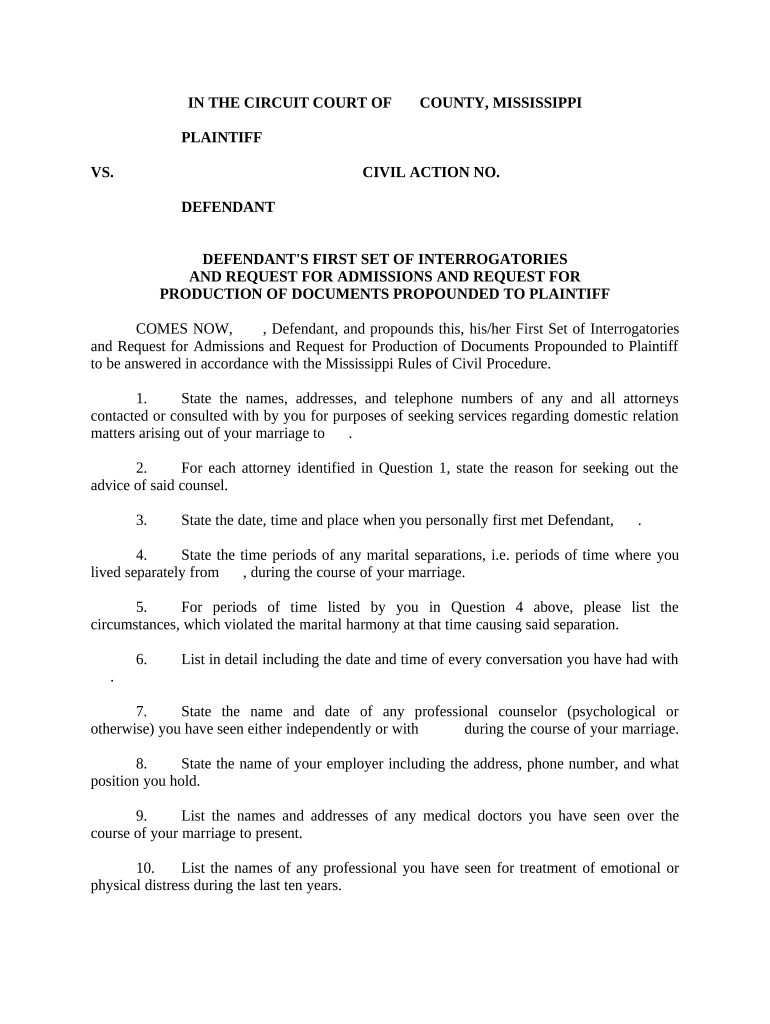
Defendant's First Set of Interrogatories and Requests for Admissions and Production of Documents to Plaintiff

This template is fully customizable. Edit the text, fill out the fields, and send it for signature. Give it a try!
Defendant's First Set of Interrogatories and Requests for Admissions and Production of Documents to Plaintiff

What this combined discovery set is and when it’s used

The Defendant's First Set of Interrogatories and Requests for Admissions and Production of Documents to Plaintiff is a coordinated discovery package served by a defendant early in litigation to obtain sworn answers, admissions, and documentary evidence from the plaintiff. It typically combines (1) interrogatories seeking factual details, (2) requests for admissions asking the plaintiff to admit or deny specific statements, and (3) requests for production demanding relevant documents or electronically stored information. In federal practice these requests are governed by the Federal Rules of Civil Procedure (Rules 33, 34, and 36); many states adopt parallel rules. Responses usually must be signed under oath and served within a prescribed time frame.

Why serving a coordinated first set matters

A single, coordinated set clarifies issues, narrows disputes, forces early disclosure of facts and documents, and can shape motion practice. It reduces duplicated requests and helps identify undisputed facts through admissions, which may streamline depositions and limit trial issues.

Why serving a coordinated first set matters

Who prepares and who responds to these discovery requests

Parties should confirm local rules and any protective order requirements before serving discovery.

  • Defense counsel and litigation paralegals who draft scope, definitions, and verification language to comply with procedural rules.
  • Plaintiff or the plaintiff’s counsel who must coordinate factual input, collect documents, and sign verified responses under oath.
  • Third-party vendors or records custodians who may produce business records under subpoena or authorization.

Core components to include in a professional discovery set

A well-structured set is organized, uses clear definitions, and attaches exhibits or sample forms where needed to reduce disputes.

Definitions

Concise defined terms reduce ambiguity; define parties, time periods, documents, and key concepts referenced across interrogatories and production requests.
Interrogatories

Numbered, targeted questions that seek specific facts, dates, witnesses, and sources of knowledge to identify proof and limit boilerplate denials.

Requests for Admission

Discrete statements framed to establish uncontested facts or authenticity of documents, helping narrow issues before trial.

Requests for Production

Clear document categories, date ranges, format instructions (e.g., native ESI or PDF), and custodial search scope to avoid discovery disputes.

Verification

A signature block or affidavit requirement for sworn responses; include who must sign and under what penalties for false statements.

Instructions

Procedural directions on objections, privilege logs, redaction, and whether documents should be Bates-stamped and produced electronically.

Step-by-step: preparing and serving your first set

Follow a clear sequence to draft, review, serve, and track responses to minimize procedural risk.

  • 01
    Draft scope: Define issues and date ranges to target relevant information.
  • 02
    Prepare definitions: Standardize terms across interrogatories, RFAs, and production requests.
  • 03
    Review for proportionality: Limit requests to reasonably proportional evidence under the rules.
  • 04
    Serve and log: Serve per local rules and record service date for response deadlines.

Configuring an online discovery workflow for drafting and service

Set up templates, signer roles, and production formats to streamline drafting and electronic delivery.

Field Online Setting
Template Name Create reusable template for defendant’s first set
Signer Role Assign counsel as preparer and client as verifier
Document Format Specify PDF/A or native ESI output
Notification Enable delivery receipt and audit-trail emails

Digital delivery and eSubmission considerations

Ensure the platform you select supports required authentication and retention for court admissibility.

  • File types: PDF, DOCX, and native ESI support
  • Audit trail: Capture timestamps, IPs, and signer identity
  • Authentication: Use email, SMS, or stronger multi-factor options

How to serve and where to send responses

Determine permitted service channels and where originals or verified copies should be filed or served.

  • Electronic service: Serve counsel via agreed email or e-service platform with delivery proof
  • Court filing: File a certificate of service with the court where required
  • Physical delivery: Use overnight courier when local rules require paper originals
  • Third-party production: Direct subpoenas or records requests to custodians or vendors

Typical deadlines and federal timing rules

Timelines for responses are time-sensitive; check the controlling rules in federal or state procedure before serving or responding.

Interrogatory Response:

Usually 30 days after service under Fed. R. Civ. P. 33(b)(2)

Requests for Production:

Typically 30 days for responses under Fed. R. Civ. P. 34(b)

Requests for Admissions:

Default 30-day response window under Fed. R. Civ. P. 36(a)

Meet-and-confer:

Local rules may require a pre-motion conference before filing disputes

Motion to Compel:

File promptly after good-faith conferral; delays can affect remedies

Common drafting and service mistakes to avoid

  • Overbroad requests that invite proportionality objections and provoke motion practice.
  • Vague definitions or ambiguous time frames that lead to disputes about responsiveness.
  • Failing to include a verification or improper oath language invalidating responses.
  • Neglecting to specify production formats or custodians, forcing follow-up meet-and-confer calls.

Principal risks and potential court consequences

Waiver of objections: Failing to timely object can forfeit certain defenses
Sanctions: Court may impose monetary or evidentiary sanctions under Rule 37
Adverse inferences: Failure to preserve or produce may lead to adverse inference
Contempt: Persistent noncompliance can result in contempt findings
Authentication issues: Unverified productions may be excluded at trial
Privilege missteps: Improper privilege claims can lead to compelled disclosure

eSignature vendor snapshot for executing discovery verifications and production acknowledgements

Compare common vendor pricing and compliance attributes for electronic signing of verified responses and production acknowledgements; signNow is listed first per standard comparison formatting.

signNow DocuSign Adobe Sign PandaDoc HelloSign
Starting Price $8/user/mo $15/user/mo $14/user/mo $19/user/mo $15/user/mo
Free Trial 7-day free trial Varies Varies Varies Varies
Bulk Send Yes Yes Yes Yes No
Audit Trail Yes Yes Yes Yes Yes
HIPAA Compliant Yes Yes Yes No No

Frequently asked questions — common issues and practical responses

Answers to common procedural and technical questions when preparing or responding to the defendant’s first discovery set.


Need help? Contact support

be ready to get more
Join over 28 million airSlate SignNow users