Establishing secure connection…Loading editor…Preparing document…

Employment Agreement for Executive Director

This template is fully customizable. Edit the text, fill out the fields, and send it for signature. Give it a try!
Employment Agreement for Executive Director

What this Employment Agreement for Executive Director is

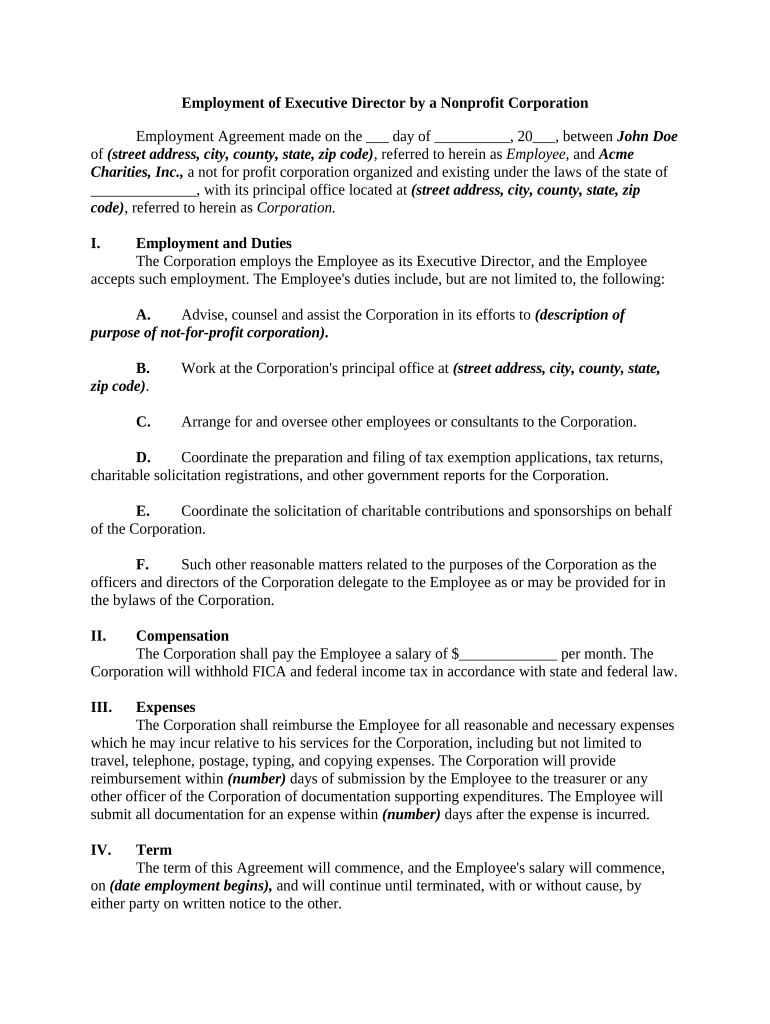
An Employment Agreement for Executive Director is a written contract that defines the relationship between a nonprofit or organization and its chief executive. It sets the executive director's duties, compensation, term, benefits, confidentiality obligations, performance expectations, and termination provisions. The agreement clarifies reporting lines to the board, outlines dispute resolution and IP or confidentiality protections, and records agreed start and end dates. Properly drafted, it reduces ambiguity about responsibilities and severance terms and provides a reference for enforcing obligations if disputes arise.

Why a clear employment agreement matters

A written Employment Agreement for Executive Director protects the organization and the executive by documenting compensation, duties, and termination terms.

Why a clear employment agreement matters

Who typically prepares and signs this agreement

Multiple signatories often must coordinate: the board (or authorized officer) signs for the organization and the executive signs personally to accept obligations.

  • Board chair or governance committee — leads negotiations and signs on behalf of the board.
  • Chief financial officer or HR director — reviews compensation, benefits, and payroll implementation.
  • Candidate or incoming executive director — reviews, negotiates, and countersigns to indicate acceptance.

Primary signers and their roles

Board Chair

Typically authorized to execute employment agreements on the board's behalf after approval. Responsible for ensuring the contract aligns with board resolutions, delegation limits, and any required board minutes or ratification.

Executive Director

Signs to accept the terms, including compensation, duties, and restrictive covenants. Their signature creates mutual obligations and triggers payroll, benefits enrollment, and onboarding steps.

Core clauses to include in the agreement

A professional Employment Agreement for Executive Director should cover the full employment relationship, from duties to dispute resolution. Each clause protects parties and clarifies expectations.

Duties

Describe executive responsibilities, reporting relationships, performance standards, and any deliverables or strategic objectives tied to compensation or evaluation.
Term

State whether the appointment is at-will, fixed-term, or renewable, and include effective start date and any automatic renewal mechanics if applicable.

Compensation

Detail base salary, pay frequency, bonus structure, deferred compensation, and any equity or retirement plan participation and eligibility.

Benefits

Specify medical, retirement, paid time off, expense reimbursement, relocation allowances, and any special perquisites such as car or housing stipends.

Confidentiality

Include non-disclosure obligations, trade-secret protection, and ownership or assignment of work product and IP developed during employment.

Termination

Set out notice periods, cause definitions, severance entitlements, post-termination obligations, and any garden leave or suspension provisions.

Security and compliance checklist

Encryption: AES-256 at rest; TLS 1.2/1.3 in transit
Audit Trail: Complete timestamp and IP records
Access Controls: Role-based user permissions
BAA Available: Business Associate Agreement option
21 CFR Part 11: Compliance available for regulated records
ESIGN / UETA: Adheres to ESIGN and UETA rules

Step-by-step: completing the agreement

Follow these steps in order to prepare a complete, enforceable Employment Agreement for Executive Director.

  • 01
    Draft Terms: Summarize duties, term, and compensation.
  • 02
    Legal Review: Have counsel review restrictive covenants and compliance.
  • 03
    Board Approval: Obtain formal board resolution if required.
  • 04
    Signatures: Collect signatures and dated execution pages.

Configuring the digital workflow

Set up an e-sign workflow that routes the agreement in order and captures audit data required by governance and compliance.

Field Configuration
Signing Order Board rep → Executive → HR
Required Fields Signature, date, printed name
Authentication Email link or SMS code
Archive Location Secure document repository

Typical routing and processing flow

An efficient e-sign process reduces delays and preserves governance records. The flow below shows common routing steps.

  • Upload Document: Sender uploads final draft
  • Place Fields: Add signature and initial fields
  • Route to Signers: Send by role-based order
  • Store Signed Copy: Save PDF with audit trail

Technical and file requirements for e-submission

Preserve a tamper-evident signed PDF and an audit trail to meet recordkeeping and compliance needs.

  • File Formats: PDF and DOCX supported
  • Integrations: Works with HR and storage tools
  • Authentication: Email, SMS, or stronger

eSignature vendor comparison for signing this agreement

Compare starting price, trial availability, bulk send, audit trail, HIPAA compliance, and envelope limits when selecting an eSignature provider.

signNow DocuSign Adobe Sign PandaDoc HelloSign
Starting Price $8/user/mo $15/user/mo $14/user/mo $19/user/mo $15/user/mo
Free Trial 7-day free trial No No Yes, limited Yes, limited
Bulk Send Yes Yes Yes Yes No
Audit Trail Yes Yes Yes Yes Yes
HIPAA Compliant Yes Yes Yes No No

Common legal and administrative risks

Invalid Signature: Missing consent
Tax Reporting: Incorrect start date
Severance Disputes: Unclear termination terms
Confidentiality Gaps: Vague IP language
Noncompliance: Failure to follow board approval
Record Loss: Poor archive practices

Avoid these common preparation mistakes

  • Leaving compensation or bonus triggers vague invites disputes over pay and performance, especially for senior executive roles.
  • Failing to obtain formal board approval can render a contract unenforceable or exceed delegated authority limits.
  • Using ambiguous termination language increases litigation risk and may produce costly severance disputes post-termination.
  • Omitting a clear governing law provision creates uncertainty about which state's courts will decide disputes.

Practical tips for accurate completion and governance

Adopt these practices to improve accuracy, compliance, and board oversight when creating the agreement.

Use clear definitions
Define terms like 'cause', 'good faith', and 'confidential information' precisely to reduce interpretation issues during enforcement or separation.
Document approvals
Record board votes or resolutions authorizing the agreement, including delegation of authority and minutes confirming approval.
Align payroll setup
Coordinate start date and compensation with payroll and benefits administrators to avoid retroactive pay or benefit enrollment gaps.
Preserve audit trail
Use an e-sign solution that captures timestamp, signer identity, and IP address to support later verification or compliance reviews.

Examples of how organizations use this agreement

Real-world examples show common uses and outcomes when the employment agreement is well structured.

Optica Ventures

A growing nonprofit formalized its executive role to align responsibilities with fundraising goals.

  • This clarified bonus metrics.
  • Brian Fitzgibbons, COO, noted the interface is simple to use and helps both staff and stakeholders complete and store agreements reliably, improving administrative consistency.

Fertility Centers

A healthcare provider added HIPAA and confidentiality language tailored to patient data handling.

  • Board approved new indemnity terms.
  • John Butler, Founder, praised the flexibility and security for ensuring signatures on sensitive documents while preserving audit trails and compliance records.

Key dates to schedule when executing the agreement

Track these dates during onboarding to ensure timely compliance with payroll, benefits, and reporting obligations.

Start Date:

The first day the executive assumes duties

Offer Acceptance Deadline:

Date by which the candidate must sign

Background Check Completion:

Date required to clear pre-employment checks

Benefits Enrollment:

Open enrollment start for coverage eligibility

Probationary Review:

Scheduled performance review during initial term

Frequently asked questions and practical answers

Answers to common questions about legality, signing, notarization, records, and changes to the Employment Agreement for Executive Director.


Need help? Contact support

be ready to get more
Join over 28 million airSlate SignNow users