Establishing secure connection…Loading editor…Preparing document…

Complaint Form for Discrimination

This template is fully customizable. Edit the text, fill out the fields, and send it for signature. Give it a try!
Complaint Form for Discrimination

What a Complaint Form for Discrimination Is and when it’s used

A Complaint Form for Discrimination is a written record used to report alleged discriminatory conduct by an employer, educational institution, housing provider, or other covered entity. The form captures facts about the complainant, the respondent, dates, locations, alleged protected characteristics (race, sex, age, disability, etc.), witnesses, and supporting evidence. It is used both for internal HR intake and for external filings with enforcement agencies such as the Equal Employment Opportunity Commission or state fair employment agencies. Accurate, timely completion helps preserve rights and starts investigatory or administrative processes.

Why this form matters for preserving rights and starting investigations

A clear, complete complaint creates a documented record that preserves claims, triggers internal or agency procedures, and supports later investigation or litigation. It helps agencies and investigators assess jurisdiction, statute-of-limitations issues, and preliminary remedies.

Why this form matters for preserving rights and starting investigations

Who prepares and who receives the complaint

Typical users preparing or receiving the complaint include affected individuals, HR representatives, union officials, and agency intake staff.

  • Complainants and employees submitting allegations to HR or an agency for investigation or remediation.
  • Human resources or compliance teams logging and triaging complaints internally and coordinating investigations.
  • State or federal enforcement agency intake officers who evaluate jurisdiction and move complaints into formal charge processes.

Use this form to document facts promptly, then follow internal reporting rules and applicable agency filing timelines.

Step-by-step: filing a discrimination complaint

Follow these steps to document incidents, preserve evidence, and submit the complaint to the right party or agency.

  • 01
    Gather facts: Collect dates, locations, emails, and witness names before drafting the complaint.
  • 02
    Complete form: Enter required fields exactly; include clear, concise descriptions of each incident.
  • 03
    Attach evidence: Add emails, messages, performance records, or other supporting documents in their original form.
  • 04
    Submit to recipient: Send to HR, union rep, or appropriate agency following their intake instructions and keep a copy.

Essential components every complaint form should include

A professional complaint form organizes information for quick triage and investigation while protecting confidentiality and meeting legal requirements.

Complainant Info

Full name, contact details, employment or enrollment status, and relationship to the respondent; used for follow-up and identity verification.
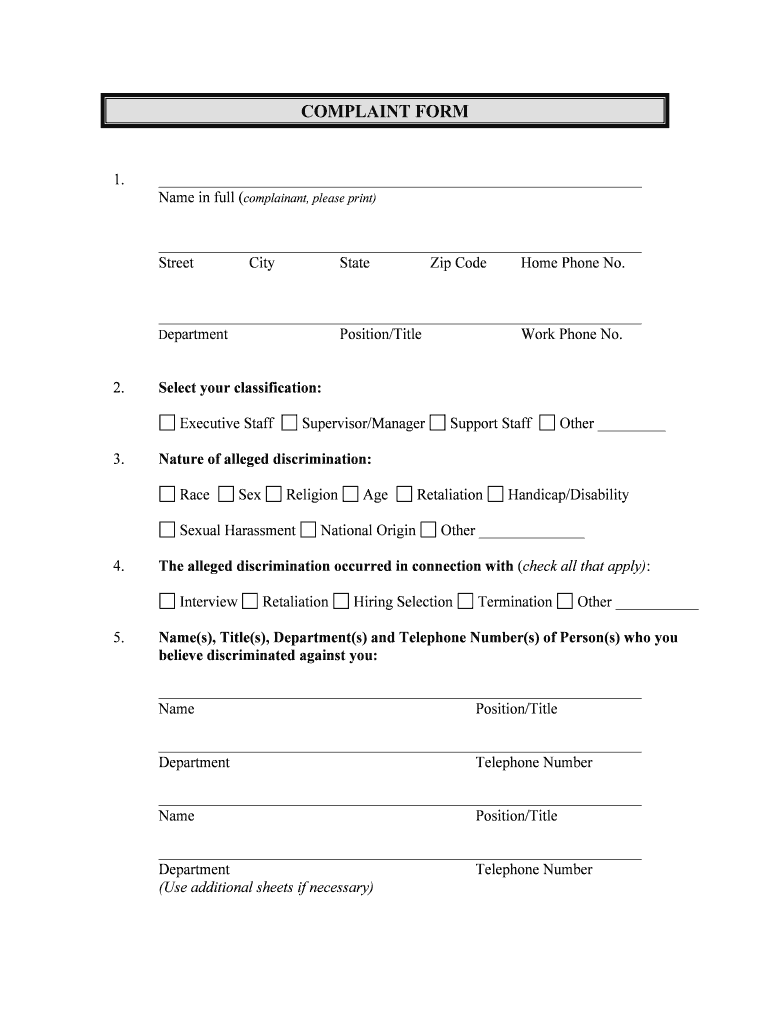
Respondent Info

Name, title, department, and employer or institution address so investigators can identify and contact the alleged offender.

Incident Narrative

Concise factual description of events, sequence, and context; include dates, times, locations and direct quotations when available.

Witnesses and Evidence

List witnesses with contact info and attach relevant documents such as emails, photos, or performance records supporting the allegation.

Relief Requested

State what remedy or outcome you seek (discipline, transfer, reinstatement, policy change, training). This frames investigatory priorities.

Certification

Signature, date, and statement attesting to truthfulness; include consent for investigatory disclosure where required by policy or law.

Typical intake and processing flow

Understanding the common routing steps helps you know what to expect after submission and which party handles each stage.

  • Intake: HR or agency logs complaint, assigns a case number, and confirms receipt to the complainant.
  • Preliminary Assessment: Coordinator screens for jurisdiction, deadlines, and whether immediate safety measures are needed.
  • Investigation: Investigators collect evidence, interview witnesses, and review documents to assess the claim.
  • Disposition: Outcome communicated: remedial action, mediation, dismissal, or referral to enforcement/legal channels.

Setting up a digital complaint workflow

Configure a secure intake workflow to collect structured complaint data, route to investigators, and retain evidence for audits.

Field Configuration
Authentication Email verification or multi-factor for sensitive submissions
Attachments Allow PDF, JPG, and DOCX; limit file size per policy
Routing Auto-forward to HR triage or designated investigator
Retention rule Apply retention policy layer upon case closure

Technical considerations for eSubmission and eSignature

Ensure the platform you use supports secure uploads, strong authentication, audit trails, and required compliance controls.

  • File formats: PDF, DOCX, JPG supported
  • Authentication: Email OTP or advanced methods
  • Audit trail: Timestamps, IP, signer identity

Confirm the solution integrates with your HR case management system and can produce tamper-evident records for investigations and legal review.

Time-sensitive filing windows to be aware of

Timeliness affects enforceability; some agencies require internal reporting before external filing and federal statutes impose strict windows.

Internal policy windows:

Follow your employer or institution's reporting policy; deadlines vary by policy and may be required for internal remedies.

EEOC federal deadline:

Typically 180 days from the last discriminatory act; may extend to 300 days in states with a local agency.

State agency deadlines:

Many states follow a 180–300 day window; check the state fair employment agency for exact limits.

Preservation actions:

Immediately preserve emails, performance reviews, and other evidence to avoid spoliation claims.

Legal consultations:

Consult counsel promptly if litigation is anticipated; statutes of limitation vary by claim and forum.

Key milestones from complaint to closure

Expect a sequence of milestones from initial intake through investigation and final determination; timing varies by agency and case complexity.

01

Receipt and Acknowledgment

Agency or HR logs the complaint and notifies the complainant with a case or reference number.

02

Screening and Jurisdiction

Coordinator determines whether the claim falls within agency authority or requires another forum.

03

Investigation Phase

Interviews and document review occur; evidence is collected and analyzed.

04

Resolution or Determination

Outcome issued: settlement, corrective action, dismissal, or a charge forwarded for enforcement.

Common mistakes that delay or weaken a complaint

  • Omitting precise dates and locations, which hinders investigators from corroborating the timeline.
  • Failing to attach supporting documents or preserving electronic evidence such as emails and messages.
  • Using emotional or speculative language instead of factual descriptions of actions and statements.
  • Missing agency filing windows or failing to follow internal reporting procedures required by policy.

Risks of incorrect or incomplete complaint submissions

Missed Deadline: Loss of right to agency review
Insufficient Facts: Investigation may be limited or dismissed
Privacy Breach: Unauthorized disclosures may violate HIPAA or institutional rules
False Allegation: Potential reputational and legal exposure
Spoliation Risk: Destruction of evidence can prejudice claims
Procedural Errors: Noncompliant filing may be rejected

Security and compliance features to expect for complaint intake

Encryption in transit: TLS 1.2/1.3
Encryption at rest: AES-256
Audit trails: Detailed timestamps and signer metadata
Regulatory support: ESIGN, UETA compliance
HIPAA support: BAA available where required
Access controls: Role-based permissions and SSO

Recommended intake workflow settings

Use these configuration items to streamline intake and ensure records are complete and secure.

Field Configuration
Required Fields Complainant, respondent, incident date, narrative
File types PDF, DOCX, JPG allowed
Authentication Email OTP; optional MFA for sensitive cases
Retention Action Auto-retain case files per policy

eSignature vendor pricing and capability snapshot for complaint intake

Compare starting prices and core capabilities relevant to secure complaint intake. Confirm plan details with each vendor before purchasing.

signNow DocuSign Adobe Sign PandaDoc HelloSign
Starting Price $8/user/mo $15/user/mo $14/user/mo $19/user/mo $15/user/mo
Free Trial 7-day free trial Verify with vendor Verify with vendor Verify with vendor Verify with vendor
Bulk Send Yes (premium tier) Plan-dependent Plan-dependent Plan-dependent Plan-dependent
Audit Trail Yes Yes Yes Yes Yes
HIPAA Compliant Yes (BAA available) Varies by plan Varies by plan Varies by plan Varies by plan
Envelope Cap No cap 100 envelopes/user/year Verify plan limits Verify plan limits Verify plan limits

Practical examples of complaint form use

Two representative scenarios illustrate how complaint forms function in real settings and what information investigators find most useful.

Workplace Harassment

An employee documents repeated derogatory comments with dates and emails

  • Witness names provided for key incidents
  • Investigators used the attachments to corroborate timing, recommended training, and recommended remedial measures while preserving confidentiality throughout the process.

Campus Discrimination

A student files a complaint alleging discriminatory grading practices, attaching graded work and emails

  • The complaint lists course sections and instructor contact info
  • University compliance office opened an investigation, offered interim protections, and completed a review resulting in corrective actions and instructor coaching.

Who may sign or certify the complaint

Complainant — Individual

The person alleging discrimination must sign or electronically certify the complaint to attest to the facts and consent to investigation; signatures establish attribution and are required by many agencies for intake.

HR or Authorized Agent

An HR representative or designated compliance officer may submit on behalf of a complainant with appropriate authorization; when submitted by an agent, include a signed authorization or clear documentation of consent.

Frequently asked questions about using the complaint form

Answers to common questions about eSignatures, deadlines, evidence, confidentiality, and next steps after filing.


Need help? Contact support

be ready to get more
Join over 28 million airSlate SignNow users