Establishing secure connection…Loading editor…Preparing document…

Motion to Dismiss Based on Failure to Administer Breathalyzer

This template is fully customizable. Edit the text, fill out the fields, and send it for signature. Give it a try!
Motion to Dismiss Based on Failure to Administer Breathalyzer

What the Motion to Dismiss Based on Failure to Administer Breathalyzer Is

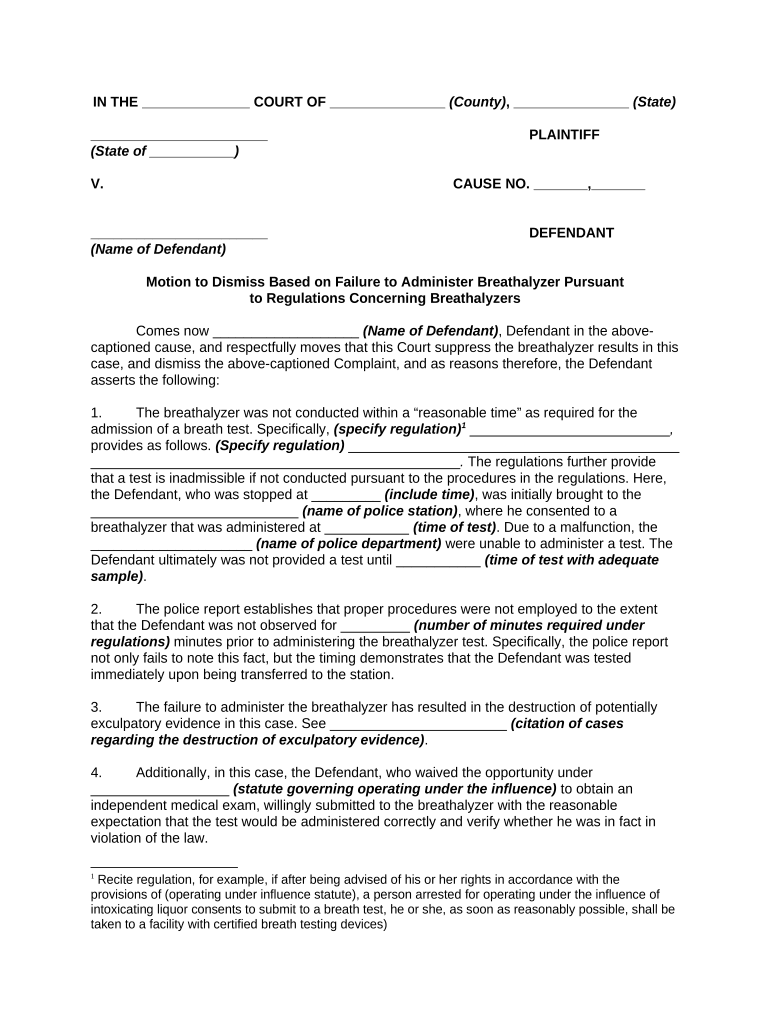
The Motion to Dismiss Based on Failure to Administer Breathalyzer is a court filing that asks a judge to dismiss DUI or related charges when law enforcement failed to provide a requested or legally required breath alcohol test. It outlines factual and legal arguments showing prejudice, statutory or constitutional violations, or lack of admissible evidence resulting from the missing breathalyzer reading. The motion summarizes the arrest timeline, officer conduct, any implied consent notices, and applicable statutory authority to show the missing test undermines the prosecution’s case.

Why This Motion Matters to a Defense Strategy

Use this motion to challenge prosecutions that rely on breathalyzer results or where absence of testing created unreasonable prejudice. Successfully argued motions can exclude key evidence, narrow charges, or result in dismissal when constitutional or statutory implied-consent requirements were not met.

Why This Motion Matters to a Defense Strategy

Who Prepares and Uses This Motion

Typical users who prepare or file this motion include defense attorneys, public defenders, and self-represented defendants in DUI proceedings.

  • Defense attorneys: criminal defense lawyers representing clients charged with DUI or related offenses.
  • Public defenders: handling high-volume DUI dockets who routinely litigate suppression and dismissal issues.
  • Self-represented litigants seeking to challenge procedural failures and exclude unreliable evidence.

Essential Sections of a Professional Motion to Dismiss Based on Failure to Administer Breathalyzer

Core components of a professional Motion to Dismiss Based on Failure to Administer Breathalyzer ensure clarity, legal sufficiency, and persuasive factual support for pretrial argument.

Clear Caption

A complete caption identifies the court, case number, parties, and document title so the clerk and opposing counsel can properly docket and respond and meet service requirements.
Concise Facts

Chronological facts focused on the breath test request, officer actions, and any communications that show the defendant sought testing and was denied or ignored by officers.

Supporting Exhibits

Attach arrest reports, video/audio, FST notes, breathalyzer maintenance logs, and sworn witness statements to corroborate the procedural timeline, and identify exhibit numbers for each item to streamline references at hearings.

Legal Citations

Include controlling statutes and appellate or supreme court decisions from your jurisdiction that directly address implied consent, admissibility, or officer obligations, with pinpoint citations and a short parenthetical explaining their application.

Remedy Requested

State the relief sought—dismissal, partial dismissal, or exclusion of evidence—and explain the legal standard and why it is met by the facts with citation to authority.

Conclusion

Summarize requested rulings briefly, restate the strongest factual points, and include a proposed order for the judge to sign if dismissal or suppression is granted.

Step-by-Step: Drafting and Filing the Motion

Follow these sequential steps to draft, support, and file a Motion to Dismiss Based on Failure to Administer Breathalyzer.

  • 01
    Step 1: Collect arrest report, dispatch logs, and officer statements.
  • 02
    Step 2: Identify whether implied-consent or statutory breath test procedures were followed.
  • 03
    Step 3: Research governing statutes and relevant case law for your jurisdiction.
  • 04
    Step 4: Draft arguments, include exhibits, cite authority, and file before applicable deadline.

Suggested Digital Workflow Settings for Online Completion

Suggested digital workflow settings for online customization, signature routing, and document security when preparing this motion.

Field Configuration
Document Template Name Use motion-specific template
Signer Order and Roles Plaintiff/defense routing optional
Authentication Level Email link or SMS code
Attach Exhibits PDFs preferred, list exhibits

How the Filing Process Flows From Draft to Ruling

This describes the filing flow from document preparation through court ruling and potential appeal opportunities.

  • Prepare Motion: Draft facts, legal argument, and exhibits
  • Serve Parties: File and serve per local rules
  • Hearing: Argue facts and legal standards
  • Ruling: Judge issues written or oral decision

Technical Considerations for eFiling and eSubmission

Digital filing and e-signature workflows require platform support for PDFs, audit trails, and signer authentication to preserve admissibility.

  • Formats: PDF, DOCX accepted
  • Integrations: Court e-filing and cloud storage
  • Authentication: Email, SMS, or KBA options

How This Motion Differs from a Motion to Suppress

Key differences between a Motion to Dismiss Based on Failure to Administer Breathalyzer and a Motion to Suppress evidence.

Criteria Motion to Dismiss Motion to Suppress
Primary Purpose remove charges exclude evidence
Typical Remedy dismissal evidence exclusion
Timing pretrial suppression hearing
Legal Basis statutory/notice constitutional/statutory

eSignature Vendor Pricing Snapshot for Motion Preparation and Filing

Compare baseline e-signature pricing and core features that affect preparing, executing, and securely storing a motion and its exhibits.

signNow DocuSign Adobe Sign PandaDoc HelloSign
Starting Price $8/user/mo $15/user/mo $14/user/mo $19/user/mo $15/user/mo
Free Trial 7-day free trial Varies by plan Varies by plan Varies by plan Varies by plan
Bulk Send Yes Yes Yes Yes No
Audit Trail Yes Yes Yes Yes Yes
HIPAA Compliant Yes Yes Yes No No

Key Deadlines and Scheduling Considerations

Deadlines can vary; confirm local rules for pretrial motion timing, service, and hearing scheduling to avoid procedural bars.

Local motion deadline:

File by court-set pretrial cutoff or arraignment rule.

Service requirement:

Serve opposing counsel per court rules before hearing.

Hearing request timing:

Request hearing when filing or by local scheduling order.

Extension motions:

Seek continuance early to preserve rights.

Record preservation:

Request video, logs, and calibration records promptly.

Milestone Timeline from Arrest to Final Ruling

Sequential milestones show the typical document and hearing stages relevant to a dismissal motion.

01

Arrest and Booking

Document time of stop, request for breath test, and officer responses.

02

Discovery and Records Request

Obtain arrest report, video, dispatch logs, maintenance and calibration records.

03

Pretrial Motion Filing

Draft and file motion before court pretrial cutoff to preserve remedies.

04

Hearing and Ruling

Present evidence and legal arguments; judge issues order or denial.

Security and Compliance Considerations for Electronic Exhibits

Encryption: TLS 1.2/1.3, AES-256 at rest
ESIGN/UETA: Compliant with federal and state e-sign laws
HIPAA: BAA required; HIPAA-compliant workflows available
SOC 2: SOC 2 Type II certification available
21 CFR Part 11: Supports FDA-regulated records and audit trails
ISO & WCAG: ISO 27001 and WCAG 2.0 Level AA

Penalties and Risks from Procedural or Filing Errors

Waiver Risk: Late filing can waive defenses
Evidentiary Loss: Key evidence may remain admitted
Procedural Default: Court may deny untimely motions
Sanctions: Possible fees or sanctions
Increased Exposure: Greater risk at trial
Appeal Limitations: Narrower relief on appeal

Common Preparation Pitfalls to Avoid

  • Failing to obtain and attach contemporaneous evidence such as dashcam footage, dispatch logs, and calibration records undermines factual assertions and makes it difficult to prove procedural lapse.
  • Relying on conclusory assertions without timestamps or witness affidavits invites the court to treat the motion as speculative and deny relief.
  • Ignoring local rules about motion timing, page limits, or required certificates of service can cause rejection or result in the court refusing to consider the motion.
  • Overstating technical claims about breathalyzer accuracy without expert support can backfire; use measured claims and reserve technical challenges for qualified witnesses.

Frequently Asked Questions About the Motion and Procedure

Common questions about this motion, evidentiary support, and procedural practice are answered below to help prepare a focused filing.


Need help? Contact support

be ready to get more
Join over 28 million airSlate SignNow users