Establishing secure connection… Loading editor… Preparing document…
Navigation

Fill and Sign the Dv 134 M Request to Dismiss Long Term Petition State of Form
Fill and Sign the Dv 134 M Request to Dismiss Long Term Petition State of Form

How it works

Open the document and fill out all its fields.
Apply your legally-binding eSignature.
Save and invite other recipients to sign it.

Rate template

4.4
35 votes
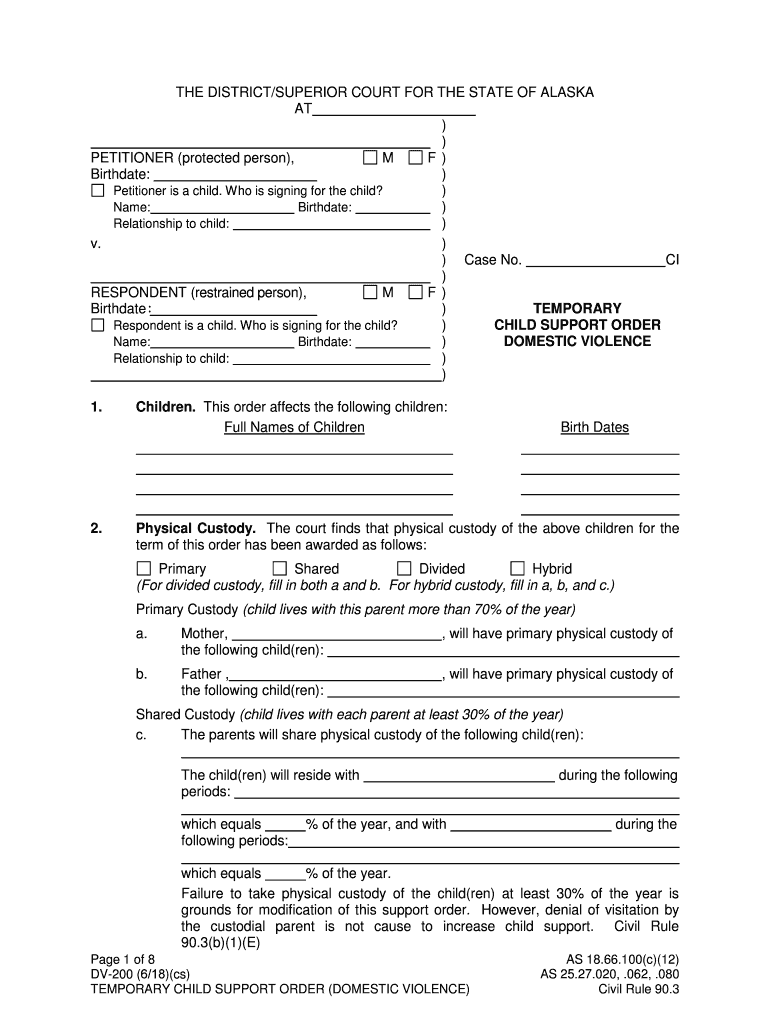
AS 18.66.100(c)(12) AS 25.27.020, .062, .080 Page 1 of 8 DV-200 (6/18)(cs) TEMPORARY CHILD SUPPORT ORDER (DOMESTIC VIOLENCE) Civil Rule 90.3 THE DISTRICT/SUPERIOR COURT FOR THE STATE OF ALASKA AT ) ) PETITIONER (protected person), M F ) Birthdate: ) Petitioner is a child. W ho is signing for the child? ) Name: Birthdate: ) Relationship to child: ) v. ) ) Case No. CI ) RESPONDENT (restrained person ), M F ) Birthdate ) TEMPORARY Respondent is a child. Who is signing for the child? ) CHILD SUPPORT ORDER Name: Birthdate: ) DOMESTIC VIOLENCE Relationship to child: ) ) 1. Children. This order affects the following children: Full Names of Children Birth Dates 2. Physical Custody. The court finds that physical custody of the above children for the term of this order has been awarded as follows: Primary Shared Divided Hybrid (For divided custody, fill in both a and b. For hybrid custody, fill in a, b, and c.) Primary Custody (child lives with this parent more than 70% of the year) a. Mother, , will have primary physical custody of the following child(ren): b. Father , , will have primary physical custody of the following child(ren): Shared Custody (child lives with each parent at least 30% of the year) c. The parents will share physical custody of the following child(ren): The child(ren) will reside with during the following periods: which equals % of the year, and with during the following periods: which equals % of the year. Failure to take physical custody of the child(ren) at least 30% of the year is grounds for modification of this support order. However, denial of visitation by the custodial parent is not cause to increase child support. Civil Rule 90.3(b)(1)(E) : AS 18.66.100(c)(12) AS 25.27.020, .062, .080 Page 2 of 8 DV-200 (6/18)(cs) TEMPORARY CHILD SUPPORT ORDER (DOMESTIC VIOLENCE) Civil Rule 90.3 3. Child Support. The court finds that the obligor, , has a legal obligation to support the above children. It is ordered that the obligor shall pay child support for the children named above as follows: (Put the current number of children on the first line. Subtract one number on each subsequent line and do the calculations for each line.) Number of Basic Monthly Health Insurance Total Monthly Children Amount Owed Adjustment (¶6) Amount Owed Except as provided below, as each child reaches the age of 18, is otherwise legally emancipated or dies, the amount of support will change to the next lower amount. Support must continue while each child is 18 years old if the child is (1) unmarried , (2) actively pursuing a high school diploma or equivalent level of technical or vocational training, and (3) living as a dependent with the obligee parent or guardian or a designee of the parent or guardian, unless the following box is checked: Child support will e nd when each child reaches age 18. The first payment is due no later than . Subsequent payments are due no later than the 1 st day of each month thereafter. 4. Extended Visitation Credit (available only in primary custody situations).Primary physical custody of the children listed in paragraph 2(a) or 2(b) has been given to the non-obligor parent. However, the obligor parent shall have physical custody of these child(ren) for the following periods of over 27 consecutive days: If this visitation is exercised, child support is reduced for the above period(s) as follows: (This reduction may not exceed 75% of the amount owed for the period.) If this visitation is not exercised, child support is not reduced. [Civil Rule 90.3(a)(3)] 5. Application of Civil Rule 90.3 Formula. The amount of child support in paragraph 3 was determined pursuant to: a. The formula in Civil Rule 90.3(a) or (b). b. 90.3(c)(2). Obligor’s adjusted annual income is over $126,000. c. 90.3(c)(3). Obligor’s calculated amount of support is less than $600 per year so the $600 minimum was ordered. Obligor’s income is low because obligor is: incarcerated. unable to work because other d. 90.3(c)(1). The court finds good cause upon proof by clear and convincing evidence that manifest injustice would result if the support award were not varied. Reason(s) for the variation: AS 18.66.100(c)(12) AS 25.27.020, .062, .080 Page 3 of 8 DV-200 (6/18)(cs) TEMPORARY CHILD SUPPORT ORDER (DOMESTIC VIOLENCE) Civil Rule 90.3 The amount of support that would have been required but for the 90.3(c)(1) variation is $ for children per month to be paid by the mother father. The estimated value of any property conveyed instead of support calculated under 90.3 is $ . 6. Medical Support Order. AS 25.27.060(c) and Civil Rule 90.3(d)(1). This order concerns health insurance for the child(ren) covered by this child support order. It does not concern health insurance for any other children or for the parents. a. Current Coverage. The obligor obligee must purchase health insurance for the child(ren) because such insurance is available at reasonable cost through his/her employer, union or otherwise. Nam e and address of employer/union through which insurance will be purchased: The insurance cost (currently $ per month) will be divided between the parties equally unless a different division of the cost is ordered. The child support calculation in paragraph 3 includes: a credit of $ per month (50% of the cost to the obligor) for health insurance purchased for the child(ren) by the obligor. If the obligor fails to purchase the insurance, the monthly child support obligation will i ncrease by this amount, without further order of the court, until the obligor purchases the insurance and provides proof of the purchase to the other parent and to the Child Support Services Division ( CSSD) if CSSD is handling collections. an extra $ per month (50% of the cost to the obligee) for health insurance purchased for the child(ren) by the obligee. If the obligee fails to purchase the insurance, the monthly child support obligation will decrease by this amount, without further order of the court, until the obligee purchases the insurance and provides proof of the purchase to the other parent and to the Child Support Services Division ( CSSD ) if CSSD is handling collections. If the cost of the insurance changes, the amount of the child support obligation will be adjusted accordingly, without further order of the court. The parent purchasing the insurance shall provide documentation of the change to the other parent and to the Child Support Services Division ( CSSD) if CSSD is handling collections. If either parent believes the cost of the insurance has become unreasonable, that parent may file a motion asking the court to suspend the requirement that insurance be purchased. The children ar e eligible for services through the Indian Health Service military medical benefits but these services are not available in the area where the children live. Therefore, insurance must be purchased as stated above until these services become available. AS 18.66.100(c)(12) AS 25.27.020, .062, .080 Page 4 of 8 DV-200 (6/18)(cs) TEMPORARY CHILD SUPPORT ORDER (DOMESTIC VIOLENCE) Civil Rule 90.3 The children are eligible for services through the Indian Health Service military medical benefits and these services are available to the children. Therefore, no additional insurance is required while these services are available. Health insurance for the child(ren) is not now available at reasonable cost or its availability is unknown. b. Future Coverage. If there is no health care coverage for the child(ren) and insurance becomes available to a parent at a reasonable cost, that parent must purchase the insurance after giving notice to the other parent. The cost of the insurance must be divided between the parents equally unless a different division of the cost is ordered. Without further order of the court, the monthly child support obligation will increase by 50% of the cost of the insurance if the obligee purchases it and decrease by 50% of the cost of the insurance if the obligor purchases it, unless otherwise ordered. If the parents disagree about whether the cost of insurance is reasonable or about which insurance policy should be purchased, either parent may file a motion asking the court to resolve the dispute. c. Information for Other Parent. The parent purchasing the insurance must notifythe insurance company that the other parent can apply for benefits on behalf of the child(ren) and should be reimbursed directly. The purchaser must also provide coverage information to the other parent and all forms and instructions necessary to apply for benefits. The parent with insurance who receives statements or Explanations of Benefits from the insurance company regarding any of the children must send a copy to the other parent upon request. 7. Uncovered Health Care Expenses (including medical, dental, vision and mental health counseling expenses). Civil Rule 90.3(d)(2) and (f)(5) The cost of the children's reasonable health care expenses not covered by insurance must be paid as follows, unless the expenses exceed $5,000 in a calendar year: Obligor will pay half and obligee will pay half. Obligor will pay and obligee will pay because A party shall reimburse the other party for his or her share of the uncovered expenses within 30 days after receiving the health care bill, proof of payment and, if applicable, a health insurance statement showing what part of the cost is uncovered. The bill and other materials should be sent within a reasonable time. If the uncovered expenses exceed $5,000 in a calendar year, the expenses must be allocated based on the parties' relative financial circumstances when the expenses occur. 8. Travel Expenses. Civil Rule 90.3(g) Travel expenses which are necessary to exercise visitation will be allocated between the parties as follows: AS 18.66.100(c)(12) AS 25.27.020, .062, .080 Page 5 of 8 DV-200 (6/18)(cs) TEMPORARY CHILD SUPPORT ORDER (DOMESTIC VIOLENCE) Civil Rule 90.3 9. Income Withholding Order. Unless one of the following boxes is checked (or CSSD later authorizes an exemption for one of these reasons), the obligor, any employer of the obligor and any person, political subdivision, department of the State, or other entity possessing property of the obligor shall immediately withhold from the obligor's income and any other money due to the obligor the amount of child support due pursuant to AS 25.27.062 and shall pay this amount to the Child Support Services Division. The parties have agreed on the alternative arrangement described in the attached document signed by both parties.* The court finds good cause not to require immediate income withholding because it would not be in the best interests of the child(ren) for the following reason: * The obligor is receiving social security or other disability compensation that includes regular payments to the child(ren) at lea st equal to the support owed each month. To the extent these payments to the child(ren) do not satisfy the monthly amount owed, the remaining amount due shall be withheld from the obligor's income pursuant to AS 25.27.062. Even if one of the above boxes is checked, exempting the obligor from immediate income withholding, such withholding may be initiated under AS 25.27.062(c) through the court or through CSSD. 10. CSSD Services. All child support payments must be made to the Child Support Services Division (CSSD) if one of the parties applies for the services of CSSD. In addition, if the above income withholding order is served on the obligor's employer or anyone holding money belonging to the obligor, the money withheld pursuant to the order must be paid to CSSD. When payments are made through CSSD: a. Payments shall include the case number and names of both parties and shall be made payable to the CHILD SUPPORT SERVICES DIVISION, PO Box 100380, Anchorage, Alaska 99510- 0380. CSSD shall disburse the payments as required by law after deducting any fee required by law. b. CSSD shall maintain a record of support payments. c. Interest will be imposed in accordance with AS 25.27.020 on payments which are 10 or more days overdue or if payment is made by a check backed by insufficient funds. No interest will be charged, except on arrearages more than 30 days past due, if payments are made under an income withholding order. d. The parties shall notify CSSD, in writing, of any change in their mailing or residence addresses within 5 days after any such change. e. The obligor shall keep CSSD informed of the name and address of his or her current employer. Whenever employment changes, the obligor must notify CSSD in writing within 20 days. This employment information must be given to the obligee instead of CSSD if CSSD is not enforcing the order. * In addition, the obligor has agreed to keep the obligee (or CSSD if CSSD is enforcing the order) informed of the obligor's current employer and the availability of employment-related health insurance coverage for the children until the support order is satisfied. AS 18.66.100(c)(12) AS 25.27.020, .062, .080 Page 6 of 8 DV-200 (6/18)(cs) TEMPORARY CHILD SUPPORT ORDER (DOMESTIC VIOLENCE) Civil Rule 90.3 f. The party ordered to provide insurance shall provide to CSSD proof of medical insurance coverage for the children within 20 days of this order. If insurance becomes unavailable, that party shall notify CSSD within 20 days. When insurance again becomes available, that party must, within 20 days, give CSSD proof that the children are insured. The above proof and notice of insurance must be given to the other party instead of CSSD if CSSD if not enforcing the order. g. If a party applies for CSSD services: (1) CSSD shall take whatever Services action is deemed legally proper, including recommending contempt proceedings against the party ordered to pay support. Failure to pay support as ordered may result in execution against the property of the obligor or arrest of the obligor. (2) Either party may ask CSSD to review the amount of child support. CSSD may require that the request be made in writing on a form specified b y CSSD . The parties shall provide income information requested by CSSD in connection with a review of the amount of child support within 20 days after the date the request is mailed. (3) Unless the box below is checked, CSSD may issue a withholding order , pursuant to AS 25.27.062 or AS 25.27.250, to attach funds owed to the obligor by any corporation created by the Alaska Native Claims Settlement Act (ANCSA) or any settlement trusts established pursuant to section 39 of ANCSA, codified at 43 USC 1629e. Upon service of such an order, the obligor's dividends, distributions and/or other periodic monetary benefits of ANCSA stock or benefits paid by a settlement trust shall be transferred to the child support obligee pursuant to the terms of the withholding order. The ANCSA corporation or settlement trust shall pay the funds so transferred to CSSD for distribution to the child support obligee. The obligor is prohibited from transferring, selling or otherwise alienating his/her ANCSA stock or trust benefits after CSSD issues a withholding order based on an arrearage. CSSD is not authorized to issue the withholding order described above because But, CSSD may issue a withholding order if obligor accrues arrears more than two times the monthly support obligation under this order. 11. Effect of Assignment of Right to Child Support to State. This order does not bind the Child Support Services Division of Alaska or of any other state to the child support herein ordered if the person receiving child support is receiving or has currently applied for welfare benefits and assigns his or her rights to child support to the state. AS 25.27.120 - .130. If child support rights are assigned to the state, any alternative arrangement for immediate income withholding will not be allowed unless approved by CSSD . AS 18.66.100(c)(12) AS 25.27.020, .062, .080 Page 7 of 8 DV-200 (6/18)(cs) TEMPORARY CHILD SUPPORT ORDER (DOMESTIC VIOLENCE) Civil Rule 90.3 12. Application For Permanent Fund Dividend (PFD) Required. AS 22.10.025(b) Unless the following box is checked, the party ordered to pay support is ordered to apply for an Alaska Permanent Fund Dividend (PFD) if he or she is an Alaska resident and is more than two months in arrears as of December 31 of the previous year. The party shall submit a complete and accurate PFD application to the Permanent Fund Dividend Division by January 15 and shall timely submit any supplemental information or documentation requested by the Permanent Fund Dividend Division. If the party is not eligible for a dividend, the party must file proof of non-eligibility with CSSD if CSSD is enforcing this support order. The party ordered to pay support is not required to apply for an Alaska Permanent Fund Dividend because: 13. Notice to Party Ordered to Pay Support (Obligor). a. You must pay the amount of support stated in this order. You cannot give gifts , clothes, food, or other things instead of paying this money. b. You must pay support on time. You are not excused from paying even if the other party denies you visitation with the child(ren). If you are denied visitation, you can file a motion to enforce visitation with the court, but you must still pay the child support. c. You must pay child support before your other bills and debts. Child support payments have priority over most other debts. d. If you get married or take on an obligation to support someone else, you will still be expected to make all the payments ordered in this order. If you fail to do so and a case is brought against you to enforce payment, your new obligations will not excuse your failure to pay. 14. Notice to Both Parties: If your situation changes, ask the court to change this order right away. This child support order is based on:  your current income, and  your current custody and visitation arrangement. If either changes significantly (for example, if a child starts living with a different parent), you can ask the court to change the custody order or child support order. The court has forms to help you do this (the DR-700 Packet). It is very important to ask the court as soon as a change occurs because child support cannot be changed retroactively (that is, a new order cannot cancel the amount ordered to be paid in the past). Past due amounts continue to remain due even if the person owed support does not ask for payment (except in the special situation described in Civil Rule 90.3(h)(3)). With interest added, these past due amounts can grow into a substantial debt. Once a year, either party can ask the other party to provide documents such as tax returns and pay stubs showing the party’s income for the prior calendar y ear. The request must be in writing and the party making it must attach copies of his or her tax return and pay stubs to the request. The other party must respond with documentation of his or her income within 30 days. AS 18.66.100(c)(12) AS 25.27.020, .062, .080 Page 8 of 8 DV-200 (6/18)(cs) TEMPORARY CHILD SUPPORT ORDER (DOMESTIC VIOLENCE) Civil Rule 90.3 15. Other Child Support Orders. The court is aware of no other child support order currently in effect concerning these parties. While this order is in effect, it supersedes the following child support order: Case No. Effective Date: 16. Duration of Order. This child support order is effective fromto unless either:a. the custody order in this case is modified or dissolved earlier by court order, or b. a superior court or CSSD enters a child support order concerning these parties. Ef fective Date Judicial Officer Printed Name: I certify that on I sent a copy of this order to: CSSD at DOR.CSSD.records.tracking@alaska.gov for the state case registry Both Parties (list): Attorneys (list): If 5.d on page 2 is checked , I also sent a copy to the Administrative Director of the Court System If 6.a on page 3 is checked, I also sent a copy of this order & the DR -330 Notice** to: Employer(s) of: Obligor Obligee Clerk/Judicial Assistant:  A copy of the order and the DR- 330 Notice to Employer Re: Children’s Medical Insurance must be sent to the employer of the party ordered to purchase insurance for the children if that party is eligible for family health care coverage through his/her employer. AS 25.27.063(b). CourtView Instructions: Enter this order and disposition into CourtView’s petition screen.

Valuable tips for finishing your ‘Dv 134 M Request To Dismiss Long Term Petition State Of ’ online

Are you fed up with the inconvenience of handling paperwork? Look no further than airSlate SignNow, the premier electronic signature service for both individuals and businesses. Bid farewell to the monotonous routine of printing and scanning documents. With airSlate SignNow, you can easily complete and sign documents online. Utilize the powerful tools integrated into this intuitive and affordable platform and transform your method of document handling. Whether you need to approve documents or gather eSignatures, airSlate SignNow manages everything seamlessly, requiring just a few clicks.

Adhere to these comprehensive instructions:

  1. Access your account or register for a complimentary trial with our service.
  2. Select +Create to upload a document from your device, cloud storage, or our template collection.
  3. Edit your ‘Dv 134 M Request To Dismiss Long Term Petition State Of ’ in the editor.
  4. Click Me (Fill Out Now) to prepare the document on your end.
  5. Add and designate fillable fields for others (if necessary).
  6. Proceed with the Send Invite settings to solicit eSignatures from others.
  7. Download, print your version, or convert it into a reusable template.

Don't worry if you need to collaborate with others on your Dv 134 M Request To Dismiss Long Term Petition State Of or send it for notarization—our platform provides everything you require to achieve these objectives. Sign up with airSlate SignNow today and elevate your document management to new levels!

Here is a list of the most common customer questions. If you can’t find an answer to your question, please don’t hesitate to reach out to us.

Need help? Contact Support

The best way to complete and sign your dv 134 m request to dismiss long term petition state of form


Save time on document management with airSlate SignNow and get your dv 134 m request to dismiss long term petition state of form eSigned quickly from anywhere with our fully compliant eSignature tool.

How to Sign a PDF Online How to Sign a PDF Online

How to complete and sign documents online

In the past, dealing with paperwork required lots of time and effort. But with airSlate SignNow, document management is easy and fast. Our powerful and user-friendly eSignature solution allows you to effortlessly fill out and electronically sign your dv 134 m request to dismiss long term petition state of form online from any internet-connected device.

Follow the step-by-step guide to eSign your dv 134 m request to dismiss long term petition state of form template online:

  • 1.Sign up for a free trial with airSlate SignNow or log in to your account with password credentials or SSO authorization option.
  • 2.Click Upload or Create and import a file for eSigning from your device, the cloud, or our form collection.
  • 3.Click on the file name to open it in the editor and use the left-side menu to complete all the blank areas appropriately.
  • 4.Drop the My Signature field where you need to eSign your sample. Type your name, draw, or upload a photo of your handwritten signature.
  • 5.Click Save and Close to finish modifying your completed form.

As soon as your dv 134 m request to dismiss long term petition state of form template is ready, download it to your device, export it to the cloud, or invite other people to electronically sign it. With airSlate SignNow, the eSigning process only takes a couple of clicks. Use our robust eSignature solution wherever you are to handle your paperwork successfully!


How to Sign a PDF Using Google Chrome How to Sign a PDF Using Google Chrome

How to complete and sign forms in Google Chrome

Completing and signing documents is easy with the airSlate SignNow extension for Google Chrome. Adding it to your browser is a quick and beneficial way to manage your paperwork online. Sign your dv 134 m request to dismiss long term petition state of form template with a legally-binding electronic signature in just a couple of clicks without switching between applications and tabs.

Follow the step-by-step guide to eSign your dv 134 m request to dismiss long term petition state of form template in Google Chrome:

  • 1.Go to the Chrome Web Store, locate the airSlate SignNow extension for Chrome, and add it to your browser.
  • 2.Right-click on the link to a document you need to approve and select Open in airSlate SignNow.
  • 3.Log in to your account with your password or Google/Facebook sign-in buttons. If you don’t have one, you can start a free trial.
  • 4.Utilize the Edit & Sign menu on the left to fill out your template, then drag and drop the My Signature field.
  • 5.Upload a photo of your handwritten signature, draw it, or simply enter your full name to eSign.
  • 6.Make sure all the details are correct and click Save and Close to finish modifying your form.

Now, you can save your dv 134 m request to dismiss long term petition state of form template to your device or cloud storage, send the copy to other people, or invite them to eSign your document with an email request or a secure Signing Link. The airSlate SignNow extension for Google Chrome enhances your document workflows with minimum effort and time. Start using airSlate SignNow today!


How to Sign a PDF in Gmail How to Sign a PDF in Gmail How to Sign a PDF in Gmail

How to fill out and sign documents in Gmail

Every time you get an email with the dv 134 m request to dismiss long term petition state of form for approval, there’s no need to print and scan a document or save and re-upload it to another program. There’s a better solution if you use Gmail. Try the airSlate SignNow add-on to quickly eSign any documents right from your inbox.

Follow the step-by-step guidelines to eSign your dv 134 m request to dismiss long term petition state of form in Gmail:

  • 1.Go to the Google Workplace Marketplace and locate a airSlate SignNow add-on for Gmail.
  • 2.Install the tool with a related button and grant the tool access to your Google account.
  • 3.Open an email containing an attachment that needs approval and use the S symbol on the right sidebar to launch the add-on.
  • 4.Log in to your airSlate SignNow account. Opt for Send to Sign to forward the file to other people for approval or click Upload to open it in the editor.
  • 5.Put the My Signature field where you need to eSign: type, draw, or import your signature.

This eSigning process saves time and only requires a couple of clicks. Use the airSlate SignNow add-on for Gmail to update your dv 134 m request to dismiss long term petition state of form with fillable fields, sign documents legally, and invite other individuals to eSign them al without leaving your inbox. Improve your signature workflows now!


How to Sign a PDF on a Mobile Device How to Sign a PDF on a Mobile Device How to Sign a PDF on a Mobile Device

How to complete and sign documents in a mobile browser

Need to rapidly submit and sign your dv 134 m request to dismiss long term petition state of form on a mobile phone while working on the go? airSlate SignNow can help without the need to set up additional software applications. Open our airSlate SignNow solution from any browser on your mobile device and create legally-binding electronic signatures on the go, 24/7.

Follow the step-by-step guide to eSign your dv 134 m request to dismiss long term petition state of form in a browser:

  • 1.Open any browser on your device and follow the link www.signnow.com
  • 2.Sign up for an account with a free trial or log in with your password credentials or SSO option.
  • 3.Click Upload or Create and add a file that needs to be completed from a cloud, your device, or our form catalogue with ready-to go templates.
  • 4.Open the form and complete the empty fields with tools from Edit & Sign menu on the left.
  • 5.Place the My Signature field to the sample, then type in your name, draw, or add your signature.

In a few simple clicks, your dv 134 m request to dismiss long term petition state of form is completed from wherever you are. As soon as you're done with editing, you can save the file on your device, create a reusable template for it, email it to other people, or ask them to eSign it. Make your paperwork on the go speedy and productive with airSlate SignNow!


How to Sign a PDF on iPhone How to Sign a PDF on iPhone

How to complete and sign paperwork on iOS

In today’s corporate environment, tasks must be completed quickly even when you’re away from your computer. With the airSlate SignNow app, you can organize your paperwork and approve your dv 134 m request to dismiss long term petition state of form with a legally-binding eSignature right on your iPhone or iPad. Install it on your device to conclude contracts and manage forms from anyplace 24/7.

Follow the step-by-step guidelines to eSign your dv 134 m request to dismiss long term petition state of form on iOS devices:

  • 1.Go to the App Store, search for the airSlate SignNow app by airSlate, and set it up on your device.
  • 2.Open the application, tap Create to add a form, and choose Myself.
  • 3.Choose Signature at the bottom toolbar and simply draw your autograph with a finger or stylus to eSign the sample.
  • 4.Tap Done -> Save right after signing the sample.
  • 5.Tap Save or take advantage of the Make Template option to re-use this document in the future.

This method is so easy your dv 134 m request to dismiss long term petition state of form is completed and signed in just a few taps. The airSlate SignNow application works in the cloud so all the forms on your mobile device are kept in your account and are available whenever you need them. Use airSlate SignNow for iOS to boost your document management and eSignature workflows!


How to Sign a PDF on Android How to Sign a PDF on Android

How to complete and sign paperwork on Android

With airSlate SignNow, it’s simple to sign your dv 134 m request to dismiss long term petition state of form on the go. Install its mobile app for Android OS on your device and start improving eSignature workflows right on your smartphone or tablet.

Follow the step-by-step guide to eSign your dv 134 m request to dismiss long term petition state of form on Android:

  • 1.Go to Google Play, search for the airSlate SignNow app from airSlate, and install it on your device.
  • 2.Log in to your account or register it with a free trial, then add a file with a ➕ button on the bottom of you screen.
  • 3.Tap on the uploaded file and select Open in Editor from the dropdown menu.
  • 4.Tap on Tools tab -> Signature, then draw or type your name to electronically sign the form. Complete empty fields with other tools on the bottom if needed.
  • 5.Utilize the ✔ key, then tap on the Save option to finish editing.

With an easy-to-use interface and full compliance with major eSignature standards, the airSlate SignNow app is the best tool for signing your dv 134 m request to dismiss long term petition state of form. It even operates without internet and updates all form adjustments once your internet connection is restored and the tool is synced. Fill out and eSign forms, send them for eSigning, and generate multi-usable templates anytime and from anywhere with airSlate SignNow.

Sign up and try Dv 134 m request to dismiss long term petition state of form
  • Close deals faster
  • Improve productivity
  • Delight customers
  • Increase revenue
  • Save time & money
  • Reduce payment cycles

