Establishing secure connection…Loading editor…Preparing document…

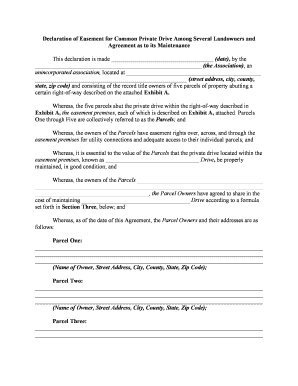
Declaration of Easement for Common Private Drive

This template is fully customizable. Edit the text, fill out the fields, and send it for signature. Give it a try!
Declaration of Easement for Common Private Drive

What the Declaration of Easement for Common Private Drive Is

A Declaration of Easement for Common Private Drive is a recorded legal instrument that grants specified access rights over a private driveway for multiple properties. It identifies the grantor and grantees, describes the servient and dominant tenements with a precise legal description, defines permitted uses, and outlines maintenance responsibilities, cost allocation, and dispute resolution. Recording the declaration places future owners on notice and creates an enforceable, perpetual or time-limited property interest that runs with the land under state real property law.

Why a Declaration of Easement Matters for Shared Driveways

The declaration reduces boundary disputes, clarifies routine maintenance and cost sharing, protects access rights for future owners, and improves marketability by recording legal access. It creates enforceable expectations and prevents ad hoc arrangements that commonly lead to litigation.

Why a Declaration of Easement Matters for Shared Driveways

Who Typically Prepares and Uses This Declaration

Use the instrument early in transactions, during subdivision, or before selling to ensure recorded, enforceable rights.

  • Homeowner associations managing common access and upkeep obligations between lots.
  • Adjacent property owners who require shared ingress/egress across another parcel.
  • Developers or subdividers establishing rights and maintenance rules for future owners.

Primary Signers and Typical Roles

Property Owner

Individual or entity that grants or receives the easement. Often signs as grantor or grantee, must match recorded title name and provide accurate address and parcel identification for the county recorder.

Attorney / Title Agent

Drafts or reviews the declaration for clarity and enforceability, confirms legal descriptions, and coordinates recording. May advise on cost allocation, maintenance provisions, and compliance with local recording requirements.

Key Security and Recordkeeping Practices

Encryption: TLS 1.2/1.3; AES-256 storage
Audit Trail: Timestamped signing logs
Notary Evidence: Acknowledgement or RON session
Access Control: Role-based signer permissions
Retention: Keep original recorded copy
Chain of Title: Recording proof in county files

Risks If the Declaration Is Incorrect or Missing

Unclear Rights: Ambiguous access terms
Boundary Disputes: Costly litigation risk
Recording Rejection: Clerical defect delays
Title Issues: Impaired marketability
Insurance Problems: Claim denial risk
Enforcement Limits: Weak remedial options

Common Preparation Mistakes to Avoid

  • Using informal descriptions instead of a complete legal description causes recording rejections and future boundary disputes.
  • Failing to specify maintenance obligations and cost apportionment leads to disagreement and unpaid repairs.
  • Not confirming signatory authority for entities or trusts results in invalid signatures and title defects.
  • Skipping recording at the county recorder’s office leaves future purchasers unaware of the easement right.

Filling Out the Declaration: Step-by-Step

Follow these core steps to complete a professional Declaration of Easement for Common Private Drive.

  • 01
    Identify Parties: Enter full legal names and current addresses for grantor(s) and grantee(s).
  • 02
    Describe Parcels: Provide recorded legal descriptions and parcel numbers for each involved lot.
  • 03
    Define Easement: Specify location, width, permitted uses, and any restrictions.
  • 04
    Maintenance Terms: State cost-sharing, repair obligations, and dispute resolution procedures.

Typical Document Workflow from Draft to Recorded Instrument

A typical workflow moves the declaration from drafting through signing, notarization, recording, and distribution.

  • Drafting: Prepare clear easement language and exhibits with legal descriptions.
  • Signing: Parties sign in presence of notary or via authorized RON process.
  • Recording: Submit the executed instrument to the county recorder for indexing.
  • Distribution: Provide recorded copies to all parties and title companies.

Digital Workflow Settings to Consider

Configure a consistent digital workflow to reduce errors and speed execution for multi-party easements.

Field Configuration
Signer Authentication Email link or SMS code for each signer
Template Usage Use a standardized template with conditional fields
Notary Integration Enable remote online notarization where permitted
Record Storage Save final recorded PDF in secure cloud

Technical Distribution and eSignature Considerations

Ensure the selected service provides tamper-evident signed PDFs, signer attribution, and retention controls compatible with your recorder and title company.

  • File Formats: PDF and DOCX supported
  • Integrations: Connects with title or document management
  • Authentication: Multi-factor signer verification

Timing Considerations and Typical Deadlines

Timing for execution and recording affects enforceability and title transfer; some steps have practical deadlines rather than statutory ones.

Upon Execution:

Record promptly after notarization to give public notice.

Before Sale:

Record prior to closing to avoid title issues.

Prior to Financing:

Notify lenders and ensure easement does not conflict with mortgage terms.

Notary/RON Scheduling:

Book notary or RON session early to prevent closing delays.

Retention Obligations:

Keep recorded originals according to applicable retention rules.

Core Clauses to Include in a Professional Declaration

Each clause below reduces ambiguity and improves enforceability when well drafted and tailored to local law.

Parties Identification

Clearly name grantor(s) and grantee(s) using full legal entity names and mailing addresses to match title records and avoid ambiguity in enforcement and recording.
Legal Descriptions

Provide precise metes and bounds or recorded parcel numbers and include an attached exhibit map showing the drive location and reference points for unambiguous identification.

Easement Grant

Define the exact rights granted (ingress, egress, utilities), specify width, surface area, permitted vehicle and utility uses, and any restrictions on alteration.

Maintenance Allocation

Detail responsibility for repairs, resurfacing, snow removal, and proportions for cost sharing, including assessment procedures and payment timelines.

Liability and Indemnity

State limits on liability, required insurance levels, and indemnification for damage arising from use or maintenance to reduce future disputes.

Termination and Transfer

Specify conditions for termination, assignment procedures, effect on successors, and recording obligations when property changes ownership.

eSignature Pricing and Capability Snapshot for Easement Workflows

Compare starting prices and key capabilities for common eSignature vendors used when executing land instruments; verify plan details with each vendor.

signNow DocuSign Adobe Sign PandaDoc HelloSign
Starting Price $8/user/mo $15/user/mo $14/user/mo $19/user/mo $15/user/mo
Free Trial Yes, 7-day free trial Varies by vendor Varies by vendor Varies by vendor Varies by vendor
Bulk Send Yes Yes Yes Yes No
Audit Trail Yes Yes Yes Yes Yes
HIPAA Compliant Yes Yes Yes No No

Frequently Asked Questions About Declarations of Easement

Answers to common questions about e-signatures, notarization, recording, amendment, and typical pitfalls when preparing an easement declaration.


Need help? Contact support

be ready to get more
Join over 28 million airSlate SignNow users