Establishing secure connection…Loading editor…Preparing document…

Employee Coaching Script for Top Performing Employees

This template is fully customizable. Edit the text, fill out the fields, and send it for signature. Give it a try!
Employee Coaching Script for Top Performing Employees

What the Employee Coaching Script for Top Performing Employees Is

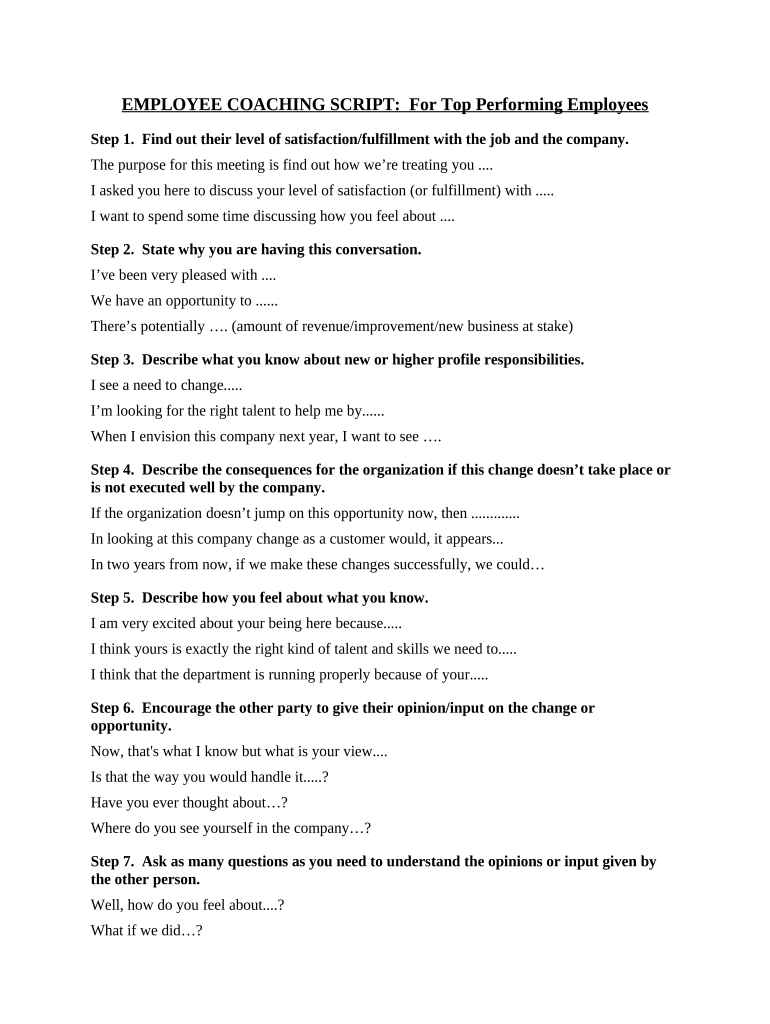
The Employee Coaching Script for Top Performing Employees is a structured, reusable HR document designed to guide managers through focused coaching conversations with high-performing staff. It standardizes praise, development goals, stretch assignments, and career planning while preserving a consistent record for performance tracking. The script includes prompts for strengths recognition, feedback on stretch areas, measurable objectives, timelines for follow-up, and agreements on support or resources. Organizations use it to align coaching practice across teams, reduce bias, and document agreed next steps for talent retention and succession planning.
Why a Standardized Coaching Script Matters

Use this script to make coaching conversations consistent, measurable, and productive for top performers. It clarifies expectations, captures development commitments, and supports retention strategies while creating a clear record for internal HR reviews and future promotion decisions.

Why a Standardized Coaching Script Matters

Who Typically Uses and Completes This Script

HR teams, managers, and people leaders use the script to run consistent coaching sessions with high-potential employees.

  • Frontline managers running one-on-one development meetings with top performers regularly
  • HR business partners coordinating calibration and tracking career progression metrics
  • Talent and succession planners documenting readiness for stretch roles and assignments

Core Sections Every Professional Coaching Script Should Include

Essential sections in the script provide structure for recognition, development goals, action plans, follow-up, resources, and manager commitments to support top performer growth.

Strengths Recognition

Begin the conversation by naming specific strengths with examples. Citing recent achievements reduces defensiveness and reinforces behaviors to repeat; document examples to reference in future performance and promotion discussions.

Development Objectives

Define one to three measurable objectives tied to business outcomes. Use SMART criteria with target metrics, acceptance criteria, and expected completion dates to make progress verifiable.

Stretch Assignments

Identify stretch projects that expand responsibility and skills. Specify scope, timelines, resources, and expected deliverables so the employee clearly understands success criteria and how performance will be evaluated during reviews.

Action Plan

Agree on concrete steps, owners, deadlines, and interim check-ins. Include training, mentorship, or cross-functional exposure and document who will provide each form of support with expected time commitments.

Follow-up Schedule

Set specific dates for progress reviews and one-on-one check-ins. Note metrics to review at each session and required evidence of progress or blockers and who will record outcomes.

Resources & Support

List training courses, mentors, budget, systems access, or role changes needed. Clarify HR contacts and approval steps required to allocate resources promptly and estimated timelines for provisioning.

Step-by-Step: Completing and Signing the Script

Follow this sequence to complete the coaching script accurately, ensure consent for electronic signatures, and schedule timely follow-up.

  • 01
    Prepare Agenda: Gather performance data and recent examples.
  • 02
    Conduct Meeting: Use script prompts; allow employee input.
  • 03
    Agree Actions: Document objectives, owners, and deadlines.
  • 04
    Record & Sign: Capture signatures and file in HR system.

How to Configure the Digital Workflow

Configure digital workflow fields, routing order, and reminders before sending the coaching script for signature.

Online Form Field and Configuration Configuration steps for each field in the workflow.
Signer Routing Order and Delivery Set signer sequence and when notifications are sent.
Field Validation and Required Status Mark essential fields required; add format validation and conditional logic.
Reminder Schedule and Escalation Settings Enable reminders and escalations after missed deadlines; specify timing.
Authentication and Access Controls Methods Choose email, SMS code, or SSO; limit editing to assigned users.

Typical eSignature Routing for the Coaching Script

Typical routing for an electronic coaching script ensures manager initiation, employee review, signature, and HR filing with an audit trail.

  • Upload Document: Attach the completed script to the eSignature platform.
  • Place Fields: Insert signature, date, and initials fields where required.
  • Choose Signers: Add manager and employee email addresses and routing order.
  • Send for Signature: Deliver link or email; capture audit trail on completion.

Platform Features to Support Secure Coaching Workflows

Explain required platform features for secure e-signing and recordkeeping before using the script.

  • Supported Formats: PDF and DOCX with form fields.
  • Integrations: Connectors for HRIS and ATS.
  • Authentication Options: Email, SMS, SSO, or KBA available.

Key Dates to Track in Each Coaching Script

Track key dates for coaching scripts such as meeting date, agreed deadlines, follow-ups, and HR record entry to ensure compliance and timely reviews.

Meeting Date and Time:

Record when coaching session occurred and attendees present.

Agreed Objective Deadlines:

Enter target completion dates for each objective.

Interim Check-In Dates:

Schedule progress reviews at agreed intervals.

Manager Completion Date:

Manager signs off when commitments are met or revised.

HR Record Entry Date:

File signed script in HR system within business days.

Real Examples of Structured Coaching in Practice

Real-world examples show how structured coaching scripts improve consistency and reduce administrative follow-up across organizations.

Optica Ventures — Brian Fitzgibbons

Optica used structured coaching scripts to standardize manager conversations and capture agreed actions across offices, reducing variability in follow-up.

  • Managers reported clearer next steps and accountability.
  • Brian Fitzgibbons highlighted that a repeatable script made documenting commitments simpler, accelerated follow-up cycles, and provided HR consistent data for talent reviews and promotion discussions without adding administrative burden or extra approval steps.

Xerox — Kodi-Marie Evans

Xerox integrated coaching scripts with HR systems to route signed records into employee files and tie development plans to operational goals.

  • Integration reduced manual filing and improved traceability.
  • Kodi-Marie Evans noted that automated routing and stored audit trails reduced administrative time, kept coaches accountable, and enabled HR to monitor progress trends across business units for succession planning and skills development.

Practical Tips to Keep Coaching Effective and Defensible

Follow these practices to keep coaching focused, fair, and actionable while preserving records useful for HR decisions and audits.

Prepare with documented performance examples
Before the meeting, gather objective data, project outcomes, and customer feedback. Present specific examples during the conversation to ground praise and development areas and reduce subjective or vague feedback that can impede progress tracking.
Use SMART objectives and measurable metrics
Translate development goals into measurable targets with baselines, deadlines, owners, and success criteria. This allows objective evaluation in follow-ups and clearer decisions on promotions, pay actions, or additional training investments.
Document commitments and follow-up responsibilities
Record agreed actions, who owns each step, and when progress will be reviewed. Circulate the signed script to the employee and HR to ensure alignment and to create an auditable trail for future reference.
Respect privacy and limit sensitive details
Avoid including unnecessary personal or health details in coaching notes. If discussions include protected information, follow privacy policies, obtain consent where required, and store records with restricted access consistent with HIPAA or internal confidentiality controls.

Common Mistakes to Avoid When Preparing the Script

  • Skipping concrete metrics and leaving objectives vague leading to unclear progress measurement and missed expectations.
  • Failing to document agreed support or resources causing delays when managers cannot provide promised training or time.
  • Using subjective language or comparative statements that may increase bias and reduce defensibility in promotion or dispute reviews.
  • Not verifying signer identity for electronic signatures, which can lead to record challenges or audit questions.

Required Information to Capture and Secure

Employee Name: Full legal name as on payroll.
Employee ID: Company-issued identifier, no SSN.
Role / Title: Current role and business unit.
Meeting Date: Use MM/DD/YYYY format for date.
Objectives: SMART objectives with owner and deadline.
Signatures: Manager and employee signatures with dates.

Risks if the Script Is Incomplete or Incorrect

Unclear Commitments: Missed expectations and performance disputes.
Record Inaccuracy: Invalid names or dates create HR mismatch.
Privacy Breach: Sensitive details improperly stored or shared.
Audit Exposure: Incomplete audit trails during compliance reviews.
Discoverability Risk: Notes may be subpoenaed in litigation.
Regulatory Noncompliance: HIPAA or state rules violations possible.

Pricing and Feature Snapshot for Common eSignature Vendors

Platform pricing and feature comparison for common eSignature vendors to help organizations select an appropriate solution for coaching script eSignature needs.

signNow DocuSign Adobe Sign PandaDoc HelloSign
Starting Price $8/user/mo $15/user/mo $14/user/mo $19/user/mo $15/user/mo
Free Trial 7-day trial Varies by plan Varies by plan Varies by plan Varies by plan
Bulk Send Yes; Business Premium Available on paid tiers Available on paid tiers Available on paid tiers Available on paid tiers
Audit Trail Full audit trail with timestamps Full audit trail with timestamps Full audit trail with timestamps Full audit trail with timestamps Full audit trail with timestamps
HIPAA Compliant Yes (BAA available) Varies by plan Varies by plan Varies by plan Varies by plan

FAQs and Common Issues When Using the Coaching Script

Common questions about completing, signing, and retaining the coaching script, and how electronic workflows affect legal and privacy obligations.


Need help? Contact support

be ready to get more
Join over 28 million airSlate SignNow users