Establishing secure connection… Loading editor… Preparing document…
Navigation

Fill and Sign the Employment of Executive or General Manager in a Closely Held Corporate Business Form
Fill and Sign the Employment of Executive or General Manager in a Closely Held Corporate Business Form

How it works

Open the document and fill out all its fields.
Apply your legally-binding eSignature.
Save and invite other recipients to sign it.

Rate template

4.6
34 votes
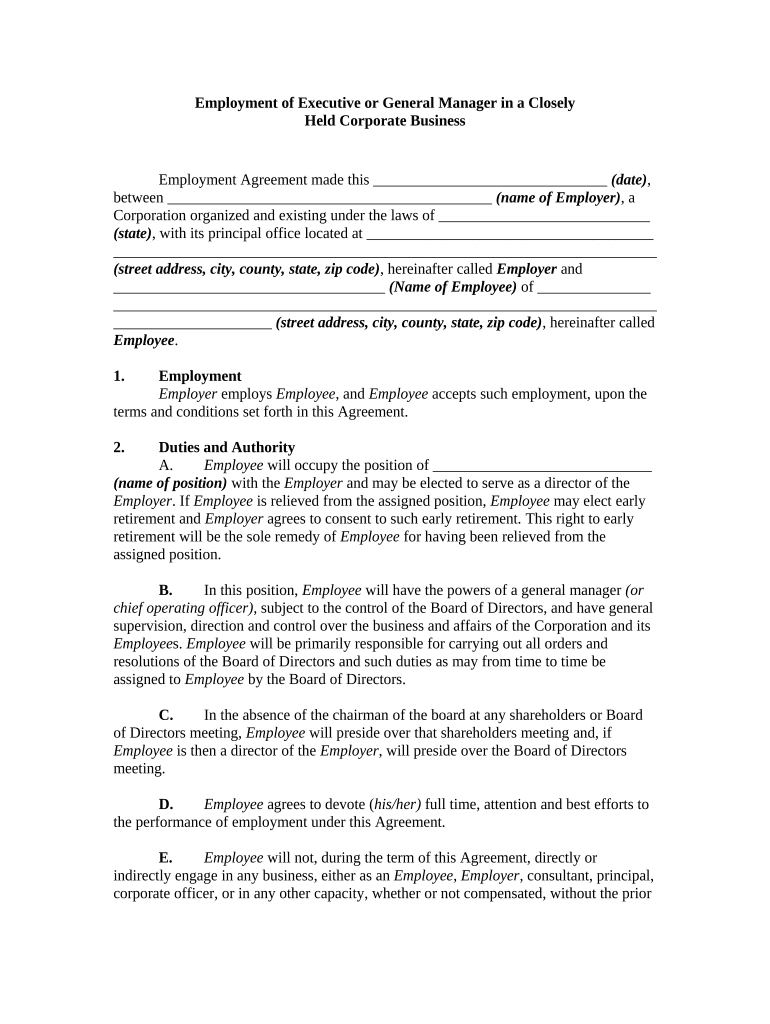
Employment of Executive or General Manager in a Closely Held Corporate Business Employment Agreement made this _______________________________ (date) , between ___________________________________________ (name of Employer) , a Corporation organized and existing under the laws of ____________________________ (state) , with its principal office located at ______________________________________ ________________________________________________________________________ (street address, city, county, state, zip code) , hereinafter called Employer and ____________________________________ (Name of Employee) of _______________ ________________________________________________________________________ _____________________ (street address, city, county, state, zip code) , hereinafter called Employee . 1. Employment Employer employs Employee , and Employee accepts such employment, upon the terms and conditions set forth in this Agreement. 2. Duties and Authority A. Employee will occupy the position of _____________________________ (name of position) with the Employer and may be elected to serve as a director of the Employer . If Employee is relieved from the assigned position, Employee may elect early retirement and Employer agrees to consent to such early retirement. This right to early retirement will be the sole remedy of Employee for having been relieved from the assigned position. B. In this position, Employee will have the powers of a general manager (or chief operating officer) , subject to the control of the Board of Directors, and have general supervision, direction and control over the business and affairs of the Corporation and its Employee s. Employee will be primarily responsible for carrying out all orders and resolutions of the Board of Directors and such duties as may from time to time be assigned to Employee by the Board of Directors. C. In the absence of the chairman of the board at any shareholders or Board of Directors meeting, Employee will preside over that shareholders meeting and, if Employee is then a director of the Employer , will preside over the Board of Directors meeting. D. Employee agrees to devote ( his/her) full time, attention and best efforts to the performance of employment under this Agreement. E. Employee will not, during the term of this Agreement, directly or indirectly engage in any business, either as an Employee , Employer , consultant, principal, corporate officer, or in any other capacity, whether or not compensated, without the prior written consent of Employer , except for that time allocated for such purposes as contained in the Shareholders Agreement. 3. Terms of Employment The term of employment shall begin on the date of this Agreement, and shall extend until terminated as provided for in this Agreement. 4. Compensation Employee will receive compensation during the term of this Agreement as follows: A. A base annual salary of $_______________ payable either bi-monthly or monthly at the discretion of the Employee . The base salary shall be adjusted at the end of each year of employment to reflect any change in the cost of living by multiplying the salary for the prior year by a fraction, the numerator of which is the National Consumer Price Index (NCPI) for the month most recently released by the Bureau of Labor Statistics of the United States Department of Labor and the denominator of which is the NCPI for the identical month in the preceding year. If this index is discontinued, changed or unavailable, Employer shall determine and use a similar criterion for reflecting any increase in the cost of living. B. A bonus as determined by the Board of Directors at its annual meeting in the sole discretion of said Board. 5. Deferred Compensation If Employee retires after performing services for the Employer up until Employee reaches the age of ________ (retirement age) or retires at an earlier age with the approval of the Employer , Employee will be entitled to deferred compensation payments after retirement upon the following terms and conditions: A. For a period of _______ (number) years (the retirement period) , Employee will receive the following: 1. Base payments equal to _______% of the average total salary ( i.e., base salary plus any bonuses) paid to Employee during the last ________ (number) full years of employment prior to the month of retirement _______________ (the retirement salary base ). 2. Advisor payments equal to ________% of the retirement salary base, provided that Employee serves as an advisor and consultant to the Employer regarding its business. To earn the advisor payments, Employee will hold (himself/herself) available to perform services at reasonable times at the request of the Board of Directors of the Employer , consistent with any business activities Employee may be engaged in at such time. The Board of Directors of the Employer shall have the right to require the presence of Employee at any Board of Directors meeting, not exceeding more than one meeting per month, to act and serve in the advisory capacity. Attendance at these Board of Directors meetings shall not be required should Employee 's health prevent attendance; however, Employer shall have the right to demand a written statement from Employee prepared by a licensed medical examiner evidencing inability of Employee to attend the meeting or meetings. Employee will be reimbursed for all reasonable and necessary travel and incidental expenses incurred by Employee in connection with the performance of advisory services. 3. Noncompetition payments equal to _______% of the retirement base salary, provided that Employee will not, directly or indirectly, perform any business, commercial, or consulting services to any person, firm, or organization or become associated as a manager, employee, director, or owner of any business organization competing directly or indirectly with the Employer , whether or not compensated, without the prior written consent of Employer . If Employer and Employee are unable to agree on whether a particular business in which Employee attempts to engage is directly or indirectly in competition with the Employer , the matter will be submitted to arbitration under the provisions of Section 16 of this Agreement. B. The deferred compensation payments shall be made in equal monthly installments starting in the month following the month of retirement. C. In the event of the death of Employee prior to the expiration of the retirement period, the Employer will pay all remaining base payments specified in Subparagraph A-1 above, and no other deferred compensation payments, to any beneficiary of Employee designated by Employee in a written document filed with the Employer , or in the absence of such designation, the estate of Employee . The Employer may elect to pay these remaining base payments in a lump sum or in the equal monthly installments specified in Paragraph B . D. Employee shall not sell, assign, transfer or pledge, or in any other way dispose of or encumber, voluntarily or involuntarily, by gift, testamentary disposition, inheritance, transfer to any inter-vivos trust, seizure and sale by legal process, operation of law, bankruptcy, winding up of a corporation, or otherwise, the right to receive any deferred compensation pursuant to this Agreement. 6. Relocation If Employee is transferred and assigned to a new principal place of work located more than _______ (number) miles from Employee 's present residence, Employer will pay for all reasonable relocation expenses including: A. Transportation fares, meals, and lodging for Employee , (his/her) spouse and family from Employee 's present residence to any new residence located near the new principal place of work; B. Moving of Employee 's household goods and the personal effects of Employee and Employee 's family from Employee 's present residence to the new residence; C. Lodging and meals for Employee and Employee 's family for a period of not more than _______ (number) consecutive days while occupying temporary living quarters located near the new principal place of work; D. Round trip travel, meals, and lodging expenses for Employee 's family for no more than _______ (number) house-hunting trips to locate a new residence, each trip not to exceed _______ (number) days; and E. Expenses in connection with the sale of the residence of Employee including realtor fees, mortgage prepayment penalties, termite inspector fees, title insurance policy and revenue stamps, escrow fees, fees for preparing documents, state or local sales taxes, mortgage discount points (if in lieu of a prepayment penalty), and seller's attorneys' fees (not to exceed _________ % of the sales price). At the option of Employee and in lieu of reimbursement for these expenses, Employee may sell the residence of Employee to the Employer at the fair market value of the residence determined by an appraiser chosen by the Employer . The appraisal will be performed within _______ (number) days after notice of transfer, and notice of appraised value will be submitted by report to Employee . Employee will have the right to sell the residence to the Employer at the appraised price by giving notice of intent to sell within ________ (number) days from the date of the appraisal report. The term residence shall mean the property occupied by Employee as the principal residence at the time of transfer and does not include summer homes, multiple-family dwellings, houseboats, boats, or airplanes, but does include condominium or cooperative apartment units and duplexes (two-family) occupied by Employee . 7. Medical and Group Insurance Employer agrees to include Employee in the group medical and hospital plan of Employer , when such plan is established, and will provide group life insurance for Employee in the amount of not less than $_______________ of life insurance during the term of employment. 8. Vacation Employee shall be entitled to _______ (number) weeks of paid vacation during each year of employment; the time for the vacation shall be mutually agreed upon by Employee and Employer . If vacation is not taken, for the benefit of the Employer , Employee shall be reimbursed at (his/her) base salary rate for time not taken) 9. Automobile Employer will provide to Employee , during the term of this Agreement, the use of a new automobile of Employee 's choice, at a price not to exceed $_____________, and will replace the automobile with a new one every ________ (number) years. Employer will pay all automobile operating expenses incurred by Employee in the performance of Employee 's business duties. The Employer will procure and maintain in force an automobile liability policy for the automobile with coverage, including Employee , in the minimum amount of $______________ of automobile liability insurance, combined single limit on bodily injury and property damage. 10. Expense Reimbursement Employee shall be entitled to reimbursement for all reasonable expenses, including travel and entertainment, incurred by Employee in the performance of Employee 's duties. Employee will maintain records and written receipts as required by federal and state tax authorities to substantiate expenses as an income tax deduction for Employer and shall submit vouchers for expenses for which reimbursement is made. 11. Permanent Disability A. If Employee becomes permanently disabled (as defined below) during employment with Employer , Employer may terminate this Agreement by giving _______ (number) days' notice to Employee of its intent to terminate, and, unless Employee resumes performance of the duties set forth in Section Two within ______ (number) days of the date of notice and continues performance for the remainder of the notice period, this Agreement will terminate at the end of the ______ (number) -day period. Permanently disabled for the purpose of this Agreement will mean the inability, due to physical or mental ill health, or any reason beyond the control of Employee , to perform Employee 's duties for _______ (number) consecutive days or for an aggregate of ______ (number) days during any one employment year irrespective of whether such days are consecutive. B. Upon termination of employment under the provisions of the above Paragraph A , Employee may have any deferred compensation to which the Employee may be entitled under the provisions of Section Five paid to (him/her) upon giving notice to the Employer . For the purposes of Section Five , termination under Paragraph A of this Section shall be considered retirement ; Employee will be excused from performing advisory services as required under Section Five , Subparagraph A-2 , but shall nevertheless be entitled to advisory payments except to the extent limited by death of Employee as set forth in Section Five , Paragraph C . C. Employer shall maintain, at its expense, a disability policy covering Employee for a dollar amount specified by Employee . This amount may not exceed 100% of Employee’s base salary. 12. Termination A. This Agreement shall immediately be deemed terminated by death of Employee. B. This Agreement may be terminated by Employer by giving (number) days' notice to Employee if Employee willfully breaches or habitually neglects the duties to be performed under Section Two , or engages in any conduct which is dishonest or damages the reputation of Employer . C. . This Agreement may be terminated by Employee , without cause by giving ______ (number) days' notice to Employer . D. If employment is terminated pursuant to Paragraph B or C above, Employee will be entitled to only base salary compensation earned prior to the date of termination as provided for in Section Three of this Agreement computed pro rata up to and including the date of termination. Employee shall not receive the deferred compensation payments provided for in Section Four , Paragraph B , and Section Five , respectively. E. If Employer is acquired, is a non-surviving party in a merger or transfers substantially all of its assets, this Agreement shall not be terminated and Employer agrees to take all actions necessary to ensure that the transferee or surviving company is bound by the provisions of this Agreement. 13. No Waiver The failure of either party to this Agreement to insist upon the performance of any of the terms and conditions of this Agreement, or the waiver of any breach of any of the terms and conditions of this Agreement, shall not be construed as subsequently waiving any such terms and conditions, but the same shall continue and remain in full force and effect as if no such forbearance or waiver had occurred. 14. Governing Law This Agreement shall be governed by, construed, and enforced in accordance with the laws of the State of __________________. 15. Notices Any notice provided for or concerning this Agreement shall be in writing and shall be deemed sufficiently given when sent by certified or registered mail if sent to the respective address of each party as set forth at the beginning of this Agreement. 16 . Mandatory Arbitration Any dispute under this Agreement shall be required to be resolved by binding arbitration of the parties hereto. If the parties cannot agree on an arbitrator, each party shall select one arbitrator and both arbitrators shall then select a third. The third arbitrator so selected shall arbitrate said dispute. The arbitration shall be governed by the rules of the American Arbitration Association then in force and effect. 17 Entire Agreement This Agreement shall constitute the entire agreement between the parties and any prior understanding or representation of any kind preceding the date of this Agreement shall not be binding upon either party except to the extent incorporated in this Agreement. 18. Modification of Agreement Any modification of this Agreement or additional obligation assumed by either party in connection with this Agreement shall be binding only if placed in writing and signed by each party or an authorized representative of each party. 19. Assignment of Rights The rights of each party under this Agreement are personal to that party and may not be assigned or transferred to any other person, firm, corporation, or other entity without the prior, express, and written consent of the other party. 20. Counterparts This Agreement may be executed in any number of counterparts, each of which shall be deemed to be an original, but all of which together shall constitute but one and the same instrument. WITNESS our signatures as of the day and date first above stated. ___________________________ (Name of Employer) By: _________________________ _____________________________ ____________________________ _____________________________ (P rinted or typed name) Name and Signature of Employee _____________________________ (Name and Office in Corporation)

Useful tips for preparing your ‘Employment Of Executive Or General Manager In A Closely Held Corporate Business’ online

Are you fed up with the burden of managing paperwork? Your solution is airSlate SignNow, the premier electronic signature service for individuals and small to medium-sized businesses. Bid farewell to the tedious process of printing and scanning documents. With airSlate SignNow, you can smoothly finalize and approve paperwork online. Utilize the robust features embedded in this intuitive and affordable platform to transform your document handling experience. Whether you need to approve forms or gather electronic signatures, airSlate SignNow simplifies everything with just a few clicks.

Adhere to this comprehensive guide:

  1. Access your account or register for a complimentary trial with our service.
  2. Press +Create to upload a file from your computer, cloud storage, or our form repository.
  3. Open your ‘Employment Of Executive Or General Manager In A Closely Held Corporate Business’ within the editor.
  4. Select Me (Fill Out Now) to finalize the form on your end.
  5. Incorporate and designate fillable fields for other participants (if needed).
  6. Proceed with the Send Invite options to solicit eSignatures from others.
  7. Store, print your version, or convert it into a reusable template.

No need to worry if you wish to collaborate with others on your Employment Of Executive Or General Manager In A Closely Held Corporate Business or send it for notarization—our platform equips you with everything you require to accomplish such tasks. Sign up with airSlate SignNow today and elevate your document management to new levels!

Here is a list of the most common customer questions. If you can’t find an answer to your question, please don’t hesitate to reach out to us.

Need help? Contact Support

The best way to complete and sign your employment of executive or general manager in a closely held corporate business form


Save time on document management with airSlate SignNow and get your employment of executive or general manager in a closely held corporate business form eSigned quickly from anywhere with our fully compliant eSignature tool.

How to Sign a PDF Online How to Sign a PDF Online

How to fill out and sign forms online

In the past, dealing with paperwork required lots of time and effort. But with airSlate SignNow, document management is easy and fast. Our powerful and easy-to-use eSignature solution enables you to easily complete and electronically sign your employment of executive or general manager in a closely held corporate business form online from any internet-connected device.

Follow the step-by-step guidelines to eSign your employment of executive or general manager in a closely held corporate business form template online:

  • 1.Sign up for a free trial with airSlate SignNow or log in to your account with password credentials or SSO authentication.
  • 2.Click Upload or Create and add a file for eSigning from your device, the cloud, or our form catalogue.
  • 3.Click on the document name to open it in the editor and utilize the left-side toolbar to fill out all the empty fields accordingly.
  • 4.Place the My Signature field where you need to approve your form. Type your name, draw, or import a photo of your regular signature.
  • 5.Click Save and Close to accomplish modifying your completed form.

After your employment of executive or general manager in a closely held corporate business form template is ready, download it to your device, save it to the cloud, or invite other parties to electronically sign it. With airSlate SignNow, the eSigning process only requires a few clicks. Use our powerful eSignature tool wherever you are to manage your paperwork effectively!


How to Sign a PDF Using Google Chrome How to Sign a PDF Using Google Chrome

How to complete and sign documents in Google Chrome

Completing and signing documents is simple with the airSlate SignNow extension for Google Chrome. Installing it to your browser is a fast and beneficial way to manage your paperwork online. Sign your employment of executive or general manager in a closely held corporate business form sample with a legally-binding electronic signature in just a few clicks without switching between tools and tabs.

Follow the step-by-step guide to eSign your employment of executive or general manager in a closely held corporate business form template in Google Chrome:

  • 1.Navigate to the Chrome Web Store, locate the airSlate SignNow extension for Chrome, and install it to your browser.
  • 2.Right-click on the link to a document you need to sign and select Open in airSlate SignNow.
  • 3.Log in to your account using your credentials or Google/Facebook sign-in buttons. If you don’t have one, sign up for a free trial.
  • 4.Use the Edit & Sign menu on the left to complete your template, then drag and drop the My Signature option.
  • 5.Upload a picture of your handwritten signature, draw it, or simply type in your full name to eSign.
  • 6.Make sure all information is correct and click Save and Close to finish editing your form.

Now, you can save your employment of executive or general manager in a closely held corporate business form template to your device or cloud storage, send the copy to other people, or invite them to electronically sign your document with an email request or a protected Signing Link. The airSlate SignNow extension for Google Chrome enhances your document workflows with minimum time and effort. Start using airSlate SignNow today!


How to Sign a PDF in Gmail How to Sign a PDF in Gmail How to Sign a PDF in Gmail

How to fill out and sign forms in Gmail

When you receive an email containing the employment of executive or general manager in a closely held corporate business form for signing, there’s no need to print and scan a document or download and re-upload it to another tool. There’s a much better solution if you use Gmail. Try the airSlate SignNow add-on to rapidly eSign any documents right from your inbox.

Follow the step-by-step guidelines to eSign your employment of executive or general manager in a closely held corporate business form in Gmail:

  • 1.Go to the Google Workplace Marketplace and locate a airSlate SignNow add-on for Gmail.
  • 2.Set up the program with a related button and grant the tool access to your Google account.
  • 3.Open an email containing an attached file that needs signing and utilize the S symbol on the right panel to launch the add-on.
  • 4.Log in to your airSlate SignNow account. Select Send to Sign to forward the document to other parties for approval or click Upload to open it in the editor.
  • 5.Place the My Signature field where you need to eSign: type, draw, or upload your signature.

This eSigning process saves time and only requires a couple of clicks. Take advantage of the airSlate SignNow add-on for Gmail to update your employment of executive or general manager in a closely held corporate business form with fillable fields, sign paperwork legally, and invite other individuals to eSign them al without leaving your inbox. Boost your signature workflows now!


How to Sign a PDF on a Mobile Device How to Sign a PDF on a Mobile Device How to Sign a PDF on a Mobile Device

How to fill out and sign documents in a mobile browser

Need to quickly submit and sign your employment of executive or general manager in a closely held corporate business form on a smartphone while working on the go? airSlate SignNow can help without the need to set up additional software applications. Open our airSlate SignNow tool from any browser on your mobile device and create legally-binding eSignatures on the go, 24/7.

Follow the step-by-step guide to eSign your employment of executive or general manager in a closely held corporate business form in a browser:

  • 1.Open any browser on your device and follow the link www.signnow.com
  • 2.Create an account with a free trial or log in with your password credentials or SSO authentication.
  • 3.Click Upload or Create and import a file that needs to be completed from a cloud, your device, or our form collection with ready-to go templates.
  • 4.Open the form and complete the empty fields with tools from Edit & Sign menu on the left.
  • 5.Place the My Signature area to the sample, then enter your name, draw, or upload your signature.

In a few simple clicks, your employment of executive or general manager in a closely held corporate business form is completed from wherever you are. Once you're done with editing, you can save the document on your device, create a reusable template for it, email it to other individuals, or ask them to eSign it. Make your paperwork on the go prompt and efficient with airSlate SignNow!


How to Sign a PDF on iPhone How to Sign a PDF on iPhone

How to fill out and sign forms on iOS

In today’s corporate environment, tasks must be completed quickly even when you’re away from your computer. With the airSlate SignNow application, you can organize your paperwork and sign your employment of executive or general manager in a closely held corporate business form with a legally-binding eSignature right on your iPhone or iPad. Install it on your device to conclude agreements and manage forms from just about anywhere 24/7.

Follow the step-by-step guidelines to eSign your employment of executive or general manager in a closely held corporate business form on iOS devices:

  • 1.Open the App Store, find the airSlate SignNow app by airSlate, and install it on your device.
  • 2.Open the application, tap Create to import a form, and choose Myself.
  • 3.Choose Signature at the bottom toolbar and simply draw your signature with a finger or stylus to eSign the form.
  • 4.Tap Done -> Save after signing the sample.
  • 5.Tap Save or utilize the Make Template option to re-use this document later on.

This process is so simple your employment of executive or general manager in a closely held corporate business form is completed and signed in a couple of taps. The airSlate SignNow application works in the cloud so all the forms on your mobile device remain in your account and are available whenever you need them. Use airSlate SignNow for iOS to improve your document management and eSignature workflows!


How to Sign a PDF on Android How to Sign a PDF on Android

How to complete and sign forms on Android

With airSlate SignNow, it’s simple to sign your employment of executive or general manager in a closely held corporate business form on the go. Install its mobile app for Android OS on your device and start enhancing eSignature workflows right on your smartphone or tablet.

Follow the step-by-step guidelines to eSign your employment of executive or general manager in a closely held corporate business form on Android:

  • 1.Open Google Play, find the airSlate SignNow app from airSlate, and install it on your device.
  • 2.Sign in to your account or register it with a free trial, then add a file with a ➕ key on the bottom of you screen.
  • 3.Tap on the uploaded document and choose Open in Editor from the dropdown menu.
  • 4.Tap on Tools tab -> Signature, then draw or type your name to electronically sign the sample. Complete blank fields with other tools on the bottom if required.
  • 5.Utilize the ✔ button, then tap on the Save option to finish editing.

With an easy-to-use interface and total compliance with major eSignature requirements, the airSlate SignNow application is the best tool for signing your employment of executive or general manager in a closely held corporate business form. It even operates without internet and updates all form adjustments once your internet connection is restored and the tool is synced. Fill out and eSign documents, send them for eSigning, and generate multi-usable templates anytime and from anywhere with airSlate SignNow.

Sign up and try Employment of executive or general manager in a closely held corporate business form
  • Close deals faster
  • Improve productivity
  • Delight customers
  • Increase revenue
  • Save time & money
  • Reduce payment cycles

