Establishing secure connection…Loading editor…Preparing document…

Equal Employment Opportunity Policy

This template is fully customizable. Edit the text, fill out the fields, and send it for signature. Give it a try!
Equal Employment Opportunity Policy

What an Equal Employment Opportunity Policy Is and Why It Matters

An Equal Employment Opportunity Policy documents an employer's commitment to nondiscrimination and outlines prohibited conduct, protected characteristics, complaint procedures, and remedies. It explains who is covered, clarifies the employer's expectations for managers and employees, and supports compliance with federal and state civil-rights laws such as Title VII, the Americans with Disabilities Act, and the Age Discrimination in Employment Act. The policy also serves as a reference for internal investigations, training, and recordkeeping so employers can demonstrate consistent treatment and reduce legal and reputational risk.

Why a Clear EEO Policy Benefits Your Organization

A formal EEO policy reduces legal exposure, supports fair hiring and promotion, and promotes an inclusive workplace culture while documenting your compliance efforts for regulators and contractors.

Why a Clear EEO Policy Benefits Your Organization

Who Typically Creates and Uses an EEO Policy

Human resources, legal teams, and organizational leaders normally draft and maintain EEO policies; employees and managers rely on them for guidance.

  • HR professionals and compliance teams who manage hiring, training, and recordkeeping responsibilities.
  • In-house counsel or external employment attorneys who review legal language and regulatory alignment.
  • Supervisors and managers who enforce conduct rules and receive complaints for investigation.

Representatives from these groups should coordinate to keep the policy current, accessible, and consistently applied across locations.

Core Elements to Include in a Professional EEO Policy

A comprehensive EEO Policy should be concise but complete, combining a strong policy statement with clear procedures, definitions, and enforcement mechanisms to make expectations and processes unambiguous for all employees.

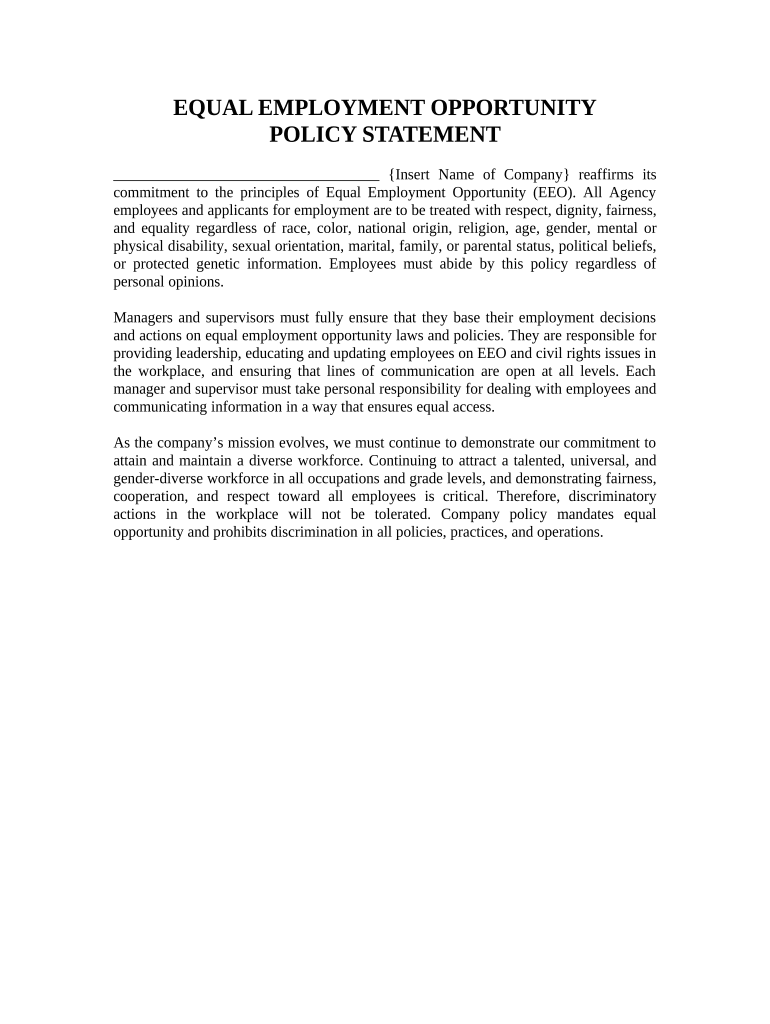
Policy Statement

A plain-language declaration of nondiscrimination and equal opportunity that names the employer and states the commitment to lawful employment practices and fair treatment.
Scope & Definitions

Specify who is covered (employees, applicants, contractors) and define protected characteristics and key terms used throughout the policy to avoid ambiguity.

Protected Classes

List federally protected categories and any state or local protected classes applicable at the workplace location to ensure the policy reflects local law differences.

Prohibited Conduct

Describe harassment, discrimination, retaliation, and other banned behaviors with illustrative examples and clarify that such conduct will not be tolerated.

Complaint Procedure

Provide step-by-step reporting options, internal contacts, timelines for investigations, confidentiality limits, and escalation paths for unresolved complaints.

Enforcement & Remedies

Explain disciplinary measures, corrective action, and how employees may pursue external remedies with government agencies such as the EEOC or state civil rights offices.

Essential Fields and Required Information

Employer Name: Legal entity name
Effective Date: MM/DD/YYYY
Policy Owner: Name and title
Scope: Who the policy covers
Complaint Contact: Phone and email
Record Retention: Retention rule reference

Step-by-Step: Drafting and Finalizing an EEO Policy

Follow a clear sequence from drafting to distribution to ensure legal review and consistent application across the organization.

  • 01
    Draft: Compile legal requirements and company standards.
  • 02
    Legal Review: Have counsel confirm compliance with federal and state law.
  • 03
    Approve: Obtain executive sign-off and date the policy.
  • 04
    Distribute: Share with employees and retain signed acknowledgements.

Where to Store and Submit the Policy Internally

Designate a primary repository and define submission routes so employees know where to find the policy and how to submit acknowledgements or complaints.

  • HR Repository: Store master copy in the HR document system.
  • Employee Handbook: Include the policy in the handbook and onboarding materials.
  • Postings: Display required notices in common workplace areas.
  • External Filings: Provide policy copies to contractors or regulatory requests.

Configuring an Electronic Workflow for Policy Distribution

Set up standard fields, signer order, and retention rules for a consistent, auditable distribution and acknowledgement workflow.

Field Configuration
Signature Field Required, date-stamped
Authentication Email + optional SMS code
Audit Trail Enable timestamps and IP logging
Retention Rule Retain signed copies for seven years

Digital Signing and File Format Recommendations

Use PDF or DOCX formats for the policy and enable audit trails, signer authentication, and downloadable signed copies for records.

  • File Formats: PDF and DOCX supported
  • Integrations: Connect with HRIS and cloud storage
  • Authentication: Email, SMS, or stronger MFA

Choose a platform that produces tamper-evident signed PDFs, stores an auditable certificate of completion, and integrates with your HR systems for centralized retention.

Timelines and Internal Deadlines to Set

Establish firm deadlines for review, acknowledgement, complaint response, and record retention so the policy functions as an operational tool rather than a nominal document.

Adoption Effective Date:

Set and publish the effective date immediately upon approval

Employee Acknowledgement:

Request signed acknowledgement within 30 days of distribution

Annual Review:

Review policy content and state-law updates at least annually

Complaint Response Window:

Acknowledge receipt within 5 business days

Investigation Target:

Aim to complete investigations within 45 days

Common Risks and Consequences of an Inadequate Policy

Legal Liability: Increased risk of discrimination claims
Regulatory Action: Penalty or enforcement by agencies
Contract Risk: Loss of government contracts
Reputational Harm: Public relations and recruiting impact
Ineffective Enforcement: Inconsistent investigations and outcomes
Recordkeeping Failures: Evidence gaps during audits or litigation

Practical Examples of Policy Use in Organizations

These concise scenarios show common ways organizations publish, acknowledge, and enforce an EEO policy across different team sizes.

Small Business Scenario

A small company publishes a one-page policy during onboarding to set expectations

  • Employees sign an acknowledgement form
  • The employer retains signed acknowledgements centrally for investigations and audits.

Multi-State Employer

A regional employer adopts a baseline policy plus state-specific addenda

  • Legal reviews ensure local protected classes are included
  • The HRIS distributes state versions based on employee worksite to maintain compliance.

Practical Tips to Keep Your EEO Policy Effective

Follow these practices to ensure the policy is enforceable, current, and effective as an operational tool.

Keep Definitions Clear
Use concise, consistent definitions for protected classes and complaint processes so employees and investigators share the same understanding.
Train Managers Regularly
Provide mandatory training on complaint intake, neutral investigation, and non-retaliation to ensure consistent handling.
Document Investigations
Record investigation steps, findings, and corrective actions to support decisions and defend against claims.
Review Annually
Schedule legal and operational reviews at least annually and whenever state or federal laws change.

eSignature Pricing and Feature Snapshot for Policy Distribution

Compare typical vendor starting prices and key features that matter when distributing and storing signed EEO policies; signNow is listed first for consistency.

signNow DocuSign Adobe Sign PandaDoc HelloSign
Starting Price $8/user/mo $15/user/mo $14/user/mo $19/user/mo $15/user/mo
Free Trial 7-day trial Varies Varies Varies Varies
Bulk Send Yes (premium) Varies Varies Varies Varies
Audit Trail Yes Yes Yes Yes Yes
HIPAA Compliant Yes Yes Yes No No
Envelope Cap No cap 100 env/yr Varies Varies Varies

Frequently Asked Questions About EEO Policies and Electronic Execution

Answers to common questions about legal validity, signing, and recordkeeping when using an electronic or paper EEO policy.


Need help? Contact support

be ready to get more
Join over 28 million airSlate SignNow users