Establishing secure connection…Loading editor…Preparing document…

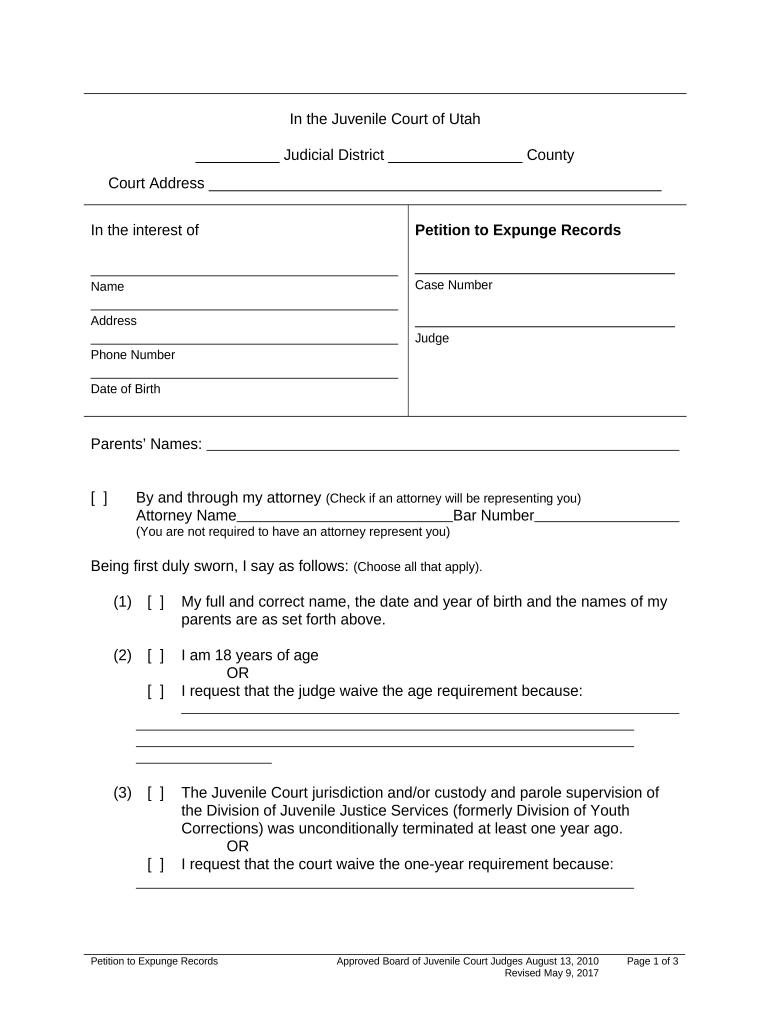
Utah Petition to Expunge Records

This template is fully customizable. Edit the text, fill out the fields, and send it for signature. Give it a try!
Utah Petition to Expunge Records

What the Utah Petition to Expunge Records Is and when it applies

The Utah Petition to Expunge Records is a court filing used to request that a criminal conviction or arrest record be sealed or removed from public access under Utah law. It identifies the petitioner, the specific charges or case numbers at issue, and the relief requested, and it attaches certified disposition records when required. The petition initiates judicial review and may require notice to the prosecution. Eligibility, waiting periods, and the scope of relief depend on statute and case history; counsel often assists with eligibility assessment and supporting evidence.

Why filing an expungement petition matters in Utah

Filing a Utah Petition to Expunge Records can limit public access to past arrests or convictions, improving employment and housing prospects. It can restore certain civil rights and reduce collateral consequences, but relief varies by offense, waiting period, and statutory eligibility.

Why filing an expungement petition matters in Utah

Who typically prepares and files these petitions

Individuals with eligible arrests or convictions, defense attorneys, and legal clinics commonly prepare and file Utah expungement petitions on behalf of petitioners.

  • Individuals seeking employment, education, or housing who meet Utah statutory eligibility criteria.
  • Criminal defense attorneys preparing supporting legal arguments and evidence for court review.
  • Public defenders and legal aid organizations assisting income-qualified clients with petition preparation.

Essential components of a professional expungement petition

A professional Utah Petition to Expunge Records includes statutory citations, detailed case history, supporting exhibits, clear relief language, service proof, and compliance with local rules.

Case Caption

Include court name, case number, parties' full legal names, and docket information to ensure the petition attaches correctly to the court file and is retrievable.
Statement of Facts

Provide a concise chronological summary of relevant events, arrests, convictions, dispositions, and sentences with dates and jurisdictional context to support eligibility under Utah statute citation.

Legal Basis

Cite the specific Utah code sections and case law that authorize expungement or sealing for the offenses listed, and explain how the facts satisfy statutory criteria.

Relief Sought

Specify exactly what record restrictions are requested: full expungement, sealing from public view, background check suppression, or defined partial redactions with proposed order language attached.

Supporting Evidence

Attach certified dispositions, sentencing documents, certificates of completion for required programs, letters of support, and any proof of rehabilitation and employment history.

Service & Notice

Include proof of service to the prosecutor and any statutorily required agencies, and attach return-of-service affidavits or certified mail receipts as required by local rules.

Required information and fields at a glance

Petitioner Name: Full legal name as shown on ID.
Case Number: Court docket number for the matter.
Dates: Arrest, charge, disposition dates.
Charge Details: Statute citations and disposition.
Supporting Docs: Certified dispositions, program certificates.
Signature: Petitioner signature and date.

Step-by-step: completing and filing the petition

Follow these steps to complete and file a Utah Petition to Expunge Records correctly and reduce avoidable delays.

  • 01
    Gather Records: Order certified dispositions and arrest reports from the court.
  • 02
    Confirm Eligibility: Check statutory waiting periods and offense exclusions under Utah law.
  • 03
    Draft Petition: Complete required statutory language, case details, and relief requested.
  • 04
    File & Serve: File with clerk and serve prosecutor per local rules.

Configuring an electronic workflow for petitions

Configure an electronic workflow to collect petitioner details, signatures, evidence, and service confirmations for Utah expungement filings.

Field Configuration
Data Collection Use secure form fields for names, dates, and case numbers.
Evidence Upload Allow PDFs and certified documents with size limits.
Signer Auth Email code or identity verification depending on risk.
Service Proof Attach affidavit of service or certified mail receipt.

Typical online workflow from preparation to court filing

This workflow explains online preparation, signing, filing, and service steps for a Utah expungement petition.

  • Prepare Document: Assemble petition, exhibits, and certified dispositions.
  • eSign or Sign: Sign electronically if permitted; otherwise sign physically.
  • File with Court: Submit filing in-court or via e-filing portal where available.
  • Serve Parties: Serve the prosecutor and any required agencies per rules.

Technical considerations for electronic filing and signatures

Electronic filing and eSignature can streamline expungement petitions where courts accept electronic submissions and signatures.

  • File Formats: PDF or DOCX accepted.
  • Authentication: Email, SMS code, or ID verification.
  • Integrations: Court e-filers, document storage, calendars.

Principal risks and penalties for incorrect or incomplete petitions

Denial Risk: Incomplete evidence may result in denial.
Incorrect Service: Improper service can void filing.
Missed Deadlines: Statutory waiting periods not satisfied.
Data Errors: Mismatched names trigger TIN or ID issues.
Fee Forfeiture: Failure to pay fees delays consideration.
Privacy Exposure: Unsealed records remain publicly searchable.

Common preparation mistakes to avoid

  • Missing certified disposition is a frequent cause of denial; courts often require official court-certified records rather than uncertified printouts from third-party websites.
  • Incomplete service or failure to serve the prosecutor per local rules can lead to dismissal or the need to refile, adding cost and time.
  • Overlooking statutory disqualifiers such as certain violent or sexual offenses can cause petitions to be rejected as a matter of law.
  • Using vague relief language like 'remove from records' instead of precise terms (seal, expunge, limited access) may result in unclear orders.

Practical tips to strengthen your petition and avoid delays

Follow these best practices to improve petition clarity, ensure procedural compliance, and present persuasive evidence to the court in Utah expungement cases.

Provide certified court and disposition records
Request certified dispositions and sentencing documents directly from the clerk; include sealed juvenile records only when statutorily permitted. Certified records carry more weight than third-party printouts and prevent delays during verification or hearing.
Describe exact relief and order language requested
Draft proposed order language that clearly states the practical effects: which records will be sealed, whether background checks will show arrests, and which public access points are restricted. Ambiguous orders lead to enforcement disputes.
Attach evidence of rehabilitation and community ties
Include employment records, completion certificates, volunteer service, letters of recommendation, and any educational achievements. Demonstrating sustained rehabilitation and positive community involvement strengthens equitable arguments for relief at hearings.
Confirm service method and attach proof
Serve the prosecutor and any required agencies per local rule; upload return-of-service affidavits or certified mail receipts to the court file. Ensure proof follows the precise format courts require to avoid delays.

Timing considerations and deadlines to track

Key timing and statutory deadlines affect eligibility, filing, and service for expungement petitions in Utah.

Waiting Periods:

Statutory waiting periods vary by offense category and disposition.

Filing Deadlines:

No universal filing deadline; file when eligible under statute.

Service Timing:

Serve prosecutor per local court rules before hearing.

Response Window:

Prosecutor may file objection within set days under local rules.

Hearing Dates:

Courts schedule hearings after notice; timing varies by docket.

Key milestones from filing to final order

Typical processing stages for a Utah expungement petition show filing, review, response, and final order milestones in sequence.

01

Filing Submitted

Clerk accepts petition and assigns case number.

02

Prosecutor Review

Prosecutor evaluates and decides whether to object.

03

Court Hearing

Court reviews evidence, hears arguments, and rules.

04

Final Order

Judge issues order granting or denying relief and directs sealing.

Real examples showing how petitions are structured and resolved

Real-world scenarios illustrate how Utah petitioners structure filings, present evidence, and obtain orders sealing records.

Nonviolent Misdemeanor Case

A petitioner with a single nonviolent misdemeanor seeks sealing after completing sentence and probation; certified disposition shows case closed.

  • No victim objection; prosecutor declines to oppose.
  • The court reviewed statutory eligibility, accepted rehabilitation evidence including steady employment and education completion, and issued a sealing order limiting public access and routine background checks; the order outlines specific agencies to update records.

Deferred Adjudication Case

A young adult with a deferred adjudication for drug possession completed diversion and waited statutory period before filing for expungement.

  • Prosecutor files no objection after reviewing records.
  • The judge considered program completion certificates, community letters, and employment records, then granted partial sealing with a defined list of agencies to suppress arrest details; the order specified procedures for background check responses.

eSignature provider comparison for preparing and signing expungement petitions

Comparison of common eSignature providers and plan features relevant to preparing and submitting Utah expungement petitions.

signNow DocuSign Adobe Sign PandaDoc HelloSign
Starting Price $8/user/mo $15/user/mo $14/user/mo $19/user/mo $15/user/mo
Free Trial 7-day free trial Varies by plan Varies by plan Varies by plan Varies by plan
Bulk Send Yes (Business Premium) Varies by plan Varies by plan Varies by plan Varies by plan
Audit Trail Yes Yes Yes Yes Yes
HIPAA Compliant Yes Yes Yes No No
Envelope Cap No envelope cap 100 envelopes/user/year Varies by plan Varies by plan Varies by plan

Frequently asked questions about Utah expungement petitions

Answers to common questions about filing a Utah Petition to Expunge Records, eligibility checks, electronic signing, and court procedures.


Need help? Contact support

be ready to get more
Join over 28 million airSlate SignNow users