Establishing secure connection… Loading editor… Preparing document…
Navigation

Fill and Sign the Family Contempt Form
Fill and Sign the Family Contempt Form

How it works

Open the document and fill out all its fields.
Apply your legally-binding eSignature.
Save and invite other recipients to sign it.

Rate template

4.7
62 votes
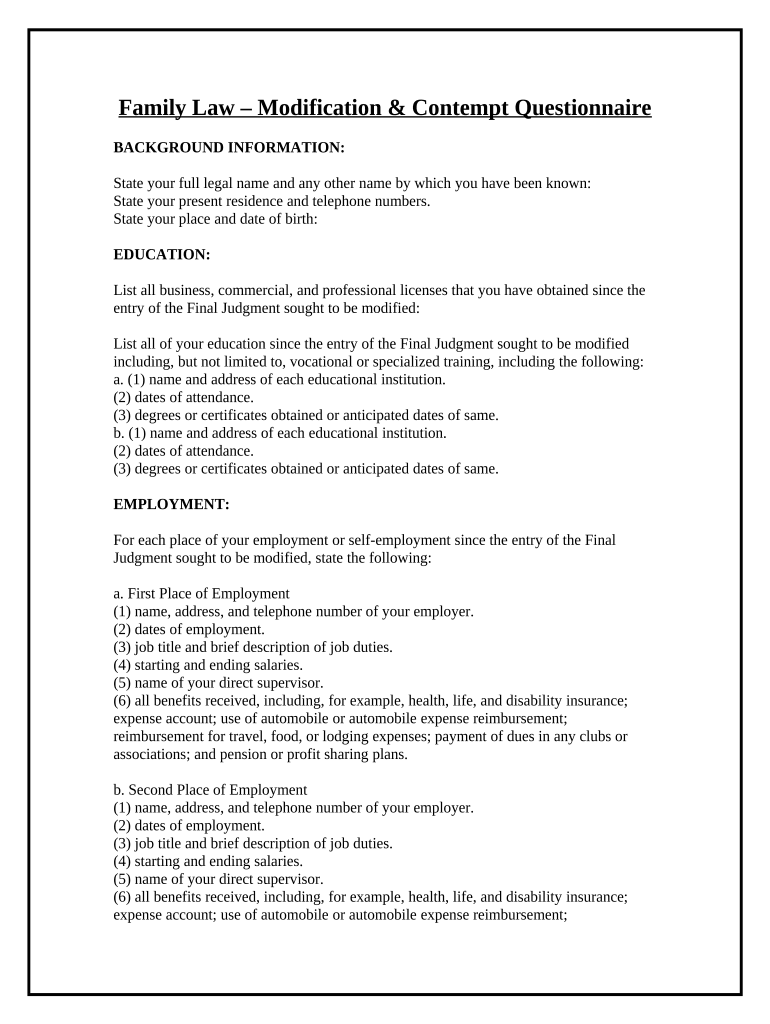
Family Law – Modification & Contempt Questionnaire BACKGROUND INFORMATION: State your full legal name and any other name by which you have been known:       State your present residence and telephone numbers.       State your place and date of birth:       EDUCATION: List all business, commercial, and professional licenses that you have obtained since the entry of the Final Judgment sought to be modified:       List all of your education since the entry of the Final Judgment sought to be modified including, but not limited to, vocational or specialized training, including the following: a. (1) name and address of each educational institution.       (2) dates of attendance.       (3) degrees or certificates obtained or anticipated dates of same.       b. (1) name and address of each educational institution.       (2) dates of attendance.       (3) degrees or certificates obtained or anticipated dates of same.       EMPLOYMENT: For each place of your employment or self-employment since the entry of the Final Judgment sought to be modified, state the following: a. First Place of Employment (1) name, address, and telephone number of your employer.       (2) dates of employment.       (3) job title and brief description of job duties.       (4) starting and ending salaries.       (5) name of your direct supervisor.       (6) all benefits received, including, for example, health, life, and disability insurance; expense account; use of automobile or automobile expense reimbursement; reimbursement for travel, food, or lodging expenses; payment of dues in any clubs or associations; and pension or profit sharing plans.       b. Second Place of Employment (1) name, address, and telephone number of your employer.       (2) dates of employment.       (3) job title and brief description of job duties.       (4) starting and ending salaries.       (5) name of your direct supervisor.       (6) all benefits received, including, for example, health, life, and disability insurance; expense account; use of automobile or automobile expense reimbursement; reimbursement for travel, food, or lodging expenses; payment of dues in any clubs or associations; and pension or profit sharing plans.       Other than as an employee, if you have been engaged in or associated with any business, commercial, or professional activity since the entry of the Final Judgment sought to be modified that was not detailed above, state for each such activity the following: a. First Business Activity (1) name, address, and telephone number of each activity.       (2) dates you were connected with such activity.       (3) position title and brief description of activities.       (4) starting and ending compensation.       (5) name of all persons involved in the business, commercial, or professional activity with you.       (6) all benefits and compensation received, including, for example, health, life, and disability insurance; expense account; use of automobile or automobile expense reimbursement; reimbursement for travel, food, or lodging expenses; payment of dues in any clubs or associations; and pension or profit sharing plans.       b. Second Business Activity (1) name, address, and telephone number of each activity.       (2) dates you were connected with such activity.       (3) position title and brief description of activities.       (4) starting and ending compensation.       (5) name of all persons involved in the business, commercial, or professional activity with you.       (6) all benefits and compensation received, including, for example, health, life, and disability insurance; expense account; use of automobile or automobile expense reimbursement; reimbursement for travel, food, or lodging expenses; payment of dues in any clubs or associations; and pension or profit sharing plans.       If you have been unemployed at any time since the entry of the Final Judgment sought to be modified, state the dates of unemployment.       ASSETS: Real Estate . State the street address, if any, and if not, the legal description of all real property that you own or owned during the last 3 years, or since the entry of the Final Judgment sought to be modified, if shorter. For each property, state the following: Property address #1:       (1) the names and addresses of any other persons or entities holding any interest and their percentage of interest.       (2) the present fair market value.       Property address #2:       (1) the names and addresses of any other persons or entities holding any interest and their percentage of interest.       (2) the present fair market value.       Tangible Personal Property . List all items of tangible personal property that are owned by you or in which you have had any interest during the last 3 years, or since the entry of the Final Judgment sought to be modified, if shorter, including, but not limited to, motor vehicles, tools, furniture, boats, jewelry, art objects or other collections, and collectibles whose fair market value exceeds $100. Item Percentage And Type Interest You Hold. Names And Addresses Of Any Other Persons Or Entities Holding Any Interest Present Fair Market Value                                                                                                 Intangible Personal Property . Other than the financial accounts (checking, savings, money market, credit union accounts, retirement accounts, or other such cash management accounts) listed below, list all items of intangible personal property that are owned by you or in which you have had any ownership interest (including closed accounts) within the last 3 years, or since the entry of the Final Judgment sought to be modified, if shorter, including, but not limited to, partnership and business interests (including good will), deferred compensation accounts unconnected with retirement, including but not limited to stock options, sick leave, and vacation pay, stocks, stock funds, mutual funds, bonds, bond funds, real estate investment trusts, receivables, certificates of deposit, notes, mortgages, and debts owed to you by another entity or person. Item Percentage And Type Interest You Hold. Names And Addresses Of Any Other Persons Or Entities Holding Any Interest And The Names And Addresses Of The Persons And Entities Who Are Indebted To You. Present Fair Market Value Or The Amounts You Claim Are Owned By Or Owed To You                                                                                                 Retirement Accounts : List all information regarding each retirement account/plan, including but not limited to defined benefit plans, 401k, 403B, IRA accounts, pension plans, federal government plans, money purchase plans, Keogh plans, profit sharing plans, annuities, employee savings plans, etc. that you have established and/or that have been established for you by you, your employer or any previous employer. For each account, state the following: Name, Account Number, and Location Type Of Account Name And Address Of The Fiduciary Plan Administrator/Service Representative Fair Market Value Of Your Interest Value On The Date Of Separation Value On The Date Of Filing Of The Petition For Dissolution Vested Amount, If Any Date At Which You Became/Become Eligible To Receive Some Funds                                                                                                                                                 You may answer this question by providing copies of all periodic (monthly, quarterly, semi-annual, or annual) account statements for each such account for the preceding 3 years, or since the entry of the Final Judgment sought to be modified, if shorter. Financial Accounts . For all financial accounts (checking, savings, money market, credit union accounts, or other such cash management accounts) listed in your Financial Affidavit, in which you have had any legal or equitable interest, regardless of whether the interest is or was held in your own name individually, in your name with another person, or in any other name. Name And Address Of Institution Name In Which The Account Is Or Was Maintained Account Number Names Of Each Person Authorized To Make Withdrawals From The Accounts Highest Balance Within Each Of The Preceding 3 Years, Or Since The Entry Of The Final Judgment Sought To Be Modified, If Shorter Lowest Balance Within Each Of The Preceding 3 Years, Or Since The Entry Of The Final Judgment Sought To Be Modified, If Shorter                                                                                                             You may answer this question by providing copies of all periodic (monthly, quarterly, semi-annual, or annual) account statements for each such account for the preceding 3 years, or since the entry of the Final Judgment sought to be modified, if shorter. Closed Financial Accounts . For all financial accounts (checking, savings, money market, credit union accounts, or other such cash management accounts) closed within the last 3 years, or since the entry of the Final Judgment sought to be modified, if shorter, in which you have had any legal or equitable interest, regardless of whether the interest is or was held in your own name individually, in your name with another person, or in any other name. Name And Address Of Institution Name In Which The Account Is Or Was Maintained Account Number Name Of Each Person Authorized To Make Withdrawals From The Account Date Account Was Closed                                                             Trust . For any interest in an estate, trust, insurance policy, or annuity, state the following: (1) if you are the beneficiary of any estate, trust, insurance policy, or annuity, give for each one the following: i. (a) identification of the estate, trust, insurance policy, or annuity.       (b) the nature, amount, and frequency of any distributions of benefits.       (c) the total value of the beneficiaries’ interest in the benefit.       (d) whether the benefit is vested or contingent.       ii. (a) identification of the estate, trust, insurance policy, or annuity.       (b) the nature, amount, and frequency of any distributions of benefits.       (c) the total value of the beneficiaries’ interest in the benefit.       (d) whether the benefit is vested or contingent.       (2) if you have established any trust or are the trustee of a trust, state the following: (a) the date the trust was established.       (b) the names and addresses of the trustees.       (c) the names and addresses of the beneficiaries.       (d) the names and addresses of the persons or entities who possess the trust (e) each asset that is held in each trust, with its fair market value.       Name of Accountant, Bookkeeper, or Records Keeper . State the names, addresses, and telephone numbers of your accountant, bookkeeper, and any other persons who possess your financial records, and state which records each possesses. Name Address Phone Number                                                       LIABILITIES: Loans, Liabilities, Debts, and Other Obligations . For all loans, liabilities, debts, and other obligations (other than credit cards and charge accounts) listed in your financial statement, indicate for each the following: Name And Address Of Creditor Name In Which The Obligation Is Or Was Incurred Loan Or Account Number Nature Of The Security, If Any Payment Schedule Present Balance And Current Status Of Your Payments Total Amount Of Arrearage, If Any                                                                                                                                                                                                                   You may answer this question by providing copies of all periodic (monthly, quarterly, semi-annual, or annual) account statements for each such account for the preceding 3 years, or since the entry of the Final Judgment sought to be modified, if shorter. Credit Cards and Charge Accounts . For all financial accounts (credit cards, charge accounts, or other such accounts) listed in your financial statment, in which you have had any legal or equitable interest, regardless of whether the interest is or was held in your own name individually, in your name with another person, or in any other name, give the following: Name And Address Of Creditor Name In Which The Account Is Or Was Maintained Account Number Lowest Balance Within Each Of The Preceding 3 Years, Or Since The Entry Of The Final Judgment Sought To Be Modified, If Shorter. Highest Balance Within Each Of The Preceding 3 Years, Or Since The Entry Of The Final Judgment Sought To Be Modified, If Short Present Balance And Current Status Of Your Payments Total Amount Of Arrearage, If Any                                                                                                                                                                                                                   You may answer this question by providing copies of all periodic (monthly, quarterly, semi-annual, or annual) account statements for each such account for the preceding 3 years, or since the entry of the Final Judgment sought to be modified, if shorter. Closed Credit Cards and Charge Accounts . As to all financial accounts (credit card, charge accounts, or other such accounts) closed with no remaining balance, within the last 3 years, or since the entry of the Final Judgment sought to be modified, if shorter, in which you have had any legal or equitable interest, regardless of whether the interest is or was held in your own name individually, in your name with another person, or in any other name, give the following: Name of Creditor Address Account Number Name Of Each Person Authorized To Sign On The Accounts Date The Balance Was Paid Off And Amount                                                                                           You may answer this question by providing copies of all periodic (monthly, quarterly, semi-annual, or annual) account statements for each such account for the preceding 3 years, or since the entry of the Final Judgment sought to be modified, if shorter. MISCELLANEOUS: If you are claiming a diminished earning capacity since the entry of the Final Judgment sought to be modified as grounds to modify alimony or deviate from the child support established in your case, describe in detail how your earning capacity is lowered and state all facts upon which you rely in your claim. If unemployed, state how, why, and when you lost your job.       If you are claiming a change in a mental or physical condition since the entry of the Final Judgment sought to be modified as grounds to modify alimony or change the child support established in your case, describe in detail how your mental and/or physical capacity has changed and state all facts upon which you rely in your claim. Identify the change in your mental and/or physical capacity, and state the name and address of all health care providers involved in the treatment of this mental or physical condition.       If you are requesting a change in shared or sole parental responsibility, primary residency, the parenting schedule, or any combination thereof, for the minor child(ren), describe in detail the change in circumstances since the entry of the Final Judgment sought to be modified that you feel justify the requested change. State when the change of circumstances occurred, how the change of circumstances affects the child(ren), and why it is in the best interests of the child(ren) that the Court make the requested change.       Attach your parenting schedule. If you do not feel the requested change in shared or sole parental responsibility, primary residency, the parenting schedule, or any combination thereof, for the minor child(ren) is in their best interests, describe in detail any facts since the entry of the Final Judgment sought to be modified that you feel justify the Court denying the requested change. State, in your opinion, what change, if any, of the parenting arrangement is justified or agreeable to you and why it is in the best interests of the child(ren).      

Practical advice on finalizing your ‘Family Contempt’ online

Are you fed up with the inconvenience of managing documents? Look no further than airSlate SignNow, the premier electronic signature solution for both individuals and businesses. Bid farewell to the tedious process of printing and scanning files. With airSlate SignNow, you can effortlessly complete and sign documents online. Utilize the robust features built into this user-friendly and cost-effective platform and transform your document management practices. Whether you need to sign forms or collect signatures, airSlate SignNow simplifies the entire process, requiring just a few clicks.

Follow this comprehensive guide:

  1. Log into your account or initiate a free trial with our service.
  2. Click +Create to upload a document from your device, cloud storage, or our template library.
  3. Open your ‘Family Contempt’ in the editor.
  4. Click Me (Fill Out Now) to get the form ready on your end.
  5. Add and designate fillable fields for others (if necessary).
  6. Proceed with the Send Invite options to request eSignatures from others.
  7. Save, print your version, or convert it into a reusable template.

Don’t be concerned if you need to collaborate with others on your Family Contempt or send it for notarization—our solution provides everything necessary to accomplish these tasks. Sign up with airSlate SignNow today and enhance your document management to new levels!

Here is a list of the most common customer questions. If you can’t find an answer to your question, please don’t hesitate to reach out to us.

Need help? Contact Support

The best way to complete and sign your family contempt form

Save time on document management with airSlate SignNow and get your family contempt form eSigned quickly from anywhere with our fully compliant eSignature tool.

How to Sign a PDF Online How to Sign a PDF Online

How to complete and sign paperwork online

Previously, coping with paperwork required pretty much time and effort. But with airSlate SignNow, document management is fast and easy. Our powerful and user-friendly eSignature solution lets you effortlessly fill out and eSign your family contempt form online from any internet-connected device.

Follow the step-by-step guide to eSign your family contempt form template online:

  • 1.Register for a free trial with airSlate SignNow or log in to your account with password credentials or SSO authorization option.
  • 2.Click Upload or Create and import a file for eSigning from your device, the cloud, or our form collection.
  • 3.Click on the file name to open it in the editor and use the left-side menu to complete all the empty fields appropriately.
  • 4.Place the My Signature field where you need to approve your form. Type your name, draw, or upload a photo of your regular signature.
  • 5.Click Save and Close to finish modifying your completed document.

After your family contempt form template is ready, download it to your device, save it to the cloud, or invite other individuals to electronically sign it. With airSlate SignNow, the eSigning process only requires several clicks. Use our powerful eSignature solution wherever you are to deal with your paperwork efficiently!


How to Sign a PDF Using Google Chrome How to Sign a PDF Using Google Chrome

How to fill out and sign forms in Google Chrome

Completing and signing documents is easy with the airSlate SignNow extension for Google Chrome. Adding it to your browser is a quick and efficient way to deal with your paperwork online. Sign your family contempt form sample with a legally-binding eSignature in just a few clicks without switching between tools and tabs.

Follow the step-by-step guide to eSign your family contempt form in Google Chrome:

  • 1.Navigate to the Chrome Web Store, search for the airSlate SignNow extension for Chrome, and install it to your browser.
  • 2.Right-click on the link to a form you need to approve and select Open in airSlate SignNow.
  • 3.Log in to your account using your password or Google/Facebook sign-in option. If you don’t have one, sign up for a free trial.
  • 4.Use the Edit & Sign toolbar on the left to complete your template, then drag and drop the My Signature field.
  • 5.Upload a picture of your handwritten signature, draw it, or simply type in your full name to eSign.
  • 6.Make sure all information is correct and click Save and Close to finish modifying your paperwork.

Now, you can save your family contempt form sample to your device or cloud storage, email the copy to other people, or invite them to eSign your form via an email request or a secure Signing Link. The airSlate SignNow extension for Google Chrome improves your document processes with minimum time and effort. Start using airSlate SignNow today!


How to Sign a PDF in Gmail How to Sign a PDF in Gmail How to Sign a PDF in Gmail

How to fill out and sign forms in Gmail

Every time you receive an email with the family contempt form for approval, there’s no need to print and scan a file or save and re-upload it to another tool. There’s a better solution if you use Gmail. Try the airSlate SignNow add-on to promptly eSign any paperwork right from your inbox.

Follow the step-by-step guide to eSign your family contempt form in Gmail:

  • 1.Go to the Google Workplace Marketplace and look for a airSlate SignNow add-on for Gmail.
  • 2.Set up the program with a related button and grant the tool access to your Google account.
  • 3.Open an email with an attachment that needs signing and use the S sign on the right sidebar to launch the add-on.
  • 4.Log in to your airSlate SignNow account. Opt for Send to Sign to forward the document to other parties for approval or click Upload to open it in the editor.
  • 5.Place the My Signature field where you need to eSign: type, draw, or upload your signature.

This eSigning process saves time and only requires a couple of clicks. Take advantage of the airSlate SignNow add-on for Gmail to adjust your family contempt form with fillable fields, sign paperwork legally, and invite other people to eSign them al without leaving your mailbox. Enhance your signature workflows now!


How to Sign a PDF on a Mobile Device How to Sign a PDF on a Mobile Device How to Sign a PDF on a Mobile Device

How to complete and sign documents in a mobile browser

Need to rapidly submit and sign your family contempt form on a mobile phone while working on the go? airSlate SignNow can help without the need to set up extra software applications. Open our airSlate SignNow tool from any browser on your mobile device and create legally-binding electronic signatures on the go, 24/7.

Follow the step-by-step guidelines to eSign your family contempt form in a browser:

  • 1.Open any browser on your device and follow the link www.signnow.com
  • 2.Register for an account with a free trial or log in with your password credentials or SSO authentication.
  • 3.Click Upload or Create and add a file that needs to be completed from a cloud, your device, or our form library with ready-made templates.
  • 4.Open the form and complete the empty fields with tools from Edit & Sign menu on the left.
  • 5.Put the My Signature field to the form, then enter your name, draw, or upload your signature.

In a few simple clicks, your family contempt form is completed from wherever you are. Once you're done with editing, you can save the file on your device, generate a reusable template for it, email it to other individuals, or ask them to electronically sign it. Make your paperwork on the go speedy and effective with airSlate SignNow!


How to Sign a PDF on iPhone How to Sign a PDF on iPhone

How to fill out and sign documents on iOS

In today’s business community, tasks must be completed rapidly even when you’re away from your computer. Using the airSlate SignNow mobile app, you can organize your paperwork and sign your family contempt form with a legally-binding eSignature right on your iPhone or iPad. Set it up on your device to close deals and manage documents from anywhere 24/7.

Follow the step-by-step guidelines to eSign your family contempt form on iOS devices:

  • 1.Open the App Store, search for the airSlate SignNow app by airSlate, and set it up on your device.
  • 2.Launch the application, tap Create to import a template, and select Myself.
  • 3.Select Signature at the bottom toolbar and simply draw your autograph with a finger or stylus to eSign the form.
  • 4.Tap Done -> Save after signing the sample.
  • 5.Tap Save or take advantage of the Make Template option to re-use this paperwork in the future.

This method is so simple your family contempt form is completed and signed in just a couple of taps. The airSlate SignNow application works in the cloud so all the forms on your mobile device remain in your account and are available any time you need them. Use airSlate SignNow for iOS to boost your document management and eSignature workflows!


How to Sign a PDF on Android How to Sign a PDF on Android

How to fill out and sign documents on Android

With airSlate SignNow, it’s simple to sign your family contempt form on the go. Set up its mobile app for Android OS on your device and start improving eSignature workflows right on your smartphone or tablet.

Follow the step-by-step guide to eSign your family contempt form on Android:

  • 1.Go to Google Play, find the airSlate SignNow application from airSlate, and install it on your device.
  • 2.Log in to your account or create it with a free trial, then add a file with a ➕ key on the bottom of you screen.
  • 3.Tap on the imported file and choose Open in Editor from the dropdown menu.
  • 4.Tap on Tools tab -> Signature, then draw or type your name to eSign the sample. Fill out blank fields with other tools on the bottom if necessary.
  • 5.Utilize the ✔ button, then tap on the Save option to end up with editing.

With a user-friendly interface and full compliance with main eSignature standards, the airSlate SignNow app is the perfect tool for signing your family contempt form. It even operates offline and updates all document adjustments when your internet connection is restored and the tool is synced. Complete and eSign documents, send them for eSigning, and create re-usable templates whenever you need and from anyplace with airSlate SignNow.

Sign up and try Family contempt form
  • Close deals faster
  • Improve productivity
  • Delight customers
  • Increase revenue
  • Save time & money
  • Reduce payment cycles


