Establishing secure connection… Loading editor… Preparing document…
Navigation

Fill and Sign the Fill Free Fillable Copyright Office Form Se PDF Form
Fill and Sign the Fill Free Fillable Copyright Office Form Se PDF Form

How it works

Open the document and fill out all its fields.
Apply your legally-binding eSignature.
Save and invite other recipients to sign it.

Rate template

4.5
47 votes
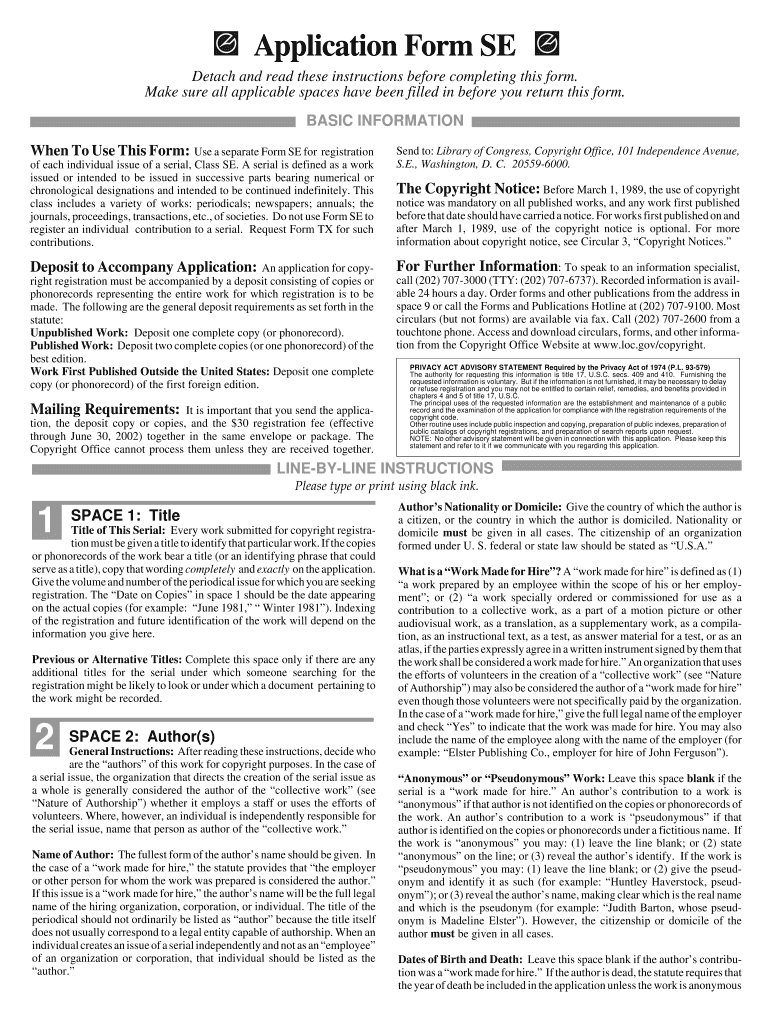
When To Use This Form: Use a separate Form SE for registration of each individual issue of a serial, Class SE. A serial is defined as a work issued or intended to be issued in successive parts bearing numerical orchronological designations and intended to be continued indefinitely. This class includes a variety of works: periodicals; newspapers; annuals; the journals, proceedings, transactions, etc., of societies. Do not use Form SE toregister an individual contribution to a serial. Request Form TX for such contributions. Deposit to Accompany Application: An application for copy- right registration must be accompanied by a deposit consisting of copies or phonorecords representing the entire work for which registration is to bemade. The following are the general deposit requirements as set forth in the statute: Unpublished Work: Deposit one complete copy (or phonorecord). Published Work: Deposit two complete copies (or one phonorecord) of the best edition.Work First Published Outside the United States: Deposit one complete copy (or phonorecord) of the first foreign edition. Mailing Requirements: It is important that you send the applica- tion, the deposit copy or copies, and the $30 registration fee (effective through June 30, 2002) together in the same envelope or package. The Copyright Office cannot process them unless they are received together. Application Form SE Detach and read these instructions before completing this form. Make sure all applicable spaces have been filled in before you return this form. BASIC INFORMATION Send to: Library of Congress, Copyright Office, 101 Independence Avenue, S.E., Washington, D. C. 20559-6000. The Copyright Notice: Before March 1, 1989, the use of copyright notice was mandatory on all published works, and any work first published before that date should have carried a notice. For works first published on andafter March 1, 1989, use of the copyright notice is optional. For more information about copyright notice, see Circular 3, “Copyright Notices.” For Further Information : To speak to an information specialist, call (202) 707-3000 (TTY: (202) 707-6737). Recorded information is avail- able 24 hours a day. Order forms and other publications from the address inspace 9 or call the Forms and Publications Hotline at (202) 707-9100. Most circulars (but not forms) are available via fax. Call (202) 707-2600 from a touchtone phone. Access and download circulars, forms, and other informa-tion from the Copyright Office Website at www.loc.gov/copyright. Author’s Nationality or Domicile: Give the country of which the author is a citizen, or the country in which the author is domiciled. Nationality ordomicile must be given in all cases. The citizenship of an organization formed under U. S. federal or state law should be stated as “U.S.A.” What is a “Work Made for Hire”? A “work made for hire” is defined as (1) “a work prepared by an employee within the scope of his or her employ- ment”; or (2) “a work specially ordered or commissioned for use as acontribution to a collective work, as a part of a motion picture or other audiovisual work, as a translation, as a supplementary work, as a compila- tion, as an instructional text, as a test, as answer material for a test, or as anatlas, if the parties expressly agree in a written instrument signed by them that the work shall be considered a work made for hire.” An organization that uses the efforts of volunteers in the creation of a “collective work” (see “Natureof Authorship”) may also be considered the author of a “work made for hire” even though those volunteers were not specifically paid by the organization. In the case of a “work made for hire,” give the full legal name of the employerand check “Yes” to indicate that the work was made for hire. You may also include the name of the employee along with the name of the employer (for example: “Elster Publishing Co., employer for hire of John Ferguson”). “Anonymous” or “Pseudonymous” Work: Leave this space blank if the serial is a “work made for hire.” An author’s contribution to a work is “anonymous” if that author is not identified on the copies or phonorecords of the work. An author’s contribution to a work is “pseudonymous” if that author is identified on the copies or phonorecords under a fictitious name. Ifthe work is “anonymous” you may: (1) leave the line blank; or (2) state “anonymous” on the line; or (3) reveal the author’s identify. If the work is “pseudonymous” you may: (1) leave the line blank; or (2) give the pseud-onym and identify it as such (for example: “Huntley Haverstock, pseud- onym”); or (3) reveal the author’s name, making clear which is the real name and which is the pseudonym (for example: “Judith Barton, whose pseud-onym is Madeline Elster”). However, the citizenship or domicile of the author must be given in all cases. Dates of Birth and Death: Leave this space blank if the author’s contribu- tion was a “work made for hire.” If the author is dead, the statute requires that the year of death be included in the application unless the work is anonymous LINE-BY-LINE INSTRUCTIONS Please type or print using black ink. SPACE 1: Title Title of This Serial: Every work submitted for copyright registra- tion must be given a title to identify that particular work. If the copies or phonorecords of the work bear a title (or an identifying phrase that could serve as a title), copy that wording completely and exactly on the application. Give the volume and number of the periodical issue for which you are seeking registration. The “Date on Copies” in space 1 should be the date appearing on the actual copies (for example: “June 1981,” “ Winter 1981”). Indexing of the registration and future identification of the work will depend on theinformation you give here. Previous or Alternative Titles: Complete this space only if there are any additional titles for the serial under which someone searching for the registration might be likely to look or under which a document pertaining to the work might be recorded. SPACE 2: Author(s) General Instructions: After reading these instructions, decide who are the “authors” of this work for copyright purposes. In the case of a serial issue, the organization that directs the creation of the serial issue as a whole is generally considered the author of the “collective work” (see “Nature of Authorship”) whether it employs a staff or uses the efforts ofvolunteers. Where, however, an individual is independently responsible for the serial issue, name that person as author of the “collective work.” Name of Author: The fullest form of the author’s name should be given. In the case of a “work made for hire,” the statute provides that “the employer or other person for whom the work was prepared is considered the author.”If this issue is a “work made for hire,” the author’s name will be the full legal name of the hiring organization, corporation, or individual. The title of the periodical should not ordinarily be listed as “author” because the title itselfdoes not usually correspond to a legal entity capable of authorship. When an individual creates an issue of a serial independently and not as an “employee” of an organization or corporation, that individual should be listed as the“author.” PRIVACY ACT ADVISORY STATEMENT Required by the Privacy Act of 1974 (P.L. 93-579) The authority for requesting this information is title 17, U.S.C. secs. 409 and 410. Furnishing the requested information is voluntary. But if the information is not furnished, it may be necessary to delay or refuse registration and you may not be entitled to certain relief, remedies, and benefits provided inchapters 4 and 5 of title 17, U.S.C.The principal uses of the requested information are the establishment and maintenance of a publicrecord and the examination of the application for compliance with lthe registration requirements of thecopyright code. Other routine uses include public inspection and copying, preparation of public indexes, preparation of public catalogs of copyright registrations, and preparation of search reports upon request.NOTE: No other advisory statement will be given in connection with this application. Please keep thisstatement and refer to it if we communicate with you regarding this application. 1 2 in his or her own name. If the work in question is a contribution to a collective work as opposed to the issue as a whole, file Form TX, not Form SE. c. Check this box (and complete space 6) if this particular issue or a substantial portion of the material in it has been previously registered and you are now seeking registration for the additions and revisions which appear inthis issue for the first time. Previous Registration Number and Date: Complete this line if you checked one of the boxes above. If more than one previous registration has been made for the issue or for material in it, give only the number and year date for the latest registration. SPACE 6: Derivative Work or Compilation General Instructions: Complete space 6 if this issue is a “changed version,” “compilation,” or “derivative work” that incorporates one or more earlier works that have already been published or registered for copyright or that have fallen into the public domain. Do not complete space6 for an issue consisting of entirely new material appearing for the first time such as a new issue of a continuing serial. A “compilation” is defined as “a work formed by the collection and assembling of preexisting materials or ofdata that are selected, coordinated, or arranged in such a way that the resulting work as a whole constitutes an original work of authorship.” A “derivative work” is “a work based on one or more preexisting works.”Examples of derivative works include translations, fictionalizations, abridg- ments, condensations, or “any other form in which a work may be recast, transformed, or adapted.” Derivative works also include works “consistingof editorial revisions, annotations, or other modifications” if these changes, as a whole, represent an original work of authorship. Preexisting Material (space 6a): For derivative works, complete this space and space 6b. In space 6a identify the preexisting work that has been recast, transformed, adapted, or updated. Example: “1978 Morgan Co. Sales Cata- log.” Do not complete space 6a for compilations. Material Added to This Work (space 6b): Give a brief, general statement of the new material covered by the copyright claim for which registration is sought. Derivative work examples include: “Editorial revisions and addi- tions to the Catalog”; “Translation”; “Additional material.” If a periodical issue is a compilation , describe both the compilation itself and the material that has been compiled. Examples: “Compilation of previously publishedjournal articles”; “Compilation of previously published data.” An issue maybe both a derivative work and a compilation, in which case a sample statement might be: “Compilation of [describe] and additional new mate- rial.” SPACE 7,8,9: Fee, Correspondence, Certification, Return Address Deposit Account (Space 7a): If you maintain a Deposit Account in the Copyright Office, identify it in space 7a. Otherwise leave the space blank and send the fee of $30 (effective through June 30, 2002) withyour application and deposit. Correspondence (space 7b): This space should contain the name, address, area code, and telephone and fax number and email address of the person to be consulted if correspondence about this application becomes necessary. Certification (space 8): The application cannot be accepted unless it bears the date and the handwritten signature of the author or other copyright claimant, or of the owner of exclusive right(s), or of the duly authorized agent of the author, claimant, or owner of exclusive right(s). Address for Return of Certificate (space 9): The address box must be completed legibly since the certificate will be returned in a window enve- lope. or pseudonymous. The author’s birth date is optional but is useful as a formof identification. Nature of Authorship: Give a brief statement of the nature of the particular author’s contribution to the work. If an organization directed, controlled, and supervised the creation of the serial issue as a whole, check the box“collective work.” The term “collective work” means that the author is responsible for compilation and editorial revision and may also be respon- sible for certain individual contributions to the serial issue. Further examplesof “Authorship” which may apply both to organizational and to individual authors are “Entire text”; “Entire text and/or illustrations”; “Editorial revi- sion, compilation, plus additional new material.” SPACE 3: Creation and Publication General Instructions: Do not confuse “creation” with “publica- tion.” Every application for copyright registration must state “the year in which creation of the work was completed.” Give the date and nation of first publication only if the work has been published. Creation: Under the statute, a work is “created” when it is fixed in a copy or phonorecord for the first time. Where a work has been prepared over a period of time, the part of the work existing in fixed form on a particular date constitutes the created work on that date. The date you give here should be the year in which this particular issue was completed. Publication: The statute defines “publication” as “the distribution of copies or phonorecords of a work to the public by sale or other transfer of ownership or by rental, lease, or lending”; a work is also “published” if there has been an “offering to distribute copies or phonorecords to a group of persons for purposes of further distribution, public performance, or public display.”Give the full date (month, day, year) when, and the country where, publica- tion of this particular issue first occurred. If first publication took place simultaneously in the United States and other countries, it is sufficient to state“U.S.A.” SPACE 4: Claimant(s) Name(s) and Address(es) of Copyright Claimant(s): This space must be completed. Give the name(s) and address(es) of the copy- right claimant(s) of this work even if the claimant is the same as the author named in space 2. Copyright in a work belongs initially to the author of the work (including, in the case of a work made for hire, the employer or other person for whom the work was prepared). The copyright claimant is either theauthor of the work or a person or organization to whom the copyright initially belonging to the author has been transferred. Transfer: The statute provides that, if the copyright claimant is not the author, the application for registration must contain “a brief statement of how the claimant obtained ownership of the copyright.” If any copyright claimantnamed in space 4 is not an author named in space 2, give a brief statement explaining how the claimant(s) obtained ownership of the copyright. Ex- amples: “By written contract”; “Transfer of all rights by author”; “Assign-ment”; “By will.” Do not attach transfer documents or other attachments or riders. SPACE 5: Previous Registration General Instructions: This space rarely applies to serials. Com- plete space 5 if this particular issue has been registered earlier or if it contains a substantial amount of material that has been previously regis- tered. Do not complete this space if the previous registrations are simply those made for earlier issues. Previous Registration: a. Check this box if this issue has been registered in unpublished form and a second registration is now sought to cover the first published edition.b. Check this box if someone other than the author is identified as copyright claimant in the earlier registration and the author is now seeking registration 4 5 6 7,8,9 3 DO NOT WRITE ABOVE THIS LINE. IF YOU NEED MORE SPACE, USE A SEPARATE CONTINUATION SHEET. 1 3 4 TITLE OF THIS SERIAL ▼ Volume ▼ Number ▼ Date on Copies ▼ Frequency of Publication ▼ PREVIOUS OR ALTERNATIVE TITLES ▼ 2 YEAR IN WHICH CREATION OF THIS ISSUE WAS COMPLETED This information must be givenin all cases.DATE AND NATION OF FIRST PUBLICATION OF THIS PARTICULAR ISSUE Complete this information ONLY if this workhas been published. COPYRIGHT CLAIMANT(S) Name and address must be given even if the claimant is the same as the author given in space 2. ▼ TRANSFER If the claimant(s) named here in space 4 is (are) different from the author(s) named in space 2, give a brief statement of how the claimant(s) obtained ownership of the copyright. ▼ Year b a Month Day Year Nation ▼ ▼ ▼ ▲ ▲ MORE ON BACK DO NOT WRITE HERE Page 1 of pages ▼ DO NOT WRITE HERE OFFICE USE ONLY See instructions before completingthis space. NAME OF AUTHOR ▼ DATES OF BIRTH AND DEATH Year Born ▼ Year Die d ▼ NOTE Under the law, the “author” of a “work made for hire” isgenerally the employer, not the employee(see instruc- tions). For any part of thiswork that was “made for hire” check “Yes” inthe space provided, give the employer(or other person for whom the workwas prepared) as “Author” of that part, andleave the space for dates of birth anddeath blank. Name of Country Citizen of Domiciled in { Was this contribution to the work a “work made for hire”? OR AUTHOR'S NATIONALITY OR DOMICILE ▼ ▼ WAS THIS AUTHOR'S CONTRIBUTION TO THE WORK Anonymous? mm Yes mm No Pseudonymous? mm Ye s mm No If the answer to either of these questions is “Yes,” see detailedinstructions. NATURE OF AUTHORSHIP Briefly describe nature of material created by this author in which copyright is claimed . ▼ a NAME OF AUTHOR ▼ DATES OF BIRTH AND DEATH Year Born ▼ Year Die d ▼ Name of Country Citizen of Domiciled in { Was this contribution to the work a “work made for hire”? OR AUTHOR'S NATIONALITY OR DOMICILE ▼ ▼ WAS THIS AUTHOR'S CONTRIBUTION TO THE WORK Anonymous? mm Yes mm No Pseudonymous? mm Ye s mm No If the answer to either of these questions is “Yes,” see detailedinstructions. NATURE OF AUTHORSHIP Briefly describe nature of material created by this author in which copyright is claimed . ▼ b NAME OF AUTHOR ▼ DATES OF BIRTH AND DEATH Year Born ▼ Year Die d ▼ Name of Country Citizen of Domiciled in { Was this contribution to the work a “work made for hire”? OR AUTHOR'S NATIONALITY OR DOMICILE ▼ ▼ WAS THIS AUTHOR'S CONTRIBUTION TO THE WORK Anonymous? mm Yes mm No Pseudonymous? mm Ye s mm No If the answer to either of these questions is “Yes,” see detailedinstructions. NATURE OF AUTHORSHIP Briefly describe nature of material created by this author in which copyright is claimed . ▼ c APPLICATION RECEIVED ONE DEPOSIT RECEIVED TWO DEPOSITS RECEIVEDFUNDS RECEIVED mm Yes mm No mm Yes mm No mm Yes mmNo FORM SE For a Serial UNITED STATES COPYRIGHT OFFICE REGISTRATION NUMBER U EFFECTIVE DATE OF REGISTRATION Month Day Year mm Collective Work Other: mm Collective Work Other: mm Collective Work Other: • Complete all applicable spaces (numbers 5-9) on the reverse side of this page. • See detailed instructions. • Sign the form at line 8. Fees are effective through June 30, 2002. After that date, check the Copyright OfficeWebsite at www.loc.gov/copyright or call (202) 707-3000 for current fee information. EXAMINED BY CHECKED BYCORRESPONDENCE Yes ■■ FORM SE FOR COPYRIGHT OFFICEUSE ONLY DEPOSIT ACCOUNT If the registration fee is to be charged to a Deposit Account established in the Copyright Office, give name and number of Account. Name ▼ Account Number ▼ CORRESPONDENCE Give name and address to which correspondence about this application should be sent. Name/Address/Apt/City/State/ZIP ▼ Area code and telephone number Fax number Email of the work identified in this application and that the statements made by me in this application are correct to the best of my knowledge. Typed or printed name and date ▼ If this application gives a date of publication in space 3, do not sign and submit it before that date. ▼ ▼ ▼ M author M other copyright claimant M owner of exclusive right(s) M authorized agent of Name of author or other copyright claimant, or owner of exclusive right(s) ▲ 9 Date DERIVATIVE WORK OR COMPILATION Complete both space 6a and 6b for a derivative work; complete only 6b for a compilation. Preexisting Material Identify any preexisting work or works that this work is based on or incorporates. ▼ Material Added to This Work Give a brief, general statement of the material that has been added to this work and in which copyright is claimed. ▼ 5 6 DO NOT WRITE ABOVE THIS LINE. IF YOU NEED MORE SPACE, USE A SEPARATE CONTINUATION SHEET. PREVIOUS REGISTRATION Has registration for this work, or for an earlier version of this work, already been made in the Copyright Office? M Yes M No If your answer is “Yes, ” why is another registration being sought? (Check appropriate box.) ▼ a. M This is the first published edition of a work previously registered in unpublished form. b. M This is the first application submitted by this author as copyright claimant. c. M This is a changed version of the work, as shown by space 6 on this application. If your answer is “Yes, ” give: Previous Registration Number ▼ Year of Registration ▼ Name ▼ Number/Street/Apt ▼ City/State/ZIP ▼ ✩U.S. GOVERNMENT PRINTING OFFICE: 1999-454-879/59 June 1999—50,000 WEB REV: June 1999 *17 U.S.C. § 506(e): Any person who knowingly makes a false representation of a material fact in the application for copyright registration provided for by section 409, or in any written statement filed in connection with the application, shall be fined not more than $2,500. ☛ See instructions before completing this space. Handwritten signature (X) ▼ 7 8 CERTIFICATION* I, the undersigned, hereby certify that I am the { ▼ YOU MUST:• Complete all necessary spaces • Sign your application in space 8 SEND ALL 3 ELEMENTS IN THE SAME PACKAGE: 1. Application form 2. Nonrefundable filing fee in check or money order payable to Register of Copyrights 3. Deposit materialMAIL TO:Library of Congress Copyright Office101 Independence Avenue, S.E.Washington, D.C. 20559-6000 a b X Check only one ▼ a b ▼ Certificate will bemailed inwindowenvelopeto thisaddress: PRINTED ON RECYCLED PAPER As of July 1,1999,thefilingfee for Form SEis $30.

Valuable tips for finishing your ‘Fill Free Fillable Copyright Office Form Se Pdf Form’ online

Are you fed up with the inconvenience of managing paperwork? Look no further than airSlate SignNow, the top electronic signature platform for individuals and businesses. Bid farewell to the tedious task of printing and scanning documents. With airSlate SignNow, you can effortlessly finalize and approve paperwork online. Take advantage of the robust features integrated into this simple and cost-effective platform and transform your method of document handling. Whether you need to authorize forms or gather signatures, airSlate SignNow accomplishes it all effortlessly, needing just a few clicks.

Adhere to this detailed guide:

  1. Access your account or register for a free trial with our service.
  2. Click +Create to upload a document from your device, cloud storage, or our collection of templates.
  3. Open your ‘Fill Free Fillable Copyright Office Form Se Pdf Form’ in the editor.
  4. Click Me (Fill Out Now) to set up the form on your end.
  5. Insert and allocate fillable fields for others (if necessary).
  6. Proceed with the Send Invite options to solicit eSignatures from additional parties.
  7. Download, print your version, or convert it into a reusable template.

No need to worry if you need to work with your coworkers on your Fill Free Fillable Copyright Office Form Se Pdf Form or send it for notarization—our solution equips you with everything necessary to accomplish such tasks. Register with airSlate SignNow today and elevate your document management to a whole new level!

Here is a list of the most common customer questions. If you can’t find an answer to your question, please don’t hesitate to reach out to us.

Need help? Contact Support

The best way to complete and sign your fill free fillable copyright office form se pdf form

Save time on document management with airSlate SignNow and get your fill free fillable copyright office form se pdf form eSigned quickly from anywhere with our fully compliant eSignature tool.

How to Sign a PDF Online How to Sign a PDF Online

How to fill out and sign paperwork online

Previously, dealing with paperwork required lots of time and effort. But with airSlate SignNow, document management is quick and easy. Our powerful and easy-to-use eSignature solution lets you easily complete and electronically sign your fill free fillable copyright office form se pdf form online from any internet-connected device.

Follow the step-by-step guidelines to eSign your fill free fillable copyright office form se pdf form template online:

  • 1.Sign up for a free trial with airSlate SignNow or log in to your account with password credentials or SSO authorization option.
  • 2.Click Upload or Create and import a file for eSigning from your device, the cloud, or our form collection.
  • 3.Click on the file name to open it in the editor and use the left-side menu to complete all the blank areas accordingly.
  • 4.Drop the My Signature field where you need to eSign your sample. Type your name, draw, or import an image of your handwritten signature.
  • 5.Click Save and Close to accomplish modifying your completed document.

Once your fill free fillable copyright office form se pdf form template is ready, download it to your device, export it to the cloud, or invite other people to electronically sign it. With airSlate SignNow, the eSigning process only requires a couple of clicks. Use our robust eSignature tool wherever you are to deal with your paperwork successfully!


How to Sign a PDF Using Google Chrome How to Sign a PDF Using Google Chrome

How to complete and sign documents in Google Chrome

Completing and signing paperwork is simple with the airSlate SignNow extension for Google Chrome. Installing it to your browser is a fast and productive way to manage your paperwork online. Sign your fill free fillable copyright office form se pdf form sample with a legally-binding electronic signature in just a few clicks without switching between tools and tabs.

Follow the step-by-step guidelines to eSign your fill free fillable copyright office form se pdf form template in Google Chrome:

  • 1.Navigate to the Chrome Web Store, search for the airSlate SignNow extension for Chrome, and add it to your browser.
  • 2.Right-click on the link to a form you need to eSign and select Open in airSlate SignNow.
  • 3.Log in to your account using your password or Google/Facebook sign-in option. If you don’t have one, sign up for a free trial.
  • 4.Utilize the Edit & Sign toolbar on the left to complete your template, then drag and drop the My Signature field.
  • 5.Upload a photo of your handwritten signature, draw it, or simply enter your full name to eSign.
  • 6.Verify all data is correct and click Save and Close to finish editing your paperwork.

Now, you can save your fill free fillable copyright office form se pdf form sample to your device or cloud storage, email the copy to other people, or invite them to electronically sign your form via an email request or a protected Signing Link. The airSlate SignNow extension for Google Chrome enhances your document processes with minimum time and effort. Start using airSlate SignNow today!


How to Sign a PDF in Gmail How to Sign a PDF in Gmail How to Sign a PDF in Gmail

How to complete and sign forms in Gmail

Every time you get an email containing the fill free fillable copyright office form se pdf form for approval, there’s no need to print and scan a document or download and re-upload it to another program. There’s a much better solution if you use Gmail. Try the airSlate SignNow add-on to promptly eSign any documents right from your inbox.

Follow the step-by-step guidelines to eSign your fill free fillable copyright office form se pdf form in Gmail:

  • 1.Navigate to the Google Workplace Marketplace and find a airSlate SignNow add-on for Gmail.
  • 2.Install the program with a corresponding button and grant the tool access to your Google account.
  • 3.Open an email containing an attachment that needs approval and utilize the S symbol on the right sidebar to launch the add-on.
  • 4.Log in to your airSlate SignNow account. Opt for Send to Sign to forward the document to other parties for approval or click Upload to open it in the editor.
  • 5.Drop the My Signature option where you need to eSign: type, draw, or import your signature.

This eSigning process saves efforts and only takes a few clicks. Take advantage of the airSlate SignNow add-on for Gmail to adjust your fill free fillable copyright office form se pdf form with fillable fields, sign documents legally, and invite other people to eSign them al without leaving your mailbox. Improve your signature workflows now!


How to Sign a PDF on a Mobile Device How to Sign a PDF on a Mobile Device How to Sign a PDF on a Mobile Device

How to complete and sign paperwork in a mobile browser

Need to rapidly submit and sign your fill free fillable copyright office form se pdf form on a smartphone while doing your work on the go? airSlate SignNow can help without the need to install extra software applications. Open our airSlate SignNow tool from any browser on your mobile device and create legally-binding eSignatures on the go, 24/7.

Follow the step-by-step guidelines to eSign your fill free fillable copyright office form se pdf form in a browser:

  • 1.Open any browser on your device and follow the link www.signnow.com
  • 2.Sign up for an account with a free trial or log in with your password credentials or SSO authentication.
  • 3.Click Upload or Create and pick a file that needs to be completed from a cloud, your device, or our form catalogue with ready-to go templates.
  • 4.Open the form and complete the empty fields with tools from Edit & Sign menu on the left.
  • 5.Place the My Signature area to the form, then enter your name, draw, or upload your signature.

In a few simple clicks, your fill free fillable copyright office form se pdf form is completed from wherever you are. As soon as you're finished editing, you can save the document on your device, generate a reusable template for it, email it to other people, or invite them eSign it. Make your paperwork on the go quick and efficient with airSlate SignNow!


How to Sign a PDF on iPhone How to Sign a PDF on iPhone

How to complete and sign forms on iOS

In today’s business world, tasks must be accomplished quickly even when you’re away from your computer. Using the airSlate SignNow mobile app, you can organize your paperwork and approve your fill free fillable copyright office form se pdf form with a legally-binding eSignature right on your iPhone or iPad. Set it up on your device to close deals and manage documents from anywhere 24/7.

Follow the step-by-step guidelines to eSign your fill free fillable copyright office form se pdf form on iOS devices:

  • 1.Go to the App Store, search for the airSlate SignNow app by airSlate, and install it on your device.
  • 2.Open the application, tap Create to upload a template, and choose Myself.
  • 3.Choose Signature at the bottom toolbar and simply draw your signature with a finger or stylus to eSign the form.
  • 4.Tap Done -> Save right after signing the sample.
  • 5.Tap Save or take advantage of the Make Template option to re-use this paperwork in the future.

This method is so simple your fill free fillable copyright office form se pdf form is completed and signed within a couple of taps. The airSlate SignNow application works in the cloud so all the forms on your mobile device are kept in your account and are available whenever you need them. Use airSlate SignNow for iOS to enhance your document management and eSignature workflows!


How to Sign a PDF on Android How to Sign a PDF on Android

How to fill out and sign paperwork on Android

With airSlate SignNow, it’s easy to sign your fill free fillable copyright office form se pdf form on the go. Install its mobile app for Android OS on your device and start improving eSignature workflows right on your smartphone or tablet.

Follow the step-by-step guide to eSign your fill free fillable copyright office form se pdf form on Android:

  • 1.Go to Google Play, find the airSlate SignNow app from airSlate, and install it on your device.
  • 2.Log in to your account or create it with a free trial, then upload a file with a ➕ button on the bottom of you screen.
  • 3.Tap on the imported file and choose Open in Editor from the dropdown menu.
  • 4.Tap on Tools tab -> Signature, then draw or type your name to electronically sign the form. Fill out empty fields with other tools on the bottom if necessary.
  • 5.Utilize the ✔ button, then tap on the Save option to finish editing.

With an easy-to-use interface and full compliance with major eSignature laws and regulations, the airSlate SignNow application is the best tool for signing your fill free fillable copyright office form se pdf form. It even operates offline and updates all record modifications once your internet connection is restored and the tool is synced. Fill out and eSign forms, send them for eSigning, and make re-usable templates anytime and from anywhere with airSlate SignNow.

Sign up and try Fill free fillable copyright office form se pdf form
  • Close deals faster
  • Improve productivity
  • Delight customers
  • Increase revenue
  • Save time & money
  • Reduce payment cycles

