Establishing secure connection… Loading editor… Preparing document…
Navigation

Fill and Sign the Fill Free Fillable Form Sr PDF Form
Fill and Sign the Fill Free Fillable Form Sr PDF Form

How it works

Open the document and fill out all its fields.
Apply your legally-binding eSignature.
Save and invite other recipients to sign it.

Rate template

4.5
46 votes
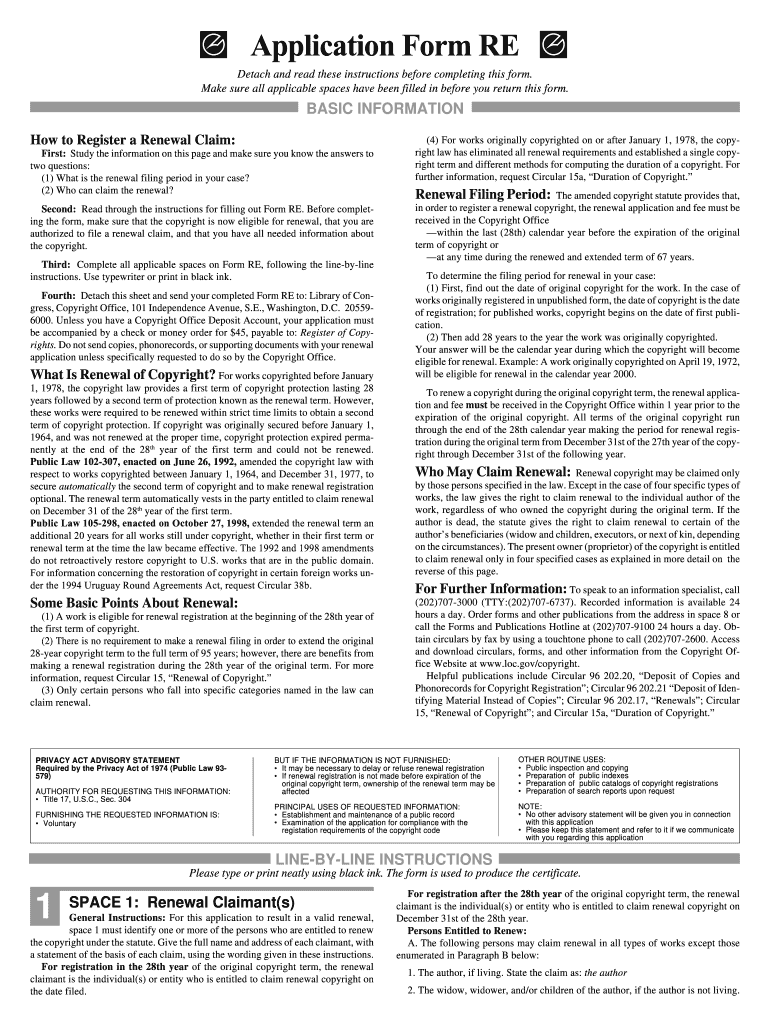
For registration after the 28th year of the original copyright term, the renewal claimant is the individual(s) or entity who is entitled to claim renewal copyright on December 31st of the 28th year. Persons Entitled to Renew:A. The following persons may claim renewal in all types of works except those enumerated in Paragraph B below: 1. The author, if living. State the claim as:  the author 2. The widow, widower, and/or children of the author, if the author is not living. BASIC INFORMATION SPACE 1: Renewal Claimant(s) General Instructions: For this application to result in a valid renewal, space 1 must identify one or more of the persons who are entitled to renew the copyright under the statute. Give the full name and address of each claimant, with a statement of the basis of each claim, using the wording given in these instructions. For registration in the 28th year of the original copyright term, the renewal claimant is the individual(s) or entity who is entitled to claim renewal copyright onthe date filed. LINE-BY-LINE INSTRUCTIONS Please type or print neatly using black ink. The form is used to produce the certificate. How to Register a Renewal Claim: First: Study the information on this page and make sure you know the answers to two questions: (1) What is the renewal filing period in your case? (2) Who can claim the renewal? Second: Read through the instructions for filling out Form RE. Before complet- ing the form, make sure that the copyright is now eligible for renewal, that you are authorized to file a renewal claim, and that you have all needed information aboutthe copyright. Third: Complete all applicable spaces on Form RE, following the line-by-line instructions. Use typewriter or print in black ink. Fourth: Detach this sheet and send your completed Form RE to: Library of Con- gress, Copyright Office, 101 Independence Avenue, S.E., Washington, D.C.  20559- 6000. Unless you have a Copyright Office Deposit Account, your application must be accompanied by a check or money order for $45, payable to:  Register of Copy- rights.  Do not send copies, phonorecords, or supporting documents with your renewal application unless specifically requested to do so by the Copyright Office. What Is Renewal of Copyright? For works copyrighted before January 1, 1978, the copyright law provides a first term of copyright protection lasting 28 years followed by a second term of protection known as the renewal term. However,these works were required to be renewed within strict time limits to obtain a second term of copyright protection. If copyright was originally secured before January 1, 1964, and was not renewed at the proper time, copyright protection expired perma-nently at the end of the 28 th  year of the first term and could not be renewed. Public Law 102-307, enacted on June 26, 1992,  amended the copyright law with respect to works copyrighted between January 1, 1964, and December 31, 1977, tosecure  automatically  the second term of copyright and to make renewal registration optional. The renewal term automatically vests in the party entitled to claim renewalon December 31 of the 28 th  year of the first term. Public Law 105-298, enacted on October 27, 1998,  extended the renewal term an additional 20 years for all works still under copyright, whether in their first term  or renewal term at the time the law became effective. The 1992 and 1998 ame ndments do  not  retroactively  restore  copyright  to  U.S.  works  that  are  in  the  public  domain. For information concerning the restoration of copyright in certain foreign works un- der the 1994 Uruguay Round Agreements Act, request Circular 38b. Some Basic Points About Renewal: (1) A work is eligible for renewal registration at the beginning of the 28th year of the first term of copyright. (2) There is no requirement to make a renewal filing in order to extend the orig inal 28-year copyright term to the full term of 95 years; however, there are benefits from making a renewal registration during the 28th year of the original term. For more information, request Circular 15, “Renewal of Copyright.” (3) Only certain persons who fall into specific categories named in the law can claim renewal. (4) For works originally copyrighted on or after January 1, 1978, the copy- right law has eliminated all renewal requirements and established a single copy- right term and different methods for computing the duration of a copyright. Forfurther information, request Circular 15a, “Duration of Copyright.” Renewal Filing Period: The amended copyright statute provides that, in order to register a renewal copyright, the renewal application and fee must be received in the Copyright Office —within the last (28th) calendar year before the expiration of the original term of copyright or —at any time during the renewed and extended term of 67 years. To determine the filing period for renewal in your case: (1) First, find out the date of original copyright for the work. In the case of works originally registered in unpublished form, the date of copyright is the dateof registration; for published works, copyright begins on the date of first publi- cation. (2) Then add 28 years to the year the work was originally copyrighted. Your answer will be the calendar year during which the copyright will become eligible for renewal. Example: A work originally copyrighted on April 19, 1972,will be eligible for renewal in the calendar year 2000. To renew a copyright during the original copyright term, the renewal applica- tion and fee  must be received in the Copyright Office within 1 year prior to the expiration of the original copyright. All terms of the original copyright run through the end of the 28th calendar year making the period for renewal regis- tration during the original term from December 31st of the 27th year of the copy-right through December 31st of the following year. Who May Claim Renewal: Renewal copyright may be claimed only by those persons specified in the law. Except in the case of four specific types of works, the law gives the right to claim renewal to the individual author of thework, regardless of who owned the copyright during the original term. If theauthor is dead, the statute gives the right to claim renewal to certain of the author’s beneficiaries (widow and children, executors, or next of kin, depending on the circumstances). The present owner (proprietor) of the copyright is entitledto claim renewal only in four specified cases as explained in more detail on  thereverse of this page. For Further Information: To speak to an information specialist, call (202)707-3000 (TTY:(202)707-6737). Recorded information is available 24 hours a day. Order forms and other publications from the address in space 8 orcall the Forms and Publications Hotline at (202)707-9100 24 hours a day. Ob- tain circulars by fax by using a touchtone phone to call (202)707-2600. Access and download circulars, forms, and other information from the Copyright Of-fice Website at www.loc.gov/copyright. Helpful publications include Circular 96 202.20, “Deposit of Copies and Phonorecords for Copyright Registration”; Circular 96 202.21 “Deposit of Iden-tifying Material Instead of Copies”; Circular 96 202.17, “Renewals”; Circular 15, “Renewal of Copyright”; and Circular 15a, “Duration of Copyright.” Detach and read these instructions before completing this form. Make sure all applicable spaces have been filled in before you return this form. Application Form RE PRIVACY ACT ADVISORY STATEMENT Required by the Privacy Act of 1974 (Public Law 93-579) AUTHORITY FOR REQUESTING THIS INFORMATION: • Title 17, U.S.C., Sec. 304 FURNISHING THE REQUESTED INFORMATION IS: • Voluntary BUT IF THE INFORMATION IS NOT FURNISHED: • It may be necessary to delay or refuse renewal registration • If renewal registration is not made before expiration of the original copyright term, ownership of the renewal term may beaffected PRINCIPAL USES OF REQUESTED INFORMATION: • Establishment and maintenance of a public record • Examination of the application for compliance with the registation requirements of the copyright code OTHER ROUTINE USES: • Public inspection and copying • Preparation of  public indexes • Preparation of  public catalogs of copyright registrations • Preparation of search reports upon request NOTE: • No other advisory statement will be given you in connection with this application • Please keep this statement and refer to it if we communicate with you regarding this application 1 State the claim as: the widow (widower) of the author .  . . . . . . . . . . . . . . . . . . . . . . . . . . . . . . . . .       (Name of author) and/or the child (children) of the deceased author   . . . . . . . . . . . . . . . . . . . . . .       (Name of author) 3. The author’s executor(s), if the author left a will and if there is no surviving widow, widower, or child. State the claim as:the executor(s) of the author  . . . . . . . . . . . . . . . . . . . . . . . . . . . . . . . . . . . . . .       (Name of author) 4.  The next of kin of the author, if the author left no will and if there is no surviv-  ing widow, widower, or child. State the claim as: the next of kin of the deceased author . . .  . . . . . . . . . . . . . . . .there being no will.                                                                           (Name of author) B. In the case of the following four types of works, the proprietor (owner of the copyright at the time of renewal registration) may claim renewal: 1. Posthumous work (a work published after the author’s death as to which nocopyright assignment or other contract for exploitation has occurred during theauthor’s lifetime). State the claim as:  proprietor of copyright in a posthumous work. 2.  Periodical, cyclopedic, or other composite work. State the claim as:  proprietor of copyright in a composite work. 3. “Work copyrighted by a corporate body otherwise than as assignee or licensee of the individual author.”  State the claim as:   proprietor of copyright in a work copyrighted by a corporate body otherwise than as assignee orlicensee  of the individual author. This type of claim is considered appropriate in relatively few cases. 4. Work copyrighted by an employer for whom such work was made for hire. State the claim as:  proprietor of copyright in a work made for hire. SPACE 2: Work Renewed General Instructions: This space is to identify the particular work being renewed. The information given here should agree with that appearing in the certificate of original registration. Title: Give the full title of the work, together with any subtitles or descriptive wording included with the title in the original registration. In the case of a musical composition, give the specific instrumentation of the work. Renewable Matter: Copyright in a new version of a previously published or copyrighted work such as an arrangement, translation, dramatization, compilation,or work republished with new matter covers only the additions, changes, or other newmaterial appearing for the first time in that version. If this work was a new version,state in general the new matter upon which copyright was claimed. Contribution to Periodical, Serial, or other Composite Work:  Separate re- newal registration is possible for a work published as a contribution to a periodical, serial, or other composite work, whether the contribution was copyrighted indepen- dently or as part of the larger work in which it appeared. Each contribution publishedin a separate issue ordinarily requires a separate renewal registration. However, thelaw provides an alternative, permitting groups of periodical contributions by the sameindividual author to be combined under a single renewal application and fee in cer-tain cases. If this renewal application covers a single contribution, give all of the requested information in space 2.  If you are seeking to renew a group of contributions, includea reference such as “See space 5” in space 2 and give the requested information aboutall of the contributions in space 5. SPACE 3: Author(s) General Instructions: The copyright secured in a new version of a work is independent of any copyright protection in material published earlier. The only “authors” of a new version are those who contributed copyrightable matter to it. Thus, for renewal purposes, the person who wrote the original versionon which the new work is based cannot be regarded as an “author” of the new ver- sion, unless that person also contributed to the new matter. Authors of Renewable Matter: Give the full names of all authors who contrib- uted copyrightable matter to this particular version of the work. General Instructions: Each item in space 4 should agree with the infor- mation appearing in the original registration for the work. If the work being renewed is a single contribution to a periodical or composite work that was not sepa-rately registered, give information about the particular issue in which the contribu- tion appeared.You may leave this space blank if you are completing space 5. Original Registration Number: Give the full registration number, which appears in the upper right hand corner of the front of the certificate of registration. Original Copyright Claimant: Give the name in which ownership of the copy- right was claimed in the original registration. Date of Publication or Registration:  Give only one date. If the original registra- tion gave a publication date, it should be transcribed here; otherwise the registrationwas for an unpublished work, and the date of registration should be given. See Notebelow. General Instructions: A renewal registration using a single application and $45 fee can be made for a group of works if  all the following statutory conditions are met: (1) all the works were written by the same author, who is namedin space 3 and who is or was an individual (not an employer for hire); (2) all the workswere first published as contributions to periodicals (including newspapers) and were copyrighted on their first publication either through separate copyright notice and registration or by virtue of a general copyright notice in the periodical issue as awhole; (3) the renewal claimant or claimants and the basis of claim or claims, asstated in space 1, are the same for all the works; (4) the renewal application and feeare received not less than 27 years after the 31st day of December of the calendaryear in which all the works were first published (See following Note); and (5) the renewal application identifies each work separately, including the periodical contain- ing it and the date of first publication. Note:  During the 28th year of the original term and during the extended 67-year renewal term, renewal registration may be made for a single work or a group of workswithout having made an original registration. This option requires the filing of a re- newal application Form RE accompanied by a Form RE  Addendum, a copy of the work as first published or appropriate identifying material in accordance with the re- quirements of 37 CFR 202.17, and a total $60 filing fee. Time Limits for Group Renewals: To be renewed as a group, all the contribu- tions must have been first published during the same calendar year. For example,suppose six contributions by the same author were published on April 1, 1968, July 1, 1968, November 1, 1968, February 1, 1969, July 1, 1969, and March 1, 1970. The three 1968 copyrights can be combined and renewed at any time during 1996, andthe two 1969 copyrights can be renewed as a group during 1997, but the 1970 copy-right must be renewed by itself in 1998. Identification of Each Work: Give all the requested information for each con- tribution. The registration number should be that for the contribution itself if it was separately registered, and the registration number for the periodical issue if it was not. Deposit Account (Fee):  If you maintain a Deposit Account in the Copyright Of- fice, identify it in space 6. Otherwise, leave the space blank and send the fee of $45for Form RE or $60 for Form RE accompanied by Form RE Addendum with yourapplication and deposit. Correspondence : This space should contain the name, address, area code, tele- phone number, fax number, and email address of the person to be consulted ifcorrespondence about this application becomes necessary. Certification (Space 7): The renewal application is not acceptable unless it bears the date and the handwritten signature of the renewal claimant or the duly authorizedagent of the renewal claimant. Address for Return of Certificate (Space 8): The address box must be com- pleted legibly since the certificate will be returned in a window envelope. SPACE 6,7,8: Deposit Account (Fee), Correspondence, Certification,Return Address SPACE 5: Group Renewals 2 3 4 Space 4: Facts of Original Registration 5 6,7,8 ORIGINAL DATE OF COPYRIGHT If the original registration for this work was made in published form, give:DATE OF PUBLICATION: _______________________________________________ MORE ON BACKDO NOT WRITE HERE Page 1 of   pages ▼• Complete all applicable spaces (numbers 5-8) on the reverse side of this page. • See detailed instructions.                          • Sign the form at space 7. 4 ORIGINAL REGISTRATION NUMBER ▼ ORIGINAL COPYRIGHT CLAIMANT ▼ For Renewal of a Work UNITED STATES COPYRIGHT OFFICE REGISTRATION NUMBER EFFECTIVE DATE OF RENEWAL REGISTRATION               Month                          Day                           Year FORM RE  (Month)                         (Day)                           (Year)      (Month)                         (Day)                           (Year) AUTHOR(S) OF RENEWABLE MATTER ▼ 3 TITLE OF WORK IN WHICH RENEWAL IS CLAIMED ▼ RENEWABLE MATTER ▼ PUBLICATION AS A CONTRIBUTION If this work was published as a contribution to a periodical, serial, or other composite work, give information about the collective work in which the contribution appeared. Title of Collective Work ▼ If published in a periodical or serial give: Volume ▼ Number ▼ Issue Date ▼ 2 Name  . . . . . . . . . . . . . . . . . . . . . . . . . . . . . . . . . . . . . . . . . . . . . . . . . . . . . . . . . . . . . . . . . . . . . . . . . . . . . . . . . . . . . . . . . . . . . . . . . . . . . . . . . . . . . . . . . . . . . . . . . . . . Address  . . . . . . . . . . . . . . . . . . . . . . . . . . . . . . . . . . . . . . . . . . . . . . . . . . . . . . . . . . . . . . . . . . . . . . . . . . . . . . . . . . . . . . . . . . . . . . . . . . . . . . . . . . . . . . . . . . . . . . . . . . Claiming as  . . . . . . . . . . . . . . . . . . . . . . . . . . . . . . . . . . . . . . . . . . . . . . . . . . . . . . . . . . . . . . . . . . . . . . . . . . . . . . . . . . . . . . . . . . . . . . . . . . . . . . . . . . . . . . . . . . . . . . .. . . . . . Name  . . . . . . . . . . . . . . . . . . . . . . . . . . . . . . . . . . . . . . . . . . . . . . . . . . . . . . . . . . . . . . . . . . . . . . . . . . . . . . . . . . . . . . . . . . . . . . . . . . . . . . . . . . . . . . . . . . . . . . . . . . . . Address  . . . . . . . . . . . . . . . . . . . . . . . . . . . . . . . . . . . . . . . . . . . . . . . . . . . . . . . . . . . . . . . . . . . . . . . . . . . . . . . . . . . . . . . . . . . . . . . . . . . . . . . . . . . . . . . . . . . . . . . . . . Claiming as  . . . . . . . . . . . . . . . . . . . . . . . . . . . . . . . . . . . . . . . . . . . . . . . . . . . . . . . . . . . . . . . . . . . . . . . . . . . . . . . . . . . . . . . . . . . . . . . . . . . . . . . . . . . . . . . . . . . .. . . .. Name  . . . . . . . . . . . . . . . . . . . . . . . . . . . . . . . . . . . . . . . . . . . . . . . . . . . . . . . . . . . . . . . . . . . . . . . . . . . . . . . . . . . . . . . . . . . . . . . . . . . . . . . . . . . . . . . . . . . . . . . . . . . . Address  . . . . . . . . . . . . . . . . . . . . . . . . . . . . . . . . . . . . . . . . . . . . . . . . . . . . . . . . . . . . . . . . . . . . . . . . . . . . . . . . . . . . . . . . . . . . . . . . . . . . . . . . . . . . . . . . . . . . . . . . . . Claiming as  . . . . . . . . . . . . . . . . . . . . . . . . . . . . . . . . . . . . . . . . . . . . . . . . . . . . . . . . . . . . . . . . . . . . . . . . . . . . . . . . . . . . . . . . . . . . . . . . . . . . . . . . . . . . . . . . . . . . . . .. . . . . . DO NOT WRITE ABOVE THIS LINE. IF YOU NEED MORE SPACE, USE A SEPARATE CONTINUATION SHEET (FORM RE/CON). 1 RENEWAL CLAIMANT(S), ADDRESS(ES), AND STATEMENT OF CLAIM ▼ (See Instructions) (Use appropriate statement from instructions) a bc If the original registration for this work was made in unpublished form, give: DATE OF REGISTRATION: ________________________________________________ OR Fees are effective through June 30, 2002. After that date, check the Copyright Office Website at www.loc.gov/copyright or call (202) 707-3000 for current fee information.   CORRESPONDENCE: Give name and address to which correspondence about this application should be sent. Name ______________________________________________________________ Address _________________________________________________________________________________________________________________________________ Title of Contribution: . . . . . . . . . . . . . . . . . . . . . . . . . . . . . . . . . . . . . . . . . . . . . . . . . . . . . . . . . . . . . . . . . . . . . . . . . . . . . . . . . . . . . . . . .. . . . . . . . . . . . . . . . . . . . . . . . Title of Periodical:   . . . . . . . . . . . . . . . . . . . . . . . . . . . . . . . . . . . . . . . . . . . . . . . . Vol: . . .  . . . . . . . . . No: . . . . . . . . . . . . Issue Date:. . . . . . . . . Date of Publication:    . . . . . . . . . . . . . . . . . . . . . . . . . . . . . . . . . . . . . . . . . . . . . . . Registrati on Number:    . . . . . . . . . . . . . . . . . . . . . . . . . . . . . . . Title of Contribution: . . . . . . . . . . . . . . . . .. . . . . . . . . . . . . . . . . . . . . . . . . . . . . . . . . . . . . . . . . . . . . . . . . . . . . . . . . . . . . . . . . . . . . . . . . . . . . . . . . . . . . . . . . . . . . . . . Title of Periodical:   . . . . . . . . . . . . . . . . . . . . . . . . . . . . . . . . . . . . . . . . . . . . . . . . Vol: . . .  . . . . . . . . . No: . . . . . . . . . . . . Issue Date:. . . . . . . . . Date of Publication:    . . . . . . . . . . . . . . . . . . . . . . . . . . . . . . . . . . . . . . . . . . . . . . . Registrati on Number:    . . . . . . . . . . . . . . . . . . . . . . . . . . . . . . . Title of Contribution: . . . . . . . . . . .. . . . . . . . . . . . . . . . . . . . . . . . . . . . . . . . . . . . . . . . . . . . . . . . . . . . . . . . . . . . . . . . . . . . . . . . . . . . . . . . . . . . . . . . . . . . . . . . . . . . . . Title of Periodical:   . . . . . . . . . . . . . . . . . . . . . . . . . . . . . . . . . . . . . . . . . . . . . . . . Vol: . . .  . . . . . . . . . No: . . . . . . . . . . . . Issue Date:. . . . . . . . . Date of Publication:    . . . . . . . . . . . . . . . . . . . . . . . . . . . . . . . . . . . . . . . . . . . . . . . Registrati on Number:    . . . . . . . . . . . . . . . . . . . . . . . . . . . . . . . Title of Contribution: . . . . . . . . . . . . . . . . . . . . . . . . . . . .  . . . . . . . . . . . . . . . . . . . . . . . . . . . . . . . . . . . . . . . . . . . . . . . . . . . . . . . . . . . . . . . . . . . . . . . . . . . . . . . . . . . . Title of Periodical:   . . . . . . . . . . . . . . . . . . . . . . . . . . . . . . . . . . . . . . . . . . . . . . . . Vol: . . .  . . . . . . . . . No: . . . . . . . . . . . . Issue Date:. . . . . . . . . Date of Publication:    . . . . . . . . . . . . . . . . . . . . . . . . . . . . . . . . . . . . . . . . . . . . . . . Registrati on Number:    . . . . . . . . . . . . . . . . . . . . . . . . . . . . . . . 5 FORM RE FOR COPYRIGHT OFFICEUSE ONLY DO NOT WRITE ABOVE THIS LINE. IF YOU NEED MORE SPACE, USE A SEPARATE CONTINUATION SHEET (FORM RE/CON). Certificate will bemailed inwindowenvelopeto thisaddress: Name ▼ Number/Street/Apt ▼ City/State/ZIP ▼ ✩U.S. GOVERNMENT PRINTING OFFICE: 2000-461-113/87 *17 U.S.C. § 506(e): Any person who knowingly makes a false representation of a material fact in the application for copyright  registration provided for by section 409, or in any written statement filed in connection with the application, shall be fined not more than $2,500. ☛ Handwritten signature (X) ▼ 8 EXAMINED BY CHECKED BY FUNDS RECEIVED RENEWAL APPLICATION RECEIVED CORRESPONDENCE  ❑ YES CERTIFICATION* I, the undersigned, hereby certify that I am the: (Check one) ❑ renewal claimant ❑ duly authorized agent of of the work identified in this application and that the statements made by me in this application are correct to the best of my knowledge. Typed or printed name ▼ Date ▼ (Name of renewal claimant) ▲ 6 7 (City)                                                                             (State)                                (ZIP) (Apt) YOU MUST:• Complete all necessary spaces • Sign your application in space 7 SEND ALL ELEMENTS IN THE SAME PACKAGE: 1.  Application form 2.  Nonrefundable filing fee in check or money order payable to  Register of Copyrights MAIL TO:Library of Congress Copyright Office101 Independence Avenue, S.E.Washington, D.C. 20559-6000 RENEWAL FOR GROUP OF WORKS BY SAME AUTHOR: To make a single registration for a group of works by the same individual author published as contributions to periodicals (see instructions), give full information about each contribution. If more space is needed, request continuation sheet (Form RE/CON). (Month)            (Day)             (Year) (Month)            (Day)             (Year) (Month)            (Day)             (Year) (Month)            (Day)             (Year) a b c d DEPOSIT ACCOUNT: If the registration fee is to be charged to a Deposit Account established in the Copyright Office, give name and number of Account. Name ______________________________________________________________ _____________________________________________________________________Account Number ____________________________________________________ December 1999 —20,000 WEB REV: December 1999 PRINTED ON RECYCLED PAPER Area code and daytime telephone number     __________________________________ ▼ ▼ Fax number       ________________________________________________________ ▼ ▼ Email Address As of July 1, 1999, thefiling feefor FormRE is $45.

Useful tips for finishing your ‘Fill Free Fillable Form Sr Pdf Form’ online

Are you fed up with the inconvenience of dealing with paperwork? Look no further than airSlate SignNow, the leading eSignature platform for individuals and businesses. Wave farewell to the tedious process of printing and scanning documents. With airSlate SignNow, you can effortlessly complete and sign documents online. Take advantage of the powerful tools integrated into this user-friendly and economical platform and transform your document management strategy. Whether you need to sign forms or collect digital signatures, airSlate SignNow manages everything with ease, requiring only a few clicks.

Adhere to these comprehensive steps:

  1. Sign in to your account or initiate a free trial with our service.
  2. Click +Create to upload a file from your device, cloud storage, or our template library.
  3. Open your ‘Fill Free Fillable Form Sr Pdf Form’ in the editor.
  4. Click Me (Fill Out Now) to set up the document on your end.
  5. Add and designate fillable fields for others (if needed).
  6. Proceed with the Send Invite settings to request eSignatures from others.
  7. Download, print your copy, or convert it into a reusable template.

Don’t be concerned if you need to collaborate with others on your Fill Free Fillable Form Sr Pdf Form or send it for notarization—our solution offers everything you need to accomplish such tasks. Register with airSlate SignNow today and enhance your document management to a greater level!

Here is a list of the most common customer questions. If you can’t find an answer to your question, please don’t hesitate to reach out to us.

Need help? Contact Support

The best way to complete and sign your fill free fillable form sr pdf form

Save time on document management with airSlate SignNow and get your fill free fillable form sr pdf form eSigned quickly from anywhere with our fully compliant eSignature tool.

How to Sign a PDF Online How to Sign a PDF Online

How to fill out and sign documents online

Previously, working with paperwork took pretty much time and effort. But with airSlate SignNow, document management is quick and easy. Our powerful and user-friendly eSignature solution lets you easily fill out and electronically sign your fill free fillable form sr pdf form online from any internet-connected device.

Follow the step-by-step guidelines to eSign your fill free fillable form sr pdf form template online:

  • 1.Sign up for a free trial with airSlate SignNow or log in to your account with password credentials or SSO authentication.
  • 2.Click Upload or Create and import a file for eSigning from your device, the cloud, or our form collection.
  • 3.Click on the file name to open it in the editor and use the left-side toolbar to fill out all the blank areas properly.
  • 4.Place the My Signature field where you need to approve your form. Type your name, draw, or import a photo of your regular signature.
  • 5.Click Save and Close to finish editing your completed form.

Once your fill free fillable form sr pdf form template is ready, download it to your device, export it to the cloud, or invite other people to electronically sign it. With airSlate SignNow, the eSigning process only takes several clicks. Use our robust eSignature tool wherever you are to manage your paperwork productively!


How to Sign a PDF Using Google Chrome How to Sign a PDF Using Google Chrome

How to fill out and sign forms in Google Chrome

Completing and signing documents is easy with the airSlate SignNow extension for Google Chrome. Adding it to your browser is a fast and efficient way to deal with your paperwork online. Sign your fill free fillable form sr pdf form sample with a legally-binding electronic signature in just a couple of clicks without switching between programs and tabs.

Follow the step-by-step guide to eSign your fill free fillable form sr pdf form template in Google Chrome:

  • 1.Navigate to the Chrome Web Store, find the airSlate SignNow extension for Chrome, and install it to your browser.
  • 2.Right-click on the link to a document you need to approve and select Open in airSlate SignNow.
  • 3.Log in to your account using your credentials or Google/Facebook sign-in buttons. If you don’t have one, you can start a free trial.
  • 4.Utilize the Edit & Sign menu on the left to fill out your sample, then drag and drop the My Signature field.
  • 5.Insert a picture of your handwritten signature, draw it, or simply type in your full name to eSign.
  • 6.Verify all the details are correct and click Save and Close to finish modifying your paperwork.

Now, you can save your fill free fillable form sr pdf form sample to your device or cloud storage, send the copy to other individuals, or invite them to electronically sign your form with an email request or a protected Signing Link. The airSlate SignNow extension for Google Chrome enhances your document processes with minimum effort and time. Start using airSlate SignNow today!


How to Sign a PDF in Gmail How to Sign a PDF in Gmail How to Sign a PDF in Gmail

How to fill out and sign forms in Gmail

Every time you get an email with the fill free fillable form sr pdf form for approval, there’s no need to print and scan a document or save and re-upload it to another tool. There’s a better solution if you use Gmail. Try the airSlate SignNow add-on to promptly eSign any documents right from your inbox.

Follow the step-by-step guide to eSign your fill free fillable form sr pdf form in Gmail:

  • 1.Go to the Google Workplace Marketplace and find a airSlate SignNow add-on for Gmail.
  • 2.Install the tool with a corresponding button and grant the tool access to your Google account.
  • 3.Open an email containing an attachment that needs approval and utilize the S key on the right sidebar to launch the add-on.
  • 4.Log in to your airSlate SignNow account. Opt for Send to Sign to forward the document to other people for approval or click Upload to open it in the editor.
  • 5.Place the My Signature field where you need to eSign: type, draw, or import your signature.

This eSigning process saves efforts and only takes a couple of clicks. Use the airSlate SignNow add-on for Gmail to update your fill free fillable form sr pdf form with fillable fields, sign paperwork legally, and invite other parties to eSign them al without leaving your mailbox. Improve your signature workflows now!


How to Sign a PDF on a Mobile Device How to Sign a PDF on a Mobile Device How to Sign a PDF on a Mobile Device

How to complete and sign documents in a mobile browser

Need to quickly fill out and sign your fill free fillable form sr pdf form on a smartphone while doing your work on the go? airSlate SignNow can help without the need to install additional software applications. Open our airSlate SignNow solution from any browser on your mobile device and create legally-binding electronic signatures on the go, 24/7.

Follow the step-by-step guidelines to eSign your fill free fillable form sr pdf form in a browser:

  • 1.Open any browser on your device and go to the www.signnow.com
  • 2.Create an account with a free trial or log in with your password credentials or SSO authentication.
  • 3.Click Upload or Create and add a file that needs to be completed from a cloud, your device, or our form catalogue with ready-to go templates.
  • 4.Open the form and fill out the blank fields with tools from Edit & Sign menu on the left.
  • 5.Put the My Signature field to the sample, then enter your name, draw, or upload your signature.

In a few easy clicks, your fill free fillable form sr pdf form is completed from wherever you are. As soon as you're done with editing, you can save the file on your device, build a reusable template for it, email it to other people, or ask them to electronically sign it. Make your documents on the go fast and effective with airSlate SignNow!


How to Sign a PDF on iPhone How to Sign a PDF on iPhone

How to complete and sign forms on iOS

In today’s corporate environment, tasks must be completed quickly even when you’re away from your computer. With the airSlate SignNow application, you can organize your paperwork and sign your fill free fillable form sr pdf form with a legally-binding eSignature right on your iPhone or iPad. Install it on your device to conclude contracts and manage documents from just about anywhere 24/7.

Follow the step-by-step guidelines to eSign your fill free fillable form sr pdf form on iOS devices:

  • 1.Go to the App Store, find the airSlate SignNow app by airSlate, and set it up on your device.
  • 2.Open the application, tap Create to import a template, and select Myself.
  • 3.Select Signature at the bottom toolbar and simply draw your autograph with a finger or stylus to eSign the form.
  • 4.Tap Done -> Save after signing the sample.
  • 5.Tap Save or take advantage of the Make Template option to re-use this paperwork later on.

This process is so straightforward your fill free fillable form sr pdf form is completed and signed within a few taps. The airSlate SignNow app works in the cloud so all the forms on your mobile device remain in your account and are available whenever you need them. Use airSlate SignNow for iOS to boost your document management and eSignature workflows!


How to Sign a PDF on Android How to Sign a PDF on Android

How to fill out and sign paperwork on Android

With airSlate SignNow, it’s simple to sign your fill free fillable form sr pdf form on the go. Install its mobile application for Android OS on your device and start enhancing eSignature workflows right on your smartphone or tablet.

Follow the step-by-step guidelines to eSign your fill free fillable form sr pdf form on Android:

  • 1.Navigate to Google Play, search for the airSlate SignNow application from airSlate, and install it on your device.
  • 2.Sign in to your account or create it with a free trial, then upload a file with a ➕ key on the bottom of you screen.
  • 3.Tap on the uploaded file and select Open in Editor from the dropdown menu.
  • 4.Tap on Tools tab -> Signature, then draw or type your name to eSign the sample. Fill out empty fields with other tools on the bottom if necessary.
  • 5.Use the ✔ button, then tap on the Save option to finish editing.

With an easy-to-use interface and total compliance with main eSignature laws and regulations, the airSlate SignNow application is the perfect tool for signing your fill free fillable form sr pdf form. It even works offline and updates all document adjustments when your internet connection is restored and the tool is synced. Fill out and eSign forms, send them for approval, and create multi-usable templates whenever you need and from anyplace with airSlate SignNow.

Sign up and try Fill free fillable form sr pdf form
  • Close deals faster
  • Improve productivity
  • Delight customers
  • Increase revenue
  • Save time & money
  • Reduce payment cycles

