Establishing secure connection… Loading editor… Preparing document…
Navigation

Fill and Sign the Findings and Conclusions on Non Parent Form
Fill and Sign the Findings and Conclusions on Non Parent Form

How it works

Open the document and fill out all its fields.
Apply your legally-binding eSignature.
Save and invite other recipients to sign it.

Rate template

4.7
63 votes
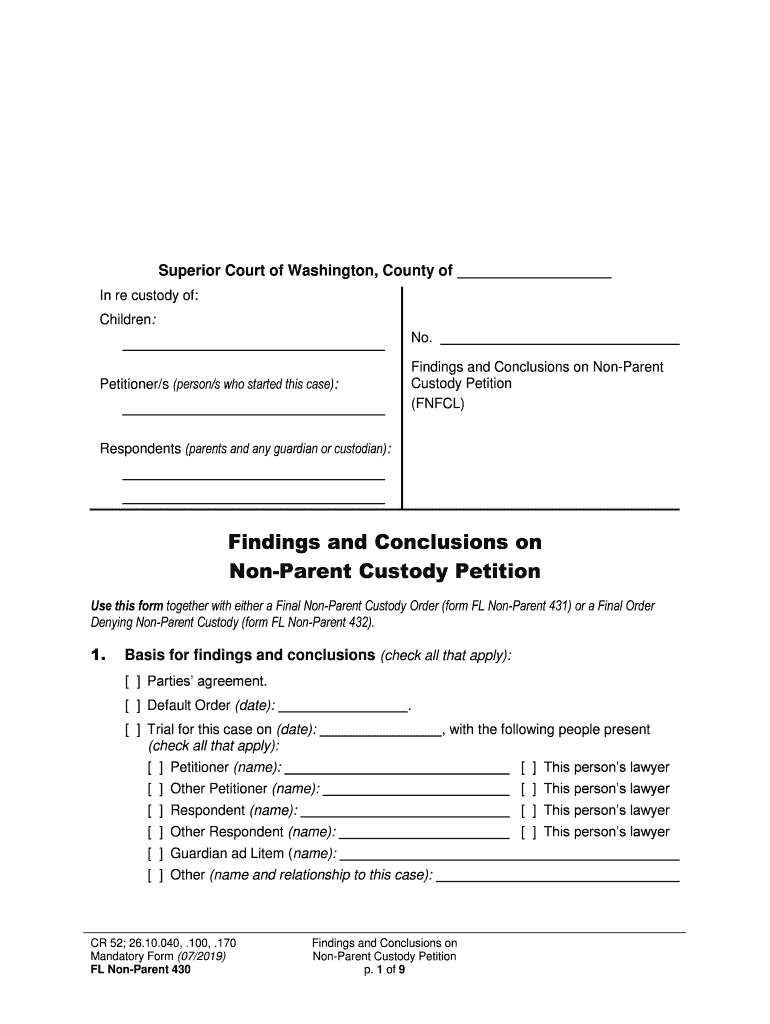
CR 52; 26.10.040, .100 , .170 Mandatory Form (07/201 9) FL Non -Parent 430 Findings and Conclusions on Non -Parent Custody Petitio n p. 1 of 9 Superior Court of Washington, County of In re custody of : Children : Petitioner /s (person /s who started this case ): Respondents (parent s and any guardian or custodian ): No. Findings and Conclusions on Non -Parent Custody Petition (FNFCL ) Fi ndings and Conclusions on Non -P arent Custody Petition Use this form together with either a Final Non -Parent Custody Order (form FL Non -Parent 431 ) or a Final Order Denying Non -Parent Custody (form FL Non -Parent 432 ). 1. Basis for findings and conclusions (check all that apply): [ ] Parties’ agreement . [ ] Default Order (date): . [ ] Trial for this case on (date): , with the following people present (check all that apply): [ ] Petitioner (name): [ ] This person’s lawyer [ ] Other Petitioner (nam e): [ ] This person’s lawyer [ ] Respondent (name): [ ] This person’s lawyer [ ] Other Respondent (name): [ ] This person’s lawyer [ ] Guardian ad Litem ( name): [ ] Other (name and relationship to this case): CR 52; 26.10.040, .100 , .170 Mandatory Form (07/201 9) FL Non -Parent 430 Findings and Conclusions on Non -Parent Custody Petitio n p. 2 of 9 2. Indian children (An Ind ian child is a child who is a member of an Indian tribe, or who is the biological child of an Indian tribe member and eligible for membership .) [ ] None of the children are Indian children . The state and federal Indian Child Welfare Acts do not apply to this case. The court makes this conclusion because (check all that apply) : [ ] the Petitioner made a good faith effort to find out if any child in this case is an Indian child . (RCW 13.38.050. ) The court has received no information showing tha t any child is or may be an Indian child. [ ] the Petitioner notified the tribal agent of every tribe the children may have been eligible for membership in . List tribes notified : . Each tribe responded that the children were not tribal members and n ot eligible for membership. [ ] other (specify): [ ] These children are Indian children : Children Tribe [ ] All children [ ] (name/s): [ ] All children [ ] (name/s): The federal and state Indian Child Welfare Acts apply to this case. Notice to tribes – The Petitioner [ ] provided [ ] did not provide the required Indian Child Welfare Act Notice (form FL Non -Parent 402 ) and a copy of th e Petition to the agent for the tribe/s named above , the parents and any Indian custodian . Evidence – The evidentiary requirements of the Acts [ ] have [ ] have not been met as described below . (RCW 13.38.130)  Active efforts – The following active efforts were made to provide remedial services and rehabilitative programs desig ned to p revent the breakup of the Indian family : (Active efforts means: “ a documented, concerted, and good faith effort to facilitate the parent's or Indian custodian's receipt of and engagement in ” those services and programs. RCW 13.38.040 .)  Serious em otional or physical damage – The court considered testimony from a qualified expert witness as defined in RCW 13.38.130. The court finds by clear and convincing evidence that the children (check one): [ ] would [ ] would not CR 52; 26.10.040, .100 , .170 Mandatory Form (07/201 9) FL Non -Parent 430 Findings and Conclusions on Non -Parent Custody Petitio n p. 3 of 9 likely suffer serious e motional or physical damage if they lived with either parent or an Indian custodian. The Court makes this conclusion because: 3. Jurisdiction over Indian child ren [ ] Does not apply. None of the children are Indian children. [ ] Th is court ca nnot decide this case for the se Indian children (names): because th is court does not have jurisdiction over the m. The Petition should be dismissed as to these children . [ ] This court can decide this case for the Indian children because (check o ne) : [ ] (Children’s names): are not domiciled or living on a n Indian reservatio n, and are not wards of a tribal court. (25 USC §1911) [ ] (Children’s names): are domiciled or living on an Indian reservatio n, or are wards of a tribal court, however (check all that apply): [ ] The child ren ’s tribe agrees to Washington State’s concurrent jurisdiction. [ ] The child ren’s tribe decided not to use its exclusive jurisdiction (expressly declined) . (RCW 13.38.060) [ ] Washington State should claim emerg ency jurisdiction for children temporarily located off the reservation to protect the children from immediate physical damage or harm. (RCW 13.38.140) [ ] Other (specify): 4. Dependency case [ ] There is no open dependency case for these children . [ ] There is an open dependency case for these children in county under case number: . The court handling the dependency has signed an order allowing this court to proceed with this non -parent custody case. 5. Jurisdiction over the children (RCW 26.27.201 – .221, .231, .261, .271) [ ] Th is court cannot decide this case for the se children (names): because th is court does not have jurisdiction over the m. The Petition should be dismissed as to these children. [ ] Th is court can decide t his case for the se children because (check all that apply; if a box applies to all of the children, you may write “the children” instead of listing names ): CR 52; 26.10.040, .100 , .170 Mandatory Form (07/201 9) FL Non -Parent 430 Findings and Conclusions on Non -Parent Custody Petitio n p. 4 of 9 [ ] Exclusive, continuing jurisdiction – A Washington court has already made a parenting plan, resi dential schedule or custody order for the child ren , and the court still has authority to make other orders for (children’s names): . [ ] Home state jurisdiction – Washington is the child ren ’s home state because (check all that apply): [ ] (Children’s names): lived in Washington with a parent or someone acting as a parent for at least the 6 months just before this case was filed, or if the child ren were less than 6 months old when the case was filed , they ha d lived in Washington with a parent or some one acting as a parent since birth. [ ] There were times the child ren were not in Washington in the 6 months just before this case was filed (or since birth if they were less than 6 months old), but those were temporary absences. [ ] (Children’s names): do not live in Washington right now, but Washington was the child ren ’s home state some time in the 6 months just before this case was filed, and a p arent or someone acting as a parent of the child ren still lives in Washington. [ ] (Children’s names): do not have another home state. [ ] No home state or home state declined – No court of any other state (or tribe) has the jurisdiction to make decisions for (children’s names): , or a court in the child ren ’s home state (or tribe) decided it is bette r to have this case in Washington and:  The child ren and a parent or someone acting as a parent have ties to Washington beyond just living here; and  There is a lot of information (substantial evidence) about the child ren ’s care, protection, education and re lationships in this state. [ ] Other state declined – The courts in other states (or tribes) that might be (children’s names): ’s home state have refused to take this case because it is better to have this case in Washington . [ ] Temporary emergency ju risdiction – Washington had temporary emergency jurisdiction over ( children’s names): when the case was filed, and now has jurisdiction to make a final custody decision because:  When the case was filed, the children were abandoned in this state, or the children were in this state and the children ( or children ’s parent, brother or sister ) was abused or threatened with abuse;  The court signed a temporary order on (date) saying that Washington’s jurisdiction will become final if no case is filed in the child ren ’s home state (or tribe) by the time the child ren ha ve been in Washington for 6 months;  The children ha ve now lived in Washington for 6 months; and  No case concerning the child ren has been started in the children ’s home state (or tribe) . [ ] Other reason (specify): CR 52; 26.10.040, .100 , .170 Mandatory Form (07/201 9) FL Non -Parent 430 Findings and Conclusions on Non -Parent Custody Petitio n p. 5 of 9 6. Background Record s Check ed The Court has (unless stated otherwise below) :  Checked the judicial information system for any information or proceedings relevant to placement of the children;  Reviewed the records from the Depart ment of Social and Health Services provided in response to the court’s Order to DSHS to Release CPS Information ; and  Reviewed the c riminal history record from the Washington State Patrol for Petitioner and each adult living in Petitioner’s home. [ ] The court did not check background records because the Petition is denied. [ ] Other findings (specify): 7. Adequate Cause The Court found there was adequate cause to make a final decision on the Petition in an Order on Adequate Cause for Non -Parent Cu stody (form FL Non -Parent 417 ) signed by the court on (date): . 8. Are there valid reasons why the children should not live with a parent? [ ] No . The Petitioners did not prove that both parents were unfit or that the children would suffer actual detr iment (harm) to their growth and development if they lived with either parent. The Petition should be denied . [ ] (Other findings ): [ ] Yes. At the time this case was filed (check all that apply ): [ ] the children we re not living with either parent. The children had been living with (name/s): since (date): . [ ] neither parent was a suitable custodian . And , Both parents are currently unfit, or, even if they may be fit, the children will suffer actual detriment (harm) to their growth and development i f they lived with either parent. (Th ese conclusion s are based on the following facts .) CR 52; 26.10.040, .100 , .170 Mandatory Form (07/201 9) FL Non -Parent 430 Findings and Conclusions on Non -Parent Custody Petitio n p. 6 of 9 9. Should the children live with Petitioner /s? [ ] Does not apply. The Court found no valid reasons why the children should not liv e with a parent. The Petition should be denied . [ ] No . The Petition should be denied. It is not in the child ren ’s best interests to live with the Petitioner/s because (explain): [ ] Yes. It is in the child ren ’s best interests to live with the Petitioner/s because (explain): 10 . Respondents ’ Visitation [ ] Does not apply. The Petition should be denied . [ ] The visitation ordered is reasonable. Findings about any reasons for limiting a parent’s visitation are summarized either in the Residential Schedule or the Non - Parent Custody Order . These findings are supported by the following facts (include facts about both parents) : 11 . Limitation on Petitioner’s Authority (RCW 26.10.170) [ ] Does not apply. The Petition sho uld be denied. [ ] No limits should be put on the Petitioner’s authority over the children’s upbringing or decision -making for the children. [ ] Limits should be put on the Petitioner’s authority over the children’s upbringing or decision -making for the children because (check all that apply ): [ ] the parties have agreed as follows: [ ] without a limit, the children’s physical, mental, or emotional health would be endangered. (Explain): CR 52; 26.10.040, .100 , .170 Mandatory Form (07/201 9) FL Non -Parent 430 Findings and Conclusions on Non -Parent Custody Petitio n p. 7 of 9 [ ] The court finds that an agency should be appo inted to assure the Petitioner is following the custodial or visitation terms of the order. The court finds that (agency name): is an appropriate agency that regularly deals with children . [ ] Other findings: 12 . Support , insurance and taxes The court has considered whether to order child support, health insurance, and allocation of tax exemptions . The court finds: [ ] Does not apply . The Petition should be denied. [ ] Child Support – The child ren should be support ed according to state law . [ ] The court signed the final Child Support Order and Worksheets filed separately today or on (date ): . [ ] There is no need for the court to make a child support order because the DSHS Division of Child Support (DCS) has already established an admini strative child support order for the children. [ ] Heath Insurance or other expenses – The parents should pay for health insurance, uninsured medical, day care, or other necessary expenses as listed in the (check one): [ ] final Child Support Order or administrative order . [ ] Final Non -Parent Custody Order (if no Child Support Order is being issued ). Support is ordered based on the Worksheets and/ or the following findings: [ ] Tax Issues – The parties should have the right to claim the children as their dependents for purposes of personal tax exemptions and associated tax credits on their t ax forms as listed on the final Child Support Order or Non -Parent Custody Order. Important! Although the personal tax exemptions are currently suspended unde r federal law through tax year 2025, other tax benefits may flow from claiming a child as dependent. [ ] (Check here i f the court is not ordering child support, health insurance , other expenses, and/ or allocating tax exemptions, and explain why .) [ ] Other (specify): 13 . Protection Order [ ] No one requested an Order for Protection in this case . [ ] (Name): requested a n Order for Protection in this case. CR 52; 26.10.040, .100 , .170 Mandatory Form (07/201 9) FL Non -Parent 430 Findings and Conclusions on Non -Parent Custody Petitio n p. 8 of 9 Conclusion: The court should (check one): [ ] not approve an Order for Protection order because: [ ] approve an Order for Protection because: 14 . Restraining Order [ ] No one requested a Restraining Order in this case . [ ] (Name ): requested a Restraining Order . Conclusion: The court should (check one): [ ] not approv e a Restraining Order because: [ ] approve a Restraining Order because: 15 . Fees and Court Costs [ ] Each party should pay his /her own fees or costs. [ ] (Name ): incurred fees and costs, and needs help to pay those fees and costs. (Nam e): has the ability to help pay fees and costs and should be ordered to pay the amount as listed in the Final Non -Parent Custody Order or Final Order Denying Non -Parent Custody . The court finds that the amount ordered is reasonable. [ ] Fees for a gua rdian ad litem (GAL) or other court -appointed professional should be paid as listed in the Final Non -Parent Custody Order or Final Order Denying Non - Parent Custody . The court has considered relevant factors including each party’s ability to pay, and finds the fees as ordered are reasonable. [ ] Other findings: 16 . Ot her findings or conclusions (if any) Date Judge or Commissioner CR 52; 26.10.040, .100 , .170 Mandatory Form (07/201 9) FL Non -Parent 430 Findings and Conclusions on Non -Parent Custody Petitio n p. 9 of 9 Petitioner /s and Respondent /s or their lawyers fill out below. This document (check any that apply) : This document (check any that apply) : [ ] is an agreement of the parties [ ] is an agreement of the parties [ ] is presented by me [ ] is presented by me [ ] may be signed by the court without notice to me [ ] may be signed by the court without notice to me Petitioner signs here or lawyer signs here + WSBA # Respondent signs here or lawyer signs here + WSBA # Print Name Date Print Name Date This document (check any that apply) : This document (check any that apply) : [ ] is an agreement of the pa rties [ ] is an agreement of the parties [ ] is presented by me [ ] is presented by me [ ] may be signed by the court without notice to me [ ] may be signed by the court without notice to me Other Petitioner or lawyer signs here + WSBA # Other Respondent or lawyer signs here + WSBA # Print Name Date Print Name Date

Valuable advice on preparing your ‘Findings And Conclusions On Non Parent’ online

Are you fed up with the inconvenience of managing paperwork? Look no further than airSlate SignNow, the premier electronic signature solution for individuals and organizations. Bid farewell to the lengthy routine of printing and scanning documents. With airSlate SignNow, you can effortlessly finalize and sign documents online. Utilize the powerful features included in this user-friendly and cost-effective platform and transform your method of paperwork organization. Whether you need to approve forms or gather eSignatures, airSlate SignNow simplifies the process, requiring only a few clicks.

Follow this detailed guide:

  1. Log into your account or initiate a free trial with our service.
  2. Click +Create to upload a file from your device, cloud storage, or our form repository.
  3. Open your ‘Findings And Conclusions On Non Parent’ in the editor.
  4. Click Me (Fill Out Now) to fill out the document on your end.
  5. Add and assign fillable fields for others (if necessary).
  6. Continue with the Send Invite settings to solicit eSignatures from others.
  7. Download, print your version, or convert it into a reusable template.

No need to worry if you want to collaborate with colleagues on your Findings And Conclusions On Non Parent or send it for notarization—our platform provides everything you need to accomplish these tasks. Sign up with airSlate SignNow today and enhance your document management to a superior level!

Here is a list of the most common customer questions. If you can’t find an answer to your question, please don’t hesitate to reach out to us.

Need help? Contact Support

The best way to complete and sign your findings and conclusions on non parent form

Save time on document management with airSlate SignNow and get your findings and conclusions on non parent form eSigned quickly from anywhere with our fully compliant eSignature tool.

How to Sign a PDF Online How to Sign a PDF Online

How to complete and sign forms online

Previously, working with paperwork took pretty much time and effort. But with airSlate SignNow, document management is fast and easy. Our powerful and easy-to-use eSignature solution lets you effortlessly fill out and electronically sign your findings and conclusions on non parent form online from any internet-connected device.

Follow the step-by-step guidelines to eSign your findings and conclusions on non parent form template online:

  • 1.Sign up for a free trial with airSlate SignNow or log in to your account with password credentials or SSO authorization option.
  • 2.Click Upload or Create and add a form for eSigning from your device, the cloud, or our form catalogue.
  • 3.Click on the file name to open it in the editor and use the left-side toolbar to fill out all the empty areas properly.
  • 4.Put the My Signature field where you need to approve your sample. Provide your name, draw, or import a photo of your regular signature.
  • 5.Click Save and Close to accomplish editing your completed form.

Once your findings and conclusions on non parent form template is ready, download it to your device, export it to the cloud, or invite other people to electronically sign it. With airSlate SignNow, the eSigning process only takes several clicks. Use our robust eSignature tool wherever you are to deal with your paperwork effectively!


How to Sign a PDF Using Google Chrome How to Sign a PDF Using Google Chrome

How to complete and sign documents in Google Chrome

Completing and signing documents is easy with the airSlate SignNow extension for Google Chrome. Installing it to your browser is a quick and efficient way to deal with your paperwork online. Sign your findings and conclusions on non parent form template with a legally-binding eSignature in just a few clicks without switching between applications and tabs.

Follow the step-by-step guide to eSign your findings and conclusions on non parent form template in Google Chrome:

  • 1.Navigate to the Chrome Web Store, search for the airSlate SignNow extension for Chrome, and add it to your browser.
  • 2.Right-click on the link to a form you need to sign and select Open in airSlate SignNow.
  • 3.Log in to your account using your password or Google/Facebook sign-in option. If you don’t have one, sign up for a free trial.
  • 4.Utilize the Edit & Sign toolbar on the left to complete your sample, then drag and drop the My Signature field.
  • 5.Upload a picture of your handwritten signature, draw it, or simply type in your full name to eSign.
  • 6.Verify all data is correct and click Save and Close to finish editing your form.

Now, you can save your findings and conclusions on non parent form template to your device or cloud storage, email the copy to other individuals, or invite them to electronically sign your document via an email request or a protected Signing Link. The airSlate SignNow extension for Google Chrome enhances your document processes with minimum effort and time. Try airSlate SignNow today!


How to Sign a PDF in Gmail How to Sign a PDF in Gmail How to Sign a PDF in Gmail

How to fill out and sign documents in Gmail

Every time you get an email containing the findings and conclusions on non parent form for signing, there’s no need to print and scan a file or save and re-upload it to a different tool. There’s a better solution if you use Gmail. Try the airSlate SignNow add-on to promptly eSign any paperwork right from your inbox.

Follow the step-by-step guide to eSign your findings and conclusions on non parent form in Gmail:

  • 1.Navigate to the Google Workplace Marketplace and find a airSlate SignNow add-on for Gmail.
  • 2.Install the tool with a related button and grant the tool access to your Google account.
  • 3.Open an email containing an attachment that needs approval and use the S key on the right panel to launch the add-on.
  • 4.Log in to your airSlate SignNow account. Choose Send to Sign to forward the file to other people for approval or click Upload to open it in the editor.
  • 5.Put the My Signature option where you need to eSign: type, draw, or upload your signature.

This eSigning process saves time and only requires a few clicks. Take advantage of the airSlate SignNow add-on for Gmail to adjust your findings and conclusions on non parent form with fillable fields, sign paperwork legally, and invite other people to eSign them al without leaving your inbox. Improve your signature workflows now!


How to Sign a PDF on a Mobile Device How to Sign a PDF on a Mobile Device How to Sign a PDF on a Mobile Device

How to fill out and sign forms in a mobile browser

Need to rapidly complete and sign your findings and conclusions on non parent form on a smartphone while doing your work on the go? airSlate SignNow can help without the need to install additional software applications. Open our airSlate SignNow solution from any browser on your mobile device and add legally-binding electronic signatures on the go, 24/7.

Follow the step-by-step guide to eSign your findings and conclusions on non parent form in a browser:

  • 1.Open any browser on your device and follow the link www.signnow.com
  • 2.Register for an account with a free trial or log in with your password credentials or SSO authentication.
  • 3.Click Upload or Create and import a file that needs to be completed from a cloud, your device, or our form catalogue with ready-made templates.
  • 4.Open the form and fill out the blank fields with tools from Edit & Sign menu on the left.
  • 5.Place the My Signature area to the sample, then enter your name, draw, or add your signature.

In a few simple clicks, your findings and conclusions on non parent form is completed from wherever you are. As soon as you're done with editing, you can save the file on your device, create a reusable template for it, email it to other people, or ask them to electronically sign it. Make your documents on the go fast and productive with airSlate SignNow!


How to Sign a PDF on iPhone How to Sign a PDF on iPhone

How to complete and sign documents on iOS

In today’s business community, tasks must be done quickly even when you’re away from your computer. With the airSlate SignNow mobile app, you can organize your paperwork and sign your findings and conclusions on non parent form with a legally-binding eSignature right on your iPhone or iPad. Install it on your device to conclude contracts and manage documents from anyplace 24/7.

Follow the step-by-step guidelines to eSign your findings and conclusions on non parent form on iOS devices:

  • 1.Open the App Store, find the airSlate SignNow app by airSlate, and set it up on your device.
  • 2.Launch the application, tap Create to upload a template, and select Myself.
  • 3.Select Signature at the bottom toolbar and simply draw your signature with a finger or stylus to eSign the sample.
  • 4.Tap Done -> Save right after signing the sample.
  • 5.Tap Save or use the Make Template option to re-use this paperwork in the future.

This method is so straightforward your findings and conclusions on non parent form is completed and signed within a couple of taps. The airSlate SignNow app works in the cloud so all the forms on your mobile device remain in your account and are available whenever you need them. Use airSlate SignNow for iOS to enhance your document management and eSignature workflows!


How to Sign a PDF on Android How to Sign a PDF on Android

How to fill out and sign paperwork on Android

With airSlate SignNow, it’s simple to sign your findings and conclusions on non parent form on the go. Set up its mobile application for Android OS on your device and start boosting eSignature workflows right on your smartphone or tablet.

Follow the step-by-step guidelines to eSign your findings and conclusions on non parent form on Android:

  • 1.Navigate to Google Play, find the airSlate SignNow app from airSlate, and install it on your device.
  • 2.Sign in to your account or create it with a free trial, then import a file with a ➕ key on the bottom of you screen.
  • 3.Tap on the imported file and choose Open in Editor from the dropdown menu.
  • 4.Tap on Tools tab -> Signature, then draw or type your name to eSign the template. Fill out empty fields with other tools on the bottom if necessary.
  • 5.Utilize the ✔ key, then tap on the Save option to finish editing.

With a user-friendly interface and full compliance with major eSignature standards, the airSlate SignNow application is the best tool for signing your findings and conclusions on non parent form. It even works without internet and updates all document adjustments when your internet connection is restored and the tool is synced. Complete and eSign documents, send them for approval, and make multi-usable templates anytime and from anyplace with airSlate SignNow.

Sign up and try Findings and conclusions on non parent form
  • Close deals faster
  • Improve productivity
  • Delight customers
  • Increase revenue
  • Save time & money
  • Reduce payment cycles

