Establishing secure connection… Loading editor… Preparing document…
Navigation

Fill and Sign the Florida Petition for Change of Name for Adult Form
Fill and Sign the Florida Petition for Change of Name for Adult Form

How it works

Open the document and fill out all its fields.
Apply your legally-binding eSignature.
Save and invite other recipients to sign it.

Rate template

4.8
40 votes
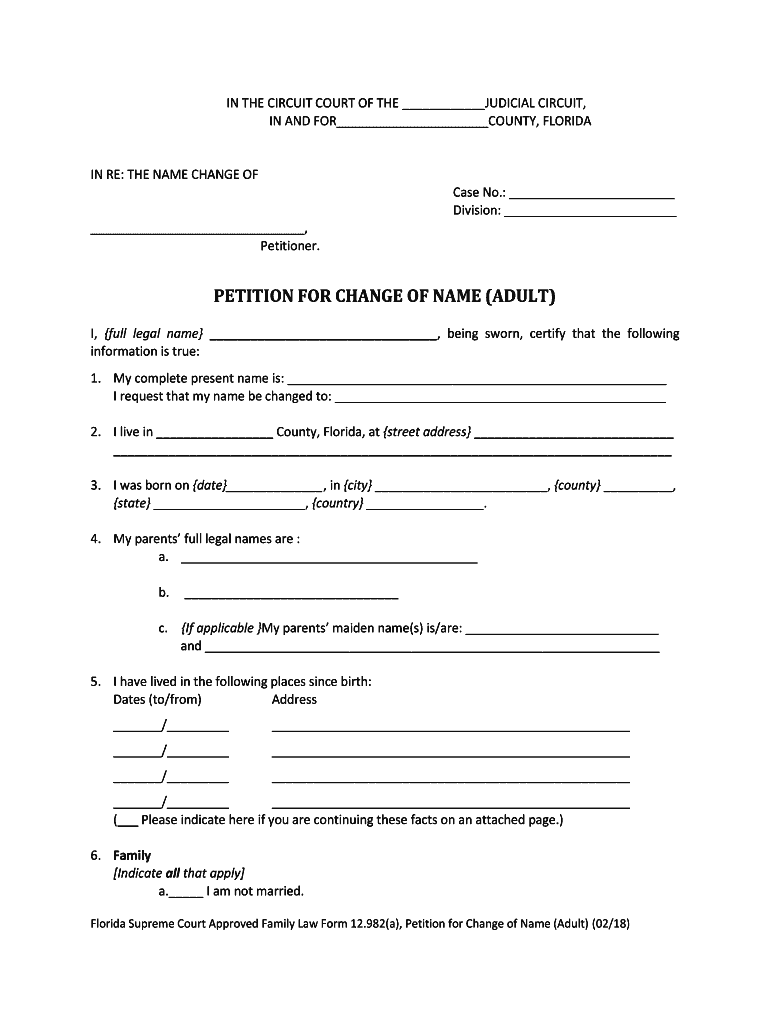
Instructions for Florida Supreme Court Approved Family Law Form 12.982(a), Petition for Change of Name (Adult) (02 /18 ) INSTRUCTIONS FOR FLORIDA SUPREME COURT APP ROVED FAMILY LAW FORM 12.982(a) PETITION FOR CHANGE OF NAME (ADULT) (02 /18 ) When should this form be used? This form should be used when an adult wants the court to change his or her name. This form is not to be used in connection with a dissolution of marriage or for adoption of child(ren) . If you want a change of name because of a dissolution of marriage or adoption of child(ren) that is not yet final, the change of name should be requested as part of that case. This form should be typed or printed in black ink and must be signed before a notary public or deputy clerk . You should file the original with the clerk of the circuit court in the county where you live and keep a copy for your records . What should I do next? Unless you are seeking to restore a former name, you must have fingerprints submitted for a state and national criminal records check. The fingerprints must be taken in a manner approved by the Department of Law Enforcement and must be submitted to the De partment for a state and national criminal records check. You may not request a hea ring on the p etition until the clerk of c ourt has received the results of your criminal history records check . The clerk of c ourt can instruct you on the process for havin g the fingerprints taken and submitted, including information on law enforcement agencies or service providers authorized to submit fingerprints electronically to the Department of Law Enforcement. The process may take several weeks and you will have to p ay for the cost of processing the fingerprints and conducting the state and national criminal history records check. Please note that the state and national criminal records check must indicate whether you have registered as a sexual predator or a sexual offender and you must also indicate on this petition whether you have ever been required to register as a sexual predator under section 775.21, Florida Statutes, or as a sexual offender under section 943.0435, F.S. Next , you must obtain a hearing date for the court to consider your request . If you are seeking to restore a former name, a hearing on the petition MAY be held immediately after the p etition is filed. The final hearing on any other petition for a name change may be held immediately aft er the clerk of c ourt receives the results of your criminal history records check. You should ask the clerk of court, family law intake staff , or judicial assistant about the local procedure for setting a hearing. You may be required to attend the final h earing . Included in these forms is a Final Judgment of Change of Name (Adult) , Florida Supreme Court Approved Family Law Form 12.982(b), which the judge may use. You should c ontact the clerk, family law intake staff, or judicial assistant, to see if you need to bring a final judgment form with you. If so, you should type or print the heading, including the circuit, county, case number, division, and the parties ’ names, and leave the rest blank for the judge to complete at your hearing or trial. If the judge grants your petition , he or she will sign this order . This officially changes your name. The clerk can provide you with certified copies of the signed order. There will be charges for the certified Instructions for Florida Supreme Court Approved Family Law Form 12.982(a), Petition for Change of Name (Adult) (02 /18 ) copies, and the clerk can tell you the amo unt of the charges . Where can I look for more information? Before proceeding, you should read General Information for Self -Represented Litigants found at the beginning of these forms. For further information, see S ection 68.07, Florida Statutes. IMPORTANT INFORMATION REGARDING E -FILING The Florida Rules of Judicial Administration ow require that all petitions, pleadings, and documents be filed electronically except in certain circumstances. Self -represented litigants may file petitions or other pleadings or documents electronically; however, they are not required to do so. If you choose to file your pleadings or other documents electronically, you must do so in accordance with Florida Rule of Judicial Administration 2.525, and you must follow the procedures of the judicial circuit in which you file. The rules and procedures should be carefully read and followed. IMPORTANT INFORMATION REGARDING E -SERVICE ELECTION After the initial service of process of the petition or supplemental petition by the Sheriff or certified process server, the Florida Rules of Judicial Administration now require that all documents required or permitted to be served on the other party must be served by electronic mail (e -mail) except in certain circumstances. You must strictly comply with the format requirements set forth in the Rules of Judicial Administration. If you elect to participate in electronic service, which means serving or rece iving pleadings by electronic mail (e -mail), or through the Florida Courts E -Filing Portal, you must review Florida Rule of Judicial Administration 2.516. You may find this rule at www.flcourts.org through the link t o the Rules of Judicial Administration provided under either Family Law Forms: Getting Started, or Rules of Court in the A -Z Topical Index. SELF -REPRESENTED LITIGANTS MAY SERVE DOCUMENTS BY E -MAIL; HOWEVER, THEY ARE NOT REQUIRED TO DO SO. If a self -repre sented litigant elects to serve and receive documents by e -mail, the procedures must always be followed once the initial election is made. To serve and receive documents by e -mail, you must designate your e -mail addresses by using the Designation of Curre nt Mailing and E -mail Address , Florida Supreme Court Approved Family Law Form 12.915, and you must provide your e -mail address on each form on which your signature appears. Please CAREFULLY read the rules and instructions for: Certificate of Service (Gener al), Florida Supreme Court Approved Family Law Form 12.914; Designation of Current Mailing and E -mail Address , Florida Supreme Court Approved Family Law Form 12.915; and Florida Rule of Judicial Administration 2.516. Instructions for Florida Supreme Court Approved Family Law Form 12.982(a), Petition for Change of Name (Adult) (02 /18 ) Special notes... The heading of the form calls for the name of the petitioner . Your current name should go there, as you are the one who is asking the court for something. The judicial circuit, case number, and division may be obtained from the clerk of court ’s office wh en you file the petition. It may be helpful to compile a list of all of the people and/or places that will need a copy of your final judgment. This list may include the driver ’s license office, social security office, banks, schools, etc. A list will he lp you know how many copies of your order you should get from the clerk of court after your hearing. Remember, a person who is NOT an attorney is called a nonlawyer. If a nonlawyer helps you fill out these forms, that person must give you a copy of a Disclosure from Nonlawyer , Florida Family Law Rules of Procedure Form 12.900 (a), before he or she helps you. A nonl awyer helping you fill out these forms also must put his or her name, address, and telephone number on the bottom of the last page of every fo rm he or she helps you comple te. Florida Supreme Court Approved Family Law Form 12.982(a), Petition for Change of Name (Adult) (02 /18 ) IN THE CIRCUIT COURT OF THE ____________ JUDICIAL CIRCUIT, IN AND FOR ______________________ COUNTY, FLORIDA IN RE: THE NAME CHANGE OF Case No.: ________________________ Division: _________________________ _____________________________ __ , Petitioner. PETITION FOR CHANGE OF NAME (ADULT) I, {full legal name} _________________________________ , being sworn, certify that the following information is true: 1. My complete present name is: ________________________ _______________________________ I request that my name be changed to: _________________ _______________________________ 2. I live in _________________ County, Florida, at {street address} _____________________________ _______________________________________________________________________________ __ 3. I was born on {date} ______________ , in {city} _________________________ , {county} __________ , {state} ______________________ , {country} _________________ . 4. My parents’ full legal name s are : a. ___________________________________________ b. __________________________ _____ c. {If applicable }My parent s’ maiden name (s) is/are : _________________________ ___ and __________________________________________________________________ 5. I have lived in the following places since birth: Dates (to/from) Address _______/_________ ____________________________________________________ _______/_________ ____________________________________________________ _______/_________ ____________________________________________________ _______/_________ ____________________________________________________ (___ Please indicate here if you are continuing these facts on an attached page. ) 6. Family [Indicate all that apply] a.____ _ I am not married. Florida Supreme Court Approved Family Law Form 12.982(a), Petition for Change of Name (Adult) (02 /18 ) b.____ _ I am married. My spouse ’s full legal name is: _____ ________________________ c.____ _ I do not have child(ren). d.____ _ The name(s), age(s), and address(es) of my child(ren) are as follows (all children, including those over 18 , must be listed): Name {last, first, middle initial} Age Address, City, State _____________________________________________________________________ __ ____________________________________________________________________ ____ ____________________________________________________________________ ___ _____________________________________________________________ __________ ______________________________________________________________________ _ (______Please indicate here if you are continuing these facts on an attache d page. ) 7. Former names [Indicate all that apply] a. _____ My name has never been changed by a court . b. _____ My name previously was changed by court order from ______________________ to _____ _____________________ on {date} _______________________________ , by {court, city, and state} ____________________________________________________ . A copy of the court order is attached . c. _____ My name previously was changed by marriage from ____ ______________________ to ___________________ on {date} , in {city, county, and state _______________________________________________________ . A copy of the marriage certificate is attached . d. _____ I have never been known or called by any other name. e. _____ I have been known or called by the following other name(s): {list name(s) and explain where you were known or called by such name(s)} ____________ _______________________ __________________________________________________________________________ 8. Occupation My occupation is: . I am employed at: {company and address} . During the past 5 years, I have had the following jobs: Dates (to/from) Employer and employer ’s address _______/_______ __________________________________________________________ _______/_______ __________________________________________________________ Florida Supreme Court Approved Family Law Form 12.982(a), Petition for Change of Name (Adult) (02 /18 ) _______/_______ __________________________________________________________ _______/_______ __________________________________________________________ _______/_______ ________________________________________________ __________ (_______Please indicate here if you are continuing these facts on an attached page. ) 9. Business [Choose one only ] __ I do not own and operate a business. __ I own and operate a business. The name of the business is: ___________________________ The street address is: . My position with the business is: . I have been involved with the business since: {date} . 10. Profession [Choose one only] _I am not in a profession. _I am in a profession. My profession is: _________________________________________ I have practiced this profession: Dates (to/from) Place and address _______/_______ __________________________________________________________ _______/_______ __________________________________________________________ _______/_______ __________________________________________________________ _______/_______ __________________________________________________________ ____ ___/_______ __________________________________________________________ ( _____ Please indicate here if you are continuing these facts on an attached page. ) 11. Education I have graduated from the following school(s): Degree Date of Received Graduation School _________ _____________ __________________________________________________ _________ __________ ___ __________________________________________________ _________ ________ _____ _______________ ______ _____________________________ (________ Please indicate here if you are continuing these facts on an attached page. ) 12. Criminal History Indicate all that apply _ I have never been arrested for or charged with, pled guilty or nolo contendere to, or been found to have committed a criminal offense, regardless of adjudication. _ I have a criminal history. In the past I have been arrested for or charged with, pled guilty or nolo contendere to, or been found to have committed a criminal offen se, regardless of adjudication. The details of my criminal history are: Florida Supreme Court Approved Family Law Form 12.982(a), Petition for Change of Name (Adult) (02 /18 ) Date City/State Event (arrest, charge, plea, or adjudication) ( _______ Please indicate here if you are continuing these facts on an attached page. ) I _____ have____have not ever been required to register as a sexual predator under section 775.21, Florida Statutes. I _____ have ______have not ever been required to register as a sexual offender under section 943.0435, Florida Statutes. 13. Bankruptcy [Choose one only] _I have never been adjudicated bankrupt. _I was adjudicated bankrupt on {date} , in {city} , {county} , {state} . (______ Please indicate here if you have filed additional bankruptcies, and explain on an attached page. ) 14. Creditor(s) ’ Judgments [Choose one only] _I have never had a money judgment entered against me by a creditor. _ The following creditor(s) ’ money judgment(s) have been entered against me: Date Amount Creditor Court enterin g judgment and case number if Paid {date} ______ _________ _________ _______________________________________________ ______ _________ _________ _______________________________________________ ______ _________ _________ _____________________ __________________________ ______ _________ _________ _______________________________________________ (_______ Please indicate here if these facts are continued on an attached page. ) 15. Fingerprints and Criminal History Records Check Unless I am seeking to restore a former name , a copy of my fingerprints has been taken in a manner approved by the Department of Law Enforcement and submitted for a state and national criminal history records check. I understand that I cannot request a h earing on my Petition until the Clerk of Court receives the results of the criminal history records check. I also understand that the state and national records check must indicate whether I have registered as either a sexual predator or sexual offender. 16. I have no ulterior or illegal purpose for filing this petition, and granting it will not in any manner invade the property rights of others, whether partnership, patent, good will, privacy, trademark, or otherwise. Florida Supreme Court Approved Family Law Form 12.982(a), Petition for Change of Name (Adult) (02 /18 ) 17. My civil rights have never been suspend ed, or, if my civil rights have been suspended, they have been fully restored. I understand that I am swearing or affirming under oath to the truthfulness of the claims made in this petition and that the punishment for knowingly making a false statement includes fines and/or imprisonment. Dated: ______________________ _____________________________________________ Signature of PETITIONER Printed Name: _________________________________ Address: _____________________________________ City, State, Zip: ________________________________ Telephone Number: _____________________________ Fax Number: __________________________________ Designated E -Mail Address(es):____________________ _____ ________________________________________ STATE OF FLORIDA COUNTY OF ____________________ Sworn to or affirmed and signed before me on ____________ by _______________________________ . _____________________________________________ NOTARY PUBLIC or DEPUTY CLERK _____________________________________________ [Print, type, or stamp commissioned name of notary or deputy clerk.] ____ Personally known ____ Produced identification ____ Type of identification produced ________________________________ IF A NONLAWYER HELPED YOU FILL OUT THIS FORM, HE/SHE MUST FILL IN THE BLANKS BELOW: [fill in all blanks] This form was prepared by the Petitioner. This form was completed with the assistance of:_ ____________________________________________ {name of individual } ___________ __________________________ ______________________________ , {name of business}:____________________________________________________________________, {address } ______________________ ___ _____________________ ______________________________ , {city } _____ _____ ______ , {state} _____ ,{zip code}________, {tele phone number } ______ ______ ______ .

Useful advice for preparing your ‘Florida Petition For Change Of Name For Adult’ online

Are you fed up with the inconvenience of managing paperwork? Look no further than airSlate SignNow, the premier electronic signature platform for individuals and small to medium-sized businesses. Bid farewell to the lengthy process of printing and scanning documents. With airSlate SignNow, you can effortlessly finalize and sign paperwork online. Utilize the extensive features packed into this user-centric and budget-friendly service to transform your document management approach. Whether you need to approve forms or collect electronic signatures, airSlate SignNow manages it all smoothly, with just a few clicks.

Adhere to this comprehensive guide:

  1. Access your account or initiate a free trial with our service.
  2. Select +Create to upload a document from your device, cloud storage, or our form repository.
  3. Edit your ‘Florida Petition For Change Of Name For Adult’ in the editor.
  4. Click Me (Fill Out Now) to complete the document on your end.
  5. Include and allocate fillable fields for other participants (if necessary).
  6. Continue with the Send Invite settings to solicit eSignatures from others.
  7. Save, print your version, or convert it into a reusable template.

Don't be concerned if you need to work together with your colleagues on your Florida Petition For Change Of Name For Adult or send it for notarization—our solution offers everything necessary to accomplish these tasks. Register with airSlate SignNow today and elevate your document management to a new standard!

Here is a list of the most common customer questions. If you can’t find an answer to your question, please don’t hesitate to reach out to us.

Need help? Contact Support

The best way to complete and sign your florida petition for change of name for adult form

Save time on document management with airSlate SignNow and get your florida petition for change of name for adult form eSigned quickly from anywhere with our fully compliant eSignature tool.

How to Sign a PDF Online How to Sign a PDF Online

How to fill out and sign forms online

Previously, working with paperwork required pretty much time and effort. But with airSlate SignNow, document management is fast and easy. Our robust and easy-to-use eSignature solution enables you to effortlessly complete and eSign your florida petition for change of name for adult form online from any internet-connected device.

Follow the step-by-step guidelines to eSign your florida petition for change of name for adult form template online:

  • 1.Register for a free trial with airSlate SignNow or log in to your account with password credentials or SSO authentication.
  • 2.Click Upload or Create and import a file for eSigning from your device, the cloud, or our form collection.
  • 3.Click on the file name to open it in the editor and use the left-side toolbar to complete all the blank areas appropriately.
  • 4.Put the My Signature field where you need to approve your form. Type your name, draw, or upload a picture of your handwritten signature.
  • 5.Click Save and Close to finish modifying your completed form.

Once your florida petition for change of name for adult form template is ready, download it to your device, export it to the cloud, or invite other individuals to electronically sign it. With airSlate SignNow, the eSigning process only takes several clicks. Use our powerful eSignature tool wherever you are to manage your paperwork efficiently!


How to Sign a PDF Using Google Chrome How to Sign a PDF Using Google Chrome

How to fill out and sign documents in Google Chrome

Completing and signing documents is easy with the airSlate SignNow extension for Google Chrome. Adding it to your browser is a quick and beneficial way to deal with your paperwork online. Sign your florida petition for change of name for adult form template with a legally-binding electronic signature in a few clicks without switching between applications and tabs.

Follow the step-by-step guidelines to eSign your florida petition for change of name for adult form in Google Chrome:

  • 1.Navigate to the Chrome Web Store, locate the airSlate SignNow extension for Chrome, and install it to your browser.
  • 2.Right-click on the link to a document you need to eSign and choose Open in airSlate SignNow.
  • 3.Log in to your account using your password or Google/Facebook sign-in option. If you don’t have one, you can start a free trial.
  • 4.Utilize the Edit & Sign toolbar on the left to complete your sample, then drag and drop the My Signature option.
  • 5.Insert an image of your handwritten signature, draw it, or simply type in your full name to eSign.
  • 6.Make sure all information is correct and click Save and Close to finish editing your form.

Now, you can save your florida petition for change of name for adult form sample to your device or cloud storage, send the copy to other people, or invite them to electronically sign your document with an email request or a protected Signing Link. The airSlate SignNow extension for Google Chrome improves your document workflows with minimum effort and time. Start using airSlate SignNow today!


How to Sign a PDF in Gmail How to Sign a PDF in Gmail How to Sign a PDF in Gmail

How to complete and sign paperwork in Gmail

When you get an email containing the florida petition for change of name for adult form for approval, there’s no need to print and scan a document or download and re-upload it to another tool. There’s a much better solution if you use Gmail. Try the airSlate SignNow add-on to promptly eSign any documents right from your inbox.

Follow the step-by-step guidelines to eSign your florida petition for change of name for adult form in Gmail:

  • 1.Go to the Google Workplace Marketplace and locate a airSlate SignNow add-on for Gmail.
  • 2.Install the program with a corresponding button and grant the tool access to your Google account.
  • 3.Open an email containing an attached file that needs approval and use the S sign on the right panel to launch the add-on.
  • 4.Log in to your airSlate SignNow account. Select Send to Sign to forward the file to other people for approval or click Upload to open it in the editor.
  • 5.Put the My Signature field where you need to eSign: type, draw, or upload your signature.

This eSigning process saves time and only takes a few clicks. Utilize the airSlate SignNow add-on for Gmail to update your florida petition for change of name for adult form with fillable fields, sign paperwork legally, and invite other parties to eSign them al without leaving your mailbox. Improve your signature workflows now!


How to Sign a PDF on a Mobile Device How to Sign a PDF on a Mobile Device How to Sign a PDF on a Mobile Device

How to complete and sign forms in a mobile browser

Need to rapidly complete and sign your florida petition for change of name for adult form on a mobile phone while working on the go? airSlate SignNow can help without needing to set up additional software apps. Open our airSlate SignNow solution from any browser on your mobile device and create legally-binding eSignatures on the go, 24/7.

Follow the step-by-step guide to eSign your florida petition for change of name for adult form in a browser:

  • 1.Open any browser on your device and go to the www.signnow.com
  • 2.Create an account with a free trial or log in with your password credentials or SSO authentication.
  • 3.Click Upload or Create and add a file that needs to be completed from a cloud, your device, or our form collection with ready-made templates.
  • 4.Open the form and fill out the empty fields with tools from Edit & Sign menu on the left.
  • 5.Add the My Signature area to the form, then type in your name, draw, or add your signature.

In a few easy clicks, your florida petition for change of name for adult form is completed from wherever you are. Once you're finished editing, you can save the document on your device, generate a reusable template for it, email it to other individuals, or invite them eSign it. Make your documents on the go fast and effective with airSlate SignNow!


How to Sign a PDF on iPhone How to Sign a PDF on iPhone

How to fill out and sign forms on iOS

In today’s business world, tasks must be accomplished rapidly even when you’re away from your computer. Using the airSlate SignNow app, you can organize your paperwork and sign your florida petition for change of name for adult form with a legally-binding eSignature right on your iPhone or iPad. Set it up on your device to close deals and manage forms from anyplace 24/7.

Follow the step-by-step guide to eSign your florida petition for change of name for adult form on iOS devices:

  • 1.Go to the App Store, search for the airSlate SignNow app by airSlate, and install it on your device.
  • 2.Launch the application, tap Create to add a template, and select Myself.
  • 3.Choose Signature at the bottom toolbar and simply draw your autograph with a finger or stylus to eSign the form.
  • 4.Tap Done -> Save after signing the sample.
  • 5.Tap Save or use the Make Template option to re-use this paperwork in the future.

This method is so straightforward your florida petition for change of name for adult form is completed and signed in just a few taps. The airSlate SignNow application works in the cloud so all the forms on your mobile device remain in your account and are available whenever you need them. Use airSlate SignNow for iOS to enhance your document management and eSignature workflows!


How to Sign a PDF on Android How to Sign a PDF on Android

How to complete and sign paperwork on Android

With airSlate SignNow, it’s easy to sign your florida petition for change of name for adult form on the go. Install its mobile application for Android OS on your device and start enhancing eSignature workflows right on your smartphone or tablet.

Follow the step-by-step guide to eSign your florida petition for change of name for adult form on Android:

  • 1.Navigate to Google Play, search for the airSlate SignNow application from airSlate, and install it on your device.
  • 2.Sign in to your account or register it with a free trial, then import a file with a ➕ button on the bottom of you screen.
  • 3.Tap on the uploaded document and select Open in Editor from the dropdown menu.
  • 4.Tap on Tools tab -> Signature, then draw or type your name to eSign the form. Complete empty fields with other tools on the bottom if needed.
  • 5.Utilize the ✔ key, then tap on the Save option to finish editing.

With an easy-to-use interface and full compliance with main eSignature laws and regulations, the airSlate SignNow application is the best tool for signing your florida petition for change of name for adult form. It even works offline and updates all form modifications when your internet connection is restored and the tool is synced. Fill out and eSign documents, send them for approval, and create multi-usable templates whenever you need and from anyplace with airSlate SignNow.

Sign up and try Florida petition for change of name for adult form
  • Close deals faster
  • Improve productivity
  • Delight customers
  • Increase revenue
  • Save time & money
  • Reduce payment cycles

