Establishing secure connection… Loading editor… Preparing document…
Navigation

Fill and Sign the Form 10 9
Fill and Sign the Form 10 9

How it works

Open the document and fill out all its fields.
Apply your legally-binding eSignature.
Save and invite other recipients to sign it.

Rate template

4.8
62 votes
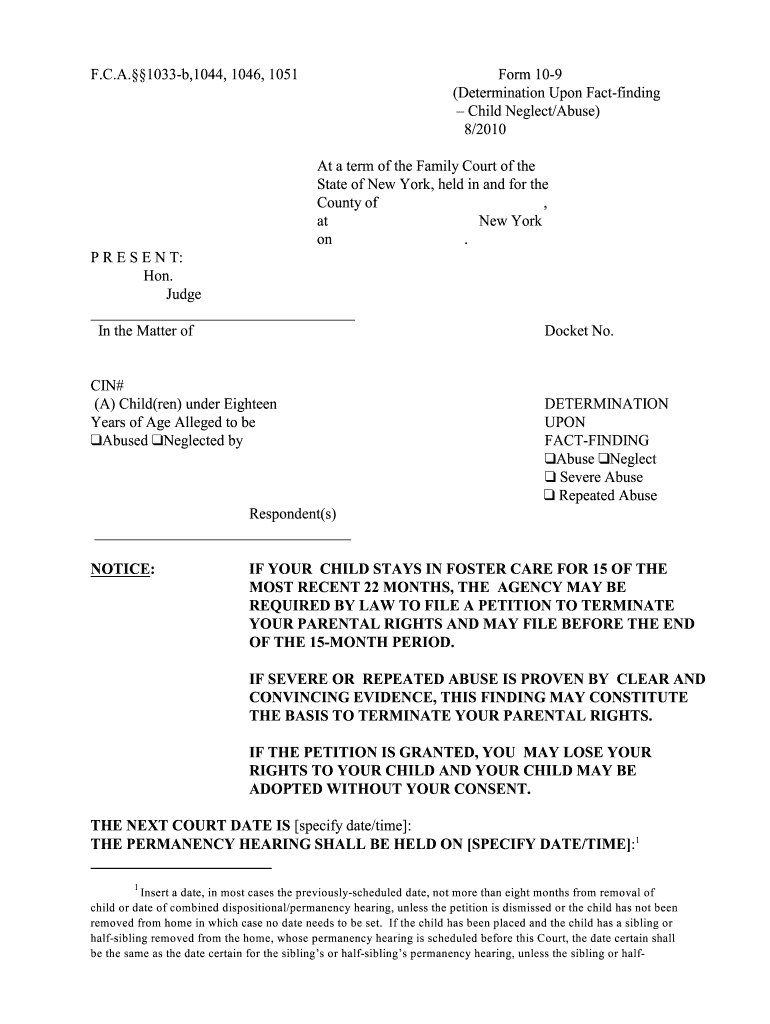
F.C.A.§§1033-b,1044, 1046, 1051 Form 10-9 (Determination Upon Fact-finding – Child Neglect/Abuse) 8/2010 At a term of the Family Court of the State of New York, held in and for the County of , at New Yorkon . P R E S E N T: Hon. Judge ___________________________________ In the Matter of Docket No. CIN# (A) Child(ren) under Eighteen DETERMINATION Years of Age Alleged to be UPON “ Abused “Neglected by FACT-FINDING“Abuse “Neglect “ Severe Abuse “ Repeated Abuse Respondent(s) __________________________________ NOTICE: IF YOUR CHILD STAYS IN FOSTER CARE FOR 15 OF THE MOST RECENT 22 MONTHS, THE AGENCY MAY BE REQUIRED BY LAW TO FILE A PETITION TO TERMINATE YOUR PARENTAL RIGHTS AND MAY FILE BEFORE THE END OF THE 15-MONTH PERIOD. IF SEVERE OR REPEATED ABUSE IS PROVEN BY CLEAR AND CONVINCING EVIDENCE, THIS FINDING MAY CONSTITUTE THE BASIS TO TERMINATE YOUR PARENTAL RIGHTS. IF THE PETITION IS GRANTED, YOU MAY LOSE YOUR RIGHTS TO YOUR CHILD AND YOUR CHILD MAY BE ADOPTED WITHOUT YOUR CONSENT. THE NEXT COURT DATE IS [specify date/time]: THE PERMANENCY HEARING SHALL BE HELD ON [SPECIFY DATE/TIME] :1 Insert a d ate, in m o st cases the p revio usly-sched ul ed d ate, no t m o re than eight m o nths fro m rem o val o f 1 child o r d ate o f co m b ined d isp o sitio nal/p erm anency hearing, unless the p etitio n is d ism issed o r the child has no t b een rem o ved fro m ho m e in w hich case no d ate need s to b e set. If the child has b een p laced and the child has a sib ling o r half-sib ling rem o ved fro m the ho m e, who se p erm anenc y hearing is sched uled b efo re this C o urt, the d ate certain shall b e the sam e as the d ate certain fo r the sib ling’s o r half-sib ling’s p erm anency hearing, unless the sib ling o r half- Form 10-9 Page 2 The petition of [specify]: under Article 10 of the Family Court Act, sworn to on [specify date]: , having been filed in this Court alleging that the above-named Respondent(s) [check applicable box(es)]: “ neglected “ abused “ severely abused “ repeatedly abused the above-named child(ren); and Notice having been duly given to the Respondent(s) pursuant to section 1036 or 1037 of the Family Court Act; and [Include separate paragraphs for each Respondent, as necessary]: Respondent [specify]: having: “ appeared “ with counsel “ without counsel “ waived counsel “ not appeared after service “ not appeared but service could not be made after every reasonable effort had been made to effect service; Respondent [specify]: having: “ appeared “ with counsel “ without counsel “ waived counsel “ not appeared after service “ not appeared but service could not be made after every reasonable effort had been made to effect service; And Respondent [specify]: having: “ voluntarily, intelligently and knowingly admitted in open court that (s)he committed the following act(s) [specify]: “ denied the allegations of the petition and the matter having duly come on for a fact- finding hearing before this Court ; “ failed to appear and the matter having duly come on for a fact- finding hearing by inquest before this Court ; “ voluntarily, intelligently and knowingly consented to the entry of an order of fact- finding without admission pursuant to Family Court Act §1051(a), and the Petitioner, attorney for the child and all other parties having consented to the entry of such order of fact-finding as well; And Respondent [specify]: having: “ voluntarily, intelligently and knowingly admitted in open court that (s)he committed the following act(s) [specify]: “ denied the allegations of the petition and the matter having duly come on for a fact- finding hearing before this Court ; “ failed to appear and the matter having duly come on for a fact- finding hearing by inquest before this Court ; “ voluntarily, intelligently and knowingly consented to the entry of an order of fact- finding without admission pursuant to Family Court Act §1051(a), and the Petitioner, attorney for the child and all other parties having consented to the entry of such order of fact- finding as well; And where the parent(s )of the above-named child(ren) are not the Respondent(s), the parent(s) were: “ present at the hearing and participated as interested party-intervenor(s); sib ling w as rem o ved o n a juvenile d elinq uency o r P I N S p etitio n o r unless he o r she has b een freed fo r ad o p tio n. Form 10-9 Page 3 “ served with a copy of the petition but did not appear; “ were not served with a copy of the petition and did not appear; although: every reasonable effort had been made to effect service; And the child(ren) having been represented by (an) attorney(s); And the following other interested party-intervenors were present and participated in the hearing [specify name(s) and relationship(s) to child(ren)]: [Required in cases involving Native-American children; check if applicable ]: “ And the following having been duly notified [check applicable box(es)]: “ parent/custodian “ tribe/nation “ United States Secretary of the Interior; And the tribe/nation having: “ appeared and participated as a party; “ appeared and declined to assume jurisdiction; “ appeared and requested transfer of jurisdiction; “ not appeared; And the Court, after [check box] “ hearing the proofs and testimony offered in relation to the case “ accepting the admission by Respondent [specify]: ; and having found [check applicable box(es) and specify act(s) of abuse and/or neglect found, if any]: “ by a preponderance of the evidence that Respondent [specify]: committed the following acts constituting “ child neglect “ child abuse [specify act(s), including name(s) of the child(ren), the Penal Law section, if applicable, and grounds for determination]: “ by a preponderance of the evidence that Respondent [specify]: committed the following acts constituting “ child neglect “ child abuse [specify act(s), including name(s) of the child(ren), the Penal Law section, if applicable, and grounds for determination]: [Applicable only where severe or repeated abuse was alleged and Respondent was so advised]: “ by clear and convincing evidence that Respondent [specify]: “ severely “ repeatedly abused the child(ren) by committing the following acts(s) that may form the basis to terminate parental rights [specify act(s), including the name(s) of the child(ren), the Penal Law section, if applicable; and grounds for determination]: “ by clear and convincing evidence that Respondent [specify]: “ severely “ repeatedly abused the child(ren) by committing the following acts(s) that may form the basis to terminate parental rights [specify act(s), including the name(s) of the child(ren), the Penal Law section, if applicable; and grounds for determination]: [Required findings in cases where the child(ren), who had NOT been ordered removed earlier in the case, is/are ordered removed pending final disposition; otherwise, skip I and II]: The Court finds and determines that : Form 10-9 Page 4 I. Required “Best Interests” and “Reasonable Efforts” Findings for Newly-removed Children [check applicable boxes and provide case-specific reasons in both A and B, below]: A. Continuation of the child(ren) in, or return of the child(ren) to, the child(ren)'s home “ would “ would not be contrary to the best interests of the child(ren) because [specify facts and reasons]: This determination is based upon the following information [check applicable box(es)]: G Petition G Report of Suspected Child Abuse or Neglect G Case Record, dated [specify]: G Service Plan, dated [specify]: G The report of [specify]: , dated [specify]: G Testimony of [specify]: G Other [specify]: B. Reasonable efforts, where appropriate, to prevent or eliminate the need for removal of the child(ren) from the home, and, if the child(ren) were removed without court order prior to the date of this hearing, to return them home safely [check applicable box and state reasons as indicated]: G were made as follows [specify]: G were not made but the lack of efforts was appropriate because of a judicial finding that the Petitioner was not required to make reasonable efforts to reunify the child(ren) with the Respondent(s) [specify date of finding]: G were not made. This determination is based upon the following information [check applicable box(es)]: G Petition G Report of Suspected Child Abuse or Neglect G Case Record, dated [specify]: G Service Plan, dated [specify]: G The report of [specify]: , dated [specify]: G Testimony of [specify]: G Other [specify]: II. Findings Regarding Alternatives to Removal to Foster Care : A. Based upon the investigation conducted by the Commissioner of Social Service, [Check applicable box(es]: “ The following person [specify]: is a “ non-respondent parent “ relative “ suitable person with whom the child(ren) may appropriately reside [specify]: [Applicable to relatives and other suitable persons]: Such person: “ seeks approval as a foster parent in order to provide care for the child(ren); “ wishes to provide care and custody for the child(ren) without foster care subsidy during the pendency of any order herein. Form 10-9 Page 5 “ may be a resource but not yet determined whether as a foster parent or custodian. “ There is no non-respondent parent, relative or suitable person with whom the child(ren) may appropriately reside. B. [Required]: Imminent risk to the child(ren) “ would “ would not be eliminated by the issuance of a temporary order of protection or order of protection directing the removal of [specify]: from the child(ren)'s residence. NOW, therefore, upon the findings made in the fact-finding hearing and upon all the proceedings had herein, it is ADJUDGED that facts sufficient to sustain the petition herein “ have “ have not been established, in that [specify]: ; and it is hereby [Check applicable box(es); include separate paragraphs for each child as necessary]: “ ADJUDGED that the above-named child(ren) (is) (are) (a) “ neglected “ abused “ severely abused “ repeatedly abused) child(ren) as defined in section 1012 of the Family Court Act by [specify Respondent(s)]: ; OR “ ORDERED, that the petition filed herein be DISMISSED; and it is further “ ORDERED that the child(ren) shall be temporarily removed from the place where the child(ren) (is) (are) residing by any peace officer or agent of a duly authorized agency, society or institution and that the child(ren) shall be brought to [specify]: pending disposition of this proceeding; (and it is further) “ ORDERED that the child(ren)(is)(are) released to the custody of [specify]: , the child(ren)'s “ Respondent parent(s) “ Non-respondent parent(s) “ other person legally responsible for the child(ren)'s care, such release to be under the supervision of [specify, if applicable]: ; (and it is further) “ ORDERED that, pending further proceedings, the child(ren) shall be placed in the temporary custody of [check applicable box]: “ the Commissioner of Social Services of County; “ the Commissioner of Social Services of County to reside with [specify]: “ the following non-respondent parent(s), relatives or other suitable person(s)[specify]: ; (and it is further) (and it is further) “ ORDERED that the Commissioner of Social Services shall investigate whether there are any non-respondent parents, grandparents, other relatives or other suitable person(s) with whom the child(ren) may appropriately reside, including, but not limited to [specify]: ; shall inform them of the pendency of the proceeding; shall ascertain whether such person(s) wish to seek approval as foster parent(s) in order to provide care for the child(ren) or wish Form 10-9 Page 6 to provide care and custody for the child(ren) without foster care subsidy during the pendency of any order herein; and shall record the results of such investigation in the child’s Uniform Case Record; (and it is further) “ ORDERED that, within 24 hours of this order, the Commissioner of Social Services shall commence an investigation of the following relatives or other suitable persons as foster parents and thereafter approve such person(s) to be foster parents, if qualified, and, if not, to report such fact to the Court, all parties and counsels, including the attorney for the child(ren), forthwith [specify]: [Applicable where child in custody of Commissioner of Social Services]:“ ORDERED that if the child absconds from the above-named custodial person or facility, written notice shall be given within 48 hours to the Clerk of Court by the custodial person or by an authorized representative of the facility, stating the name of the child, the docket number of this procedure, and the date on which the child ran away. ; (and it is further) [Applicable Where Child is Native-American]:“ ORDERED that the following should be notified of this proceeding [specify]: the “ custodian of the child; “ tribe/nation; “ United States Secretary of the Interior “ ORDERED that in light of the assumption of jurisdiction by the tribe/nation, this petition is DISMISSED WITHOUT PREJUDICE; (and it is further) “ ORDERED that if the child remains in foster care or is directly placed pursuant to Sections 1017 or 1055 of the Family Court Act, a permanency hearing shall be held on [specify date certain]: 2 ; (and it is further) “ ORDERED that ENTER ___________________________________ Dated: Judge of the Family Court NOTICE: PURSUANT TO SECTION 1113 OF THE FAMILY COURT ACT, AN APPEAL FROM THIS ORDER MUST BE TAKEN WITHIN 30 DAYS OF RECEIPT OF THE ORDER BY APPELLANT IN COURT, 35 DAYS FROM THE DATE OF MAILING OF THE ORDER TO APPELLANT BY THE CLERK OF COURT, OR 30 DAYS AFTER SERVICE BY A PARTY OR THE ATTORNEY FOR THE CHILD UPON THE APPELLANT, WHICHEVER IS EARLIEST. Check applicable box: 9 Order mailed on [specify date(s) and to whom mailed ]:___________________________ 9 Order received in court on [specify date(s) and to whom given]:_____________________ Insert a d ate, in m o st cases the p revio usly-sched ul ed d ate, no t m o re than eight m o nths fro m rem o val o f 2 child o r d ate o f co m b ined d isp o sitio nal/p erm anency hearing, unless the p etitio n is d ism issed o r the child has no t b een rem o ved fro m ho m e in w hich case no d ate need s to b e set. If the child has b een p laced and the child has a sib ling o r half-sib ling rem o ved fro m the ho m e, who se p erm anenc y hearing is sched uled b efo re this C o urt, the d ate certain shall b e the sam e as the d ate certain fo r the sib ling’s o r half-sib ling’s p erm anency hearing, unless the sib ling o r half- sib ling w as rem o ved o n a juvenile d elinq uency o r P I N S p etitio n o r unless he o r she has b een freed fo r ad o p tio n.

Helpful advice on preparing your ‘Form 10 9’ online

Are you fed up with the complications of handling paperwork? Search no further than airSlate SignNow, the leading eSignature solution for individuals and businesses. Bid farewell to the tedious task of printing and scanning documents. With airSlate SignNow, you can effortlessly complete and sign documents online. Utilize the powerful features embedded in this user-friendly and affordable platform and transform your method of document management. Whether you need to approve forms or gather electronic signatures, airSlate SignNow manages everything seamlessly, requiring just a few clicks.

Follow this comprehensive guide:

  1. Sign in to your account or sign up for a free trial with our service.
  2. Hit +Create to upload a document from your device, cloud storage, or our template library.
  3. Open your ‘Form 10 9’ in the editor.
  4. Click Me (Fill Out Now) to fill out the form on your end.
  5. Include and designate fillable fields for others (if needed).
  6. Continue with the Send Invite settings to request eSignatures from others.
  7. Store, print your copy, or convert it into a reusable template.

No need to worry if you have to collaborate with your teammates on your Form 10 9 or send it for notarization—our platform provides everything you require to accomplish such tasks. Create an account with airSlate SignNow today and enhance your document management to new levels!

Here is a list of the most common customer questions. If you can’t find an answer to your question, please don’t hesitate to reach out to us.

Need help? Contact Support
w-9 form download
w-9 form printable
W9 form 2024 PDF
Form 10 9 pdf
Form 10 9 template
Free W9 form 2024
w-9 form irs
w-9 form purpose
W-9 form download
W-9 form 2025 PDF
Form 10 9 pdf
Form 10 9 printable

The best way to complete and sign your form 10 9

Save time on document management with airSlate SignNow and get your form 10 9 eSigned quickly from anywhere with our fully compliant eSignature tool.

How to Sign a PDF Online How to Sign a PDF Online

How to fill out and sign documents online

In the past, coping with paperwork required lots of time and effort. But with airSlate SignNow, document management is fast and easy. Our powerful and easy-to-use eSignature solution enables you to easily fill out and electronically sign your form 10 9 online from any internet-connected device.

Follow the step-by-step guidelines to eSign your form 10 9 template online:

  • 1.Register for a free trial with airSlate SignNow or log in to your account with password credentials or SSO authorization option.
  • 2.Click Upload or Create and import a form for eSigning from your device, the cloud, or our form catalogue.
  • 3.Click on the document name to open it in the editor and use the left-side menu to complete all the blank fields appropriately.
  • 4.Place the My Signature field where you need to approve your form. Type your name, draw, or upload an image of your regular signature.
  • 5.Click Save and Close to accomplish editing your completed form.

As soon as your form 10 9 template is ready, download it to your device, export it to the cloud, or invite other individuals to electronically sign it. With airSlate SignNow, the eSigning process only takes a few clicks. Use our robust eSignature solution wherever you are to handle your paperwork successfully!


How to Sign a PDF Using Google Chrome How to Sign a PDF Using Google Chrome

How to complete and sign paperwork in Google Chrome

Completing and signing paperwork is easy with the airSlate SignNow extension for Google Chrome. Installing it to your browser is a quick and beneficial way to deal with your paperwork online. Sign your form 10 9 template with a legally-binding electronic signature in a couple of clicks without switching between tools and tabs.

Follow the step-by-step guide to eSign your form 10 9 template in Google Chrome:

  • 1.Go to the Chrome Web Store, find the airSlate SignNow extension for Chrome, and install it to your browser.
  • 2.Right-click on the link to a document you need to approve and select Open in airSlate SignNow.
  • 3.Log in to your account using your password or Google/Facebook sign-in buttons. If you don’t have one, sign up for a free trial.
  • 4.Utilize the Edit & Sign menu on the left to complete your template, then drag and drop the My Signature option.
  • 5.Upload a photo of your handwritten signature, draw it, or simply enter your full name to eSign.
  • 6.Verify all the details are correct and click Save and Close to finish modifying your paperwork.

Now, you can save your form 10 9 sample to your device or cloud storage, send the copy to other individuals, or invite them to electronically sign your form via an email request or a secure Signing Link. The airSlate SignNow extension for Google Chrome enhances your document processes with minimum time and effort. Start using airSlate SignNow today!


How to Sign a PDF in Gmail How to Sign a PDF in Gmail How to Sign a PDF in Gmail

How to fill out and sign documents in Gmail

When you get an email with the form 10 9 for signing, there’s no need to print and scan a document or download and re-upload it to a different program. There’s a better solution if you use Gmail. Try the airSlate SignNow add-on to promptly eSign any paperwork right from your inbox.

Follow the step-by-step guide to eSign your form 10 9 in Gmail:

  • 1.Visit the Google Workplace Marketplace and locate a airSlate SignNow add-on for Gmail.
  • 2.Set up the tool with a corresponding button and grant the tool access to your Google account.
  • 3.Open an email containing an attached file that needs approval and use the S key on the right panel to launch the add-on.
  • 4.Log in to your airSlate SignNow account. Choose Send to Sign to forward the document to other people for approval or click Upload to open it in the editor.
  • 5.Place the My Signature option where you need to eSign: type, draw, or import your signature.

This eSigning process saves time and only requires a few clicks. Utilize the airSlate SignNow add-on for Gmail to adjust your form 10 9 with fillable fields, sign documents legally, and invite other parties to eSign them al without leaving your inbox. Improve your signature workflows now!


How to Sign a PDF on a Mobile Device How to Sign a PDF on a Mobile Device How to Sign a PDF on a Mobile Device

How to fill out and sign documents in a mobile browser

Need to rapidly fill out and sign your form 10 9 on a smartphone while working on the go? airSlate SignNow can help without needing to install additional software applications. Open our airSlate SignNow tool from any browser on your mobile device and add legally-binding eSignatures on the go, 24/7.

Follow the step-by-step guide to eSign your form 10 9 in a browser:

  • 1.Open any browser on your device and go to the www.signnow.com
  • 2.Create an account with a free trial or log in with your password credentials or SSO option.
  • 3.Click Upload or Create and add a file that needs to be completed from a cloud, your device, or our form collection with ready-to go templates.
  • 4.Open the form and complete the empty fields with tools from Edit & Sign menu on the left.
  • 5.Add the My Signature field to the sample, then type in your name, draw, or upload your signature.

In a few easy clicks, your form 10 9 is completed from wherever you are. As soon as you're finished editing, you can save the document on your device, build a reusable template for it, email it to other individuals, or invite them electronically sign it. Make your documents on the go fast and effective with airSlate SignNow!


How to Sign a PDF on iPhone How to Sign a PDF on iPhone

How to fill out and sign forms on iOS

In today’s business world, tasks must be completed rapidly even when you’re away from your computer. With the airSlate SignNow mobile app, you can organize your paperwork and approve your form 10 9 with a legally-binding eSignature right on your iPhone or iPad. Install it on your device to conclude agreements and manage forms from anywhere 24/7.

Follow the step-by-step guide to eSign your form 10 9 on iOS devices:

  • 1.Open the App Store, search for the airSlate SignNow app by airSlate, and set it up on your device.
  • 2.Launch the application, tap Create to import a form, and choose Myself.
  • 3.Opt for Signature at the bottom toolbar and simply draw your signature with a finger or stylus to eSign the sample.
  • 4.Tap Done -> Save after signing the sample.
  • 5.Tap Save or use the Make Template option to re-use this paperwork later on.

This method is so easy your form 10 9 is completed and signed in a couple of taps. The airSlate SignNow app works in the cloud so all the forms on your mobile device are kept in your account and are available any time you need them. Use airSlate SignNow for iOS to boost your document management and eSignature workflows!


How to Sign a PDF on Android How to Sign a PDF on Android

How to fill out and sign forms on Android

With airSlate SignNow, it’s easy to sign your form 10 9 on the go. Install its mobile app for Android OS on your device and start improving eSignature workflows right on your smartphone or tablet.

Follow the step-by-step guidelines to eSign your form 10 9 on Android:

  • 1.Open Google Play, search for the airSlate SignNow application from airSlate, and install it on your device.
  • 2.Log in to your account or create it with a free trial, then import a file with a ➕ key on the bottom of you screen.
  • 3.Tap on the imported document and select Open in Editor from the dropdown menu.
  • 4.Tap on Tools tab -> Signature, then draw or type your name to electronically sign the form. Fill out empty fields with other tools on the bottom if required.
  • 5.Use the ✔ button, then tap on the Save option to finish editing.

With a user-friendly interface and full compliance with primary eSignature standards, the airSlate SignNow app is the perfect tool for signing your form 10 9. It even works without internet and updates all form changes when your internet connection is restored and the tool is synced. Complete and eSign documents, send them for approval, and make multi-usable templates anytime and from anyplace with airSlate SignNow.

Sign up and try Form 10 9
  • Close deals faster
  • Improve productivity
  • Delight customers
  • Increase revenue
  • Save time & money
  • Reduce payment cycles


