Establishing secure connection… Loading editor… Preparing document…
Navigation

Fill and Sign the Form 6 K Golar Lng Partners Lp for Jan 14
Fill and Sign the Form 6 K Golar Lng Partners Lp for Jan 14

How it works

Open the document and fill out all its fields.
Apply your legally-binding eSignature.
Save and invite other recipients to sign it.

Rate template

4.7
58 votes
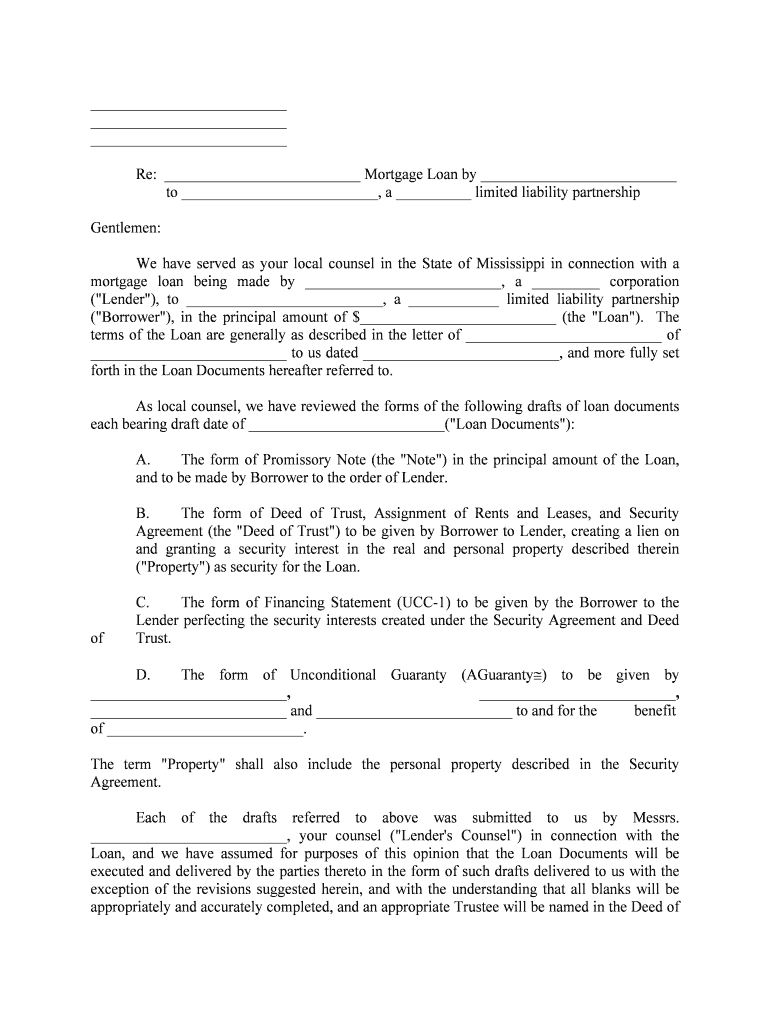
______________________________________________________________________________Re: __________________________ Mortgage Loan by __________________________ to __________________________, a __________ limited liability partnershipGentlemen:We have served as your local counsel in the State of Mississippi in connection with a mortgage loan being made by __________________________, a _________ corporation ("Lender"), to __________________________, a ____________ limited liability partnership ("Borrower"), in the principal amount of $__________________________ (the "Loan"). The terms of the Loan are generally as described in the letter of __________________________ of __________________________ to us dated __________________________, and more fully set forth in the Loan Documents hereafter referred to.As local counsel, we have reviewed the forms of the following drafts of loan documents each bearing draft date of __________________________("Loan Documents"):A.The form of Promissory Note (the "Note") in the principal amount of the Loan, and to be made by Borrower to the order of Lender.B. The form of Deed of Trust, Assignment of Rents and Leases, and Security Agreement (the "Deed of Trust") to be given by Borrower to Lender, creating a lien on and granting a security interest in the real and personal property described therein ("Property") as security for the Loan.C.The form of Financing Statement (UCC-1) to be given by the Borrower to the Lender perfecting the security interests created under the Security Agreement and Deed of Trust.D. The form of Unconditional Guaranty (Guaranty) to be given by __________________________, __________________________, __________________________ and __________________________ to and for the benefit of __________________________.The term "Property" shall also include the personal property described in the Security Agreement.Each of the drafts referred to above was submitted to us by Messrs. __________________________, your counsel ("Lender's Counsel") in connection with the Loan, and we have assumed for purposes of this opinion that the Loan Documents will be executed and delivered by the parties thereto in the form of such drafts delivered to us with the exception of the revisions suggested herein, and with the understanding that all blanks will be appropriately and accurately completed, and an appropriate Trustee will be named in the Deed of Trust. We have also reviewed such questions of law and other matters as we deemed appropriate to enable us to render this opinion. Unless otherwise indicated, all statutory references are to the Mississippi Code of 1972, as amended.For purposes of this opinion, we have assumed, without any verification, that: (a) the Borrower has good and marketable title to all of the Property; (b) the Loan will be closed and the Loan Documents signed in the State of Mississippi;  payments on account of the Loan will be made to Lender in the State of _________; (d) Lender does not actively solicit business within the State of Mississippi and, apart from the making of loans secured by real property in the State of Mississippi, does not do business within the State of Mississippi; (e) Lender is a corporation organized under the laws of the State of ______________, is not qualified to do business in Mississippi, and it does not maintain an office within the State of Mississippi nor does it have any officers, employees or agents (including soliciting agents) residing in Mississippi, nor regularly operating in Mississippi; (f) Lender does not sell property in Mississippi on the installment method; (g) Lender is not a foreign insurance company subject to certification by Mississippis Commissioner of Insurance; and (h) the proceeds of the Loan will not be used for agricultural, livestock or single family residential purposes.Regarding Section 4.1 of the Deed of Trust [and paragraph 5 of the Promissory Note], due-on-sale clauses have generally been upheld in Mississippi. First National Bank of Vicksburg v. Caruthers, 443 So. 2d 861 (Miss. 1983); Unifirst Federal Savings & Loan Association v. Tower Loan, 524 So. 2d 290 (Miss. 1986). "Our law allows a first mortgage lender to prohibit sale or transfer of the collateral without consent." Tower Loan at p. 292. Section 17 would trigger the acceleration provisions of the Note and Deed of Trust. This section states in part, "Any transfer . . . by . . . deed of trust, further encumbrance or otherwise . . . ." In dictum, the Court in Unifirst v. Tower Loan at pg. 292 stated: "It makes sense that a first mortgage holder be prohibited from acceleration or other objection upon the creation of a second mortgage, for nothing done thereby invades or prejudices any legitimate right or expectation of the first mortgage holder." It is unclear whether or not a Mississippi Court would enforce the acceleration of a debt due to the creation of a junior encumbrance on the property which is security for the loan.With regard to part of Section 9.8 of the Deed of Trust (waiving statutes of limitation) and part of Section 9.7 (attorney-in-fact provisions), please be advised that certain provisions of these paragraphs are overly broad and are unenforceable in part. We will be glad to give a detailed explanation as to what aspects of these Sections are unenforceable and why if you so desire. There is no harm, however, in leaving these paragraphs as they are in the instrument. The same is true regarding the enforceability of Section 6.2 (Collection of Rents) regarding the attorney-in-fact provisions.With regard to Section 9.18 of the Deed of Trust, please be advised that the enforceability of this paragraph will be governed in part by  89-1-49, 89-5-19 and 15-1-21 of the Mississippi Code. Section 89-5-33 of the Mississippi Code provides, in part, as follows:Every person who prepares a legal description of land or who prepares an instrument utilizing an existing description shall (except as herein provided) include an indexing instruction which shall state the section, township and range and one or more quarter sections or governmental lots or other applicable subdivisions of each section in which the land is located. The preparer, at his option, may elect to note the quarter-quarter section in which the land is located, but shall not be required to do so.We suggest that this indexing instruction be placed in the upper right hand corner of the first page of the Deed of Trust.The description in the Deed of Trust and the UCC-1 Financing Statement refers to _______ County, Mississippi. There is no such county in Mississippi.We recommend that you use the standard UCC-1 which has been adopted by the Secretary of State of Mississippi. We have enclosed this form along with the instructions for completion. We suggest that one form be used for filing in the UCC Records of the Chancery Clerk where the collateral is located and one be filed in the land records as a fixture filing with the proper indexing instruction. Of course you will also need to file a UCC-1 with the Mississippi Secretary of State.With the exception of the foregoing, we are pleased to advise you that in our opinion:1.Each of the Loan Documents is in a form reasonably customary in the State of Mississippi, is satis factory for use in the State of Mississippi to evidence and secure the Loan, and, if duly authorized and validly executed and delivered on behalf of the parties named therein, and recorded or filed with governmental offices as necessary, will provide, in substance, the benefits and security described therein.2.The provisions of the Loan Documents to the effect that the internal laws of the State of Mississippi will govern the construction and enforcement of the Deed of Trust will be enforceable in an action brought in the courts of the State of Mississippi (or in a Federal Court in the State of Mississippi) to interpret, construe or enforce any remedies under, the Loan Documents.3.The making of the Loan to Borrower and the closing of the Loan in the State of Mississippi will not, in and of themselves and without more: (a) require Lender to qualify as a foreign corporation doing business within the State of Mississippi; nor (b) subject Lender to liability to make any filings with, or give any notices to, or obtain any consents or approvals of, the State of Mississippi; noc) subject Lender to liability to file any tax returns or pay any taxes imposed by the State of Mississippi. Please refer to  79- 4-15.01, 81-5-41 and 27-7-23(d)(1) of the Mississippi Code regarding our basis for this part of our opinion. 4. The Loan, if made as described in the Loan Documents, would not be in violation of the applicable usury laws of the State of Mississippi, or other applicable laws of the State of Mississippi regulating the charges that may be imposed upon a borrower for the loan or use of money.We express no opinion, as to: Ii)The title of the Borrower to any of the Property, or the priority of the liens and/or security interests intended to be created by the Loan Documents; orii)The legality or enforceability of the aforementioned documents under federal law; oriii)The compliance by Borrower or Lender with any state or federal environmental laws in connec tion with this Loan; oriv) Any other matter not specifically included herein.Notwithstanding the foregoing and anything herein to the contrary, insofar as this opinion relates to the perfection of a security interest in the Property ("Collateral") which is subject to the Mississippi Uniform Commercial Code, this opinion is further qualified as follows: (a) in the case of property which becomes Collateral after the date hereof, the U.S. Bankruptcy Code may limit the extent to which property acquired by a debtor after the commencement of a proceeding may be subject to a security interest arising from a security agreement entered into by the debtor before the commencement of such proceeding; (b) in the case of proceeds [as such term is defined in the Mississippi Uniform Commercial Code ("UCC")], continuation of per fection of the security interest therein may be limited to the degree set forth in Section 75-9- 315 of the Mississippi Code ;in the event that the Collateral consists of letters of credit, advices of credit, instruments, money, negotiable documents or chattel paper, a prior security interest therein may have been perfected by possession or control by either a creditor or a seller of goods; (d)a buyer in the ordinary course of business may take free of a security interest even though the security interest is per fected and the buyer knows of its existence; (e)a purchaser of chattel paper or an instrument who gives new value and takes possession in the ordinary course of his business may have priority over a prior security interest perfected by filing if the purchaser acts without actual knowledge that the specific paper or instrument is subject to a security interest or if such instrument or paper is being claimed merely as proceeds of inventory even if the purchaser knows the specific paper or instrument is subject to a prior security interest; (f)filing may not constitute notice to a holder in due course of a negotiable instrument, a holder to whom a negotiable document of title has been duly negotiated or a bona fide purchaser of a security; (g)to the extent that the Collateral consists of instruments, documents, goods covered by documents or money, other than cash proceeds, the security interest may be subject to the provisions of Section 75- 9-312 of the Mississippi Code ; (h) a mechanic or materialman in the ordinary course of his business furnishing services or materials with respect to goods subject to a security interest has a statutory lien upon the goods in the possession of such person which may take priority over a prior perfected security interest; (I)purchase money security interests may take priority over existing security interests pursuant to Section 75-9-324 of the Mississippi Code ; (j) Insofar as the Property or Collateral consists of fixtures, the security interest will be subject to the priority provisions of  79-9-334 of the Mississippi Code; and insofar as the Property Collateral consists of accessions, commingled or processed goods, the security interest may be subject to the provisions of Sections 75-9-335 and -336 of the Mississippi Code; (k)the filing of a financing statement may not be effective to perfect a security interest in property subject to a statute or treaty of the United States which specifies a place of filing different from that specified in the UCC;(l) the filing of a financing statement may not be effective to perfect a security interest in a deposit account or in any policy of insurance except with respect to proceeds;(m)the security interest of a collecting bank in an item and any accompanying documents or the proceeds of either may have priority over conflicting perfected security interests in the item, accompanying documents or proceeds; (n)insofar as future advances may be made, the priority of a lien on Collateral subject to the UCC with respect to such advances may be qualified by the provisions of Section 75-9-204 of the Mississippi Code; and(o) a debtor's rights in the Collateral may be voluntarily or involuntarily transferred notwithstanding a provision in the security agreement prohibiting any such transfer or making the transfer a default.We are members of the Bar of the State of Mississippi only, and this opinion relates only to the laws of this State. We are not admitted to practice in any State other than this State and do not opine on the laws of any other jurisdiction.Insofar as this opinion relates to the enforceability of any instrument, it is subject to (I) applicable bankruptcy, insolvency, reorganization, moratorium or similar laws relating to or affecting the enforcement of creditors' and lessors' rights generally from time to time in effect; (ii) applicable laws which may affect the enforcement rights and remedies provided in the Loan Documents (which laws, as presently in effect, do not materially adversely affect the practical realization by the Beneficiary of its rights as set forth in said Loan Documents); (iii) principles of equity applicable to the enforcement of the remedy of specific performance and the granting of injunctive relief; (iv) limitations on repossession of property without judicial process requiring that such action be taken without a breach of the peace; and (v) the statutory right of redemption prior to foreclosure as set forth in Mississippi Code  89-1-59, as amended, and  75-9-623 of the Mississippi Uniform Commercial Code. This opinion is directed solely to the Lender and Lender's Counsel in connection with the transaction contemplated by the Loan Documents. This opinion is not to be used, circulated, quoted, relied upon or referred to in connection with any transaction other than the Loan or by any persons other than Lender and Lender's Counsel. This opinion is issued only with respect to the present status of the laws of the State of Mississippi, and we undertake no obligation or responsibility to update or supplement this opinion in response to subsequent changes in the law or future events affecting the transactions contemplated by the Loan Documents.WITNESS OUR SIGNATURE as of the __________________________Very truly yours,__________________________By: ______________________________________Attachment

Useful hints for completing your ‘Form 6 K Golar Lng Partners Lp For Jan 14’ online

Are you fed up with the inconvenience of handling paperwork? Look no further than airSlate SignNow, the premier eSignature solution for individuals and small to medium-sized businesses. Bid farewell to the monotonous routine of printing and scanning documents. With airSlate SignNow, you can easily complete and sign documents online. Take advantage of the powerful features integrated into this user-friendly and cost-effective platform and transform your method of document management. Whether you need to approve forms or gather eSignatures, airSlate SignNow manages it all with ease, needing just a few clicks.

Follow this step-by-step guide:

  1. Sign in to your account or sign up for a free trial with our service.
  2. Click +Create to upload a file from your device, the cloud, or our template library.
  3. Open your ‘Form 6 K Golar Lng Partners Lp For Jan 14’ in the editor.
  4. Click Me (Fill Out Now) to set up the document on your end.
  5. Add and assign fillable fields for other individuals (if necessary).
  6. Proceed with the Send Invite settings to request eSignatures from others.
  7. Save, print your version, or convert it into a reusable template.

Don’t stress if you need to work with your colleagues on your Form 6 K Golar Lng Partners Lp For Jan 14 or submit it for notarization—our solution has everything you need to complete such tasks. Register with airSlate SignNow today and elevate your document management to new levels!

Here is a list of the most common customer questions. If you can’t find an answer to your question, please don’t hesitate to reach out to us.

Need help? Contact Support

The best way to complete and sign your form 6 k golar lng partners lp for jan 14

Save time on document management with airSlate SignNow and get your form 6 k golar lng partners lp for jan 14 eSigned quickly from anywhere with our fully compliant eSignature tool.

How to Sign a PDF Online How to Sign a PDF Online

How to complete and sign forms online

Previously, working with paperwork took lots of time and effort. But with airSlate SignNow, document management is quick and easy. Our powerful and easy-to-use eSignature solution allows you to easily fill out and eSign your form 6 k golar lng partners lp for jan 14 online from any internet-connected device.

Follow the step-by-step guidelines to eSign your form 6 k golar lng partners lp for jan 14 template online:

  • 1.Register for a free trial with airSlate SignNow or log in to your account with password credentials or SSO authorization option.
  • 2.Click Upload or Create and add a file for eSigning from your device, the cloud, or our form library.
  • 3.Click on the file name to open it in the editor and utilize the left-side menu to fill out all the empty fields accordingly.
  • 4.Put the My Signature field where you need to eSign your sample. Provide your name, draw, or upload a picture of your regular signature.
  • 5.Click Save and Close to finish modifying your completed form.

As soon as your form 6 k golar lng partners lp for jan 14 template is ready, download it to your device, save it to the cloud, or invite other individuals to electronically sign it. With airSlate SignNow, the eSigning process only requires a couple of clicks. Use our robust eSignature solution wherever you are to handle your paperwork productively!


How to Sign a PDF Using Google Chrome How to Sign a PDF Using Google Chrome

How to fill out and sign documents in Google Chrome

Completing and signing documents is simple with the airSlate SignNow extension for Google Chrome. Installing it to your browser is a quick and effective way to manage your forms online. Sign your form 6 k golar lng partners lp for jan 14 template with a legally-binding electronic signature in just a couple of clicks without switching between applications and tabs.

Follow the step-by-step guide to eSign your form 6 k golar lng partners lp for jan 14 form in Google Chrome:

  • 1.Go to the Chrome Web Store, find the airSlate SignNow extension for Chrome, and install it to your browser.
  • 2.Right-click on the link to a document you need to sign and choose Open in airSlate SignNow.
  • 3.Log in to your account with your password or Google/Facebook sign-in buttons. If you don’t have one, you can start a free trial.
  • 4.Utilize the Edit & Sign menu on the left to fill out your sample, then drag and drop the My Signature field.
  • 5.Upload an image of your handwritten signature, draw it, or simply type in your full name to eSign.
  • 6.Verify all data is correct and click Save and Close to finish modifying your paperwork.

Now, you can save your form 6 k golar lng partners lp for jan 14 sample to your device or cloud storage, send the copy to other individuals, or invite them to eSign your document with an email request or a protected Signing Link. The airSlate SignNow extension for Google Chrome improves your document processes with minimum time and effort. Start using airSlate SignNow today!


How to Sign a PDF in Gmail How to Sign a PDF in Gmail How to Sign a PDF in Gmail

How to complete and sign paperwork in Gmail

Every time you get an email with the form 6 k golar lng partners lp for jan 14 for approval, there’s no need to print and scan a document or save and re-upload it to a different program. There’s a better solution if you use Gmail. Try the airSlate SignNow add-on to promptly eSign any documents right from your inbox.

Follow the step-by-step guide to eSign your form 6 k golar lng partners lp for jan 14 in Gmail:

  • 1.Navigate to the Google Workplace Marketplace and look for a airSlate SignNow add-on for Gmail.
  • 2.Set up the program with a corresponding button and grant the tool access to your Google account.
  • 3.Open an email containing an attachment that needs signing and use the S sign on the right panel to launch the add-on.
  • 4.Log in to your airSlate SignNow account. Opt for Send to Sign to forward the file to other people for approval or click Upload to open it in the editor.
  • 5.Put the My Signature option where you need to eSign: type, draw, or import your signature.

This eSigning process saves time and only takes a couple of clicks. Use the airSlate SignNow add-on for Gmail to update your form 6 k golar lng partners lp for jan 14 with fillable fields, sign forms legally, and invite other people to eSign them al without leaving your inbox. Enhance your signature workflows now!


How to Sign a PDF on a Mobile Device How to Sign a PDF on a Mobile Device How to Sign a PDF on a Mobile Device

How to fill out and sign forms in a mobile browser

Need to quickly complete and sign your form 6 k golar lng partners lp for jan 14 on a smartphone while working on the go? airSlate SignNow can help without the need to set up additional software applications. Open our airSlate SignNow solution from any browser on your mobile device and create legally-binding electronic signatures on the go, 24/7.

Follow the step-by-step guide to eSign your form 6 k golar lng partners lp for jan 14 in a browser:

  • 1.Open any browser on your device and go to the www.signnow.com
  • 2.Create an account with a free trial or log in with your password credentials or SSO option.
  • 3.Click Upload or Create and add a file that needs to be completed from a cloud, your device, or our form collection with ready-to go templates.
  • 4.Open the form and fill out the empty fields with tools from Edit & Sign menu on the left.
  • 5.Place the My Signature area to the form, then type in your name, draw, or upload your signature.

In a few simple clicks, your form 6 k golar lng partners lp for jan 14 is completed from wherever you are. As soon as you're finished editing, you can save the document on your device, generate a reusable template for it, email it to other individuals, or invite them eSign it. Make your documents on the go quick and productive with airSlate SignNow!


How to Sign a PDF on iPhone How to Sign a PDF on iPhone

How to fill out and sign forms on iOS

In today’s corporate environment, tasks must be completed rapidly even when you’re away from your computer. Using the airSlate SignNow application, you can organize your paperwork and approve your form 6 k golar lng partners lp for jan 14 with a legally-binding eSignature right on your iPhone or iPad. Set it up on your device to conclude agreements and manage documents from anywhere 24/7.

Follow the step-by-step guidelines to eSign your form 6 k golar lng partners lp for jan 14 on iOS devices:

  • 1.Go to the App Store, search for the airSlate SignNow app by airSlate, and set it up on your device.
  • 2.Launch the application, tap Create to import a form, and select Myself.
  • 3.Choose Signature at the bottom toolbar and simply draw your autograph with a finger or stylus to eSign the sample.
  • 4.Tap Done -> Save after signing the sample.
  • 5.Tap Save or utilize the Make Template option to re-use this paperwork later on.

This method is so straightforward your form 6 k golar lng partners lp for jan 14 is completed and signed within a few taps. The airSlate SignNow application works in the cloud so all the forms on your mobile device remain in your account and are available whenever you need them. Use airSlate SignNow for iOS to boost your document management and eSignature workflows!


How to Sign a PDF on Android How to Sign a PDF on Android

How to complete and sign forms on Android

With airSlate SignNow, it’s simple to sign your form 6 k golar lng partners lp for jan 14 on the go. Install its mobile application for Android OS on your device and start improving eSignature workflows right on your smartphone or tablet.

Follow the step-by-step guidelines to eSign your form 6 k golar lng partners lp for jan 14 on Android:

  • 1.Navigate to Google Play, search for the airSlate SignNow app from airSlate, and install it on your device.
  • 2.Log in to your account or register it with a free trial, then upload a file with a ➕ button on the bottom of you screen.
  • 3.Tap on the imported document and choose Open in Editor from the dropdown menu.
  • 4.Tap on Tools tab -> Signature, then draw or type your name to electronically sign the sample. Fill out empty fields with other tools on the bottom if necessary.
  • 5.Utilize the ✔ key, then tap on the Save option to finish editing.

With a user-friendly interface and full compliance with major eSignature standards, the airSlate SignNow app is the perfect tool for signing your form 6 k golar lng partners lp for jan 14. It even operates offline and updates all record adjustments when your internet connection is restored and the tool is synced. Fill out and eSign forms, send them for approval, and make multi-usable templates whenever you need and from anywhere with airSlate SignNow.

Sign up and try Form 6 k golar lng partners lp for jan 14
  • Close deals faster
  • Improve productivity
  • Delight customers
  • Increase revenue
  • Save time & money
  • Reduce payment cycles

