Establishing secure connection… Loading editor… Preparing document…
Navigation

Fill and Sign the Form of Option Award Secgov
Fill and Sign the Form of Option Award Secgov

How it works

Open the document and fill out all its fields.
Apply your legally-binding eSignature.
Save and invite other recipients to sign it.

Rate template

4.4
51 votes
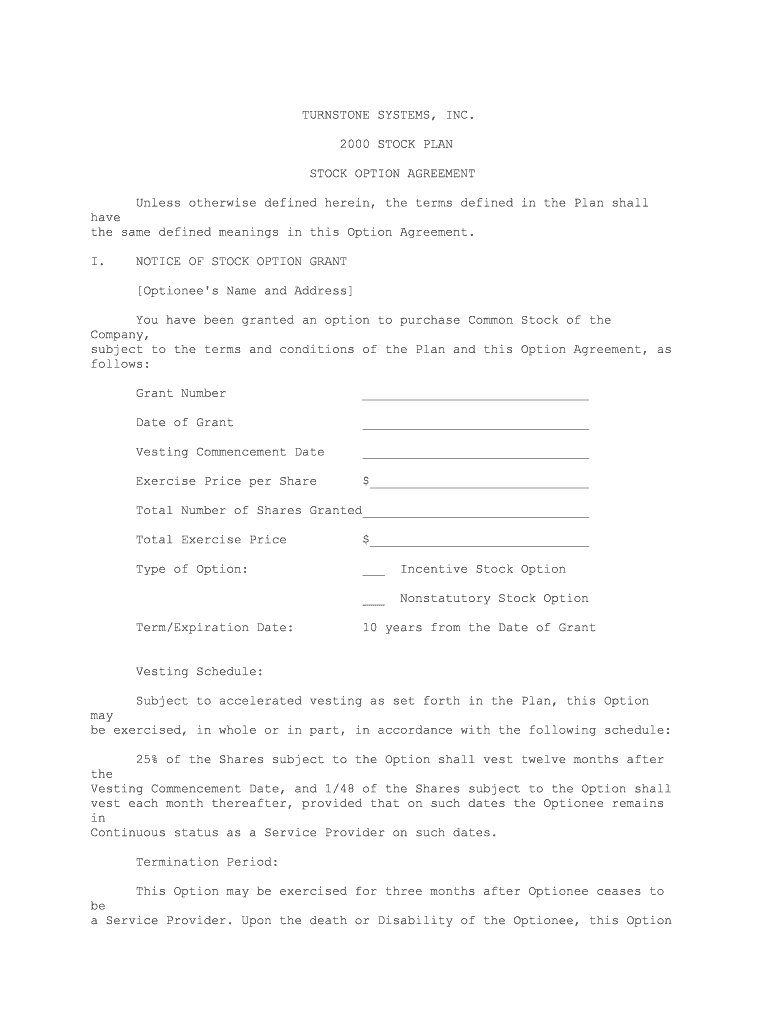
TURNSTONE SYSTEMS, INC. 2000 STOCK PLAN STOCK OPTION AGREEMENT Unless otherwise defined herein, the terms defined in the Plan shall have the same defined meanings in this Option Agreement. I. NOTICE OF STOCK OPTION GRANT [Optionee's Name and Address] You have been granted an option to purchase Common Stock of the Company, subject to the terms and conditions of the Plan and this Option Agreement, asfollows: Grant Number ______________________________ Date of Grant ______________________________ Vesting Commencement Date ______________________________ Exercise Price per Share $_____________________________ Total Number of Shares Granted______________________________ Total Exercise Price $_____________________________ Type of Option: ___ Incentive Stock Option ___ Nonstatutory Stock Option Term/Expiration Date: 10 years from the Date of Grant Vesting Schedule: Subject to accelerated vesting as set forth in the Plan, this Option may be exercised, in whole or in part, in accordance with the following schedule: 25% of the Shares subject to the Option shall vest twelve months after the Vesting Commencement Date, and 1/48 of the Shares subject to the Option shall vest each month thereafter, provided that on such dates the Optionee remains in Continuous status as a Service Provider on such dates. Termination Period: This Option may be exercised for three months after Optionee ceases to be a Service Provider. Upon the death or Disability of the Optionee, this Option may be exercised for twelve months after Optionee ceases to be a Service Provider. In no event shall this Option be exercised later than the Term/Expiration Date as provided above. 17II. AGREEMENT A. Grant of Option. The Plan Administrator of the Company hereby grants to the Optionee named in the Notice of Grant attached as Part I of this Agreement (the "Optionee") an option (the "Option") to purchase the number of Shares, as set forth in the Notice of Grant, at the exercise price per share set forth in the Notice of Grant (the "Exercise Price"), subject to the terms and conditions of the Plan, which is incorporated herein by reference. Subject to Section 15(c) of the Plan, in the event of a conflict between the terms and conditions of the Plan and the terms and conditions of this Option Agreement, the terms and conditions of the Plan shall prevail. If designated in the Notice of Grant as an Incentive Stock Option ("ISO"), this Option is intended to qualify as an Incentive Stock Option under Section 422 of the Code. However, if this Option is intended to be an Incentive Stock Option, to the extent that it exceeds the $100,000 rule of Code Section 422(d) it shall be treated as a Nonstatutory Stock Option ("NSO"). B. Exercise of Option. (a) Right to Exercise. This Option is exercisable during its term in accordance with the Vesting Schedule set out in the Notice of Grant and the applicable provisions of the Plan and this Option Agreement. (b) Method of Exercise. This Option is exercisable by delivery of an exercise notice, in the form attached as Exhibit A (the "Exercise Notice"), which shall state the election to exercise the Option, the number of Shares in respect of which the Option is being exercised (the "Exercised Shares"), and such other representations and agreements as may be required by the Company pursuant to the provisions of the Plan. The Exercise Notice shall be completed by the Optionee and delivered to the Stock Plan Administrator of the Company. The Exercise Notice shall be accompanied by payment of the aggregate Exercise Price as to all Exercised Shares. This Option shall be deemed to be exercised upon receipt by the Company of such fully executed Exercise Notice accompanied by such aggregate Exercise Price. No Shares shall be issued pursuant to the exercise of this Option unless such issuance and exercise complies with Applicable Laws. Assuming such compliance, for income tax purposes the Exercised Shares shall be considered transferred to the Optionee on the date the Option is exercised with respect to such Exercised Shares. C. Method of Payment. Payment of the aggregate Exercise Price shall be by any of the following, or a combination thereof, at the election of the Optionee: 1. cash; or 2. check; or 3. consideration received by the Company under a cashless exercise program implemented by the Company in connection with the Plan; or -2- 18 4. surrender of other Shares which (i) in the case of Shares acquired upon exercise of an option, have been owned by the Optionee for more than six (6) months on the date of surrender, and (ii) have a Fair Market Value on the date of surrender equal to the aggregate Exercise Price of the Exercised Shares; or 5. a reduction in the amount of any Company liability to the Optionee, including any liability attributable to the Optionee's participation in any Company-sponsored deferred compensation program or arrangement; or 6. such other consideration and method of payment for the issuance of Shares to the extent permitted by Applicable Laws. D. Non-Transferability of Option. This Option may not be transferred in any manner otherwise than by will or by the laws of descent or distribution and may be exercised during the lifetime of Optionee only by the Optionee. The terms of the Plan and this Option Agreement shall be binding upon the executors, administrators, heirs, successors and assigns of the Optionee. E. Term of Option. This Option may be exercised only within the term set out in the Notice of Grant, and may be exercised during such term only in accordance with the Plan and the terms of this Option Agreement. F. Tax Consequences. Some of the federal tax consequences relating to this Option, as of the date of this Option, are set forth below. THIS SUMMARY IS NECESSARILY INCOMPLETE, AND THE TAX LAWS AND REGULATIONS ARE SUBJECT TO CHANGE. THE OPTIONEE SHOULD CONSULT A TAX ADVISER BEFORE EXERCISING THIS OPTION OR DISPOSING OF THESHARES. G. Exercising the Option. 1. Nonstatutory Stock Option. The Optionee may incur regular federal income tax liability upon exercise of a NSO. The Optionee will be treated as having received compensation income (taxable at ordinary income tax rates) equal to the excess, if any, of the Fair Market Value of the Exercised Shares on the date of exercise over their aggregate Exercise Price. If the Optionee is an Employee or a former Employee, the Company will be required to withhold from his or her compensation or collect from Optionee and pay to the applicable taxing authorities an amount in cash equal to a percentage of this compensation income at the time of exercise, and may refuse to honor the exercise and refuse to deliver Shares if such withholding amounts are not delivered at the time of exercise. 2. Incentive Stock Option. If this Option qualifies as an ISO, the Optionee will have no regular federal income tax liability upon its exercise, although the excess, if any, of the Fair Market Value of the Exercised Shares on the date of exercise over their aggregate Exercise Price will be treated as an adjustment to alternative minimum taxable income for federal tax purposes andmay -3- 19 subject the Optionee to alternative minimum tax in the year of exercise. In the event that the Optionee ceases to be an Employee but remains a Service Provider, any Incentive Stock Option of the Optionee that remains unexercised shall cease to qualify as an Incentive Stock Option and will be treated for tax purposes as a Nonstatutory Stock Option on the date three (3) months and one (1) day following such change of status. 3. Disposition of Shares. (a) NSO. If the Optionee holds NSO Shares for at least one year, any gain realized on disposition of the Shares will be treated as long-term capital gain for federal income tax purposes. (b) ISO. If the Optionee holds ISO Shares for at least one year after exercise and two years after the grant date, any gain realized on disposition of the Shares will be treated as long-term capital gain for federal income tax purposes. If the Optionee disposes of ISO Shares within one year after exercise or two years after the grant date, any gain realized on such disposition will be treated as compensation income (taxable at ordinary income rates) to the extent of the excess, if any, of the lesser of (A) the difference between the Fair Market Value of the Shares acquired on the date of exercise and the aggregate Exercise Price, or (B) the difference between the sale price of such Shares and the aggregate Exercise Price. Any additional gain will be taxed as capital gain, short-term or long-term depending on the period that the ISO Shares were held. (c) Notice of Disqualifying Disposition of ISO Shares. If the Optionee sells or otherwise disposes of any of the Shares acquired pursuant to an ISO on or before the later of (i) two years after the grant date, or (ii) one year after the exercise date, the Optionee shall immediately notify the Company in writing of such disposition. The Optionee agrees that he or she may be subject to income tax withholding by the Company on the compensation income recognized from such early disposition of ISO Shares by payment in cash or out of the current earnings paid to the Optionee. H. Entire Agreement; Governing Law. The Plan is incorporated herein by reference. The Plan and this Option Agreement constitute the entire agreement of the parties with respect to the subject matter hereof and supersede in their entirety all prior undertakings and agreements of the Company and Optionee with respect to the subject matter hereof, and may not be modified adversely to the Optionee's interest except by means of a writing signed by the Company and Optionee. This agreement is governed by the internal substantive laws, but not the choice of law rules, ofCalifornia. I. NO GUARANTEE OF CONTINUED SERVICE. OPTIONEE ACKNOWLEDGES AND AGREES THAT THE VESTING OF SHARES PURSUANT TO THE VESTING SCHEDULE HEREOF IS EARNED ONLY BY CONTINUING AS A SERVICE PROVIDER AT THE WILL OF THE COMPANY (AND NOT THROUGH THE ACT OF BEING HIRED, BEING GRANTED AN OPTION OR PURCHASING SHARES HEREUNDER). OPTIONEE FURTHER ACKNOWLEDGES AND AGREES THAT THIS AGREEMENT, THE TRANSACTIONS CONTEMPLATED HEREUNDER AND THE VESTING SCHEDULE SET FORTH HEREIN DO NOT CONSTITUTE AN EXPRESS OR IMPLIED PROMISE OF CONTINUED ENGAGEMENT AS A SERVICE PROVIDER FOR THE VESTING PERIOD, FOR ANY PERIOD, OR AT ALL, AND SHALL NOT INTERFERE WITH -4- 20 OPTIONEE'S RIGHT OR THE COMPANY'S RIGHT TO TERMINATE OPTIONEE'S RELATIONSHIP AS A SERVICE PROVIDER AT ANY TIME, WITH OR WITHOUT CAUSE. By your signature and the signature of the Company's representative below, you and the Company agree that this Option is granted under and governed by the terms and conditions of the Plan and this Option Agreement. Optionee has reviewed the Plan and this Option Agreement in their entirety, has had an opportunity to obtain the advice of counsel prior to executing this Option Agreement and fully understands all provisions of the Plan and Option Agreement. Optionee hereby agrees to accept as binding, conclusive and final all decisions or interpretations of the Administrator upon any questions relating to the Plan and Option Agreement. Optionee further agrees to notify the Company upon any change in the residence address indicated below. OPTIONEE: TURNSTONE SYSTEMS, INC. - ------------------------------------ --------------------------------- -----Signature By - ------------------------------------ --------------------------------- ----- Print Name Title - ------------------------------------ Residence Address - ------------------------------------ -5- 21 CONSENT OF SPOUSE The undersigned spouse of Optionee has read and hereby approves the terms and conditions of the Plan and this Option Agreement. In consideration of the Company's granting his or her spouse the right to purchase Shares as set forth in the Plan and this Option Agreement, the undersigned hereby agrees to be irrevocably bound by the terms and conditions of the Plan and this Option Agreement and further agrees that any community property interest shall be similarly bound. The undersigned hereby appoints the undersigned's spouse as attorney-in-fact for the undersigned with respect to any amendment or exercise of rights under the Plan or this Option Agreement. ----------------------------------- --- Spouse of Optionee 22 EXHIBIT A TURNSTONE SYSTEMS, INC. 2000 STOCK OPTION PLAN EXERCISE NOTICE Turnstone Systems, Inc. 274 Ferguson Drive Mountain View, CA 94043 Attention: Corporate Secretary 1. Exercise of Option. Effective as of today, ________________, 2000, the undersigned ("Purchaser") hereby elects to purchase ______________ shares (the "Shares") of the Common Stock of Turnstone Systems, Inc. (the "Company") under and pursuant to the Turnstone Systems, Inc. 2000 Stock Plan (the "Plan") and the Stock Option Agreement dated, _____ (the "Option Agreement"). The purchase price for the Shares shall be $_____, as required by the OptionAgreement. 2. Delivery of Payment. Purchaser herewith delivers to the Company the full purchase price for the Shares. 3. Representations of Purchaser. Purchaser acknowledges that Purchaser has received, read and understood the Plan and the Option Agreement and agrees to abide by and be bound by their terms and conditions. 4. Rights as Shareholder. Until the issuance (as evidenced by the appropriate entry on the books of the Company or of a duly authorized transfer agent of the Company) of the Shares, no right to vote or receive dividends or any other rights as a shareholder shall exist with respect to the Optioned Stock, notwithstanding the exercise of the Option. The Shares so acquired shall be issued to the Optionee as soon as practicable after exercise of the Option. No adjustment will be made for a dividend or other right for which the record date is prior to the date of issuance, except as provided in Section 13 of thePlan. 5. Tax Consultation. Purchaser understands that Purchaser may suffer adverse tax consequences as a result of Purchaser's purchase or disposition of the Shares. Purchaser represents that Purchaser has consulted with any tax consultants Purchaser deems advisable in connection with the purchase or disposition of the Shares and that Purchaser is not relying on the Company for any tax advice. 23 6. Entire Agreement; Governing Law. The Plan and Option Agreement are incorporated herein by reference. This Agreement, the Plan and the Option Agreement constitute the entire agreement of the parties with respect to the subject matter hereof and supersede in their entirety all prior undertakings and agreements of the Company and Purchaser with respect to the subject matter hereof, and may not be modified adversely to the Purchaser's interest except by means of a writing signed by the Company and Purchaser. This agreement is governed by the internal substantive laws, but not the choice of law rules, ofCalifornia. Submitted by: Accepted by: PURCHASER: TURNSTONE SYSTEMS, INC. - ------------------------------------ --------------------------------- -----Signature By - ------------------------------------ --------------------------------- ----- Print Name Its Address: Address: - ------------------------------------ Turnstone Systems, Inc. 274 Ferguson Drive - ------------------------------------ Mountain View, CA 94043 ----------------------------------- --- Date Received

Essential tips for finalizing your ‘Form Of Option Award Secgov’ online

Are you fed up with the inconvenience of handling paperwork? Look no further than airSlate SignNow, the leading eSignature solution for individuals and businesses. Bid farewell to the lengthy procedure of printing and scanning documents. With airSlate SignNow, you can effortlessly complete and sign paperwork digitally. Take advantage of the comprehensive tools embedded in this user-friendly and cost-effective platform and transform your document management strategy. Whether you need to approve forms or collect electronic signatures, airSlate SignNow manages it all efficiently, requiring merely a few clicks.

Follow this comprehensive guide:

  1. Log into your account or sign up for a free trial with our service.
  2. Click +Create to upload a file from your device, cloud storage, or our form library.
  3. Access your ‘Form Of Option Award Secgov’ in the editor.
  4. Click Me (Fill Out Now) to finalize the document on your end.
  5. Add and designate fillable fields for others (if applicable).
  6. Proceed with the Send Invite options to solicit eSignatures from others.
  7. Save, print your copy, or convert it into a reusable template.

No need to worry if you want to collaborate with your team on your Form Of Option Award Secgov or send it for notarization—our platform offers everything necessary to complete such tasks. Register with airSlate SignNow today and elevate your document management to a new level!

Here is a list of the most common customer questions. If you can’t find an answer to your question, please don’t hesitate to reach out to us.

Need help? Contact Support

The best way to complete and sign your form of option award secgov
Save time on document management with airSlate SignNow and get your form of option award secgov eSigned quickly from anywhere with our fully compliant eSignature tool.

How to Sign a PDF Online How to Sign a PDF Online

How to complete and sign documents online

In the past, working with paperwork required pretty much time and effort. But with airSlate SignNow, document management is quick and simple. Our robust and user-friendly eSignature solution enables you to easily complete and electronically sign your form of option award secgov online from any internet-connected device.
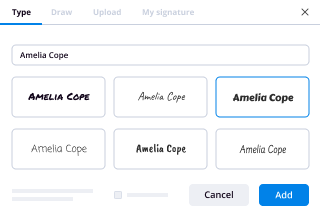
Follow the step-by-step guidelines to eSign your form of option award secgov template online:

  • 1.Register for a free trial with airSlate SignNow or log in to your account with password credentials or SSO authorization option.
  • 2.Click Upload or Create and add a file for eSigning from your device, the cloud, or our form collection.
  • 3.Click on the file name to open it in the editor and utilize the left-side toolbar to complete all the empty fields properly.
  • 4.Put the My Signature field where you need to approve your sample. Provide your name, draw, or upload a picture of your handwritten signature.
  • 5.Click Save and Close to finish editing your completed form.

After your form of option award secgov template is ready, download it to your device, save it to the cloud, or invite other parties to electronically sign it. With airSlate SignNow, the eSigning process only requires a few clicks. Use our powerful eSignature solution wherever you are to manage your paperwork efficiently!
How to Sign a PDF Using Google Chrome How to Sign a PDF Using Google Chrome

How to fill out and sign forms in Google Chrome

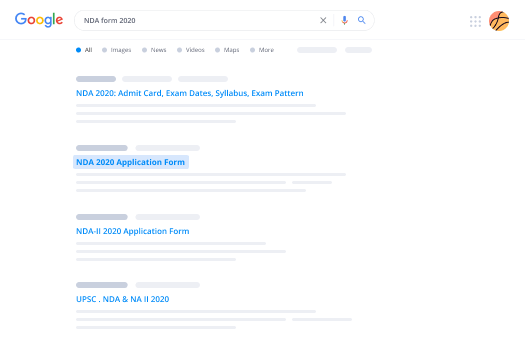
Completing and signing paperwork is easy with the airSlate SignNow extension for Google Chrome. Installing it to your browser is a quick and beneficial way to deal with your forms online. Sign your form of option award secgov sample with a legally-binding eSignature in a few clicks without switching between tools and tabs.

Follow the step-by-step guide to eSign your form of option award secgov form in Google Chrome:

  • 1.Go to the Chrome Web Store, search for the airSlate SignNow extension for Chrome, and install it to your browser.
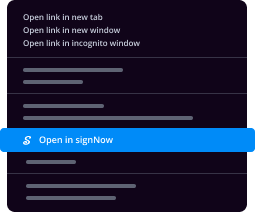
  • 2.Right-click on the link to a document you need to eSign and select Open in airSlate SignNow.
  • 3.Log in to your account with your password or Google/Facebook sign-in buttons. If you don’t have one, you can start a free trial.
  • 4.Utilize the Edit & Sign toolbar on the left to fill out your template, then drag and drop the My Signature field.
  • 5.Add an image of your handwritten signature, draw it, or simply enter your full name to eSign.
  • 6.Make sure all data is correct and click Save and Close to finish modifying your form.

Now, you can save your form of option award secgov sample to your device or cloud storage, email the copy to other people, or invite them to electronically sign your form with an email request or a secure Signing Link. The airSlate SignNow extension for Google Chrome enhances your document processes with minimum time and effort. Try airSlate SignNow today!
How to Sign a PDF in Gmail How to Sign a PDF in Gmail How to Sign a PDF in Gmail

How to complete and sign forms in Gmail

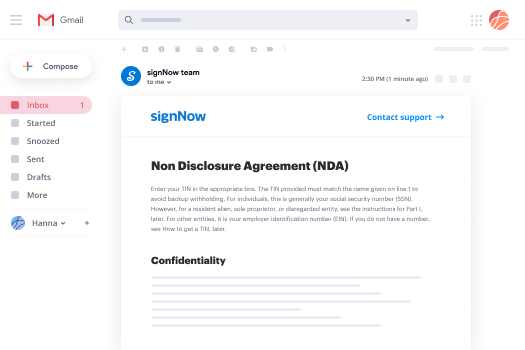
Every time you receive an email containing the form of option award secgov for signing, there’s no need to print and scan a file or save and re-upload it to another tool. There’s a much better solution if you use Gmail. Try the airSlate SignNow add-on to promptly eSign any paperwork right from your inbox.

Follow the step-by-step guide to eSign your form of option award secgov in Gmail:

  • 1.Visit the Google Workplace Marketplace and locate a airSlate SignNow add-on for Gmail.
  • 2.Install the program with a corresponding button and grant the tool access to your Google account.
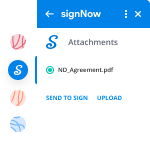
  • 3.Open an email with an attached file that needs signing and utilize the S key on the right panel to launch the add-on.
  • 4.Log in to your airSlate SignNow account. Select Send to Sign to forward the file to other people for approval or click Upload to open it in the editor.
  • 5.Put the My Signature field where you need to eSign: type, draw, or import your signature.

This eSigning process saves efforts and only requires a couple of clicks. Take advantage of the airSlate SignNow add-on for Gmail to update your form of option award secgov with fillable fields, sign documents legally, and invite other parties to eSign them al without leaving your mailbox. Enhance your signature workflows now!
How to Sign a PDF on a Mobile Device How to Sign a PDF on a Mobile Device How to Sign a PDF on a Mobile Device

How to complete and sign forms in a mobile browser

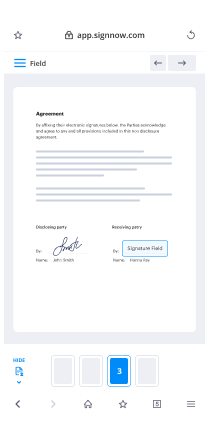
Need to rapidly submit and sign your form of option award secgov on a smartphone while working on the go? airSlate SignNow can help without the need to set up extra software applications. Open our airSlate SignNow solution from any browser on your mobile device and add legally-binding eSignatures on the go, 24/7.

Follow the step-by-step guide to eSign your form of option award secgov in a browser:

  • 1.Open any browser on your device and go to the www.signnow.com
  • 2.Sign up for an account with a free trial or log in with your password credentials or SSO authentication.
  • 3.Click Upload or Create and add a file that needs to be completed from a cloud, your device, or our form library with ready-to go templates.
  • 4.Open the form and complete the blank fields with tools from Edit & Sign menu on the left.
  • 5.Put the My Signature field to the form, then type in your name, draw, or add your signature.

In a few simple clicks, your form of option award secgov is completed from wherever you are. When you're finished editing, you can save the document on your device, generate a reusable template for it, email it to other people, or ask them to eSign it. Make your paperwork on the go fast and productive with airSlate SignNow!

How to Sign a PDF on iPhone How to Sign a PDF on iPhone

How to complete and sign forms on iOS

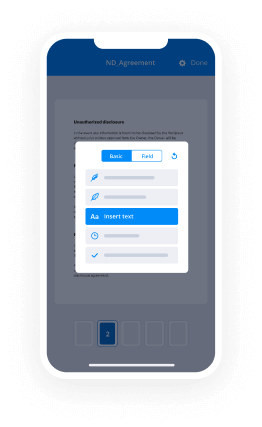
In today’s corporate environment, tasks must be done rapidly even when you’re away from your computer. Using the airSlate SignNow application, you can organize your paperwork and sign your form of option award secgov with a legally-binding eSignature right on your iPhone or iPad. Install it on your device to close deals and manage forms from anyplace 24/7.

Follow the step-by-step guide to eSign your form of option award secgov on iOS devices:

  • 1.Go to the App Store, search for the airSlate SignNow app by airSlate, and set it up on your device.
  • 2.Launch the application, tap Create to add a template, and choose Myself.
  • 3.Opt for Signature at the bottom toolbar and simply draw your signature with a finger or stylus to eSign the form.
  • 4.Tap Done -> Save after signing the sample.
  • 5.Tap Save or utilize the Make Template option to re-use this paperwork later on.

This method is so easy your form of option award secgov is completed and signed in just a few taps. The airSlate SignNow app works in the cloud so all the forms on your mobile device are kept in your account and are available whenever you need them. Use airSlate SignNow for iOS to enhance your document management and eSignature workflows!
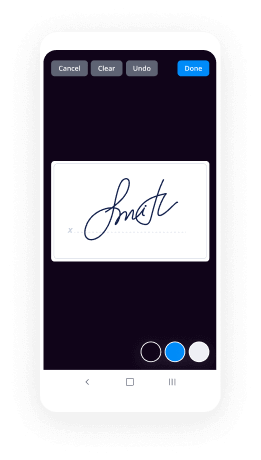
How to Sign a PDF on Android How to Sign a PDF on Android

How to complete and sign forms on Android

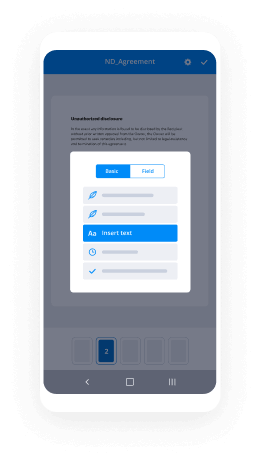
With airSlate SignNow, it’s simple to sign your form of option award secgov on the go. Set up its mobile app for Android OS on your device and start improving eSignature workflows right on your smartphone or tablet.

Follow the step-by-step guide to eSign your form of option award secgov on Android:

  • 1.Go to Google Play, search for the airSlate SignNow app from airSlate, and install it on your device.
  • 2.Log in to your account or create it with a free trial, then upload a file with a ➕ key on the bottom of you screen.
  • 3.Tap on the uploaded file and choose Open in Editor from the dropdown menu.
  • 4.Tap on Tools tab -> Signature, then draw or type your name to eSign the sample. Complete blank fields with other tools on the bottom if needed.
  • 5.Utilize the ✔ button, then tap on the Save option to finish editing.

With an intuitive interface and total compliance with main eSignature laws and regulations, the airSlate SignNow app is the best tool for signing your form of option award secgov. It even works without internet and updates all document changes once your internet connection is restored and the tool is synced. Complete and eSign documents, send them for eSigning, and create re-usable templates anytime and from anyplace with airSlate SignNow.

Sign up and try Form of option award secgov
  • Close deals faster
  • Improve productivity
  • Delight customers
  • Increase revenue
  • Save time & money
  • Reduce payment cycles