Establishing secure connection…Loading editor…Preparing document…

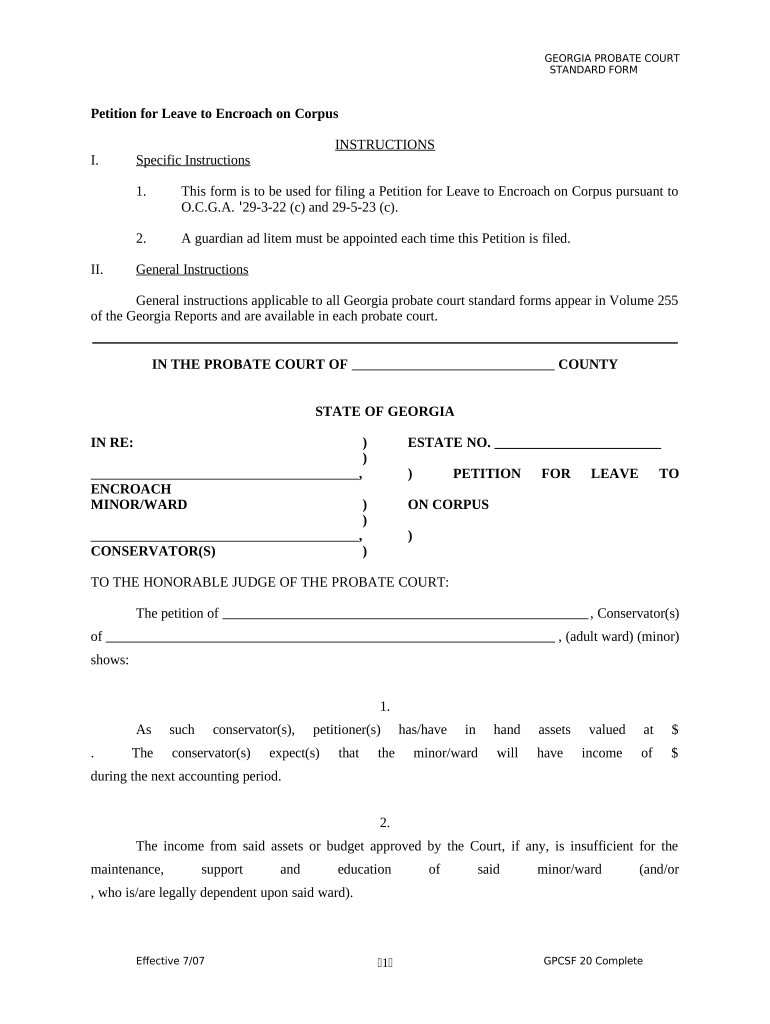
Georgia Petition for Leave to Encroach on Corpus

This template is fully customizable. Edit the text, fill out the fields, and send it for signature. Give it a try!
Georgia Petition for Leave to Encroach on Corpus

What the Georgia Petition for Leave to Encroach on Corpus Is

The Georgia Petition for Leave to Encroach on Corpus is a probate/trust filing used to request court authorization to use or withdraw part of a trust or estate principal (the corpus) for a specific purpose. Typical requests include paying beneficiary support, medical or long‑term care costs, debt repayment, or funding a specific distribution when trust instruments or fiduciary powers are insufficient. The petition asks the probate court to review trustee or executor authority, weigh beneficiary interests, and enter an order permitting a defined encroachment subject to conditions and accounting.

Why Parties Seek Court Approval to Encroach on Corpus

Court approval protects trustees and beneficiaries by creating a judicial record authorizing use of principal, reducing risk of a later surcharge claim, clarifying fiduciary duties, and ensuring an orderly accounting of distributions.

Why Parties Seek Court Approval to Encroach on Corpus

Who Typically Prepares or Files This Petition

Parties most often involved include fiduciaries, beneficiaries, and their attorneys; courts adjudicate competing interests.

  • Trustees and executors seeking permission to apply corpus funds for beneficiary needs.
  • Beneficiaries requesting an authorized distribution when fiduciary authority is disputed or limited.
  • Probate attorneys or guardians ad litem representing minor, incapacitated, or contested‑interest parties.

Stepwise Procedure to Prepare and File the Petition

Follow an orderly sequence: prepare the petition, gather exhibits, serve required parties, and request a hearing before the probate court.

  • 01
    Draft Petition: Explain legal authority, facts, amount, and relief requested.
  • 02
    Attach Evidence: Include trust instrument, account records, and medical statements.
  • 03
    Serve Parties: Provide notice to beneficiaries and interested parties per local rules.
  • 04
    Attend Hearing: Present evidence; seek an order authorizing encroachment.

Where to File and What the Court Process Looks Like

Petitions are filed in the probate or superior court with jurisdiction over the decedent’s estate or trust administration; local rules determine service and hearing procedures.

  • Filing Location: County probate or superior court clerk's office.
  • Notice Requirement: Serve beneficiaries and interested parties according to court rule.
  • Hearing Scheduling: Court sets a hearing after reviewing filings and notices.
  • Order Entry: Judge issues written order defining allowed encroachment.

How to Configure an Online Petition Workflow

Set up a digital workflow that collects identity, signed attestations, exhibits, and service confirmations before filing.

Field Configuration
Notification Method Email and certified mail
Signature Method Wet signature or eSign per ESIGN
Authentication ID check and notarization
Document Format PDF with numbered exhibits

Digital Submission and File Format Considerations

Confirm the court accepts electronically filed documents and the required PDF/A or native formats before relying on eSubmission.

  • File Types: PDF/A or court-specified formats
  • Signatures: eSign or wet-notarized per local rules
  • Integrations: E-filing portals and cloud storage

Keep master copies of signed petitions and digital audit trails; ensure exhibits retain original timestamps and that any RON sessions meet identity and retention requirements.

Key Legal Risks and Consequences of an Incorrect Petition

Trustee Breach: Court may surcharge fiduciary
Denial of Relief: Requested encroachment may be refused
Delayed Care: Beneficiary needs may go unmet
Appeal Exposure: Order can be contested on error grounds
Tax Impact: Distributions may trigger tax consequences
Service Failure: Improper notice can void proceedings

Common Mistakes When Preparing the Petition

  • Insufficient evidence: failing to attach financial statements, medical records, or the trust instrument weakens the factual basis for encroachment.
  • Improper notice: neglecting required service on all interested parties or using incorrect addresses produces procedural delays or dismissal.
  • Undefined remedy: asking for vague or open‑ended authority rather than a narrowly defined dollar amount invites challenge or denial.
  • Authentication errors: using eSign without confirming court acceptance or omitting notarization when required can render the filing noncompliant.

Security and Compliance Considerations for Digital Petitions

Encryption: TLS 1.2/1.3; AES-256 at rest
Audit Trail: IP, timestamp, and action logs
HIPAA: BAA required for PHI
ESIGN & UETA: Federal and state e-sign laws
Access Controls: Role-based permissions
Authentication: Multi-factor and identity proofing

Practical Tips for a Clear, Defensible Petition

Adopt clear drafting, strong evidence, and conservative relief requests to increase the likelihood of judicial approval and reduce future disputes.

Limit the Amount
Request only the specific sum necessary and explain why income resources are inadequate; courts favor narrowly tailored relief that balances beneficiary needs and preservation of corpus.
Attach Detailed Exhibits
Include itemized bills, bank statements, medical certifications, and an accounting of trust income to substantiate the factual and financial basis for encroachment, improving transparency at hearing.
Confirm Service
Serve every interested party per local rules and include a signed proof of service in the record; absent notice is a frequent ground for reopening or vacatur of orders.
Consider Consent Orders
If beneficiaries agree, submit a consent order signed by all parties to expedite approval and reduce litigation risk; the court still reviews fairness before entry.

Representative Scenarios Where a Petition Was Used

Realistic examples illustrate typical factual bases and how courts frame orders limiting encroachment.

Medical Necessity Example

Petitioner sought funds for extended nursing care after trustee income proved insufficient

  • The petition included medical reports and billing statements
  • The court authorized a capped withdrawal for care subject to trustee accounting and periodic review.

Home Purchase Assistance

A beneficiary requested corpus to buy an accessible home after loss of spouse income

  • The trustee contested available authority; petitioner provided appraisal and pro forma budget
  • The judge granted a limited distribution conditioned on lien or repayment terms.

Typical eSignature Pricing and Feature Comparison

Basic vendor pricing and feature checkpoints for eSignature solutions commonly used to collect signatures and maintain audit trails for legal filings.

signNow DocuSign Adobe Sign PandaDoc HelloSign
Starting Price $8/user/mo $15/user/mo $14/user/mo $19/user/mo $15/user/mo
Free Trial 7-day free trial Varies Varies Varies Varies
Bulk Send Yes Yes Yes Yes No
Audit Trail Yes Yes Yes Yes Yes
HIPAA Compliant Yes Yes Yes No No

Typical Timeline Elements to Expect in Court Processing

Timelines vary by county and caseload; these are common milestones to monitor after filing the petition.

Filing Date:

Document stamped when accepted by court clerk

Service Deadline:

Serve interested parties per local rule

Hearing Date:

Court sets hearing after notice and review

Order Entry:

Judge issues written order after hearing

Appeal Period:

Parties have statutory time to contest orders

FAQs and Troubleshooting for Georgia Petitions to Encroach on Corpus

Answers to common practical and procedural questions encountered when preparing or filing a petition in Georgia courts.


Need help? Contact support

be ready to get more
Join over 28 million airSlate SignNow users